
1. Wprowadzenie
The OSD Audio DAC-X200 is a powerful 2-channel Class D stereo amplifier designed to deliver high-fidelity audio. It features a built-in Hi-Res 24bit/192khz DAC, offering superior digital audio conversion. With versatile input options including USB, Optical, and RCA, and A/B speaker switching, this amplifier is suitable for various home audio setups, from driving bookshelf speakers to powering floorstanding units.
2. Instrukcje bezpieczeństwa
- Źródło zasilania: Podłącz urządzenie wyłącznie do określonego źródła zasilania.tage.
- Wentylacja: Zapewnij odpowiednią wentylację. Nie blokuj otworów wentylacyjnych.
- Woda i wilgoć: Nie wystawiaj urządzenia na działanie deszczu, wilgoci ani nadmiernej wilgotności.
- Źródła ciepła: Trzymaj urządzenie z dala od źródeł ciepła, takich jak grzejniki, kratki wentylacyjne, piece i inne urządzenia wytwarzające ciepło.
- Czyszczenie: Czyścić wyłącznie suchą szmatką.
- Serwisowanie: Nie próbuj samodzielnie naprawiać tego produktu. Wszelkie czynności serwisowe należy powierzyć wykwalifikowanemu personelowi serwisowemu.
- Umieszczenie: Place the unit on a stable, flat surface. Avoid placing heavy objects on top of the ampliyfikator.
3. Zawartość opakowania
Sprawdź, czy w opakowaniu znajdują się wszystkie elementy:
- OSD Audio DAC-X200 Ampżywsze
- Szybki przewodnik
- Kabel zasilający
- Pilot zdalnego sterowania (jeśli jest dołączony do Twojego modelu)
4. Koniec produktuview
4.1 Panel przedni
The front panel provides access to essential controls for daily operation.

Rysunek 4.1: Przód view of the DAC-X200 amplifier, showing the power button, speaker selectors, balance, and volume controls.

Rysunek 4.2: Detail of the front panel, highlighting the Power button and Speaker A/B selection buttons.

Rysunek 4.3: Detail of the front panel, showing the Balance and Volume control knobs.
4.2 Panel tylny
The rear panel houses all input and output connections for audio sources and speakers.
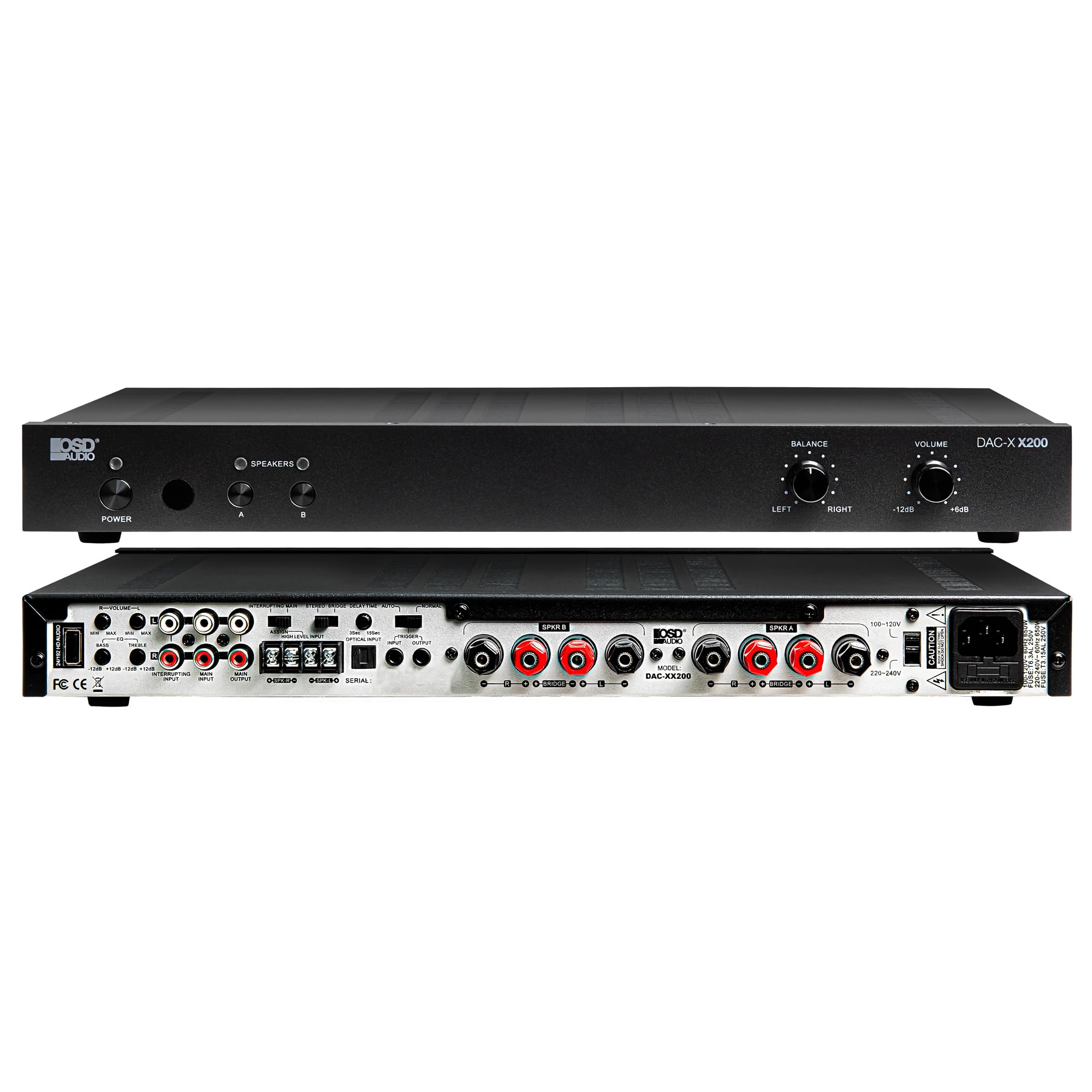
Rysunek 4.4: Tył view of the DAC-X200 amplifier, displaying various audio inputs (USB, Optical, RCA), speaker outputs, and power input.

Rysunek 4.5: Detail of the rear panel inputs, including USB, Optical, and RCA connections.

Rysunek 4.6: Detail of the rear panel speaker output terminals for Speaker A and Speaker B.
5. Konfiguracja
5.1 Umieszczenie
Place the DAC-X200 on a flat, stable surface with adequate space around it for ventilation. Avoid enclosed cabinets or areas with poor airflow to prevent overheating.
5.2 Podłączanie głośników
- Zapewnij amplifier jest wyłączony i odłączony od zasilania.
- Podłącz głośniki pasywne do MÓWCA A i/lub MÓWCA B terminals on the rear panel. Observe correct polarity (+ to + and - to -).
- For optimal performance, use high-quality speaker wire.
5.3 Podłączanie źródeł dźwięku
The DAC-X200 supports multiple input types:
- Wejście USB: Connect a computer or other USB audio source using a Type A to Type A USB 2.0 cable.
- Wejście optyczne: Podłącz cyfrowe źródła dźwięku, np. telewizory lub odtwarzacze CD, za pomocą kabla optycznego.
- Wejścia RCA: Connect analog audio sources such as music streamers, turntables (with a pre-amp), or other devices using RCA cables.
5.4 Połączenie zasilania
After all audio and speaker connections are made, connect the supplied power cable to the ampgniazda zasilania urządzenia, a następnie do odpowiedniego gniazdka zasilania prądem zmiennym.
6. Instrukcja obsługi
6.1 Włączanie/wyłączanie zasilania
Naciśnij MOC przycisk na panelu przednim, aby włączyć ampWłączanie i wyłączanie urządzenia. Kontrolka zasilania będzie świecić, gdy urządzenie jest włączone.
6.2 Wybór wejścia
The DAC-X200 features smart source switching, automatically detecting and switching to an active input. If multiple inputs are active, you may need to manually select the desired input using the remote control (if applicable) or by cycling through inputs.
6.3 Regulacja głośności
Dostosuj ogólną głośność wyjściową za pomocą TOM knob on the front panel. Rotate clockwise to increase volume and counter-clockwise to decrease it.
6.4 Regulacja tonów
Użyj BALANSOWAĆ knob to adjust the left/right channel balance. The DAC-X200 also includes bass and treble adjustment knobs (located on the rear panel or accessible via remote, depending on model variation) to fine-tune the sound to your preference or room acoustics.
6.5 A/B Speaker Switching
Naciśnij A or B buttons on the front panel to select which set of speakers (Speaker A, Speaker B, or both) are active. This allows for multi-room audio configurations.
7. Konserwacja
- Czyszczenie: Do czyszczenia zewnętrznej części urządzenia używaj miękkiej, suchej szmatki amplifier. Nie używaj płynnych środków czyszczących ani aerozoli.
- Wentylacja: Okresowo sprawdzaj, czy otwory wentylacyjne są wolne od kurzu i zanieczyszczeń.
- Składowanie: Jeśli urządzenie będzie przechowywane przez dłuższy czas, należy odłączyć je od gniazdka elektrycznego i przechowywać w chłodnym, suchym miejscu.
8. Rozwiązywanie Problemów
| Problem | Możliwa przyczyna | Rozwiązanie |
|---|---|---|
| Brak zasilania | Kabel zasilający nie jest podłączony; Gniazdo zasilania nie jest aktywne; Amplifier wyłączony. | Check power cable connection; Test power outlet; Press the Power button. |
| Brak dźwięku | Incorrect input selected; Speaker cables loose; Volume too low; Speakers A/B not selected. | Select correct input; Check speaker connections; Increase volume; Ensure Speaker A or B is active. |
| Zniekształcony dźwięk | Input signal too high; Speaker impedance mismatch; Faulty cable. | Reduce source volume; Verify speaker impedance (8̣ or 4̣); Replace audio cables. |
| Input not switching automatically | Multiple active sources; Specific source not detected. | Manually select input; Ensure only one source is playing if auto-switching is desired. |
9. Specyfikacje
- Model: DAC-X200
- Moc wyjściowa: 100W RMS per channel at 8̣; 225W RMS per channel at 4̣; 450W bridged mono
- Liczba kanałów: 2
- DAC: Hi-Res 24bit/192khz, DSD formats supported
- Wejścia: USB, Optical, RCA
- Strefy prelegentów: A/B Switching
- Wymiary (dł. x szer. x wys.): 16.7 x 10 x 2 cala
- Typ materiału: Plastikowy
- Kod UPC: 810074881173
10. Informacje o gwarancji
OSD Audio products are designed for reliability and performance. This product is covered by a limited warranty against defects in materials and workmanship. Please refer to the official OSD Audio webSzczegółowe warunki gwarancji, w tym czas trwania i zakres ochrony, znajdziesz na stronie internetowej lub w dokumentacji zakupu. Zachowaj dowód zakupu na wypadek roszczeń gwarancyjnych.
11. Wsparcie
For technical assistance, troubleshooting not covered in this manual, or service inquiries, please contact OSD Audio customer support. You can find contact information, FAQs, and additional resources on the official OSD Audio webstrona.
Webstrona: www.osdaudio.com
