
1. Wprowadzenie
The Minolta MND60V VLOG Camera Kit is designed for capturing high-quality photos and videos. This kit includes a 64MP camera capable of 4K Ultra HD video at 60 frames per second, along with essential accessories such as a tripod, external microphone, LED light, and wide-angle/macro lenses. This manual provides instructions for setting up, operating, and maintaining your camera kit to ensure optimal performance.

Image 1.1: The Minolta MND60V VLOG Camera Kit, showcasing its core capabilities for high-resolution photography and video recording.
2. Zawartość opakowania
Przed rozpoczęciem sprawdź, czy w przesyłce znajdują się wszystkie elementy wymienione poniżej:
- Minolta MND60V Camera
- Accessory Mount Arms
- Światło wideo LED
- Etui transportowe
- Tripod Pouch
- Mikrofon stereo
- Pasek na ramię
- Karta pamięci 32 GB
- Statyw z pilotem
- Akumulator litowo-jonowy
- Zasilacz sieciowy
- Wide-angle + Macro Lens
- Kable USB
- Instrukcja obsługi (ten dokument)
- Karta gwarancyjna

Image 2.1: All components included in the Minolta MND60V VLOG Camera Kit.
3. Konfiguracja
3.1 Ładowanie akumulatora
- Insert the Lithium-Ion Battery into the camera.
- Connect the AC Adaptor to the camera's USB port and plug it into a power outlet.
- Zaświeci się kontrolka ładowania. Po pełnym naładowaniu kontrolka zmieni kolor lub zgaśnie.
3.2 Wkładanie karty pamięci
The camera supports Micro SD cards. A 32GB card is included.
- Locate the memory card slot on the camera (refer to the camera diagram).
- Włóż kartę Micro SD złotymi stykami skierowanymi w dół, aż do kliknięcia.
- Aby wyjąć kartę, delikatnie naciśnij ją, aż wyskoczy.
3.3 Mocowanie akcesoriów
The kit includes various accessories to enhance your recording experience.

Image 3.1: Minolta MND60V camera with all accessories mounted.
- Statyw: Attach the camera to the tripod's mounting screw. The tripod can be used as a stand, a selfie stick, or a power source with its built-in 2,500mAh battery.
- Mikrofon zewnętrzny: Mount the stereo microphone onto one of the accessory mount arms and plug its cable into the camera's microphone input jack.
- Światło wideo LED: Mount the LED light onto another accessory mount arm. Ensure it is charged or has fresh batteries if applicable.
- Wide-angle + Macro Lens: Screw the desired lens onto the front of the camera's main lens.
4. Obsługa aparatu
4.1 Włączanie/wyłączanie zasilania
Press and hold the power button located on the camera body to turn the camera on or off.
4.2 Basic Photo and Video Recording
- Wybór trybu: Use the mode dial or menu to select between photo and video modes.
- Ramy: Use the 3-inch LCD screen to compose your shot. The screen can be flipped for self-recording.
- Nagrywanie/Migawka: Press the dedicated record button for video or the shutter button for photos.
4.3 Korzystanie z ekranu LCD
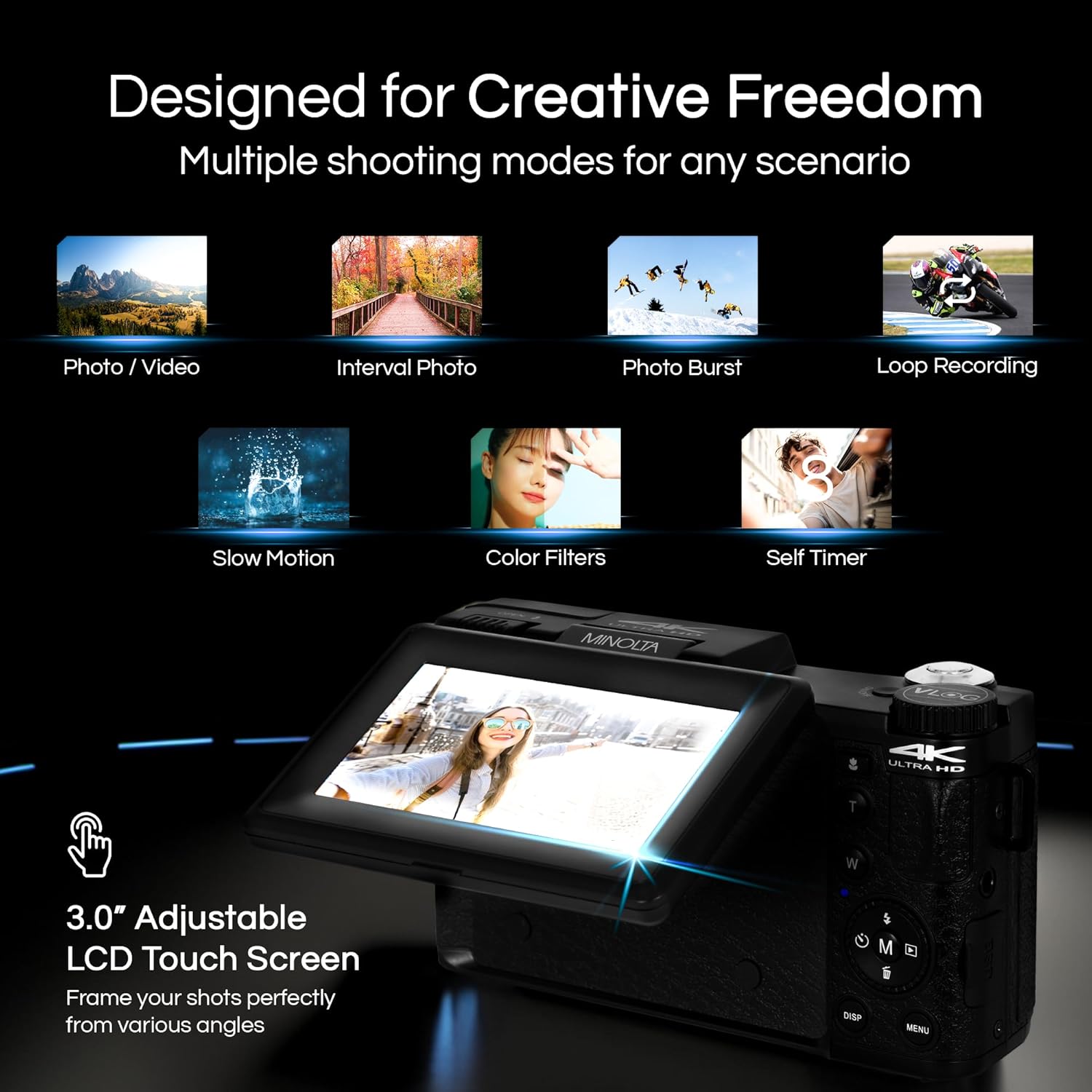
Image 4.1: The adjustable LCD screen showing various shooting modes.
3-calowy ekran LCD zapewnia podgląd na żywo view, access to menus, and playback options. It can be rotated and flipped, making it suitable for vlogging and shooting from various angles. Navigate menus using the touch screen or physical buttons.
4.4 Funkcja zoomu
The camera features 16x digital zoom. Use the zoom lever (often marked 'W' for Wide and 'T' for Telephoto) to adjust the focal length. Note that digital zoom may reduce image quality compared to optical zoom.

Obraz 4.2: Example of using digital zoom to capture distant details.
4.5 Special Features and Modes

Image 4.3: Icons illustrating the camera's creative modes.
The MND60V offers several creative modes:
- Zwolnione tempo: Nagrywa wideo z większą liczbą klatek na sekundę, co umożliwia odtwarzanie w zwolnionym tempie.
- Nagrywanie w pętli: Ciągłe nagrywanie wideo, nadpisując najstarsze files gdy karta pamięci jest pełna.
- Upływ czasu: Captures a series of photos at set intervals and combines them into a video.
- Wybór scen: Pre-set modes optimized for specific shooting conditions (e.g., portrait, landscape).
- Samowyzwalacz: Delays the shutter release for a few seconds, allowing you to get into the shot.
4.6 Korzystanie z pilota zdalnego sterowania
The included tripod features a built-in wireless remote. This allows you to start/stop recording or take photos from a distance, ideal for group shots or vlogging.
4.7 Przenoszenie Files
Connect the camera to a computer using the provided USB cable. The camera will appear as a removable drive, allowing you to copy photos and videos to your computer.
5. Konserwacja
5.1 Czyszczenie aparatu
- Do czyszczenia korpusu aparatu należy używać miękkiej, suchej ściereczki.
- Do czyszczenia soczewek należy używać specjalnej ściereczki i płynu do czyszczenia soczewek. Unikaj dotykania powierzchni soczewki palcami.
- Nie używaj żrących środków chemicznych ani materiałów ściernych.
5.2 Pielęgnacja baterii
- Całkowicie naładuj baterię przed pierwszym użyciem.
- Gdy nie używasz baterii, przechowuj ją w chłodnym i suchym miejscu.
- Unikaj wystawiania baterii na działanie ekstremalnych temperatur.
5.3 Przechowywanie
When not in use, store the camera and its accessories in the provided carrying case to protect them from dust, moisture, and physical damage.
6. Rozwiązywanie Problemów
If you encounter issues with your Minolta MND60V camera, refer to the following common problems and solutions:
| Problem | Możliwa przyczyna | Rozwiązanie |
|---|---|---|
| Kamera się nie włącza. | Bateria jest rozładowana lub nieprawidłowo włożona. | Sprawdź, czy akumulator jest całkowicie naładowany i prawidłowo włożony. |
| Zdjęcia/filmy są niewyraźne. | Autofocus issue, insufficient light, or camera shake. | Ensure proper lighting. Allow camera to focus before capturing. Use the tripod for stability. Avoid excessive digital zoom in low light. |
| Bateria szybko się rozładowuje. | Frequent use of screen/LED light, cold environment, or aging battery. | Reduce screen brightness. Turn off LED light when not needed. Keep battery warm in cold conditions. Consider a replacement battery if performance significantly degrades. |
| Błąd karty pamięci. | Karta jest pełna, uszkodzona lub niezgodna. | Format the memory card (this will erase all data). Try a different compatible Micro SD card. |
| No audio in video recordings. | External microphone not connected or faulty. | Ensure the external microphone is securely plugged into the camera's microphone input. Check microphone settings in the camera menu. |
7. Specyfikacje
Key technical specifications for the Minolta MND60V VLOG Camera Kit:
| Funkcja | Specyfikacja |
|---|---|
| Numer modelu | MND60V |
| Efektywna rozdzielczość obrazu nieruchomego | 64 MP |
| Rozdzielczość wideo | 4K (3840 Pixels Effective Video Resolution) |
| Szybkość klatek wideo | 60 FPS (for 4K) |
| Technologia czujnika fotograficznego | CMOS (2/3-inch Photo Sensor Size) |
| Wyświetlacz | 3-calowy ekran LCD |
| Typ fokusu | Autofokus |
| Zoom cyfrowy | 16x |
| Typ soczewki | Wide Angle (Minimum/Maximum Focal Length: 3.95 mm) |
| Maksymalna apertura | 1.8 stopnia |
| Stabilizacja obrazu | Cyfrowy |
| Typ pamięci flash | Mikro SD |
| Technologia łączności | USB |
| Format przechwytywania wideo | MP4 |
| Obsługiwany format audio | AAC |
| Obsługiwany format obrazu | Plik JPEG |
| Źródło zasilania | Lithium-Ion Battery (1 AAA battery required for remote, included) |
| Waga przedmiotu | 3.5 funtów |
| Kolor | Czarny |
| Cechy | Anti-Shake, Built-In Flash, Microphone Input, Remote Control, Slow Motion, Time Lapse, Timer |
8. Informacje o gwarancji
The Minolta MND60V VLOG Camera Kit comes with a Limited 1 Year Manufacturer Warranty. Please refer to the included Warranty Card for detailed terms and conditions, including coverage, limitations, and how to make a claim.
9. Obsługa klienta
For further assistance, technical support, or inquiries regarding your Minolta MND60V VLOG Camera Kit, please visit the official Minolta website or contact their customer service department. Contact information can typically be found on the warranty card or the manufacturer's webstrona.


