
1. Wprowadzenie
The Pronomic DX-50 USB MKII is a professional 4-channel DJ mixer designed for a wide range of applications, including discos, parties, restaurants, and presentations. Its user-friendly design ensures that both experienced and less experienced users can fully utilize its features. This manual provides detailed instructions for setting up, operating, and maintaining your mixer.
Key features include a recording function, integrated Bluetooth interface, USB player with transport controls, and multiple input channels.
2. Ważne instrukcje bezpieczeństwa
- Przeczytaj instrukcję: Przed użyciem produktu należy przeczytać wszystkie instrukcje dotyczące bezpieczeństwa i obsługi.
- Zachowaj instrukcje: Zachowaj instrukcje bezpieczeństwa i obsługi na przyszłość.
- Zwróć uwagę na ostrzeżenia: Przestrzegaj wszystkich ostrzeżeń umieszczonych na produkcie iw instrukcji obsługi.
- Postępuj zgodnie z instrukcją: Postępuj zgodnie ze wszystkimi instrukcjami dotyczącymi obsługi i użytkowania.
- Woda i wilgoć: Do not use this apparatus near water (e.g., bathtub, washbowl, kitchen sink, laundry tub, wet basement, or swimming pool).
- Wentylacja: Nie zasłaniaj żadnych otworów wentylacyjnych. Montaż należy wykonać zgodnie z instrukcją producenta.
- Ciepło: Nie należy instalować w pobliżu źródeł ciepła, takich jak grzejniki, kratki wentylacyjne, piece lub inne urządzenia (w tym amp(lifiers) wytwarzające ciepło.
- Źródła zasilania: Use only power sources specified by the manufacturer.
- Ochrona przewodu zasilającego: Chroń przewód zasilający przed deptaniem i przytrzaśnięciem, zwłaszcza przy wtyczkach, gniazdkach i miejscach, w których wychodzi z urządzenia.
- Czyszczenie: Czyścić wyłącznie suchą szmatką.
- Serwisowanie: Nie próbuj samodzielnie naprawiać tego produktu, ponieważ otwieranie lub zdejmowanie pokryw może narazić Cię na kontakt z niebezpiecznymi gazami.tage lub innych zagrożeń. Wszelkie prace serwisowe należy zlecać wykwalifikowanemu personelowi serwisowemu.
3. Zawartość opakowania
Please check that all items listed below are included in your package. If any items are missing or damaged, contact your dealer immediately.
- Pronomic DX-50 USB MKII DJ Mixer
- Zasilacz (prąd zmienny 12 V)
- USB Stick (32 GB, if included in your specific bundle)
- Instrukcja obsługi (ten dokument)
4. Koniec produktuview
Familiarize yourself with the various controls and connections on your DX-50 USB MKII mixer.
4.1 Elementy sterujące na panelu przednim
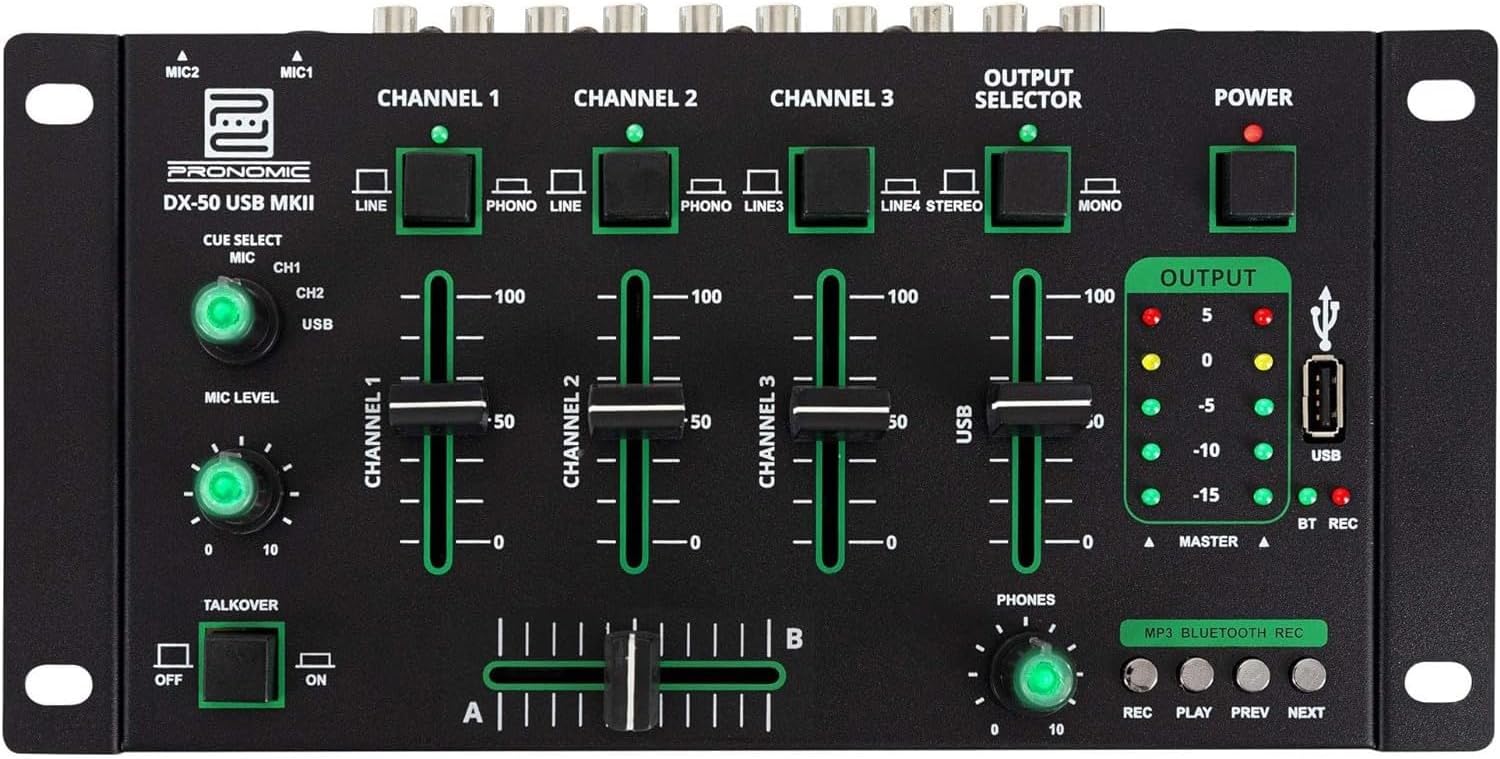
- MIC 1/2 Inputs: Podłącz mikrofony.
- Channel 1-4 Input Selectors: Switch between LINE, PHONO, or USB/Bluetooth inputs for each channel.
- Suwaki kanałów: Adjust the volume level for each channel.
- CUE Select Buttons: Route specific channels to the headphone output for monitoring.
- Pokrętło poziomu MIC: Adjust the volume of the microphone inputs.
- Talkover Switch: Activates the talkover function, which automatically lowers music volume when speaking into the microphone.
- Selektor wyjścia: Choose between Stereo or Mono master output.
- Przycisk zasilania: Włącza/wyłącza mikser.
- Mierniki poziomu wyjściowego: LED indicators showing the master output level.
- Port USB: Connect a USB drive for MP3 playback and recording.
- MP3/Bluetooth/REC Player Controls: Buttons for Play/Pause, Previous, Next, and Record functions for the integrated player.
- Pokrętło poziomu telefonu: Reguluje głośność wyjścia słuchawkowego.
- Crossfader (A/B): Blends between channels assigned to A and B.
4.2 Połączenia panelu tylnego

- Wejście zasilania prądem zmiennym 12 V: Podłącz tutaj dołączony zasilacz.
- TELEFONY Wyjście: Gniazdo 6.3 mm do podłączenia słuchawek.
- MASTER OUT L/R (RCA): Connect to your main ampgłośniki lub aktywne głośniki.
- Channel 1 & 2 Inputs (RCA Line/Phono): Connect turntables (Phono) or other line-level devices (CD players, media players). Use the front panel selector to switch.
- Channel 3 & 4 Inputs (RCA Line): Connect line-level devices.
- MIC 1 & 2 Inputs (6.3mm Jack): Podłącz mikrofony.
5. Konfiguracja
Follow these steps to set up your Pronomic DX-50 USB MKII mixer:
- Podłączenie zasilania: Ensure the mixer's power switch is in the OFF position. Connect the supplied AC 12V power adapter to the "AC 12V" input on the rear panel of the mixer. Plug the adapter into a suitable power outlet.
- Podłączenie wyjścia głównego: Connect the "MASTER OUT L/R" RCA outputs on the rear panel to the inputs of your ampgłośniki lub aktywne głośniki.
- Podłączenie urządzenia wejściowego:
- Gramofony: Connect turntables to the "CHANNEL 1" or "CHANNEL 2" RCA inputs. Set the corresponding input selector on the front panel to "PHONO".
- Odtwarzacze CD/urządzenia liniowe: Connect CD players, media players, or other line-level devices to "CHANNEL 1", "CHANNEL 2", "CHANNEL 3", or "CHANNEL 4" RCA inputs. Set the corresponding input selector on the front panel to "LINE".
- Mikrofony: Connect microphones to the "MIC 1" or "MIC 2" 6.3mm jack inputs on the rear panel.
- Podłączenie słuchawek: Connect your headphones to the "PHONES" 6.3mm jack on the rear panel.
- USB Drive (Optional): If using a USB drive for playback or recording, insert it into the "USB" port on the front panel.
- Włączanie: Once all connections are made, switch the mixer's power switch to the ON position. The power indicator LED will illuminate.
6. Instrukcja obsługi
6.1 Podstawowe mieszanie
- Wybierz wejście: For each channel, use the input selector switch (LINE/PHONO/USB/BT) to choose the desired audio source.
- Adjust Channel Volume: Use the vertical faders for each channel to adjust its individual volume level.
- Wyjście główne: Monitor the "OUTPUT" LED meters and adjust the master volume knob (if present, otherwise rely on channel faders and amplifier volume) to achieve a suitable overall output level without clipping.
- Crossfader: Use the crossfader to smoothly transition between channels assigned to A and B. Channels 1 and 2 are typically assigned to the crossfader.
6.2 Korzystanie z mikrofonu
- Connect your microphone to one of the MIC inputs on the rear panel.
- Adjust the "MIC LEVEL" knob on the front panel to control the microphone's volume.
- Talkover Function: Activate the "TALKOVER" switch to automatically reduce the volume of the music when you speak into the microphone. This is useful for announcements.
6.3 Odtwarzanie i nagrywanie przez USB
- Odtwarzanie z USB: Włóż dysk USB zawierający plik MP3 files into the "USB" port. Select "USB" as the input source for the dedicated USB channel. Use the "PLAY/PAUSE", "PREV", and "NEXT" buttons to control playback.
- Nagrywanie USB: Press the "REC" button to start recording the master output to the connected USB drive. Press "REC" again to stop recording. Ensure your USB drive has sufficient free space and is formatted correctly (FAT32 is commonly supported).
6.4 Łączność Bluetooth
- Aktywuj Bluetooth: Select "BT" as the input source for the dedicated Bluetooth channel. The mixer will enter pairing mode.
- Paruj urządzenie: On your Bluetooth-enabled device (smartphone, tablet, etc.), search for available Bluetooth devices. Select "Pronomic DX-50 USB MKII" (or similar name) from the list to pair.
- Odtwórz dźwięk: Once paired, you can play audio from your device through the mixer. Control playback from your device or using the mixer's transport controls (if supported by your device).
6.5 Monitoring with Headphones
- Connect headphones to the "PHONES" output.
- Use the "CUE SELECT" buttons to choose which channels you want to monitor in your headphones without affecting the main output.
- Adjust the "PHONES" level knob to set your desired headphone volume.
7. Konserwacja
- Czyszczenie: Disconnect the power before cleaning. Use a soft, dry cloth to wipe the surface of the mixer. Do not use liquid cleaners, aerosols, or solvents.
- Składowanie: Przechowywać mikser w chłodnym, suchym miejscu, z dala od bezpośredniego światła słonecznego i ekstremalnych temperatur.
- Fader and Knob Care: Avoid excessive force when operating faders and knobs. Periodically check for dust or debris accumulation around moving parts.
- Zarządzanie kablami: Ensure cables are not kinked or strained, which can lead to damage.
8. Rozwiązywanie Problemów
| Problem | Możliwa przyczyna | Rozwiązanie |
|---|---|---|
| Brak zasilania | Power adapter not connected; Power switch off; Faulty power outlet. | Check power adapter connection; Ensure power switch is ON; Try a different power outlet. |
| No sound from main output | Master volume too low; Amplifier/speakers off or disconnected; Incorrect input selection; Channel faders down. | Increase master volume; Check amplifier/speaker connections and power; Verify correct input selected for channels; Raise channel faders. |
| Brak dźwięku ze słuchawek | Headphone volume too low; Headphones not connected; No CUE selected. | Increase PHONES level; Connect headphones properly; Press CUE button for desired channel. |
| Bluetooth nie łączy się | Mixer not in pairing mode; Device too far; Interference. | Ensure BT input is selected; Bring device closer; Restart mixer and device. |
| Odtwarzanie USB nie działa | Dysk USB nie został prawidłowo włożony; Nieprawidłowo file format; Dysk USB nie jest poprawnie sformatowany. | Włóż ponownie dysk USB; Upewnij się files are MP3; Format USB drive to FAT32. |
9. Specyfikacje
| Model | Pronomic DX-50 USB MKII |
| Liczba kanałów | 4 |
| Technologia łączności | Bluetooth, USB |
| Wejście audio | RCA (line/phono), 6.3mm microphone, Bluetooth, USB |
| Typ złącza wyjściowego | RCA (Master Out), 6.3mm (Phones) |
| Źródło zasilania | Kabel elektryczny (adapter AC 12V) |
| Dimensions (without corner brackets and controls) | 222 x 129 x 28 mm (szerokość x głębokość x wysokość) |
| Total Dimensions (with corner brackets and controls) | 267 x 136 x 51 mm (szerokość x głębokość x wysokość) |
| Waga | 790 gramów |
10. Gwarancja i wsparcie
Aby uzyskać informacje o gwarancji i pomocy technicznej, zapoznaj się z dokumentacją dołączoną do zakupu lub skontaktuj się ze sprzedawcą. Zachowaj dowód zakupu na wypadek roszczeń gwarancyjnych.
For further assistance, you may also visit the official Pronomic webstronie lub skontaktuj się z działem obsługi klienta.


