
1. Wprowadzenie
This manual provides essential information for the safe and efficient use of your Google TV 7000 Series 4K Ultra HD LED Television. Please read these instructions thoroughly before operating the device and retain them for future reference.
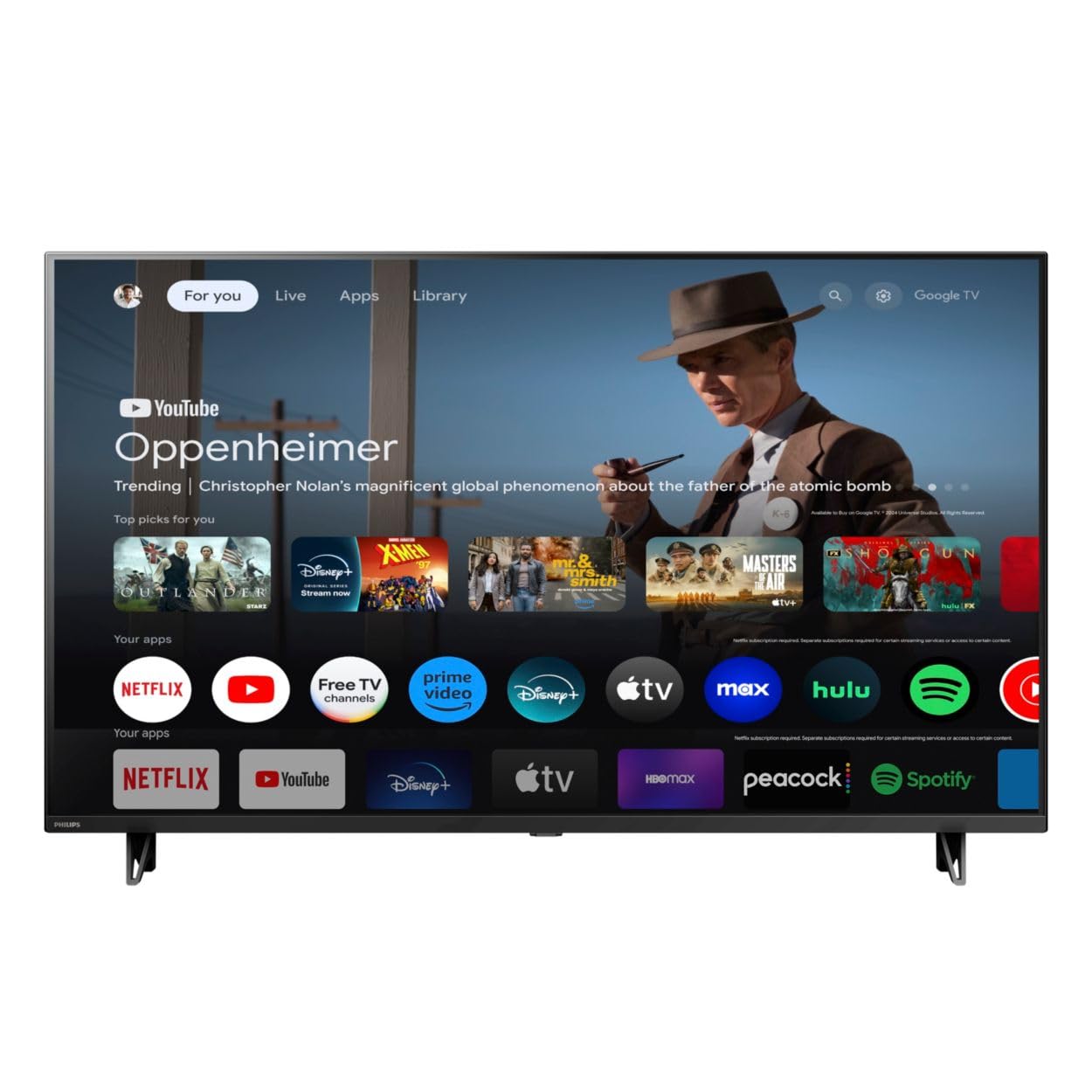
Przód view of the Google TV 7000 Series 4K Ultra HD LED Television, showcasindzięki smukłej ramce i wyświetlaczowi.
2. Konfiguracja
2.1 Rozpakowanie i zawartość opakowania
Ostrożnie wyjmij wszystkie elementy z opakowania. Upewnij się, że wszystkie elementy są obecne:
- Google TV 7000 Series Television
- Zdalne sterowanie
- Baterie do pilota
- Stojak na biurko
- Screws for tabletop stand
- Szybki przewodnik
- Instrukcja obsługi (ten dokument)
2.2 Podłączanie zasilania
Connect the power cord to the TV's power input, then plug the other end into a wall outlet. Ensure the power outlet is easily accessible.
2.3 Podłączanie urządzeń zewnętrznych
Your television supports various connectivity options:
- HDMI: Connect devices like Blu-ray players, game consoles, or set-top boxes to the HDMI ports. This model features Audio Return Channel (HDMI 2).
- USB: Use the USB port for media playback or connecting compatible accessories.
- Ethernet: Aby uzyskać stabilne przewodowe połączenie internetowe, podłącz kabel Ethernet do portu LAN.
- Wyjście słuchawkowe: Podłącz słuchawki do prywatnego słuchania.
- Cyfrowe wyjście audio (optyczne): Do podłączania zewnętrznych systemów audio.
- CVBS+wejście audio L/P: Do podłączania starszych urządzeń analogowych.
2.4 Konfiguracja początkowa
Po pierwszym włączeniu telewizor poprowadzi Cię przez proces konfiguracji początkowej. Obejmuje on:
- Wybór języka
- Connecting to a Wi-Fi network or using Ethernet
- Signing in with your Google account to access Google TV features and apps
- Scanning for available channels (ATSC, NTSC)
2.5 Opcje montażu
You can place your TV on a tabletop using the included stand or mount it on a wall.
- Stojak na stół: Attach the tabletop stand using the provided screws as per the quick start guide.
- Mocowanie ścienne: For wall mounting, use a VESA compatible mount (600 x 400 mm). Consult a professional for wall mounting to ensure safety and proper installation.
3. Instrukcja obsługi
3.1 Zdalne sterowanieview
The remote control allows you to navigate the Google TV interface, adjust settings, and control playback. It supports voice control for Google Assistant.
3.2 Podstawowe funkcje
- Moc: Naciśnij przycisk zasilania, aby włączyć lub wyłączyć telewizor.
- Tom: Użyj przycisków głośności, aby dostosować poziom dźwięku.
- Kanały: Użyj przycisków kanałów, aby przełączać się pomiędzy kanałami telewizyjnymi.
- Wejście: Wybierz żądane źródło sygnału wejściowego (HDMI, USB itp.).
3.3 Nawigacja w interfejsie Google TV
Use the directional pad and 'OK' button on your remote to navigate the Google TV home screen. The home screen provides access to your installed apps, recommended content, and settings.
3.4 Funkcje inteligentne
- Wbudowany Chromecast: Cast content from your compatible mobile devices or computer directly to your TV.
- Wbudowany Asystent Google: Press the Google Assistant button on your remote to use voice commands for searching content, controlling smart home devices, getting information, and more.
- Aplikacje do strumieniowania: Access popular streaming services like Netflix, YouTube, Discovery+, Tubi TV, and Prime Video directly from the Google TV interface.
3.5 Ustawienia obrazu i dźwięku
Dostosuj swój viewwrażenia słuchowe i dźwiękowe za pomocą menu ustawień telewizora:
- Picture Style: Choose from various preset picture modes or customize settings like brightness, contrast, color, and sharpness. Features include Dynamic contrast, Film mode, Blue stretch, and Custom Color management.
- Obsługa HDR: The TV supports HDR10 and HLG for enhanced contrast and color with compatible content.
- Tryb gry: Optimize picture settings for gaming to reduce input lag.
- Styl dźwięku: Select sound presets or adjust bass and treble. Features include Dolby Audio and Auto Volume Leveling.
- Proporcje obrazu: Adjust the screen aspect ratio (e.g., Automatic, 4:3, Movie Expand, Full).
3.6 Łączność
Your TV offers various ways to connect to networks and devices:
- Wi-Fi: Połącz się bezprzewodowo ze swoją siecią domową, aby uzyskać dostęp do Internetu.
- Bluetooth: Podłącz zgodne urządzenia Bluetooth, takie jak słuchawki lub kontrolery do gier.
- Ethernet: Zapewnia stabilne przewodowe połączenie internetowe.
4. Konserwacja
4.1 Cleaning the Screen and TV Body
- Zawsze odłączaj telewizor od zasilania przed czyszczeniem.
- Do delikatnego przecierania ekranu i obudowy telewizora używaj miękkiej, suchej i niepozostawiającej włókien ściereczki.
- W przypadku uporczywych plam delikatnieampPrzetrzyj ściereczkę wodą lub specjalnym środkiem do czyszczenia ekranów. Nigdy nie spryskuj bezpośrednio ekranu środkiem czyszczącym.
- Unikaj stosowania środków czyszczących o właściwościach ściernych, wosków i rozpuszczalników.
4.2 Aktualizacje oprogramowania
Your Google TV may receive automatic software updates to improve performance and add new features. Ensure your TV is connected to the internet to receive these updates. You can also manually check for updates in the settings menu.
4.3 Pielęgnacja pilota zdalnego sterowania
Replace batteries when the remote control's response becomes sluggish. Do not mix old and new batteries or different types of batteries. Keep the remote control away from moisture and direct sunlight.
5. Rozwiązywanie Problemów
Jeśli masz problemy z telewizorem, zapoznaj się z poniższymi typowymi rozwiązaniami:
| Problem | Możliwe rozwiązanie |
|---|---|
| Brak zasilania | Sprawdź, czy przewód zasilający jest prawidłowo podłączony do telewizora i gniazdka ściennego. Upewnij się, że gniazdko jest sprawne. |
| Brak obrazu, ale dźwięk jest | Sprawdź, czy wybrano prawidłowe źródło sygnału wejściowego. Sprawdź połączenia urządzeń zewnętrznych. |
| Brak dźwięku, ale obraz jest | Sprawdź poziom głośności i stan wyciszenia. Upewnij się, że zewnętrzne systemy audio są prawidłowo podłączone i włączone. |
| Pilot nie działa | Wymień baterie. Upewnij się, że między pilotem a czujnikiem podczerwieni telewizora nie ma żadnych przeszkód. |
| Problemy z połączeniem sieciowym | Restart your router and modem. Reconnect to the Wi-Fi network or check the Ethernet cable connection. |
| Picture quality issues (e.g., pixelation) | Check the signal strength for broadcast channels. For streaming content, ensure a stable internet connection. Adjust picture settings. |
5.1 Przywracanie ustawień fabrycznych
If problems persist, a factory reset may resolve them. This will erase all personal settings and installed apps, returning the TV to its original factory state. Consult the on-screen menu for the factory reset option, usually found under System or Device Preferences in Settings.
6. Specyfikacje
Key technical specifications for the Google TV 7000 Series 4K Ultra HD LED Television:
| Funkcja | Specyfikacja |
|---|---|
| Rozmiar ekranu | 43 cali |
| Technologia wyświetlania | LCD UltraHD Display, LED Backlight |
| Rezolucja | 4K (2160p) |
| Częstotliwość odświeżania | 120 PMR (Picture Motion Rate) |
| Obsługiwany format HDR | HDR10, HLG |
| System operacyjny | Android 11 (Google TV) |
| Technologia łączności | Bluetooth, Ethernet, USB, Wi-Fi |
| Funkcje audio | Dolby Audio, Auto Volume Leveling |
| Cechy specjalne | Chromecast Built-in, Google Assistant Built-in, Game Mode, Digital Noise Reduction, MPEG artifact reduction, Dynamic contrast |
| Wymiary produktu (Gł. x Szer. x Wys.) | 9.8" gł. x 37.9" szer. x 23.9" wys. |
| Waga przedmiotu | 14.99 funtów |
| Standard mocowania VESA | 600x400mm |
| Producent | Philips |
| Numer modelu | 43PUL7652/F7 |
| UPC | 609585254893 |
7. Gwarancja i wsparcie
7.1 Informacje o gwarancji
This product comes with a Limited Warranty. Please refer to the warranty card included in your package or contact the manufacturer for specific terms and conditions regarding coverage and duration.
7.2 Obsługa klienta
For technical assistance, troubleshooting beyond this manual, or warranty claims, please contact the manufacturer, Philips, or your retailer. Have your model number (43PUL7652/F7) and serial number ready when contacting support.