
1. Wprowadzenie
Thank you for choosing the EasySMX T37 Wireless Switch Pro Controller. This manual provides detailed instructions for setting up, operating, maintaining, and troubleshooting your controller. Please read this manual carefully before use to ensure optimal performance and longevity of your device. This controller is compatible with Nintendo Switch, Switch Lite, and Switch OLED consoles.
2. Koniec produktuview
The EasySMX T37 is a wireless gamepad designed for an enhanced gaming experience on Nintendo Switch systems. It features an ergonomic design, dual turbo vibration, and 6-axis gyro motion control.

Obraz 2.1: Przód view of the EasySMX T37 Wireless Switch Pro Controller, showcasing its ergonomic shape and button layout.
3. Konfiguracja
3.1 Parowanie z Nintendo Switch
- Włącz konsolę Nintendo Switch.
- Z menu HOME wybierz Kontrolery > Zmień uchwyt/kolejność.
- On the EasySMX T37 controller, press and hold the Przycisk SYNC (located on the top edge of the controller) for 3 seconds until the LED indicators start flashing rapidly.
- Once the controller is successfully paired, the player LED(s) on the bottom of the controller will light up solid.
3.2 Ładowanie Kontrolera
Connect the provided USB-C charging cable to the USB-C port on the controller and the other end to a USB power source (e.g., Switch dock, USB wall adapter, computer USB port). The LED indicators will show charging status and turn off when fully charged.
4. Instrukcja obsługi
4.1 Podstawowe sterowanie
The controller features standard button layouts for Nintendo Switch compatibility:
- Przyciski A/B/X/Y: Przyciski akcji.
- Pad kierunkowy: Wejście kierunkowe.
- Lewy/prawy drążek analogowy: Ruch i sterowanie kamerą.
- Przyciski L/R/ZL/ZR: Przyciski na ramionach i spustowe.
- Przycisk DOMOWY: Returns to the Switch HOME Menu.
- Przycisk PRZECHWYĆ: Robi zrzuty ekranu.
- PLUS (+) / MINUS (-) Buttons: Funkcje Start/Wybierz.

Image 4.1: A user holding the EasySMX T37 controller, demonstrating the comfortable grip and accessible button placement during gameplay.
4.2 Funkcja Turbo
The Turbo function allows for rapid, automatic pressing of a button, useful in action or arcade games.
- Aktywuj Turbo: Press and hold the desired action button (A/B/X/Y/L/R/ZL/ZR), then press the Przycisk Turbo (T button). The button will now auto-fire.
- Dostosuj prędkość Turbo: Podczas trzymania Przycisk Turbo, przesuń Right Analog Stick Up or Down to cycle through three speeds: 5 shots/s, 12 shots/s, and 20 shots/s.
- Dezaktywuj Turbo: Repeat the activation step (hold the action button, then press the Turbo button) or press and hold the Przycisk Turbo for 5 seconds to clear all Turbo settings.
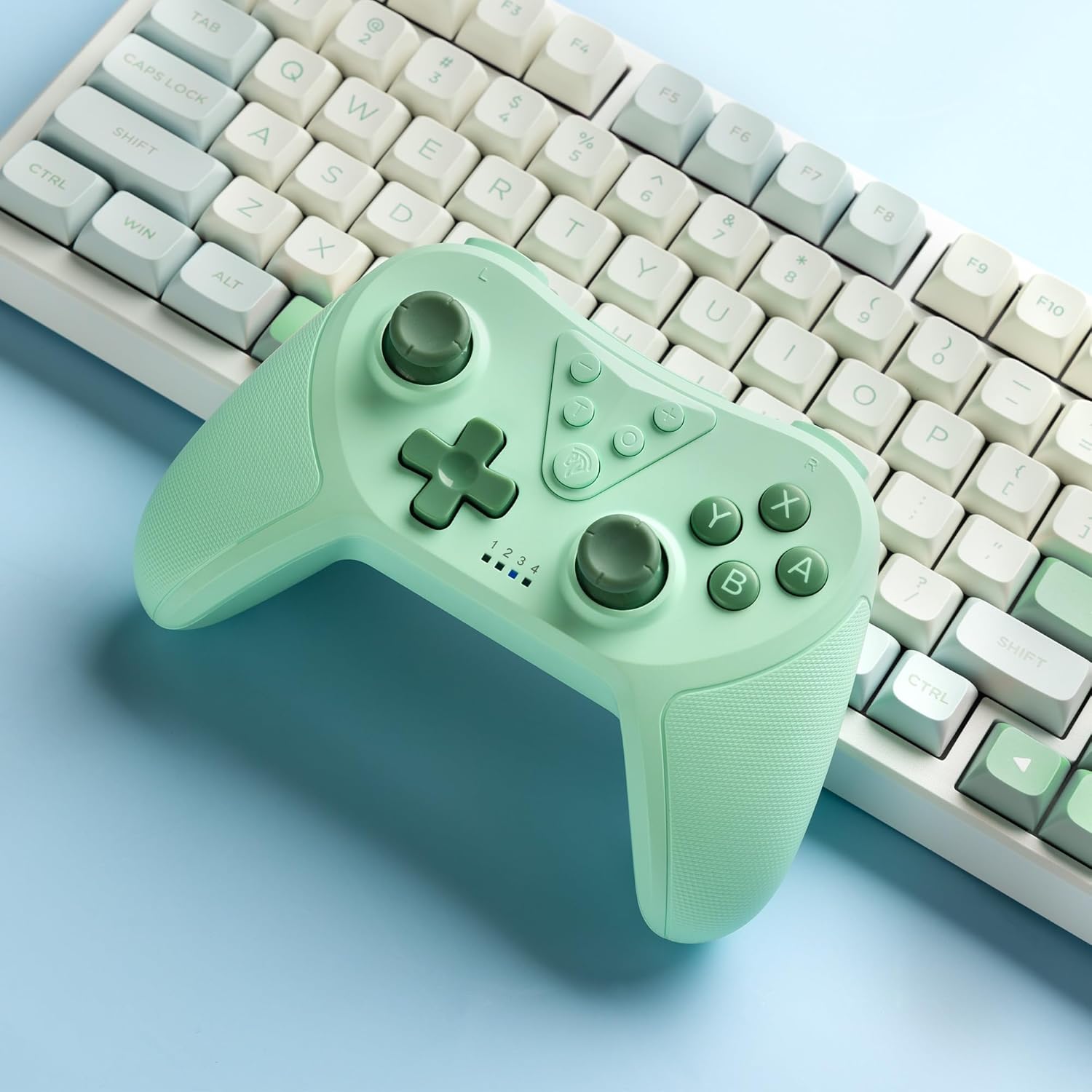
Image 4.2: Illustration of the Turbo function on the EasySMX T37 controller, showing the three adjustable speeds: 5, 12, and 20 shots per second.
4.3 Regulacja wibracji
The controller features dual motors for adjustable vibration feedback, enhancing immersion in games.
- Dostosuj intensywność wibracji: Naciśnij i przytrzymaj Przycisk Turbo, a następnie przesuń Left Analog Stick Up or Down to cycle through four vibration levels: 0% (off), 30%, 70%, and 100%.

Image 4.3: Visual representation of the Dual Vibration feature on the EasySMX T37 controller, indicating four intensity levels from 0% to 100%.
4.4 Sterowanie ruchem żyroskopu 6-osiowego
The built-in 6-axis gyroscope provides precise motion sensing, allowing for intuitive control in games that support motion input.

Image 4.4: Illustration depicting the 6-Axis Gyro Motion Control feature of the EasySMX T37 controller, showing how it interacts with a game on the Nintendo Switch screen.
5. Konserwacja
- Czyszczenie: Do czyszczenia kontrolera używaj miękkiej, suchej ściereczki. Unikaj stosowania silnych środków chemicznych i materiałów ściernych.
- Składowanie: Przechowuj kontroler w chłodnym, suchym miejscu, z dala od bezpośredniego światła słonecznego i ekstremalnych temperatur.
- Pielęgnacja baterii: Aby przedłużyć żywotność baterii, unikaj częstego całkowitego rozładowywania kontrolera. Ładuj go regularnie, nawet jeśli nie jest używany przez dłuższy czas.
- Unikaj kropli: Chroń kontroler przed upadkami i uderzeniami, które mogą uszkodzić jego podzespoły wewnętrzne.
6. Rozwiązywanie Problemów
6.1 Kontroler nie łączy się
- Sprawdź, czy kontroler jest naładowany.
- Verify the Switch console is updated to the latest system version.
- Spróbuj ponownie sparować kontroler, wykonując czynności opisane w rozdziale 3.1.
- If issues persist, try resetting the controller by inserting a thin object into the small reset hole (if present, usually on the back) for a few seconds.
6.2 Buttons Unresponsive or Lagging
- Sprawdź, czy kontroler jest całkowicie naładowany.
- Move closer to the Switch console to ensure a strong wireless connection.
- Sprawdź, czy wokół przycisków nie znajdują się żadne przeszkody fizyczne lub zanieczyszczenia.
- Ponownie sparuj kontroler.
6.3 Controller Not Charging
- Ensure the USB-C cable is securely connected to both the controller and the power source.
- Spróbuj użyć innego kabla USB-C lub zasilacza.
- Upewnij się, że źródło zasilania jest sprawne.
7. Specyfikacje
- Model: T37
- Łączność: Bezprzewodowy (Bluetooth)
- Zgodność: Nintendo Switch, Switch Lite, Switch OLED
- Cechy: Dual Turbo Function, Adjustable Vibration, 6-Axis Gyro Motion Control, Ergonomic Design
- Product Identifier (ASIN): B0CTTWN84L
8. Gwarancja i wsparcie
Aby uzyskać informacje dotyczące gwarancji, pomocy technicznej lub dalszej pomocy, zapoznaj się z oficjalną stroną EasySMX webOdwiedź witrynę lub skontaktuj się bezpośrednio z działem obsługi klienta. Zachowaj paragon zakupu na wypadek reklamacji.