
1. Wprowadzenie
Thank you for choosing the PNI Voyager S2600 WiFi 4K Ultra HD Car DVR Camera. This device is designed to record high-quality video footage of your journeys, providing security and evidence in case of incidents. It features 4K Ultra HD recording, Wi-Fi connectivity for smartphone control, parking monitoring, and a G-sensor for automatic incident detection.

Image 1.1: PNI Voyager S2600 Dash Cam installed in a vehicle, showcasing its key features: 4K Ultra HD recording, Wi-Fi connectivity, and Parking Monitoring.
2. Informacje dotyczące bezpieczeństwa
Prosimy o zapoznanie się z poniższymi wytycznymi bezpieczeństwa i przestrzeganie ich, aby zagwarantować prawidłową obsługę urządzenia i zapobiec uszkodzeniu urządzenia lub obrażeniom.
- Nie wystawiaj urządzenia na działanie ekstremalnych temperatur, długotrwałego bezpośredniego światła słonecznego ani wysokiej wilgotności.
- Upewnij się, że urządzenie jest bezpiecznie zamontowane i nie przeszkadza kierowcy. view lub zakłócać sterowanie pojazdem.
- Używaj wyłącznie dostarczonego kabla zasilającego i akcesoriów. Używanie nieautoryzowanych akcesoriów może spowodować uszkodzenie urządzenia i unieważnienie gwarancji.
- Nie próbuj samodzielnie demontować ani naprawiać urządzenia. Skontaktuj się z autoryzowanym serwisem w celu uzyskania pomocy.
- Utrzymuj obiektyw w czystości, aby zapewnić wyraźne nagrania wideo.
- Always format the microSD card regularly to maintain optimal recording performance.
3. Zawartość opakowania
Sprawdź, czy w opakowaniu znajdują się wszystkie elementy:
- PNI Voyager S2600 Car DVR Camera
- Power cord with cigarette lighter plug (12V/24V compatible)
- Mocowanie do przedniej szyby
- Instrukcja obsługi

Image 3.1: The PNI Voyager S2600 dash cam, its magnetic mount, and the power cable with a cigarette lighter adapter.
4. Koniec produktuview
Familiarize yourself with the components of your PNI Voyager S2600 dash cam.
4.1. Układ urządzenia
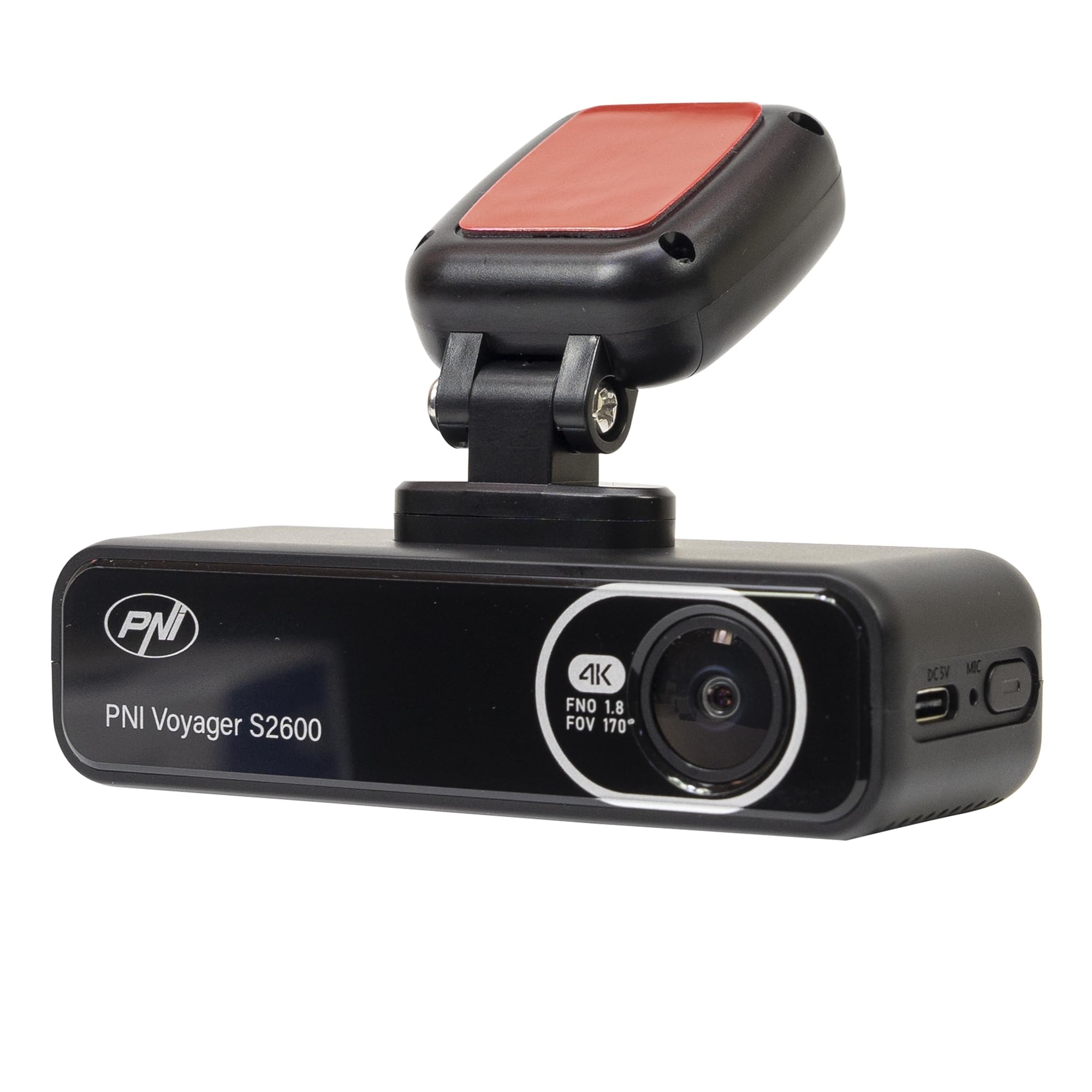
Obraz 4.1: Przód view of the PNI Voyager S2600, displaying the camera lens with 4K FNO 1.8 FOV 170° markings, the PNI brand logo, and the model name.

Rysunek 4.2: Szczegółowy view of the side of the dash cam, highlighting the USB-C power input (DC 5V) and the microphone opening.
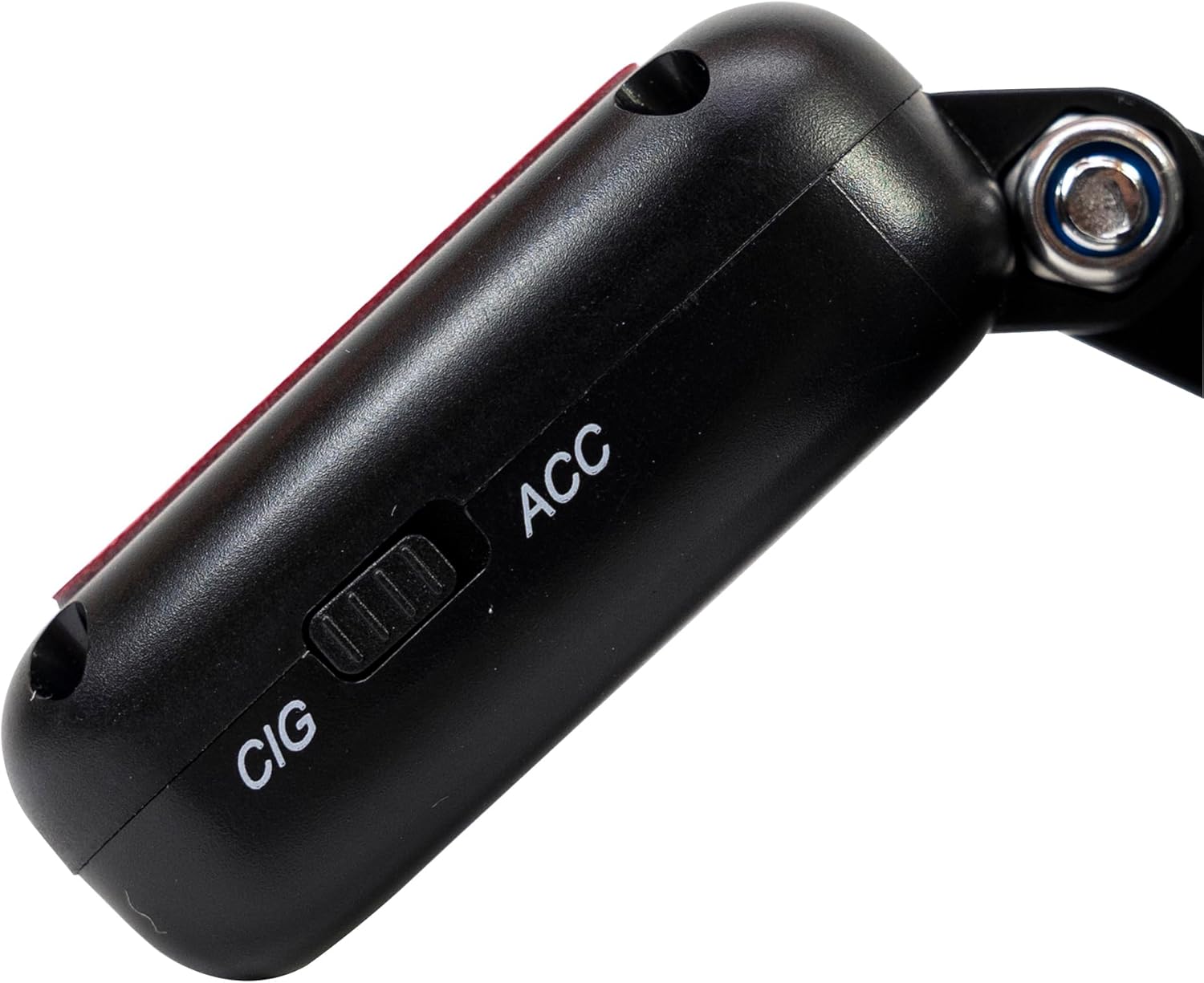
Obraz 4.3: Bok view of the magnetic mount, featuring a switch to select between 'CIG' (cigarette lighter power) and 'ACC' (accessory power) modes.
4.2. Główne cechy
- Nagrywanie wideo w jakości 4K Ultra HD: Captures video at 3840x2160 resolution at 30FPS, or 2560x1440 at 30FPS, and 1920x1080 at 60FPS/30FPS.
- Łączność Wi-Fi: Connects to your smartphone via the Viidure-Dashcam Viewer aplikacja na żywo view, pobieranie wideo i dostosowywanie ustawień.
- Monitorowanie parkowania: Activates the camera to record when vibration or movement is detected while the vehicle is parked.
- Czujnik G: Automatycznie blokuje bieżący film file in case of a collision to prevent overwriting.
- Obiektyw szerokokątny: 170 stopni viewkąt, aby uchwycić szeroką perspektywę drogi.
- Nagrywanie w pętli: Nadpisuje najstarsze footage gdy karta pamięci jest pełna, zapewniając ciągłe nagrywanie.
- Zintegrowany GPS: Records speed and coordinates, which can be displayed on recorded videos.
5. Konfiguracja
5.1. Wkładanie karty MicroSD
- Sprawdź, czy kamera samochodowa jest wyłączona.
- Znajdź gniazdo karty microSD w urządzeniu.
- Insert a high-speed (Class 10 or higher) microSD card (up to 512GB) into the slot until it clicks into place.
- To remove, gently push the card in until it clicks, then release. The card will eject.
Ważny: Format the microSD card within the app or on a computer before first use and periodically thereafter to ensure stable recording.
5.2. Instalacja i podłączenie zasilania
- Wyczyść obszar na przedniej szybie, w którym zamierzasz zamontować kamerę samochodową. Upewnij się, że nie zasłania ona widoku. view.
- Attach the windshield mount to the dash cam. The mount is magnetic for easy attachment.
- Peel off the protective film from the adhesive pad on the mount and firmly press it onto the chosen spot on your windshield for at least 30 seconds.
- Connect the power cable to the USB-C port on the mount.
- Route the power cable neatly along the windshield and dashboard to the vehicle's cigarette lighter socket.
- Plug the cigarette lighter adapter into the vehicle's 12V/24V power outlet.
- Select the appropriate power mode on the mount's switch: 'CIG' for continuous power from the cigarette lighter, or 'ACC' for power only when the vehicle's ignition is on.

Image 5.1: The PNI Voyager S2600 dash cam detached from its magnetic mount, illustrating the contact points for secure attachment.
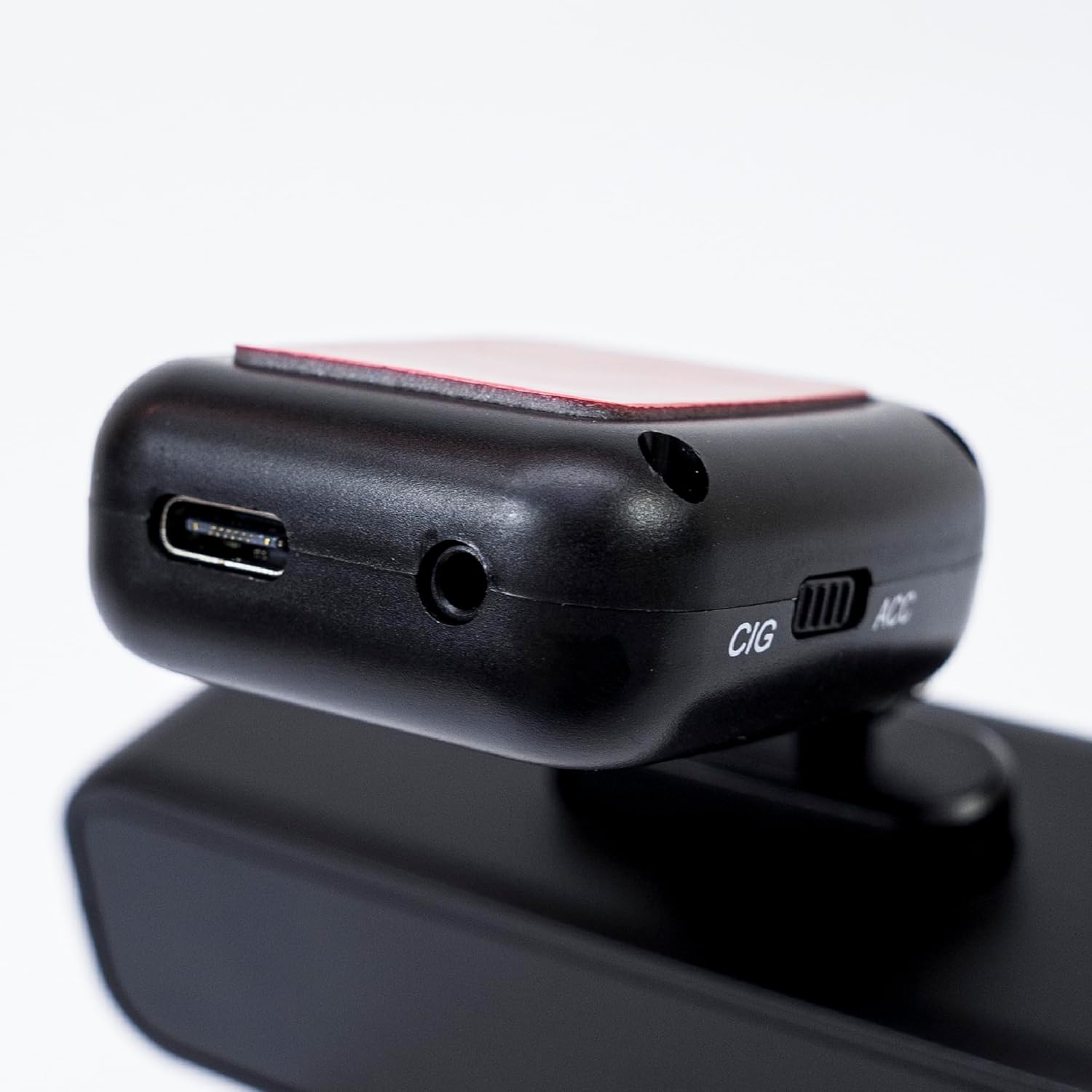
Image 5.2: The top of the dash cam mount, featuring the USB-C port for power input and the CIG/ACC switch for power mode selection.
5.3. Instalacja aplikacji i połączenie Wi-Fi
- Pobierz Kamera samochodowa Viidure Viewer aplikację ze sklepu App Store (iOS) lub Google Play Store (Android).
- Włącz kamerę samochodową.
- On your smartphone, go to Wi-Fi settings and connect to the dash cam's Wi-Fi network. The network name (SSID) and password can usually be found in the dash cam's settings (if it has a screen) or in the manual.
- Open the Viidure-Dashcam Viewer app. The app should automatically detect and connect to the dash cam.
- Za pomocą aplikacji możesz view żyćtage, adjust settings, download recorded videos, and format the microSD card.

Image 5.3: A smartphone showing the Viidure-Dashcam Viewer application, demonstrating the wireless connection and control over the PNI Voyager S2600 dash cam.
6. Instrukcja obsługi
6.1. Automatyczne nagrywanie
Once powered on and with a valid microSD card inserted, the PNI Voyager S2600 will automatically begin loop recording. Video fileFilmy są zapisywane w segmentach (np. 1, 3 lub 5 minut) na karcie microSD.
6.2. Czujnik G (nagrywanie awaryjne)
The built-in G-sensor detects sudden impacts or rapid acceleration/deceleration. When triggered, it automatically locks the current video segment, preventing it from being overwritten by loop recording. These emergency files are stored in a separate folder on the microSD card.
6.3. Monitorowanie parkowania
When the vehicle is parked and the dash cam is powered (either continuously via CIG mode or with a hardwire kit), the parking monitor function activates. If the G-sensor detects a collision or motion detection is enabled and detects movement, the dash cam will automatically power on and record a short video segment. This feature helps protect your vehicle when unattended.

Image 6.1: Visual representation of the Parking Monitor feature, showing the dash cam detecting an impact while the car is parked.
6.4. Korzystanie z Wi-Fi i aplikacji
The Viidure-Dashcam Viewer app allows you to:
- Na żywo View: See what the camera is recording in real-time on your smartphone.
- Odtwarzanie wideo: Review recorded videos directly from the microSD card.
- Pobierz filmy: Transfer important video files from the dash cam to your smartphone.
- Regulacja ustawień: Configure various dash cam settings, such as video resolution, G-sensor sensitivity, loop recording duration, and parking monitor options.
- Sformatuj kartę SD: Erase all data on the microSD card.
6.5. Funkcjonalność GPS
The integrated GPS receiver records your vehicle's speed and location data. This information can be overlaid on the video footage during playback via the app or compatible desktop software, providing additional context for your recordings.
7. Konserwacja
7.1. Czyszczenie urządzenia
Use a soft, dry cloth to clean the dash cam body. For the lens, use a specialized lens cleaning cloth to avoid scratches. Do not use chemical cleaners or abrasive materials.
7.2. MicroSD Card Formatting
It is recommended to format the microSD card every 2-4 weeks to prevent data corruption and ensure optimal recording performance. This can be done through the Viidure-Dashcam Viewer aplikacji.
7.3. Aktualizacje oprogramowania sprzętowego
Periodically check the PNI website or the Viidure-Dashcam Viewer app for available firmware updates. Firmware updates can improve performance, add new features, or fix bugs. Follow the instructions provided with the update carefully.
8. Rozwiązywanie Problemów
If you encounter issues with your PNI Voyager S2600, refer to the following common problems and solutions:
| Problem | Możliwa przyczyna | Rozwiązanie |
|---|---|---|
| Kamera samochodowa nie włącza się. | No power supply; faulty cable; incorrect power mode. | Check power cable connection; ensure cigarette lighter socket is active; verify CIG/ACC switch setting. |
| Nagrywanie zostaje zatrzymane lub zawieszone. | MicroSD card error; card full; low-speed card. | Format microSD card; replace with a high-speed (Class 10 U3) card; ensure sufficient storage. |
| Wi-Fi connection unstable or fails. | Interference; incorrect password; app issue. | Ensure dash cam Wi-Fi is enabled; re-enter password; restart app and dash cam; try connecting in a different location. |
| Słaba jakość wideo. | Dirty lens; incorrect resolution setting. | Clean the camera lens; check video resolution settings in the app. |
| Monitor parkowania nie działa. | Incorrect power mode; feature disabled. | Ensure dash cam is receiving continuous power (CIG mode or hardwire kit); enable parking monitor in app settings. |
If the problem persists, please contact PNI customer support.
9. Specyfikacje
Detailed technical specifications for the PNI Voyager S2600 Car DVR Camera:
| Funkcja | Opis |
|---|---|
| Numer modelu | PNI-S2600 |
| Rozdzielczość wideo | 4K (3840x2160@30FPS), 2K (2560x1440@30FPS), FHD (1920x1080@60FPS/30FPS) |
| Czujnik obrazu | SONY335 (5MP, 2592x1944px) |
| Viewing kąt | 170 stopni |
| Format wideo | MP4, H.264 |
| Format zdjęcia | Plik JPEG |
| Maksymalna rozdzielczość zdjęcia | 8 MP (3264x2448) |
| Składowanie | MicroSD card slot, up to 512GB (Class 10 or higher recommended) |
| Łączność | Wi-Fi, GPS (integrated) |
| Cechy specjalne | G-Sensor, Parking Monitoring, Motion Detection, Loop Recording |
| Zasilacz | 5V/2A (via 12V/24V car adapter) |
| Bateria | Super capacitor 1.5 UF |
| Temperatura pracy | -26°C ~ +80°C |
| Wymiary (dł. x szer. x wys.) | 105mm x 35mm x 27mm |
| Waga | 88 gram |
| Typ USB | Typ C |
10. Gwarancja i pomoc techniczna
10.1. Informacje o gwarancji
The PNI Voyager S2600 Car DVR Camera comes with a 24-miesięczna gwarancja from the date of purchase. This warranty covers manufacturing defects under normal use. It does not cover damage caused by misuse, accidents, unauthorized modifications, or improper installation. Please retain your proof of purchase for warranty claims.
10.2. Obsługa klienta
For technical assistance, troubleshooting, or warranty inquiries, please contact PNI customer support. You can find more information and support resources on the official PNI webstrona:
Producent: ONLINESHOP SRL
Address: Olteniei 26A, Piatra Neamt, Neamt, 610206, Romania