
1. Wprowadzenie
The HIKMICRO ECO-V Handheld Thermography Camera is a versatile thermal imaging device designed for various professional applications. It offers thermal, bi-spectrum image fusion, and visible light modes to meet diverse business needs. This manual provides essential information for the safe and effective operation of your ECO-V camera.
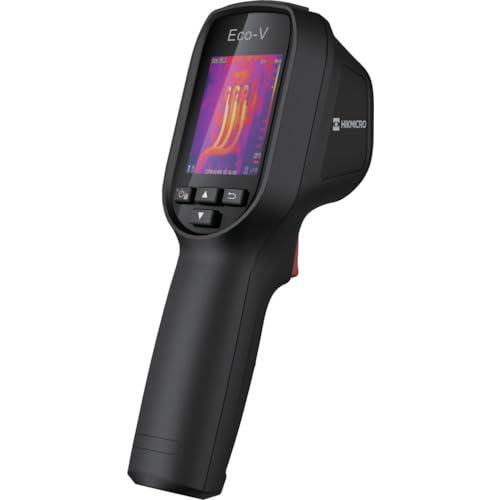
Figure 1: HIKMICRO ECO-V Handheld Thermography Camera
2. Informacje dotyczące bezpieczeństwa
Przed użyciem tego produktu należy przeczytać i zrozumieć wszystkie ostrzeżenia i instrukcje dotyczące bezpieczeństwa. Nieprzestrzeganie tych instrukcji może spowodować porażenie prądem, pożar lub poważne obrażenia.
Ogólne środki ostrożności
- Nie należy używać urządzenia w atmosferach zagrożonych wybuchem, na przykład w obecności łatwopalnych cieczy, gazów lub pyłów.
- Trzymaj urządzenie z dala od wody i innych płynów.
- Nie próbuj otwierać ani modyfikować urządzenia. Wszelkie prace serwisowe zlecaj wykwalifikowanemu personelowi.
- Use only HIKMICRO-approved accessories.
- Avoid direct exposure of the thermal lens to strong light sources (e.g., sun, laser) as this may damage the detector.
Bezpieczeństwo baterii
- The device contains a built-in Lithium-ion battery. Do not expose the battery to excessive heat, direct sunlight, or fire.
- Nie przekłuwać, nie otwierać ani nie rozmontowywać akumulatora.
- Charge the battery only with the provided USB cable and a compatible power adapter.
- Zutylizuj baterie zgodnie z lokalnymi przepisami.
3. Zawartość opakowania
The HIKMICRO ECO-V package includes the following items:
- HIKMICRO Handheld Thermography Camera ECO-V
- Kabel USB typu C.
- Szybki przewodnik (nie wymieniony wprost, ale standardowy)
- Calibration Certificate (not explicitly mentioned but standard)
Video 3.1: Unboxing the HIKMICRO M-Series (similar to ECO-V, showing typical package contents and device appearance).
4. Urządzenie ponadview
Familiarize yourself with the physical components and interface of your HIKMICRO ECO-V camera.
Wygląd i interfejs
The ECO-V features a compact, ergonomic design for comfortable handheld use. Key components include the thermal lens, optical lens, laser indicator, white light, trigger button, navigation buttons, and a 2.4-inch display.
Video 4.1: This video demonstrates the physical appearance and interface of a HIKMICRO M-Series camera, which shares similar design elements and interface components with the ECO-V.
5. Konfiguracja
5.1 Ładowanie urządzenia
Before initial use, fully charge the device's built-in Lithium-ion battery.
- Connect the provided USB Type-C cable to the device's USB port.
- Connect the other end of the USB cable to a compatible power adapter (5V2A recommended) and plug it into a power outlet.
- The charging indicator will show red during charging and turn green when fully charged.
Video 5.1: This HIKMICRO ECO operation video demonstrates the charging process for the device.
5.2 Włączanie/wyłączanie zasilania
To power on the device, press and hold the power button for more than 6 seconds. To power off, press and hold the power button again until the device shuts down.
Video 5.2: This HIKMICRO ECO operation video demonstrates how to power on the device.
6. Instrukcja obsługi
This section covers the basic and advanced operational features of your ECO-V camera.
6.1 Image Capture and Display
To capture a thermal image, aim the camera at the target and press the trigger button. The captured image will be saved to the internal EMMC storage. To view saved images, navigate to the 'Albums' section in the menu.
Video 6.1: This HIKMICRO ECO operation video demonstrates image capture and viewing saved snapshots.
6.2 Narzędzia pomiarowe
The ECO-V provides various measurement tools to analyze thermal images:
- Gorący punkt: Automatically identifies and displays the highest temperature point.
- Zimny punkt: Automatically identifies and displays the lowest temperature point.
- Punkt środkowy: Wyświetla temperaturę w środkowej części ekranu.
Video 6.2: This HIKMICRO ECO operation video demonstrates the use of measurement tools like hot, cold, and center spots.
6.3 SuperIR Image Enhancement
SuperIR technology enhances the thermal image resolution, providing more detail for analysis. You can enable or disable this feature in the settings menu.
Video 6.3: This HIKMICRO ECO operation video demonstrates how to enable and use the SuperIR image enhancement feature.
6.4 trybów obrazu
The ECO-V supports multiple image modes for different inspection needs:
- Termiczny: Wyświetla tylko obraz termiczny.
- Połączenie: Blends the thermal and visible light images for enhanced detail.
- PIP (obraz w obrazie): Overlays a smaller thermal image on a visible light image.
- Optyczny: Wyświetla tylko obraz w świetle widzialnym.
Video 6.4: This HIKMICRO B10S product video demonstrates switching between different image modes, including Thermal, Fusion, PIP, and Optical.
6.5 Parallax Correction
When using fusion modes, adjust the parallax correction based on the distance to the target to ensure accurate alignment between thermal and visible images.
Video 6.5: This HIKMICRO B10S product video demonstrates how to adjust parallax correction for accurate image fusion.
6.6 Palette Adjustment
Select from various color palettes (e.g., White Hot, Black Hot, Rainbow, Ironbow) to visualize temperature differences more effectively. This can be adjusted in the settings menu.
Video 6.6: This HIKMICRO B10S product video demonstrates how to adjust color palettes.
6.7 Emissivity and Distance Settings
For accurate temperature measurements, it is crucial to set the correct emissivity value for the target material and the distance to the target. Refer to the general emissivity reference table in the specifications section.
Video 6.7: This HIKMICRO ECO operation video demonstrates setting emissivity and distance for accurate temperature readings.
6.8 Wskaźnik laserowy
The built-in laser pointer helps to precisely identify the measurement target. It can be enabled or disabled in the settings menu.
Video 6.8: This HIKMICRO ECO operation video demonstrates how to enable and use the laser pointer.
6.9 Alarm wysokiej temperatury
Set a high temperature alarm threshold to be notified when temperatures exceed a predefined limit. This feature is useful for identifying potential overheating issues.
Video 6.9: This HIKMICRO B10S product video demonstrates how to set a high temperature alarm.
6.10 Hotspot Connection
The ECO-V can connect to a mobile device via Wi-Fi hotspot for live viewing and data transfer. Enable the Wi-Fi hotspot function in the device settings and connect your mobile device.
Video 6.10: This HIKMICRO M-Series video demonstrates how to establish a hotspot connection with a mobile device.
6.11 HIKMIKRO Viewer App Connection
Download the HIKMICRO Viewer app on your mobile device to access live view, manage images and videos, and generate reports. Connect the device to your phone via Wi-Fi.
Video 6.11: This HIKMICRO Pocket series video demonstrates connecting the device to the HIKMICRO Viewer app for various functions.
7. Konserwacja
7.1 Czyszczenie
- Przetrzyj obudowę urządzenia miękką szmatką.amp ściereczka. Nie należy używać środków czyszczących o właściwościach ściernych ani rozpuszczalników.
- Gently clean the lenses with a lens cleaning cloth. Avoid touching the lens surface with bare hands.
7.2 Przechowywanie
- Przechowuj urządzenie w chłodnym i suchym miejscu, z dala od bezpośredniego światła słonecznego i ekstremalnych temperatur.
- Jeśli akumulator będzie przechowywany przez dłuższy okres, należy upewnić się, że jest częściowo naładowany (około 50%) i ładować go co kilka miesięcy, aby zachować jego sprawność.
8. Rozwiązywanie Problemów
If you encounter issues with your HIKMICRO ECO-V, refer to the following common problems and solutions:
| Problem | Możliwa przyczyna | Rozwiązanie |
|---|---|---|
| Urządzenie nie włącza się | Niski poziom naładowania baterii; Awaria urządzenia | Charge the battery; Contact support |
| Niedokładne odczyty temperatury | Incorrect emissivity/distance settings; Dirty lens | Adjust emissivity/distance; Clean the lens |
| Cannot connect to Wi-Fi hotspot | Incorrect password; Hotspot not enabled | Verify password; Enable hotspot in settings |
9. Specyfikacje
Detailed technical specifications for the HIKMICRO ECO-V camera:
| Funkcja | Specyfikacja |
|---|---|
| Model | ECO-V |
| Zakres temperatur pomiaru | -20°C do 550°C |
| Minimum Temperature Display | 0.1°C |
| Pole View (pole widzenia) | 50° × 50° |
| Rozdzielczość przestrzenna (IFOV) | 8.89 miliradianu |
| Zakres temperatur pracy | -10°C do 50°C |
| Zakres temperatur przechowywania | -40°C do 70°C |
| Rozmiar wyświetlacza | 2.4 cali |
| Źródło zasilania | Wbudowana bateria litowo-jonowa |
| Czas pracy baterii | 8 godziny |
| Wi-Fi | Niedostępne |
| Poziom ochrony | IP54 |
| Interfejs | USB typu C |
| Rozstaw pikseli | 12μm |
| Pomiar długości fali | 7.5-14μm |
| NETTO | < 40 mK (@ 25°C, F#=1.0) |
| Długość ogniskowej | 1.35 mm |
| Otwór | F1.0 |
| Minimalna odległość ogniskowania | 0.1m (0.33 stóp) |
| Szybkość klatek | 25 Hz |
| System ostrości | Bezogniskowy |
| Nośniki zapisu | EMMC (4GB) |
| Pojemność przechowywania obrazów | 30,000 XNUMX obrazów |
| Obraz File Format | BMP (includes measurement data) |
| Rozdzielczość obrazu termowizyjnego | 96×96 (9,216 pixels) |
| Visible Image Resolution | 640×480 |
| Dokładność | ±2°C or ±2% (whichever is greater), when ambient temperature is 15°C to 35°C and target temperature is 0°C or above. |
| Przybory | Poliwęglan, żywica ABS |
| Waga | 360g |
General Emissivity Reference
| Tworzywo | Emisyjność |
|---|---|
| Ludzka skóra | 0.98 |
| Płytka drukowana | 0.91 |
| Beton cementowy | 0.95 |
| Ceramika | 0.92 |
| Guma | 0.95 |
| Farba | 0.93 |
| Drewno | 0.85 |
| Cegła | 0.96 |
| Piasek | 0.90 |
| Gleba | 0.92 |
| Bawełna | 0.98 |
| Karton | 0.90 |
| Biała Księga | 0.96 |
| Woda | 0.96 |
10. Gwarancja i wsparcie
HIKMICRO products are covered by a limited warranty. For detailed warranty terms and conditions, please refer to the official HIKMICRO webodwiedź witrynę lub skontaktuj się z lokalnym dystrybutorem.
Obsługa klienta
If you require technical assistance, troubleshooting, or have questions about your ECO-V camera, please contact HIKMICRO customer support through their official webstronę internetową lub dane kontaktowe znajdujące się na opakowaniu produktu.