
1. Wprowadzenie
Thank you for choosing the Devoko Electric Height Adjustable Standing Desk. This manual provides essential information for the safe assembly, operation, and maintenance of your new desk. Designed to enhance your workspace, this desk allows seamless transitions between sitting and standing positions, promoting better posture and productivity.

Image 1.1: Devoko 140x60cm Electric Height Adjustable Standing Desk in a home office setting.
2. Ostrzeżenia dotyczące bezpieczeństwa
- Assemble with caution. Ensure all components are securely fastened before use.
- Do not exceed the maximum load capacity of 70 kg (154 lbs). Overloading can cause damage or injury.
- Pay close attention to moving parts of the electric table during height adjustments to prevent pinching or injury. Keep hands and objects clear of the lifting mechanism.
- Podczas pracy urządzenia należy trzymać dzieci i zwierzęta z dala od biurka.
- Ensure the power cord is not pinched or damaged. Do not operate the desk with a damaged cord or plug.
- Only use the power adapter supplied with the desk.
3. Zawartość opakowania
Please verify that all parts are present before beginning assembly. Refer to the detailed installation instructions included in your product packaging for a complete list and visual guide.
- Sekcje biurkowe (3 sztuki)
- Nogi biurka i elementy ramy
- Electric motor and control panel
- Elementy stojaka na monitor
- Hardware kit (screws, bolts, tools)
- Przelotki do zarządzania kablami
- Zaczep na słuchawki
- Zasilacz i kabel
- Instrukcja obsługi (ten dokument)
4. Instrukcja montażu
Detailed installation instructions are included in the product packaging. Please follow them carefully. Assembly typically requires two people and approximately 30-60 minutes.
- Rozpakuj komponenty: Ostrożnie wyjmij wszystkie części z opakowania i połóż je na czystej, miękkiej powierzchni, aby zapobiec zarysowaniom.
- Złóż pulpit: Connect the desktop sections using the provided metal plates and screws. Ensure proper alignment for a seamless surface.
- Attach Legs and Frame: Secure the desk legs and crossbar to the desktop using the designated hardware.
- Montaż silnika i panelu sterowania: Mount the electric motor and control panel according to the instructions, ensuring all cables are properly connected and routed.
- Zamontuj podstawkę pod monitor: Assemble and attach the monitor stand to the desktop.
- Kontrole końcowe: Before plugging in, double-check all screws and connections to ensure stability.
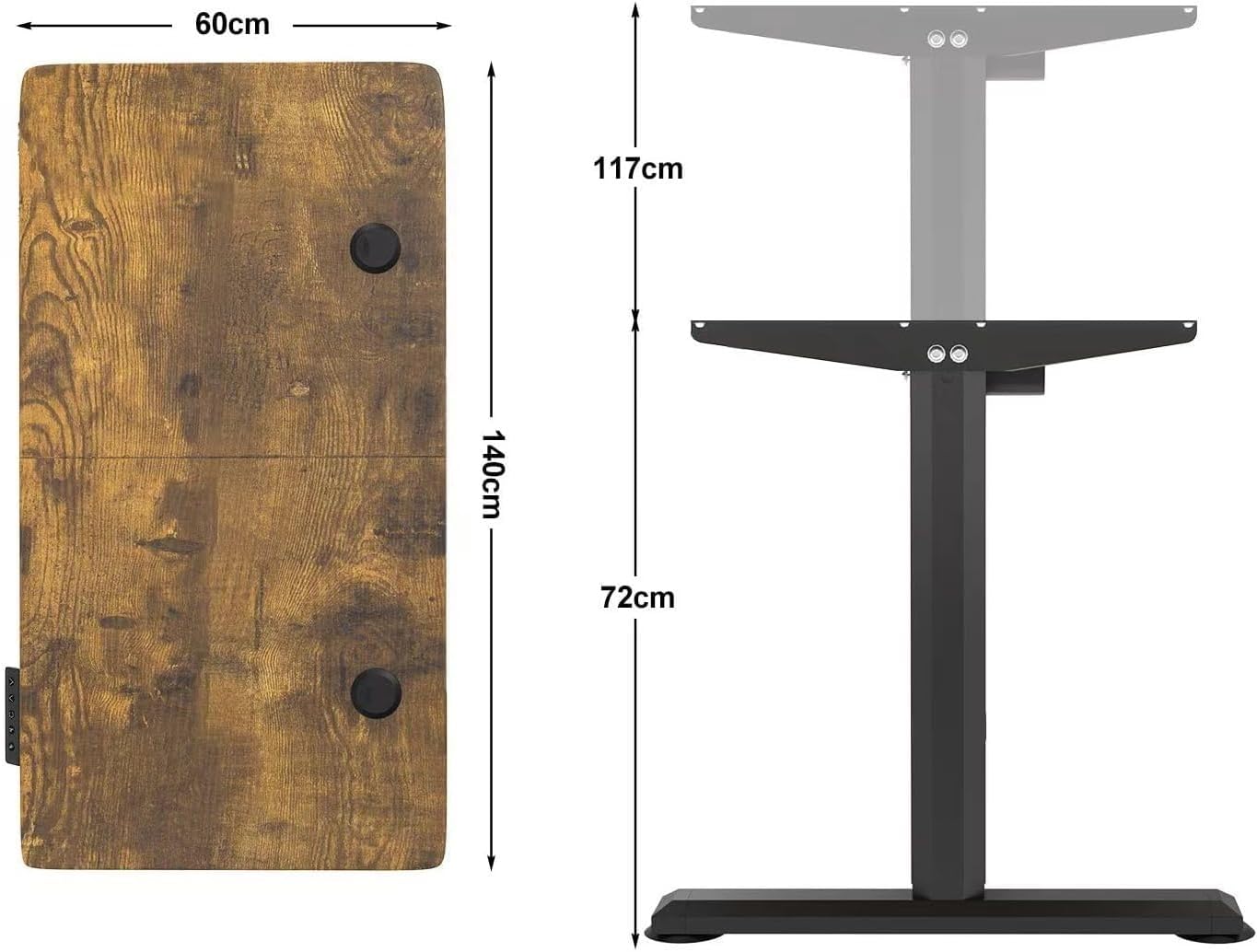
Image 4.1: Desk dimensions and adjustable height range.
5. Instrukcja obsługi
The Devoko standing desk features an intuitive control panel for easy height adjustment and memory presets.
5.1 Regulacja wysokości
Aby dostosować wysokość biurka:
- Naciśnij GÓRA (▲) przycisk do podnoszenia biurka.
- Naciśnij W DÓŁ (▼) przycisk do obniżania biurka.
The digital LED display on the control panel will show the current height in centimeters. The desk operates smoothly and quietly, allowing you to transition between sitting (73 cm) and standing (118 cm) positions effortlessly.

Image 5.1: Illustrating the adjustable height range from 73cm to 118cm.
5.2 Ustawienia pamięci
Panel sterowania umożliwia zapisanie dwóch preferowanych ustawień wysokości, co ułatwia szybki dostęp.
- Ustaw pozycję pamięci: Dostosuj wysokość biurka do swoich potrzeb za pomocą przycisków GÓRA/DÓŁ.
- Naciśnij i przytrzymaj albo '1' or '2' button until the display flashes or beeps. This indicates the current height has been saved to that preset.
- Przypomnij sobie pozycję z pamięci: Wystarczy nacisnąć '1' or '2' przycisk, aby automatycznie przesunąć biurko na zapisaną wysokość.
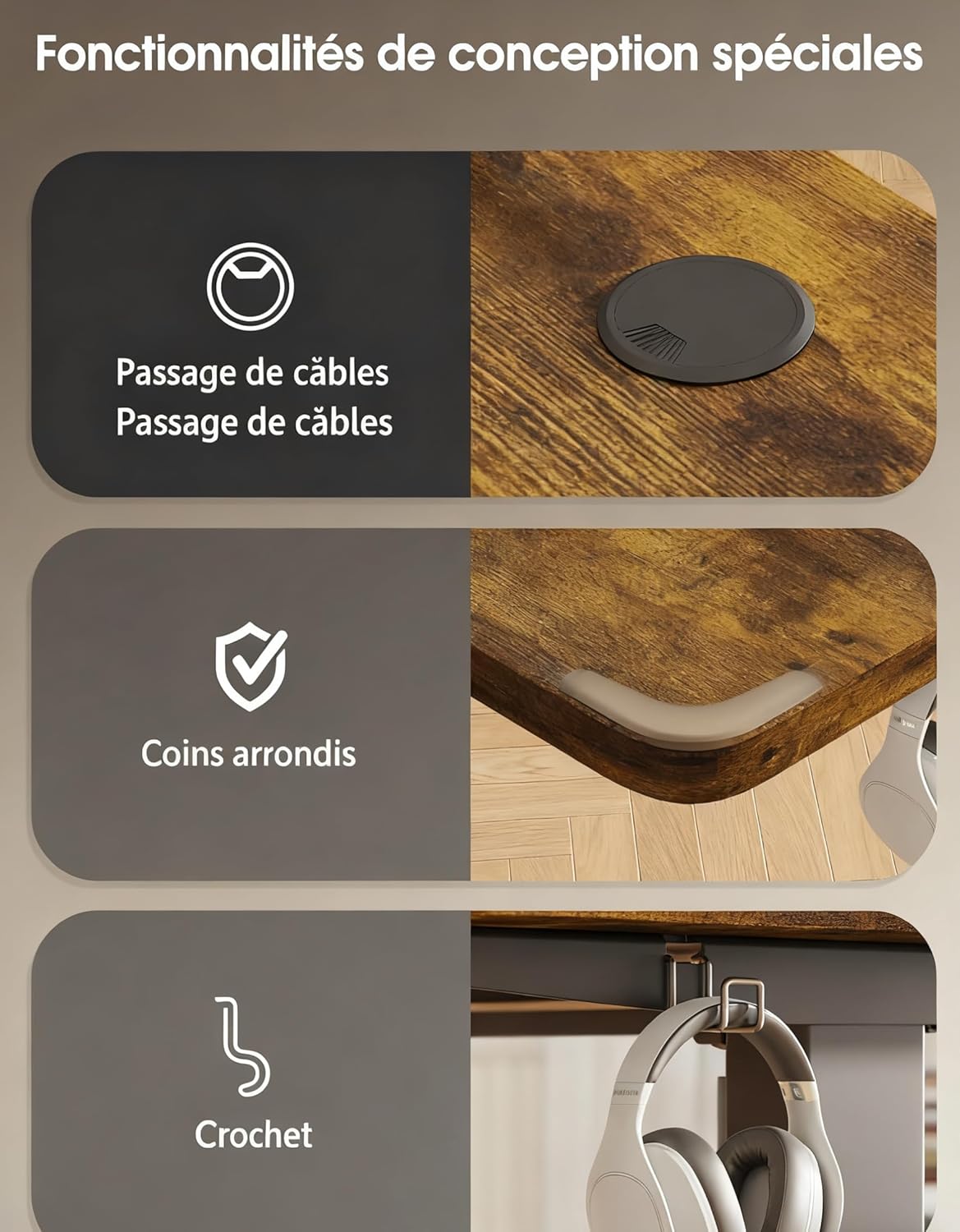
Image 5.2: Control panel with digital display and memory preset buttons.
6. Funkcje specjalne
Your Devoko standing desk is equipped with several features designed for convenience and ergonomics.
- Zintegrowana podstawka pod monitor: The desk includes a raised monitor stand to help position your screen at an ergonomic eye level, reducing neck and eye strain.
- Przelotki do zarządzania kablami: Built-in cable pass-through holes help keep your workspace tidy and organized by routing cables discreetly.
- Zaokrąglone rogi: The desktop features rounded corners for enhanced safety and a modern aesthetic.
- Haczyk na słuchawki: A convenient hook is provided for hanging headphones or other accessories, keeping your desk clutter-free.

Image 6.1: Special design features including cable management, rounded corners, and headphone hook.
7. Konserwacja
To ensure the longevity and optimal performance of your Devoko standing desk, follow these maintenance guidelines:
- Czyszczenie: Przetrzyj powierzchnię biurka miękką szmatką.amp szmatką. Unikaj silnych środków chemicznych i ściernych środków czyszczących, które mogłyby uszkodzić wykończenie.
- Czyszczenie ram: Clean the metal frame with a mild detergent and a soft cloth.
- Regularne kontrole: Okresowo sprawdzaj dokręcenie wszystkich śrub i nakrętek. W razie potrzeby dokręć je ponownie.
- Pielęgnacja silnika: Keep the motor mechanism free from dust and debris. Do not attempt to lubricate or disassemble the motor.
- Rozkład masy: Distribute weight evenly across the desktop to prevent strain on the lifting mechanism.
8. Rozwiązywanie Problemów
Jeśli napotkasz jakiekolwiek problemy z biurkiem stojącym Devoko, zapoznaj się z poniższymi typowymi rozwiązaniami:
| Problem | Możliwa przyczyna | Rozwiązanie |
|---|---|---|
| Biurko się nie rusza | Power cord disconnected; Motor overload; Control panel error. | Check power connection; Unplug and replug after 10 seconds; Reduce weight on desk; Consult detailed manual for reset procedure. |
| Biurko porusza się nierównomiernie lub wydaje nietypowe dźwięki | Uneven weight distribution; Loose connections; Obstruction. | Redistribute weight; Check all assembly screws; Ensure no objects are obstructing the legs. |
| Ustawienia pamięci nie działają | Ustawienia predefiniowane nie zostały zapisane prawidłowo. | Re-save the memory positions by following the instructions in Section 5.2. |
If these solutions do not resolve the issue, please contact Devoko customer support for further assistance.
9. Specyfikacje
| Funkcja | Szczegół |
|---|---|
| Marka | Devoko |
| Model | 140x60cm Electric Height Adjustable Standing Desk |
| Wymiary (dł. x szer. x wys.) | 140 cm x 60 cm x (73-118 cm) |
| Zakres regulacji wysokości | 73 cm - 118 cm |
| Tworzywo | Drewno konstrukcyjne (blat stołu), metal (rama) |
| Maksymalna ładowność | 70 kg (154 funta) |
| Cechy specjalne | Ergonomic, Height Adjustable, Monitor Support, Electric, Cable Management, Rounded Corners, Headphone Hook |
| Panel sterowania | Digital LED display, Up/Down buttons, 2 Memory Presets |
| Poziom hałasu | <50db |
10. Gwarancja i pomoc techniczna
Devoko products are manufactured to high-quality standards. For information regarding warranty coverage, please refer to the warranty card included with your purchase or visit the official Devoko website. If you require technical assistance, replacement parts, or have any questions not covered in this manual, please contact Devoko customer support through the retailer where you purchased the product or via the official brand channels.
Więcej informacji znajdziesz na stronie Devoko Brand Store.