
1. Wprowadzenie
This manual provides detailed instructions for the safe and effective use of your iJoy Disney Winnie The Pooh Wireless Bluetooth Speaker. Please read this manual thoroughly before operating the device and retain it for future reference.
2. Co znajduje się w pudełku
Carefully unpack your speaker and ensure all items are present:
- iJoy Disney Winnie The Pooh Wireless Bluetooth Speaker
- Kabel ładujący USB
- Zapasowy kabel AUX
- Instrukcja obsługi (ten dokument)

Image: The speaker shown next to its retail packaging, illustrating the product and its box.
3. Koniec produktuview
3.1 przyciski sterujące
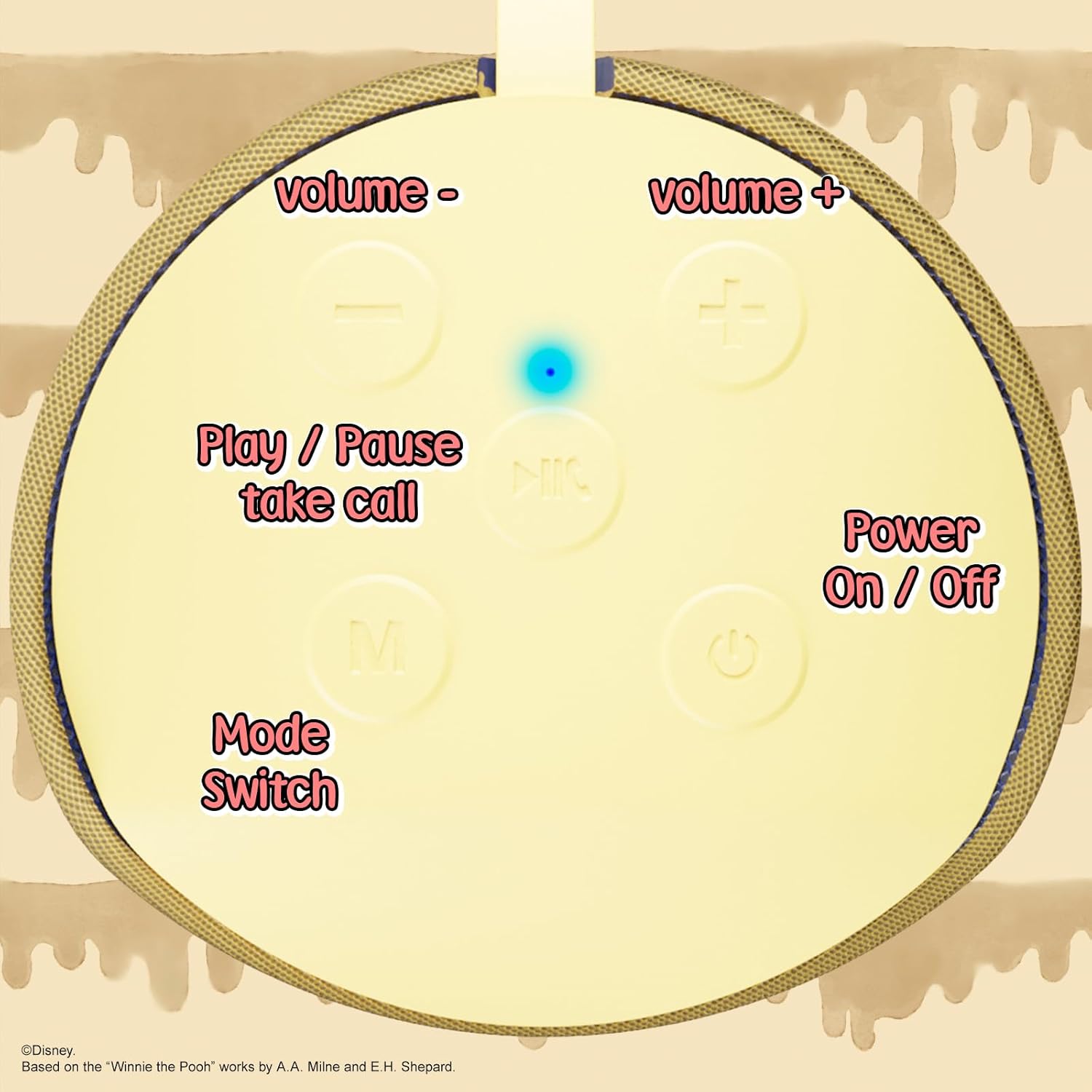
Image: A close-up of the speaker's top panel, displaying the control buttons.
- Przycisk włączania/wyłączania zasilania: Naciśnij i przytrzymaj, aby włączyć lub wyłączyć głośnik.
- Przycisk Odtwórz/Pauza: Press to play or pause audio. Also used to answer or end phone calls.
- Przycisk zwiększania głośności (+): Naciśnij, aby zwiększyć głośność. Naciśnij i przytrzymaj, aby przejść do następnego utworu.
- Przycisk zmniejszania głośności (-): Naciśnij, aby zmniejszyć głośność. Naciśnij i przytrzymaj, aby przejść do poprzedniego utworu.
- Mode Switch (M) Button: Press to switch between Bluetooth, FM Radio, SD Card, and USB modes.
3.2 Porty i wskaźniki

Obraz: szczegółowy view of the speaker's rear panel, highlighting the AUX port, SD card slot, USB port, and Micro USB charging port.
- Port AUX: For connecting external audio devices via the provided 3.5mm AUX cable.
- Gniazdo karty SD: Insert a microSD card for direct audio playback.
- Port USB: Podłącz dysk flash USB, aby móc bezpośrednio odtwarzać dźwięk.
- Port ładowania micro USB: Podłącz kabel ładujący USB, aby naładować głośnik.
- Kontrolka LED: Indicates charging status and Bluetooth pairing status.
4. Konfiguracja
4.1 Ładowanie głośnika
- Podłącz końcówkę Micro USB kabla ładującego do portu ładowania Micro USB głośnika.
- Podłącz standardowy koniec USB kabla do zasilacza USB (nie ma go w zestawie) lub do portu USB komputera.
- The LED indicator light will illuminate during charging and turn off once fully charged.
- Pełne naładowanie trwa zazwyczaj około 2 godzin.
4.2 parowanie Bluetooth
- Upewnij się, że głośnik jest w pełni naładowany.
- Press and hold the Power On/Off button to turn on the speaker. You will hear an audible prompt, and the LED indicator will flash, indicating it's in pairing mode.
- Włącz Bluetooth na swoim urządzeniu mobilnym (smartfonie, tablecie itp.).
- Szukaj available Bluetooth devices. The speaker will appear as "iJoy Winnie The Pooh Speaker" or similar.
- Select the speaker from the list to pair. Once successfully paired, you will hear a confirmation sound, and the LED indicator will stop flashing and remain solid.
- Głośnik automatycznie połączy się ponownie z ostatnio sparowanym urządzeniem po włączeniu, jeśli Bluetooth urządzenia jest aktywny i urządzenie znajduje się w zasięgu.
5. Instrukcja obsługi
5.1 Tryb Bluetooth
After successful pairing, you can stream audio wirelessly from your device to the speaker. Use your device's controls or the speaker's Play/Pause, Volume Up/Down buttons to manage playback.
Tryb radia FM 5.2
- Press the Mode (M) button to switch to FM Radio mode.
- Naciśnij przycisk Odtwarzaj/Pauza, aby automatycznie przeskanować i zapisać dostępne stacje FM.
- Za pomocą przycisków zwiększania (+) i zmniejszania (-) głośności (krótkie naciśnięcie) można poruszać się między zapisanymi stacjami.
5.3 Odtwarzanie z karty SD/USB
- Insert a microSD card into the SD card slot or a USB flash drive into the USB port.
- Głośnik automatycznie przełączy się na odpowiedni tryb i rozpocznie odtwarzanie dźwięku files. If not, press the Mode (M) button to select the correct mode.
- Use the speaker's Play/Pause, Volume Up/Down buttons to control playback.
5.4 Tryb AUX
- Connect one end of the provided 3.5mm AUX cable to the speaker's AUX port.
- Podłącz drugi koniec do gniazda słuchawkowego urządzenia audio.
- The speaker will automatically switch to AUX mode. If not, press the Mode (M) button.
- Control playback and volume primarily from your connected audio device.
5.5 Rozmowy w trybie głośnomówiącym
Po połączeniu przez Bluetooth ze smartfonem:
- Odbierz połączenie: Naciśnij raz przycisk Odtwórz/Pauza.
- Zakończ połączenie: Naciśnij przycisk Odtwórz/Pauza jeden raz podczas połączenia.
- Odrzuć połączenie: Naciśnij i przytrzymaj przycisk Odtwórz/Pauza.
6. Konserwacja
- Czyść głośnik miękką, suchą ściereczką. Nie używaj środków czyszczących o właściwościach ściernych ani rozpuszczalników.
- The speaker is IPX4 splashproof, meaning it can withstand splashes of water. Do not submerge it in water.
- Gdy głośnik nie jest używany, przechowuj go w chłodnym i suchym miejscu.
- Unikaj wystawiania głośnika na działanie ekstremalnych temperatur, bezpośredniego światła słonecznego i wysokiej wilgotności.
7. Rozwiązywanie Problemów
| Problem | Możliwa przyczyna | Rozwiązanie |
|---|---|---|
| Głośnik się nie włącza | Niski poziom baterii | Naładuj głośnik całkowicie. |
| Nie można sparować przez Bluetooth | Głośnik nie jest w trybie parowania / Bluetooth urządzenia jest wyłączony / Zbyt duża odległość od urządzenia | Ensure speaker is in pairing mode (flashing LED). Turn on Bluetooth on your device. Move speaker closer to device (within 30 feet). |
| Brak dźwięku | Volume too low / Incorrect mode / Device not playing audio | Increase speaker and device volume. Press 'M' button to select correct mode. Ensure audio is playing on your connected device. |
| Odbiór radia FM jest słaby | Weak signal / Interference | Move the speaker to a different location. The AUX cable can act as an antenna; try connecting it. |
8. Specyfikacje

Image: The speaker with visual indicators showing its height of 6.3 inches and width of 2.9 inches.
| Funkcja | Szczegół |
|---|---|
| Numer modelu | SS-KH7C-FS4O |
| Technologia łączności | Bluetooth |
| Zasięg komunikacji bezprzewodowej | Do 30 stóp (10 metrów) |
| Typ głośnika | Wieża |
| Maksymalna moc wyjściowa głośnika | 20 watów |
| Tryb wyjścia audio | Mononukleoza |
| Pojemność baterii | 800 mlnamp Godziny |
| Czas ładowania | Około 2 godzin |
| Pauza w szkole | Up to 3 Hours (depending on volume and usage) |
| Poziom wodoodporności | IPX4 (bryzgoszczelny) |
| Wymiary produktu | 3" gł. x 3" szer. x 6" wys. (7.62 cm gł. x 7.62 cm szer. x 15.24 cm wys.) |
| Waga przedmiotu | 8 uncji (226.8 gramów) |
| Zawarte komponenty | Bluetooth Speaker, USB Charging Cable, Backup AUX Cable, Owners Manual |
| Cechy specjalne | Built-in Microphone, LED Indicator Lights, Portable, SD Card Slot, USB Port, FM Radio |
9. Gwarancja i wsparcie
9.1 Informacje o gwarancji
This iJoy Disney Winnie The Pooh Wireless Bluetooth Speaker comes with a 90-day manufacturer's warranty from the date of purchase. This warranty covers manufacturing defects and workmanship under normal use. It does not cover damage caused by misuse, accidents, unauthorized modifications, or normal wear and tear.
9.2 Obsługa klienta
For technical assistance, warranty claims, or further inquiries, please contact iJoy customer support through their official website or the retailer where the product was purchased. Please have your model number (SS-KH7C-FS4O) and proof of purchase ready.