
1. Wprowadzenie
This manual provides detailed instructions for the safe and efficient operation of your ATOMSTACK A12 Pro Laser Engraving Machine. Please read this manual thoroughly before use to ensure proper setup, operation, and maintenance. Keep this manual for future reference.
Ostrzeżenia dotyczące bezpieczeństwa:
- Always wear UV-filtering eye protection when operating the laser engraver.
- Należy zapewnić odpowiednią wentylację, aby rozproszyć opary i dym powstający podczas grawerowania/cięcia.
- Nie pozostawiaj maszyny bez nadzoru podczas pracy.
- Trzymać materiały łatwopalne z dala od miejsca pracy.
- Zapoznaj się z lokalizacją przycisku zatrzymania awaryjnego.
2. Zawartość opakowania
Sprawdź, czy w przesyłce znajdują się wszystkie elementy wymienione poniżej:
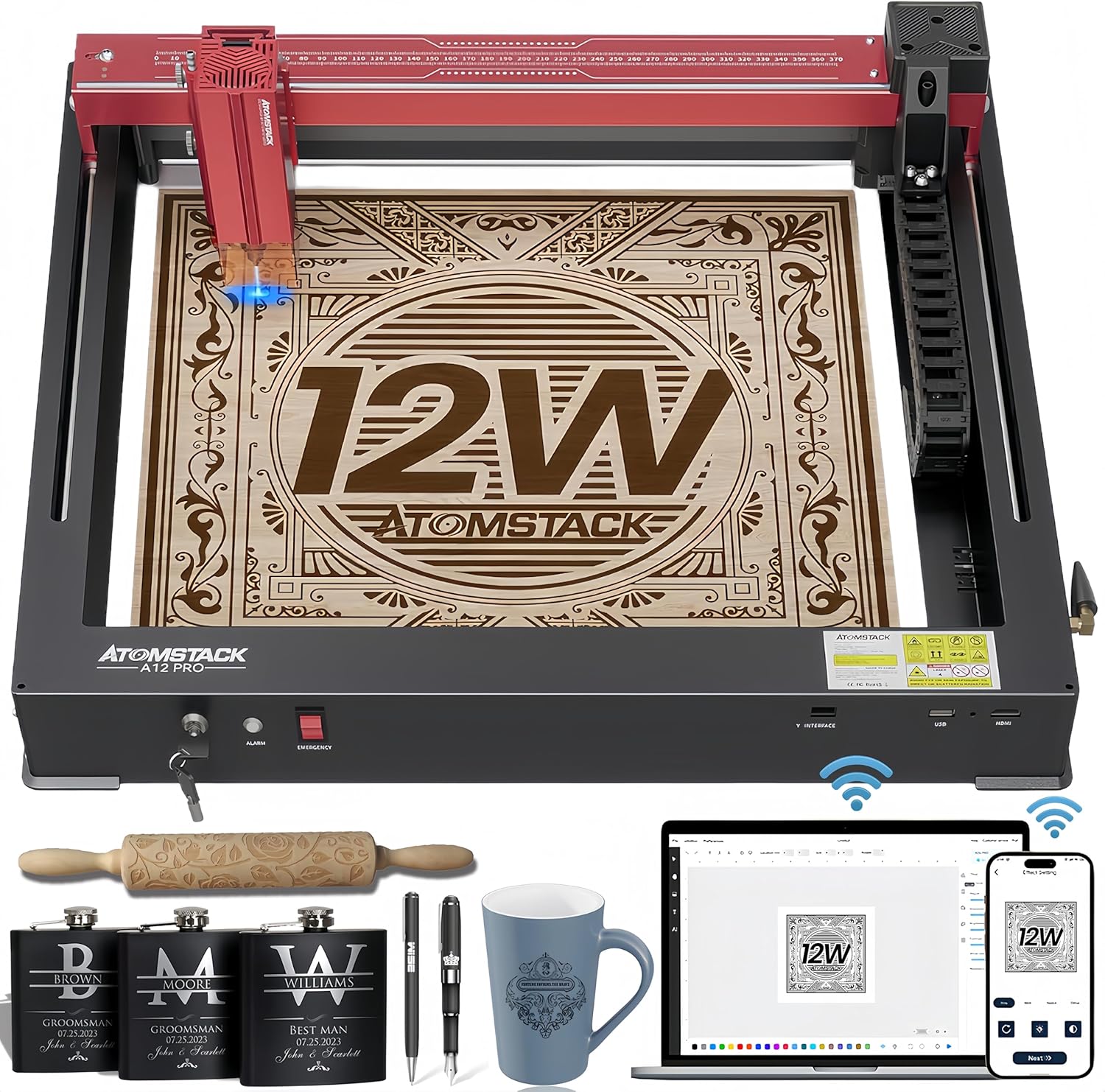
Figure 2.1: ATOMSTACK A12 Pro Laser Engraving Machine and included accessories.
- ATOMSTACK A12 Pro Laser Engraving Machine (Unibody Frame)
- Głowica laserowa
- Zasilacz (24 V, 5 A)
- Kabel zasilający
- Kabel USB (Typ C)
- Goggles (UV-filtering eye protection)
- Obiektyw o stałej ogniskowej
- Instrukcja obsługi
- Tools (H3 hexagon L-shaped wrench, M4 thumb screws)
- Dysk Flash
- Antena WiFi
- Silicone Hose (air hose)
- Wire Anchor
- Kabel Clamp
- 100*30 lint free cloth
- Suwak
- Klawisz przełączania
3. Przewodnik konfiguracji
The ATOMSTACK A12 Pro features an unibody design for minimal assembly. Follow these steps to get started:
- Rozpakowywanie: Carefully remove the machine and all accessories from the packaging. The machine is pre-calibrated and shipped as a single unit.

Figure 3.1: The ATOMSTACK A12 Pro is ready to use right out of the box with its unibody design.
- Install the Slider: Attach the slider component to the designated rail on the machine. Secure it with the provided screws.
- Install the Laser Head: Mount the laser head onto the slider. Ensure it is firmly attached.
- Install the WiFi Antenna: Screw the WiFi antenna into its port on the machine's side.
- Install Tubing and X-axis Link Lines: Connect the tubing and X-axis link lines as shown in the diagram to ensure proper cable management and operation.
- Podłącz zasilanie i USB: Plug the power adapter into the machine and a power outlet. Connect the USB cable from the machine to your computer.
- Włączanie: Insert the switch key and turn it to the ON position. The machine is now ready for software setup.
Video 3.1: A detailed guide on how to install and set up the ATOMSTACK laser engraver.
4. Instrukcja obsługi
4.1 Kontrola oprogramowania
The ATOMSTACK A12 Pro supports multiple control methods:
- ATOMSTACK PC Software: Exclusive software for simplified operation, ideal for beginners.
- LightBurn & LaserGRBL: Traditional PC software for advanced users.
- ATOMSTACK Mobile APP: Available on Android and Apple App Stores for WiFi control via smartphone.

Rysunek 4.1: Koniecview of the various software and app control options for the laser engraver.
4.2 Proces grawerowania
- Umieszczenie materiału: Place your material flat on the engraving bed.
- Regulacja ostrości: Use the fixed-focus design for rapid and precise focusing in approximately 10 seconds.
- Cross Positioning: Utilize the newly added cross laser positioning feature for clear visibility of the laser's location, ensuring perfect alignment for engraving and easy horizontal adjustment.
- Ustawienia oprogramowania: Adjust engraving parameters (speed, power, passes) in your chosen software based on the material.
- Rozpocznij grawerowanie: Rozpocznij proces grawerowania z poziomu oprogramowania.

Figure 4.2: The cross positioning system helps align objects and lock to edges for precise horizontal carving.
5. Features & Capabilities
- Konstrukcja unibody: Sturdy all-aluminum unibody design, installation-free and pre-calibrated.
- High Speed & Precision: New dual-axis linear guide rail structure and high-speed motherboard allow engraving speeds up to 600mm/s, 3-6 times faster than traditional frame machines. Accuracy within 0.004 inches.
- Mocny laser: 12000mW diode laser (Laser Class 4) with 50W machine power and a 0.05*0.06mm ultra-fine laser spot focus.
- Thicker Cuts: Can cut through 8mm wood, 5mm black acrylic, and 0.02mm stainless steel in a single pass.
- Diverse Material Compatibility: Engraves and cuts a wide range of materials including wood, acrylic, metal, glass, ceramics, leather, paper, cardboard, and more.
- Automatic Power Failure Recovery: Memorizes engraving position and swiftly resumes from the paused point, ensuring uninterrupted production and material saving.
- Zwiększone bezpieczeństwo: Equipped with 4-way limit switches, UV-filtering eye protection, a tilt detector with a 15-degree alarm, and an emergency stop button.

Figure 5.1: Comparison showing the significantly faster engraving speed of the A12 Pro.
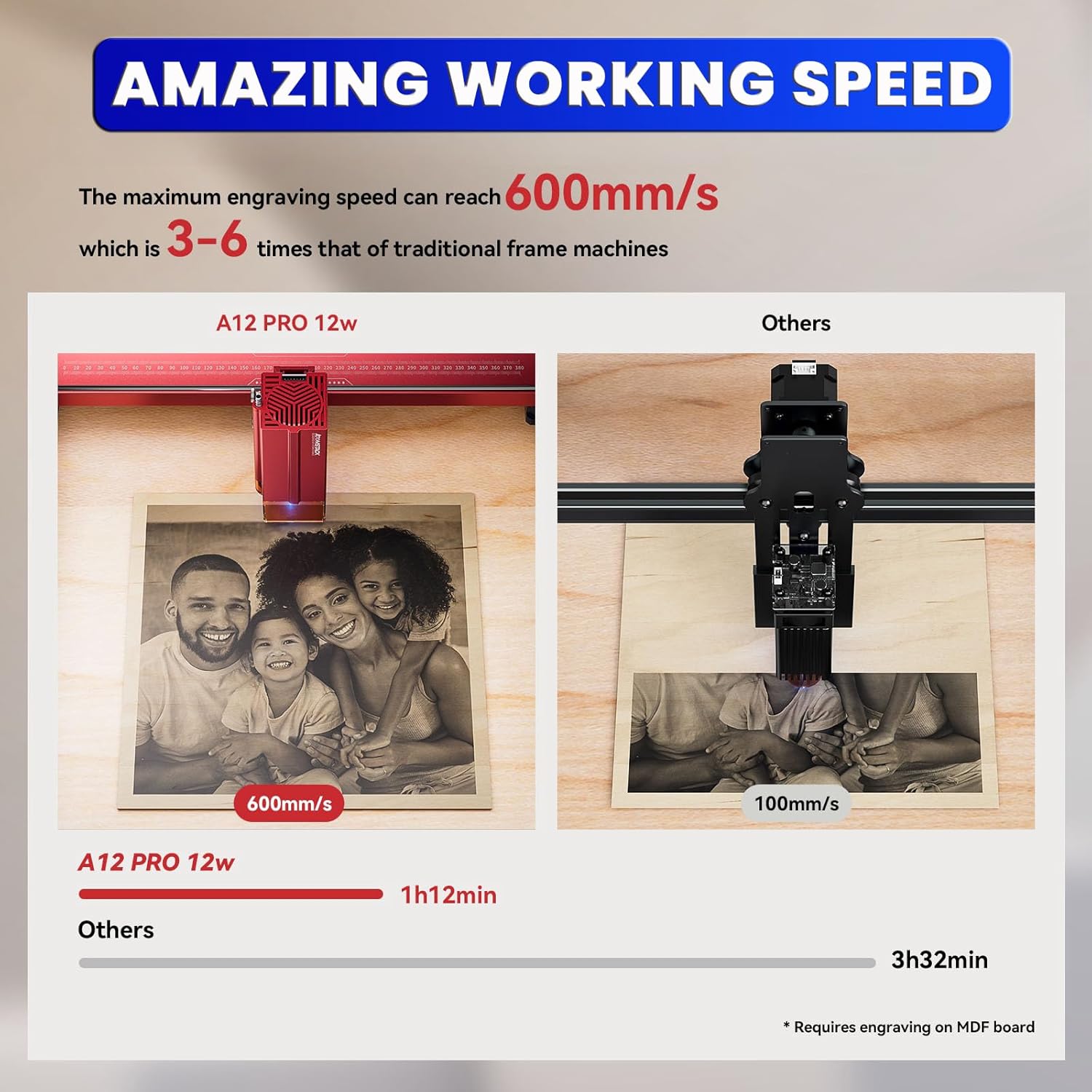
Figure 5.2: Demonstrates the maximum cutting thickness for various materials with the A12 Pro.

Rysunek 5.3: Examples of various materials that can be engraved or cut by the machine.
6. Konserwacja
- Czyszczenie soczewek: Regularly clean the laser lens with the provided lint-free cloth to maintain optimal performance and prevent residue buildup.
- Smarowanie szyn: Okresowo należy nakładać niewielką ilość smaru na szyny prowadzące, aby zapewnić płynny ruch głowicy lasera.
- Usuwanie zanieczyszczeń: Keep the engraving bed and surrounding area free of debris and dust. Use an air compressor or brush to clear away small particles.
- Aktualizacje oprogramowania układowego: Check the official ATOMSTACK website periodically for firmware updates to ensure your machine has the latest features and bug fixes.
7. Rozwiązywanie Problemów
| Problem | Możliwa przyczyna | Rozwiązanie |
|---|---|---|
| Maszyna się nie włącza | Power cable loose; Emergency stop engaged; Key not turned. | Check power connections; Disengage emergency stop; Turn key to ON. |
| Laser nie działa/słaba moc | Lens dirty; Incorrect focus; Low power setting in software. | Clean laser lens; Adjust focus; Increase power setting. |
| Engraving is distorted/inaccurate | Loose belts/rails; Material shifting; Incorrect software settings. | Check and tighten belts/rails; Secure material; Verify software settings. |
| Oprogramowanie nie łączy się z maszyną | USB cable issue; Driver not installed; Incorrect COM port. | Try different USB port/cable; Install drivers; Select correct COM port in software. |
8. Specyfikacje
- Wymiary produktu: 23.22 x 23.22 x 7.08 cala
- Waga przedmiotu: 18.74 funta
- Moc wyjściowa lasera: 12 000 mW (40 W)
- Moc maszyny: 50 W
- Rozmiar plamki lasera: 0.05*0.06mm
- Prędkość grawerowania: Do 600 mm/s
- Dokładność: Within 0.004 inches
- Łączność: USB, WiFi (via Mobile APP)
- Obsługiwane oprogramowanie: ATOMSTACK PC Software, LightBurn, LaserGRBL
- Producent: Shenzhen AtomStack Technologies Co., Ltd.
- Kraj pochodzenia: Chiny
9. Gwarancja i wsparcie
Your ATOMSTACK A12 Pro Laser Engraving Machine comes with a standard manufacturer's warranty. For detailed warranty information, technical support, or service inquiries, please refer to the warranty card included in your package or visit the official ATOMSTACK webstrona.
Our professional technical and support teams are available 24/7 to answer any questions or concerns you may have.