
Wstęp
This manual provides detailed instructions for the safe and effective use of your ION Audio PA Ultimate 650 Watt Bluetooth Speaker Sound System. The PA Ultimate is a powerful, bi-amplified sound system designed for various audio applications, featuring Bluetooth connectivity, a multi-channel mixer, and integrated lighting effects. Please read this manual thoroughly before operating the device and retain it for future reference.
Zawartość opakowania
- ION Audio PA Ultimate Speaker
- Kabel zasilający
- Podstawa głośnika
- Mikrofon
- Kabel mikrofonowy
- Quickstart Guide (not included in this digital manual)
- Safety & Warranty Manual (not included in this digital manual)
Informacje dotyczące bezpieczeństwa
Podczas korzystania z tego produktu należy zawsze przestrzegać podstawowych zasad bezpieczeństwa, aby zmniejszyć ryzyko pożaru, porażenia prądem elektrycznym i obrażeń ciała. Zachowaj tę instrukcję do wykorzystania w przyszłości.
- Źródło zasilania: Connect the unit to a power supply only of the type described in the operating instructions or as marked on the appliance.
- Woda i wilgoć: Nie należy używać tego urządzenia w pobliżu wody.
- Ciepło: Nie należy instalować w pobliżu źródeł ciepła, takich jak grzejniki, kratki wentylacyjne, piece lub inne urządzenia (w tym amp(lifiers) wytwarzające ciepło.
- Wentylacja: Nie zasłaniaj żadnych otworów wentylacyjnych. Montaż należy wykonać zgodnie z instrukcją producenta.
- Grunt: Ten produkt musi być uziemiony.
- Czyszczenie: Czyścić wyłącznie suchą szmatką.
- Serwisowanie: Wszelkie czynności serwisowe należy powierzyć wykwalifikowanemu personelowi serwisowemu. Serwis jest wymagany, gdy urządzenie zostało w jakikolwiek sposób uszkodzone.
Organizować coś
1. Rozpakowywanie
Carefully remove all components from the packaging. Inspect the unit for any damage that may have occurred during shipping. If any damage is found, contact your retailer immediately.
2. Speaker Stand Assembly
The included speaker stand provides optimal height for sound projection. Extend the legs of the stand to form a stable base. Adjust the height to your desired level and secure it using the locking pin and knob. Carefully lift the PA Ultimate speaker and place it onto the stand's pole mount.

Figure 1: PA Ultimate speaker on its stand, ready for use.
3. Podłączenie zasilania
Connect the included power cable to the power input on the rear panel of the PA Ultimate speaker. Plug the other end into a grounded electrical outlet. Ensure the power switch is in the OFF position before connecting to power.
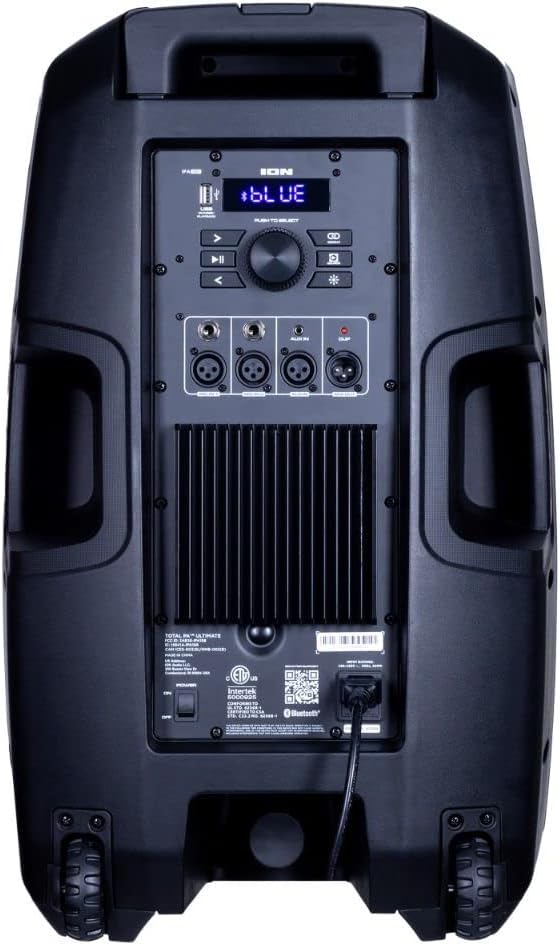
Figure 2: Rear panel with power input and control interface.
4. Podłączenie mikrofonu
Connect the included microphone to one of the XLR or 1/4-inch microphone inputs on the rear panel. The PA Ultimate features two such inputs. Adjust the microphone volume using the dedicated controls on the mixer.
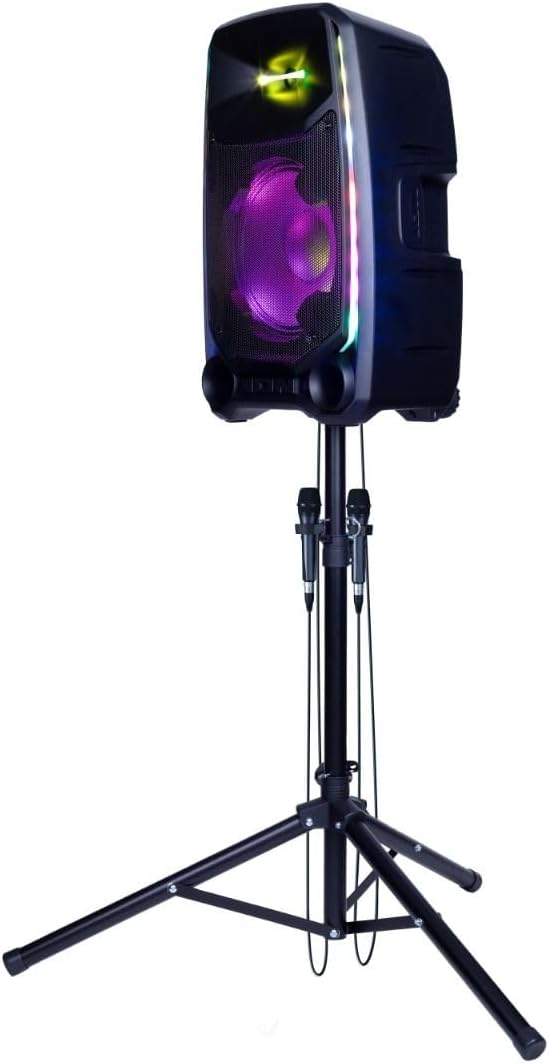
Figure 3: Microphones connected to the PA Ultimate speaker.
Instrukcja obsługi
1. Włączanie/wyłączanie zasilania
Locate the power switch on the rear panel. Flip the switch to the 'ON' position to power on the unit. The display and lights will illuminate. To power off, flip the switch back to 'OFF'.
2. Parowanie Bluetooth
- Ensure the PA Ultimate is powered on.
- Press the Bluetooth button on the rear panel or control interface to enter pairing mode. The Bluetooth indicator will flash.
- On your Bluetooth-enabled device (smartphone, tablet, etc.), navigate to the Bluetooth settings and select 'ION Audio PA Ultimate' from the list of available devices.
- Po sparowaniu wskaźnik Bluetooth zacznie świecić światłem ciągłym, a Ty będziesz mógł przesyłać dźwięk bezprzewodowo.
3. Połączenia wejściowe audio
The PA Ultimate supports multiple audio input sources:
- XLR / 1/4-inch Inputs: Do mikrofonów i instrumentów liniowych.
- Wejście AUX 3.5 mm: For connecting non-Bluetooth devices using a standard audio cable.
- Odtwarzanie z USB: Włóż dysk USB zawierający dźwięk files into the USB port. Use the control interface to navigate and play tracks.
4. Multi-Channel Mixer
The integrated multi-channel mixer allows for independent volume control of various inputs, including microphones and auxiliary sources. Use the master volume knob to adjust the overall output level.
5. Echo Effects
Activate and adjust the echo effect for microphone inputs using the dedicated controls on the mixer. This feature enhances vocal performances.
6. Sonic Wide Audio
The PA Ultimate features Sonic Wide Audio technology, designed to provide premium sound distribution to the front, left, and right of the speaker, ensuring a broad soundstage.
7. Edge-Glow Lighting
The Edge-Glow lighting system offers 10 distinct light modes, producing unique lighting effects in multiple colors that can dance in sync with your music. Use the light mode button on the control panel to cycle through the available options.

Figure 4: PA Ultimate speaker showcasing its Edge-Glow lighting effects.
8. Wireless Stereo-Link
To achieve a wider stereo sound, you can wirelessly connect a second ION Audio PA Ultimate speaker using the Stereo-Link technology. Refer to the specific instructions for activating Stereo-Link mode on both units.

Figure 5: Wireless Stereo-Link connection between two PA Ultimate speakers.
Konserwacja
1. Czyszczenie
Disconnect the unit from the power source before cleaning. Use a soft, dry cloth to wipe the exterior surfaces. Do not use abrasive cleaners, waxes, or solvents as they may damage the finish. Avoid spraying liquids directly onto the unit.
2. Przechowywanie
When not in use for extended periods, store the PA Ultimate in a cool, dry place, away from direct sunlight and extreme temperatures. It is recommended to store it in its original packaging or a protective cover to prevent dust accumulation and damage.
Rozwiązywanie problemów
If you encounter issues with your ION Audio PA Ultimate, refer to the following common problems and solutions:
- Brak zasilania: Ensure the power cable is securely connected to both the unit and a working electrical outlet. Check the power switch position.
- Brak dźwięku: Verify that the master volume and individual input volumes are turned up. Check all audio cable connections. Ensure your Bluetooth device is paired and playing audio.
- Problemy z parowaniem Bluetooth: Make sure the PA Ultimate is in pairing mode. Disable and re-enable Bluetooth on your device. Move your device closer to the speaker.
- Zniekształcony dźwięk: Reduce the volume of the input source or the master volume. Check for damaged cables.
- Mikrofon nie działa: Ensure the microphone is properly connected and its volume knob is adjusted. Check the microphone cable for damage.
Jeśli po wypróbowaniu tych rozwiązań problem nadal występuje, skontaktuj się z obsługą klienta.
Specyfikacje
| Nazwa modelu | PA Ultimate |
| Moc wyjściowa | 650 watów (Bi-amplifikowany) |
| Rozmiar głośnika niskotonowego | 12 cala (304.8 mm) |
| Rozmiar głośnika wysokotonowego | 1 cala (25.4mm) |
| Łączność | Bluetooth, AUX (3.5mm), USB, XLR, 1/4 inch |
| Wejścia audio | XLR, 1/4 inch (for microphones), 3.5mm aux |
| Liczba kanałów | 2 |
| Źródło zasilania | Elektryczny przewodowy |
| Cechy specjalne | Edge-Glow Lighting, Sonic Wide Audio, Wireless Stereo-Link, Echo Effects |
| Typ montażu | Podstawa głośnika |
| UPC | 657768966996 |
| ASIN | B0CT626L8T |
Gwarancja i wsparcie
This product is offered as an Amazon Renewed item. Please refer to the specific warranty terms provided at the time of purchase for Amazon Renewed products. Typically, Amazon Renewed products come with a 90-day Amazon Renewed Guarantee.
For technical support, troubleshooting assistance, or warranty claims, please contact the seller or Amazon Renewed customer service directly. Contact information for ION Audio may also be available on their official website for product-specific inquiries.