
Teverun Fighter Mini I (Model: 52vi20,8 Ah_fm)
Instrukcja obsługi skutera elektrycznego TEVERUN Fighter Mini I
Model: 52vi20,8 Ah_fm
1. Wprowadzenie
Thank you for choosing the TEVERUN Fighter Mini I Electric Scooter. This manual provides essential information for the safe operation, maintenance, and troubleshooting of your new electric scooter. Please read this manual thoroughly before your first ride to ensure optimal performance and safety.

Figure 1.1: The TEVERUN Fighter Mini I Electric Scooter, showcasinwyróżnia się eleganckim, czarnym wzornictwem i solidną konstrukcją.
2. Informacje dotyczące bezpieczeństwa
Your safety is paramount. Always wear a helmet and appropriate protective gear (knee pads, elbow pads, gloves) when riding. Adhere to local traffic laws and regulations. Avoid riding in wet conditions, on uneven terrain, or at night without proper lighting. Do not perform stunts or ride under the influence of alcohol or drugs.
- Always check brakes, tires, and battery level before each ride.
- Zachowaj bezpieczną odległość od innych pojazdów i pieszych.
- Nie przekraczaj maksymalnego udźwigu 120 kg.
- Bądź świadomy swojego otoczenia i potencjalnych zagrożeń.
3. Zawartość opakowania
Po otwarciu opakowania należy upewnić się, że wszystkie elementy znajdują się w opakowaniu i są w dobrym stanie:
- TEVERUN Fighter Mini I Electric Scooter
- Rumak
- Instrukcja obsługi (ten dokument)
4. Konfiguracja
4.1 Rozkładanie skutera
Carefully lift the handlebar stem until it locks into place. Ensure the folding mechanism is securely latched before riding.

Figure 4.1: Detail of the secure folding mechanism on the scooter's stem.
4.2 Pierwsze ładowanie
Przed pierwszym użyciem należy w pełni naładować akumulator hulajnogi. Podłącz ładowarkę do portu ładowania, a następnie do gniazdka elektrycznego. Wskaźnik ładowania zmieni się po pełnym naładowaniu.
4.3 Połączenie aplikacji
Download the official TEVERUN app from your smartphone's app store. Follow the in-app instructions to pair your scooter via Bluetooth. The app allows for customized lighting, battery status monitoring, and problem diagnosis.
5. Instrukcja obsługi
5.1 Włączanie/wyłączanie
Press and hold the power button on the handlebar display to turn the scooter on or off. The display will show speed, battery level, and trip information.
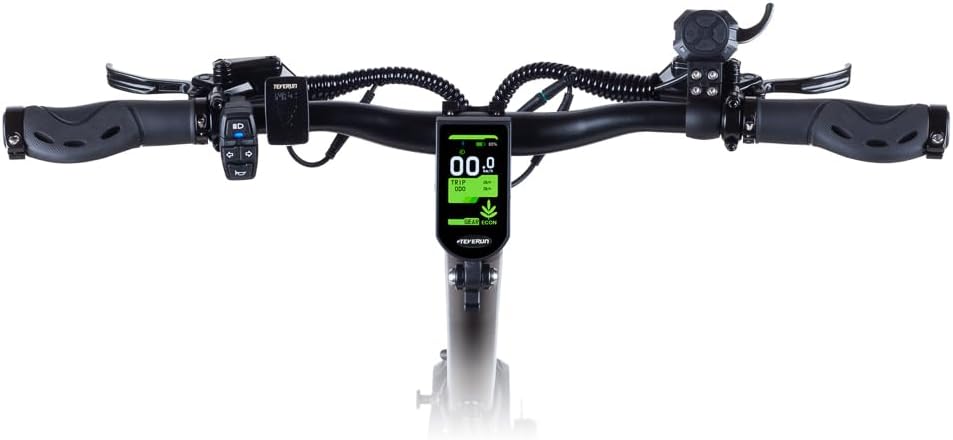
Rysunek 5.1: Widok z góry na dół view of the handlebar assembly, showing the central display and control buttons.
5.2 Jazda konna
Place one foot on the deck and push off with the other. Once you gain some momentum, gently press the throttle lever to accelerate. The scooter can reach speeds of up to 25 km/h.
5.3 Hamowanie
The scooter is equipped with hydraulic disc brakes on both the front and rear wheels for immediate and reliable stopping power. Gently squeeze the brake levers on the handlebars to slow down or stop.

Figure 5.2: Close-up of the rear wheel, showcasing the robust hydraulic disc brake system.
5.4 Oświetlenie i wskaźniki
The scooter features integrated front and rear lights, as well as turn indicators for enhanced visibility and safety. These can be controlled via the handlebar controls or the TEVERUN app.

Rysunek 5.3: View of the front light and the upper part of the handlebar stem.
6. Konserwacja
6.1 Ciśnienie w oponach
Regularly check the pressure of the 10-inch tubeless tires. Proper tire pressure ensures optimal ride comfort, range, and safety. Refer to the tire sidewall for recommended pressure.
6.2 Kontrola układu hamulcowego
Inspect the hydraulic disc brakes periodically for wear and proper function. If you notice reduced braking performance or unusual noises, have the brakes inspected by a qualified technician.
6.3 Czyszczenie
Wyczyść skuter za pomocą adamp ściereczką. Unikaj stosowania strumieni wody pod wysokim ciśnieniem lub silnych środków chemicznych, ponieważ mogą one uszkodzić elementy elektroniczne.
6.4 Pielęgnacja baterii
Aby przedłużyć żywotność akumulatora, należy unikać częstego całkowitego rozładowywania akumulatora. Przechowuj hulajnogę w chłodnym, suchym miejscu i ładuj ją okresowo, jeśli nie jest używana przez dłuższy czas.

Rysunek 6.1: Zbliżenie view of the hydraulic suspension, designed for a smooth ride over various terrains.
7. Rozwiązywanie Problemów
If you encounter issues with your scooter, refer to the following common problems and solutions. For more complex issues, use the problem diagnosis feature in the TEVERUN app or contact customer support.
| Problem | Możliwa przyczyna | Rozwiązanie |
|---|---|---|
| Hulajnoga się nie włącza | Niski poziom naładowania baterii; Luźne połączenie | Charge battery; Check all connections |
| Zmniejszony zasięg | Low tire pressure; Overload; Cold weather | Inflate tires; Reduce load; Battery performance may decrease in cold |
| Hamulce są słabe | Worn brake pads; Air in hydraulic line | Inspect and replace pads; Seek professional service for bleeding |
8. Specyfikacje
| Funkcja | Specyfikacja |
|---|---|
| Marka | Teverun |
| Nazwa modelu | 52vi20,8 Ah_fm |
| Przedział wiekowy | Dorośli |
| Typ hamulca | Rear Brake, Front Brake (Hydraulic Disc Brakes) |
| Kolor | Czarny |
| Wymiary (dł. x szer. x wys.) | Wymiary 118 x 65 x 125 cm |
| Waga | 37 kilograma |
| Materiał ramy | Aluminium |
| Typ materiału | Metal, Guma |
| Cechy | App-controlled lighting, Hydraulic Brakes, Dual Brake System, Integrated Lights, Battery Status Monitoring, Problem Diagnosis |
| Zawieszenie | Hydraulic Suspension |
| Rozmiar opony | 10 Inch (Tubeless) |
| Baterie w zestawie | Tak |
| Maksymalna ładowność | 120 kilograma |
| Liczba kół | 2 |
| Materiał koła | Guma |
| Typ kierownicy | Naprawił |
9. Gwarancja i wsparcie
For detailed warranty information, please refer to the official TEVERUN website or the warranty card included with your purchase. For technical support, spare parts, or service inquiries, please contact TEVERUN customer service through their official channels.
Ask a question about this manual
Ask about setup, troubleshooting, compatibility, parts, safety, or missing instructions. Manuals+ will review the question and use this page’s manual context to help answer it.