
PQWT M200
PQWT M200 Water Detector Instruction Manual
Model: M200
1. Wprowadzenie
The PQWT M200 Water Detector is a geophysical instrument designed for underground water detection. It utilizes the natural electric field frequency selection system to analyze changes in the earth's electromagnetic field, providing millivolt data (Self-potential) to identify potential water sources.
2. Zawartość opakowania
Sprawdź, czy w opakowaniu znajdują się wszystkie komponenty:
- Host Machine (PQWT M200 Detector)
- Electrode Bars
- Copper Electrodes
- Kabel
- Pasek
- Rumak
- Etui transportowe
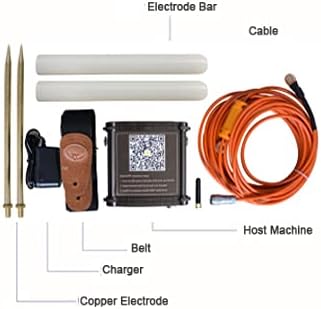
Figure 2.1: Included components of the PQWT M200 Water Detector kit.

Figure 2.2: The PQWT M200 Water Detector and its accessories stored in the carrying case.
3. Specyfikacje techniczne
| Parametr | Wartość |
|---|---|
| Model produktu | PQWT-M100/200/400 (M200 variant) |
| Pomiar głębokości | 100/200/400 meters (M200: 200 meters) |
| Measurement Data Unit | Electric field component of different frequencies of the earth electromagnetic field ΔVs (mV) |
| Zakres pomiarowy | 0mV-1000mV, automatic range conversion |
| Dokładność pomiaru | 0.001mV |
| Measuring Channel | 4/6/8 kanały |
| Zysk kanału | 1-200,000 razy |
| Częstotliwość pomiaru | 30/36/48 frequency |
| Waga (gospodarza) | 0.55kg |
| Moc | 18650*2 3000mAh rechargeable lithium battery |
| Wyświetlacz | Wskaźnik LED |
| Przetwornik A / C | 8-bit 1Msps |
| Impedancja wejściowa | ≥10MΩ |
| Wilgotność względna | ≤85% |
| Pobór mocy | Około 1 W |
| Temperatura środowiska pracy | -20°C ~ +50°C |
| Wymiary produktu | 16.4" dł. x 6.1" szer. x 13.2" wys. |
| Metoda kontroli | Aplikacja, zdalny |
| Technologia czujników | Electric Field Sensor |
| Kompatybilne urządzenia | Urządzenia z Androidem |

Figure 3.1: Detailed technical specifications for the PQWT M-series water detectors.
4. Konfiguracja i instalacja
4.1. Mobile App Installation
The PQWT M200 operates with a dedicated mobile application on Android devices. Follow these steps to install the app:
- Locate the QR code on the side of the host machine.
- Zeskanuj kod QR za pomocą urządzenia mobilnego.
- Open the download link provided by the QR code in your browser.
- Install the application named "PQWT water finder" or "PQWT_MobileAPP_PRO.APK".
Alternatively, you can download the app directly from: http://www.pqwtcs.com/download/PQWT_MobileAPP_PRO.APK

Rycina 4.1: Przód view of the PQWT M200 device with the mobile app QR code visible.

Rysunek 4.2: Góra i bok views of the PQWT M200 device, highlighting the QR code for app download.

Rysunek 4.3: Szczegółowy view of the QR code and instructions for mobile app installation.
4.2. Połączenie sprzętowe
- Connect the cable to the host machine.
- Connect the electrode bars and copper electrodes to the cable.
- Secure the host machine to your person using the provided belt for ease of use during surveys.
- Ensure the device is charged using the provided charger before use.
5. Instrukcja obsługi
5.1. Włączanie i podłączanie
- Press and hold the white button on the host machine to turn it on.
- Open the "PQWT water finder" app on your Android device.
- The app should automatically connect to the device. Verify the connection status within the app.

Figure 5.1: Visual guide for initial setup and software interface navigation.
5.2. Conducting a Survey
The PQWT M200 offers high-speed and efficient detection of underground water sources. It is suitable for various geological structures including plains, hills, mountains, highlands, and basins.
- Wybierz tryb pomiaru: In the software operation interface, choose your desired measurement mode (e.g., "Three frequency" for rough tests or "Profile survey").
- Ustaw parametry: Adjust parameters such as "Lines", "Sites", and "Gain" as needed. Click "OK" to confirm.
- Rozpocznij pomiar: Click "Record" to begin measuring the first point.
- Continue Measurement: After the data for the first point is measured and the app indicates "record completed", move to the next measurement point and click "Record" again. Repeat this process for all desired points.
- Analiza danych: The instrument automatically generates geological section drawings without the need for a computer (Android system only). Analyze the generated curves and maps to identify potential water locations.
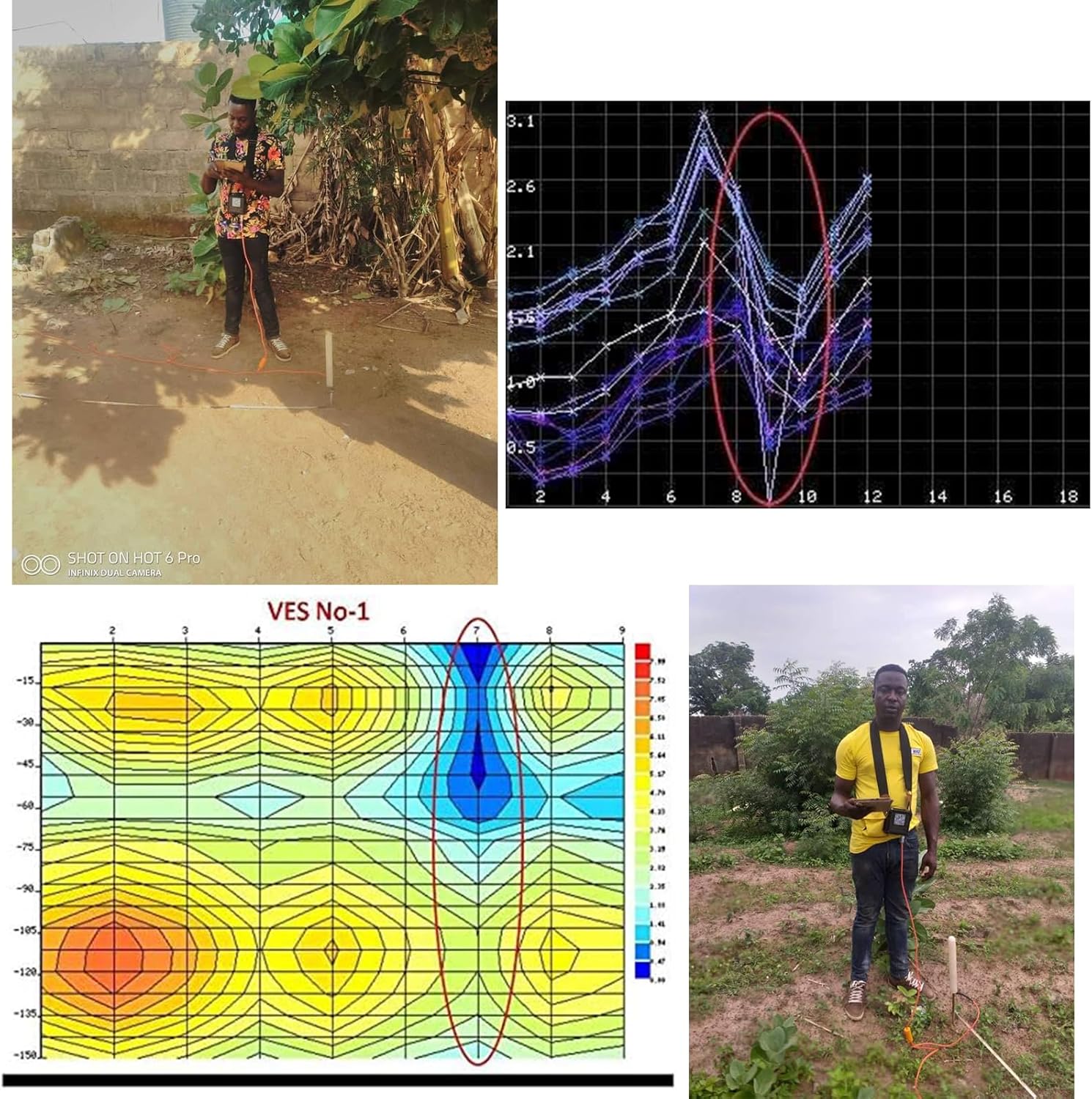
Figure 5.2: User conducting a water survey in the field with the PQWT M200.
Video 5.1: A demonstration of the PQWT M100 (similar model) in a real-world water survey application in Zambia, showing the process from survey to drilling.
6. Konserwacja
- Utrzymuj urządzenie w czystości, bez kurzu i wilgoci.
- Store the device and accessories in the provided carrying case when not in use to prevent damage.
- Charge the battery regularly, even during periods of inactivity, to maintain battery health.
- Unikaj wystawiania urządzenia na działanie ekstremalnych temperatur lub bezpośredniego światła słonecznego przez dłuższy czas.
- Inspect cables and electrodes for wear or damage before each use. Replace damaged components as necessary.
7. Rozwiązywanie Problemów
| Problem | Możliwa przyczyna | Rozwiązanie |
|---|---|---|
| Urządzenie nie włącza się. | Niski poziom naładowania baterii lub przycisk zasilania nie został wciśnięty prawidłowo. | Charge the device. Press and hold the power button firmly for a few seconds. |
| App fails to connect to the device. | Bluetooth/wireless issue, app not installed correctly, or device not powered on. | Ensure the device is on. Restart the app and device. Check your Android device's wireless settings. Reinstall the app if necessary. |
| Niedokładne lub niespójne odczyty. | Poor electrode contact, environmental interference, or incorrect survey procedure. | Ensure electrodes are firmly inserted into the ground. Avoid areas with significant electromagnetic interference. Review operating instructions for correct survey methods. |
| Aplikacja ulega awarii lub zawiesza się. | Software bug or insufficient device resources. | Restart the app. Ensure your Android device meets the minimum system requirements. Check for app updates. |
Aby uzyskać dalszą pomoc, zapoznaj się z sekcją pomocy technicznej lub skontaktuj się z obsługą klienta.
8. Gwarancja i wsparcie
The PQWT M200 Water Detector comes with a two-year instrument warranty and free maintenance. For any inquiries, concerns, or expert remote assistance regarding well position fixing, please contact our dedicated after-sales support group.
Informacje kontaktowe: Refer to the product packaging or the official PQWT webna tej stronie znajdziesz najnowsze dane kontaktowe działu pomocy technicznej.