
Dreo DR-HTF008S
Instrukcja obsługi wentylatora wieżowego Dreo Smart Tower DR-HTF008S
Model: DR-HTF008S
1. Ważne instrukcje bezpieczeństwa
Please read this manual thoroughly before use and retain it for future reference. Always follow basic safety precautions when using electrical appliances to reduce the risk of fire, electric shock, and injury to persons.
- Upewnij się, że zasilanie jest zgodne z objtagpodane na tabliczce znamionowej wentylatora.
- Nie używaj wentylatora z uszkodzonym przewodem lub wtyczką. Jeśli przewód jest uszkodzony, musi zostać wymieniony przez producenta, serwisanta lub osobę o podobnych kwalifikacjach, aby uniknąć zagrożenia.
- Avoid placing the fan in wet or damp areas. Do not immerse the fan in water or other liquids.
- Podczas pracy wentylatora należy trzymać palce i inne przedmioty z dala od kratek wentylatora.
- Odłączaj wentylator od gniazdka elektrycznego, gdy nie jest używany, gdy przenosisz go z jednego miejsca do drugiego i przed czyszczeniem.
- Urządzenie to nie jest przeznaczone do użytku przez osoby (w tym dzieci) o ograniczonej sprawności fizycznej, sensorycznej lub umysłowej, a także osoby nieposiadające odpowiedniego doświadczenia lub wiedzy, chyba że znajdują się one pod nadzorem osoby odpowiedzialnej za ich bezpieczeństwo lub otrzymały od niej instrukcje dotyczące korzystania z urządzenia.
- Dzieci powinny znajdować się pod nadzorem, aby mieć pewność, że nie bawią się urządzeniem.
2. Koniec produktuview
Familiarize yourself with the components and controls of your Dreo Smart Tower Fan.
Zawartość opakowania
- Dreo Smart Tower Fan
- Zdalne sterowanie
- Instrukcja obsługi
Elementy wentylatora
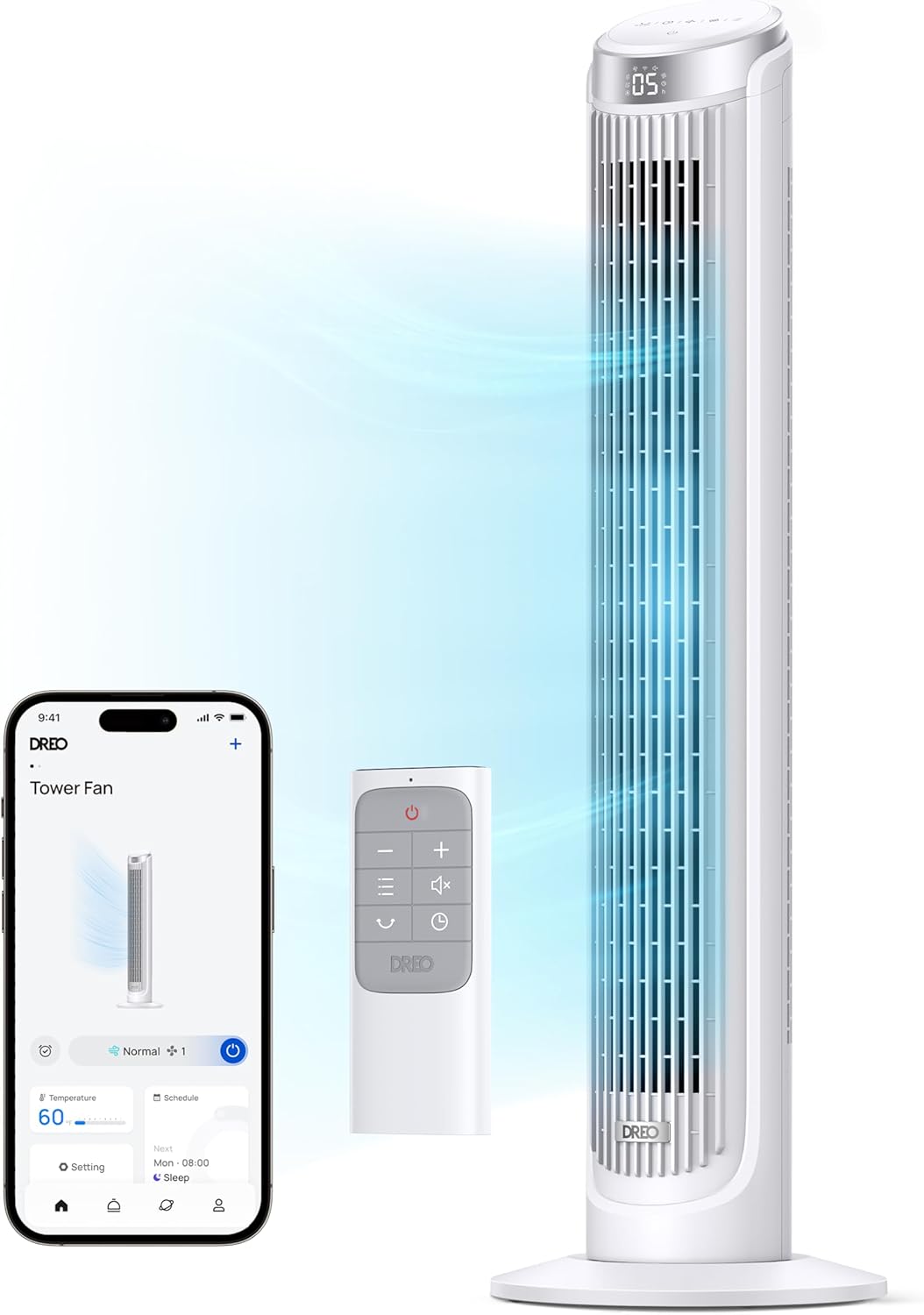
The fan unit consists of the main tower, a stable base, and an intuitive control panel on top. A remote control is included for convenient operation.
3. Konfiguracja
Follow these steps to set up your Dreo Smart Tower Fan.
3.1 Montaż
The Dreo Smart Tower Fan features tool-free assembly for quick setup.
- Ostrożnie usuń wszystkie materiały opakowaniowe i sprawdź, czy wszystkie elementy są obecne.
- Attach the base to the bottom of the fan tower. Align the base with the fan unit and twist or click into place according to the markings.
- Secure the base if necessary (some models may have a locking mechanism or screw).

3.2 Umieszczenie
Ustaw wentylator na stabilnej, równej powierzchni. Upewnij się, że wokół wentylatora jest wystarczająco dużo miejsca, aby zapewnić optymalny przepływ powietrza i oscylację.
3.3 Połączenie zasilania
Podłącz przewód zasilający do standardowego gniazdka elektrycznego 120 V AC.
3.4 App Pairing (Optional)
To utilize smart features, download the Dreo app from your smartphone's app store and follow the in-app instructions to pair your fan. This enables remote control, scheduling, and voice control capabilities.

4. Instrukcja obsługi
Your Dreo Smart Tower Fan offers multiple ways to control its functions.
4.1 Panel sterowania
The fan features a smart touch control panel on its top for direct operation.
4.2 Pilot zdalnego sterowania
Use the included remote control for convenient adjustments from a distance.
4.3 tryby pracy
The fan offers four distinct operating modes:
- Tryb normalny: Provides a consistent airflow at your selected speed level.
- Tryb naturalny: Imituje naturalny wiatr poprzez zmianę prędkości wentylatora.
- Tryb uśpienia: Operates at a low noise level (as low as 34dB) with reduced display brightness for undisturbed sleep.
- Tryb automatyczny: Adjusts fan speed automatically based on the ambient room temperature, optimizing comfort and energy efficiency.
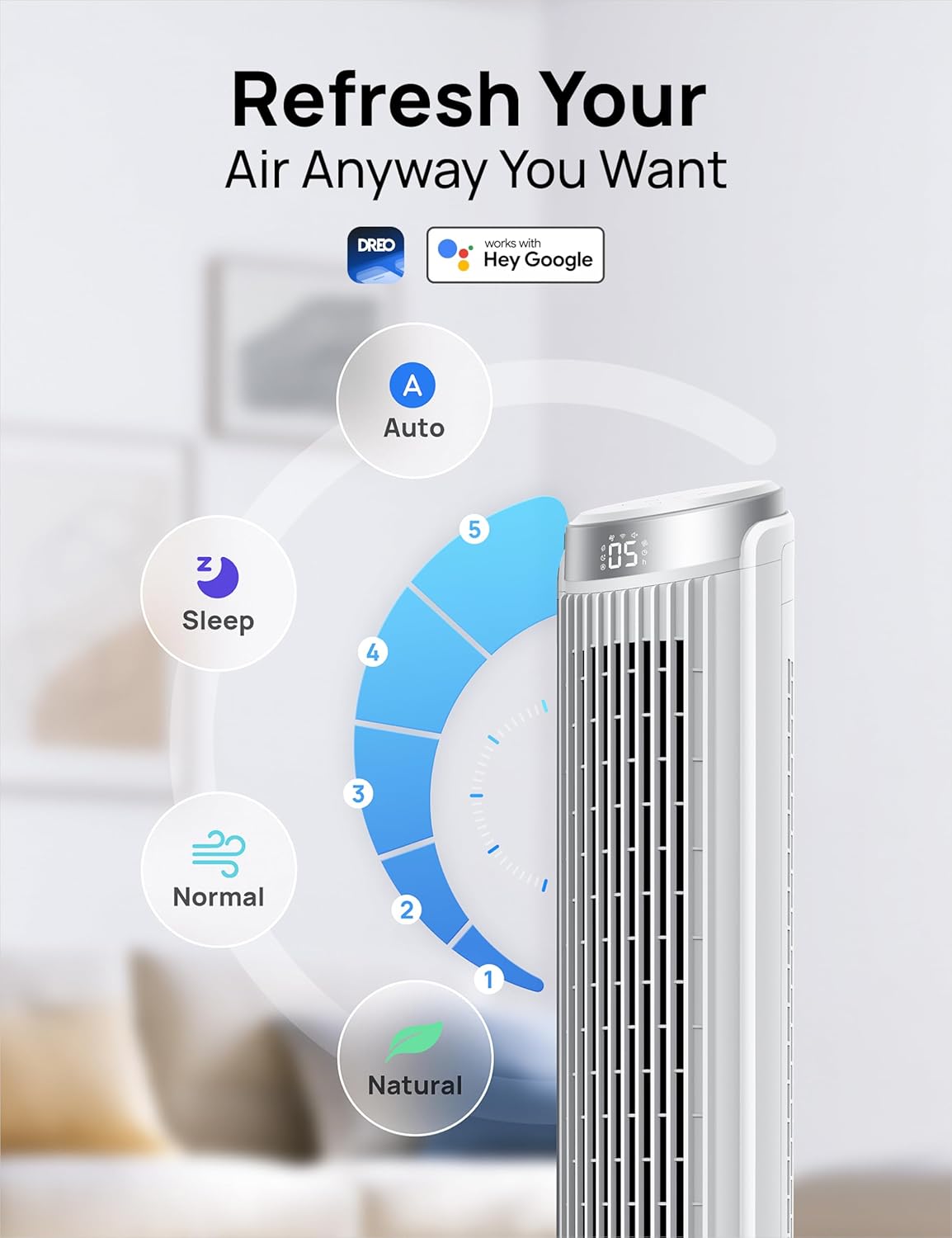
Ustawienia prędkości 4.4
The fan features 5 power levels, allowing you to adjust the airflow intensity from a gentle breeze to a powerful blast of 26ft/s.

4.5 Oscylacja
Activate the 90° oscillation feature to distribute airflow evenly across a wider area of the room.

4.6 czasomierz
Set the 12-hour timer to automatically turn the fan off after a specified duration.
4.7 Smart Control (Dreo App)
The Dreo app provides advanced control and customization options:
- Dostęp zdalny: Control your fan from anywhere.
- Harmonogram: Set custom schedules for the fan to turn on/off and change modes automatically.
- Adaptacja temperaturowa: Utilize Auto mode to let the fan adjust speed based on room temperature.
- Desktop Widgets: Add quick control widgets to your smartphone's home screen for easy access.


4.8 Sterowanie głosowe
The fan is compatible with Alexa and Google Home for hands-free voice control.

5. Konserwacja
Regularna konserwacja zapewnia optymalną wydajność i długowieczność wentylatora.
5.1 Czyszczenie
The Dreo Smart Tower Fan is designed for effortless clean-up.
- Zawsze odłączaj wentylator od zasilania przed czyszczeniem.
- Użyj miękkiego, damp ściereczka do wycierania zewnętrznych powierzchni wentylatora.
- For internal dust, the rear grille can be removed for access to the fan blades. Use a vacuum cleaner with a brush attachment or a soft cloth to gently remove dust.
- Przed ponownym podłączeniem wentylatora należy upewnić się, że wszystkie części są całkowicie suche.
5.2 Przechowywanie
When storing the fan, keep it in a cool, dry place, preferably in its original packaging, to protect it from dust and damage.
6. Rozwiązywanie Problemów
W tej sekcji znajdziesz informacje o typowych problemach i ich rozwiązaniach.
| Problem | Możliwa przyczyna | Rozwiązanie |
|---|---|---|
| Wentylator się nie włącza. | Brak zasilania. Przewód zasilający nie jest prawidłowo podłączony. | Ensure the fan is plugged into a working electrical outlet. Sprawdź, czy przewód zasilający jest prawidłowo podłączony. |
| Słaby przepływ powietrza. | Prędkość wentylatora jest zbyt niska. Zablokowany wlot/wylot powietrza. Gromadzenie się kurzu. | Zwiększ ustawienie prędkości wentylatora. Ensure there are no obstructions around the fan. Clean the fan grilles and internal components as per maintenance instructions. |
| Wentylator jest głośny. | Wentylator nie stoi na równej powierzchni. Internal components loose or dirty. | Umieść wentylator na płaskiej, stabilnej powierzchni. Clean the fan thoroughly. If noise persists, contact customer support. |
| Pilot nie działa. | Baterie są rozładowane lub nieprawidłowo włożone. Przeszkoda pomiędzy pilotem a wentylatorem. | Wymień baterie na nowe, zwracając uwagę na prawidłową biegunowość. Usuń wszelkie obiekty blokujące ścieżkę sygnału. |
| Problemy z łącznością aplikacji. | Wi-Fi signal weak or disconnected. Incorrect pairing process. | Ensure your fan is within Wi-Fi range and your router is functioning. Re-attempt the app pairing process as described in the app. |
7. Specyfikacje
Technical details for the Dreo Smart Tower Fan DR-HTF008S.
| Funkcja | Szczegół |
|---|---|
| Nazwa modelu | DR-HTF008S |
| Marka | Dreo |
| Kolor | Biały |
| Projekt wentylatora elektrycznego | Wentylator podłogowy |
| Źródło zasilania | Elektryczny przewodowy |
| Wymiary produktu | 11.34" gł. x 11.34" szer. x 39.76" wys. |
| Cechy specjalne | App Operable, Bladeless, Oscillating, Remote Controlled, Sleep Mode |
| Poziom hałasu | 34 decybeli |
| Tomtage | 120 V |
| Waga przedmiotu | 7.7 funtów |
| Zawarte komponenty | Remote, Tower Fan |
| Zastosowanie wewnątrz/na zewnątrz | Wnętrz |
| Metoda kontroli | Aplikacja, Pilot, Dotyk, Głos |
| Liczba poziomów mocy | 5 |
| UPC | 810142854092 |
8. Gwarancja i wsparcie
Aby uzyskać informacje dotyczące gwarancji, zapoznaj się z kartą gwarancyjną dołączoną do produktu lub odwiedź oficjalną stronę internetową Dreo website. If you encounter any issues not covered in this manual or require further assistance, please contact Dreo customer support.
Dreo Customer Support:
- Zapoznaj się z opakowaniem produktu lub oficjalną stroną Dreo webna tej stronie znajdziesz najbardziej aktualne dane kontaktowe.