
Codnida YM-MWM553+MWZ553C-EU
Instrukcja obsługi monitora dziecięcego Codnida YM-MWM553+MWZ553C-EU
Kompleksowy przewodnik po konfiguracji, obsłudze i konserwacji
1. Wprowadzenie
This manual provides detailed instructions for the safe and effective use of your Codnida Baby Monitor, Model YM-MWM553+MWZ553C-EU. Please read this manual thoroughly before operating the device and retain it for future reference. This baby monitor is designed to provide secure and reliable surveillance of your child, offering features such as a 5.5-inch 2K HD display, PTZ camera control, two-way audio, and environmental monitoring.
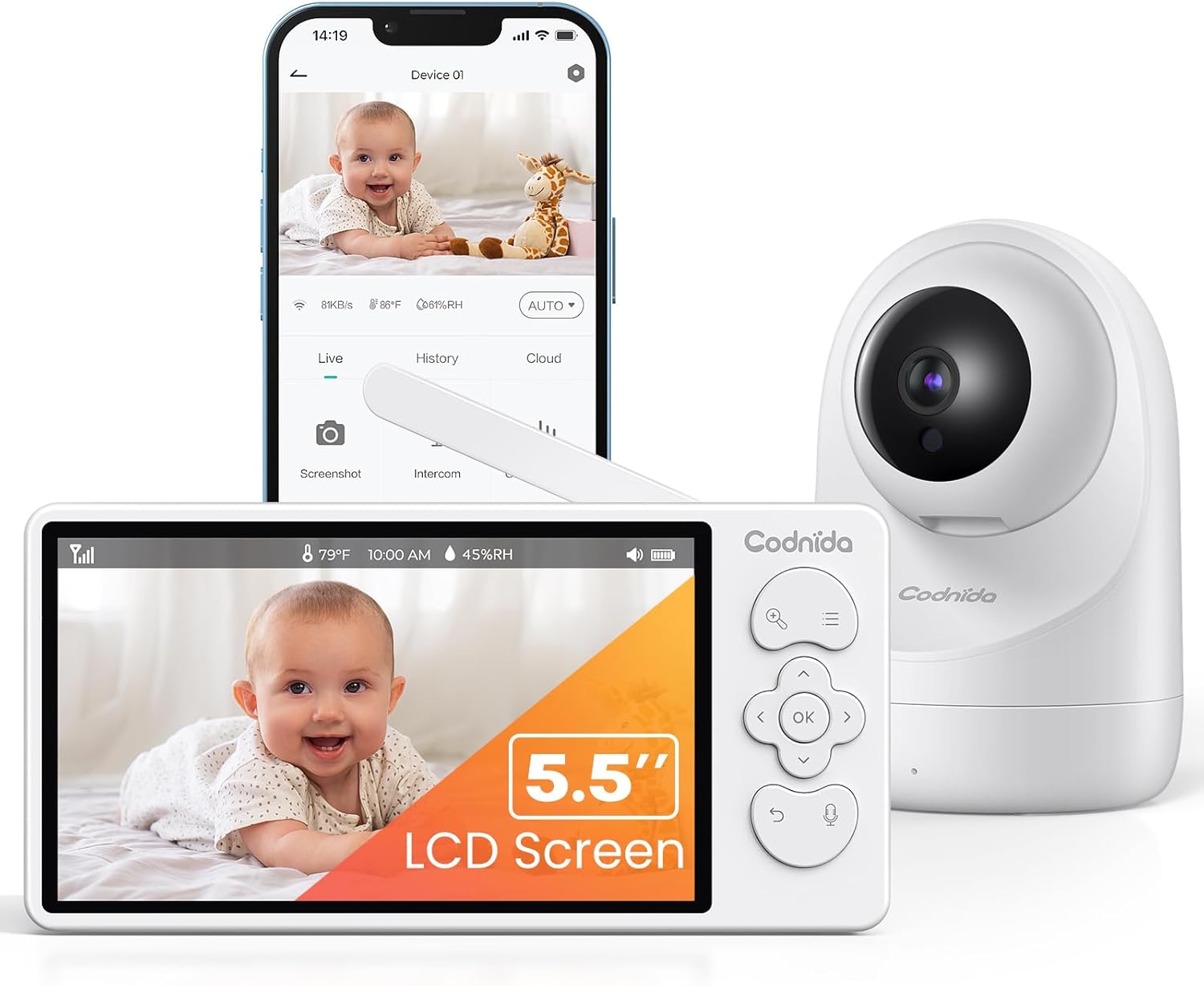
Image 1.1: Codnida Baby Monitor system, showing the monitor, camera, and smartphone interface.
2. Zawartość opakowania
Sprawdź, czy w opakowaniu znajdują się wszystkie elementy:
- Baby Monitor (Parent Unit)
- Baby Camera (Baby Unit)
- Power Adapters (2x, for monitor and camera)
- Kable ładujące USB (2x)
- Zestaw do montażu na ścianie (śruby i kotwy)
- Instrukcja obsługi (ten dokument)

Image 2.1: All components included in the Codnida Baby Monitor package.
3. Koniec produktuview
3.1 Jednostka rodzicielska (monitor)
The parent unit features a 5.5-inch LCD screen for live video feed, control buttons for camera functions, and a built-in microphone and speaker for two-way audio communication.
- Ekran LCD: 5.5-inch 2K HD display.
- Przyciski sterujące: Navigation, OK, Menu, Talk, Zoom.
- Antena: Do bezprzewodowej transmisji sygnału.
- Mikrofon: Do dwukierunkowej transmisji dźwięku.
- Głośnik: For listening to your baby and lullabies.
- Port zasilania: USB-C do ładowania.
- Bateria: Zintegrowany akumulator o pojemności 4000mAh.
3.2 Jednostka dziecka (kamera)
The baby unit is equipped with a 3MP 2K HD camera, infrared LEDs for night vision, and a temperature/humidity sensor.
- Obiektyw aparatu: 3MP 2K HD resolution.
- Diody podczerwieni: For clear night vision up to 8 meters.
- Mikrofon: To detect baby's sounds.
- Głośnik: To play lullabies and enable two-way audio.
- Czujnik temperatury/wilgotności: Monitors room environment.
- Port zasilania: USB-C for continuous power.
- Otwór montażowy: Do montażu na ścianie.
4. Konfiguracja
4.1 Ładowanie jednostki głównej
Before first use, fully charge the parent unit for approximately 8 hours. Connect the provided USB charging cable to the parent unit's power port and the power adapter to an electrical outlet. The battery indicator on the screen will show charging status.

Image 4.1: Charging the parent unit and expected battery life.
4.2 Włączanie jednostki dziecięcej
The baby unit requires continuous power. Connect the provided USB charging cable to the baby unit's power port and the power adapter to an electrical outlet. Ensure the cable is placed safely away from the baby's reach.
4.3 Umiejscowienie kamery
Umieść jednostkę dla dziecka (kamerę) w miejscu zapewniającym dobrą widoczność. view of your baby. Ensure it is at least 1 meter (3 feet) away from the baby's crib to prevent any entanglement hazards with the power cord. The camera can be placed on a flat surface or mounted to a wall using the provided kit.
- Dla optymalnego viewing, position the camera to capture the entire crib area.
- Avoid placing the camera near heat sources or direct sunlight.
- Ensure the camera is within the monitor's transmission range (up to 700 meters in open areas).
4.4 Połączenie początkowe
The Codnida Baby Monitor uses FHSS technology for a secure, direct connection without requiring Wi-Fi or an app for basic operation. Simply power on both the parent unit and the baby unit. They should automatically connect. If they do not connect, refer to the troubleshooting section for pairing instructions.

Image 4.2: Secure FHSS connection between monitor and camera.
5. Instrukcja obsługi
5.1 Włączanie/wyłączanie zasilania
- Jednostka nadrzędna: Press and hold the power button until the screen turns on/off.
- Jednostka dla dziecka: Jednostka dla dziecka włącza się automatycznie po podłączeniu do zasilania.
5.2 Na żywo View and VOX Mode
The monitor defaults to live view, continuously displaying video from the camera. To conserve battery, you can activate VOX (Voice Operated eXchange) mode.
- Tryb VOX: In VOX mode, the monitor screen remains black. It will automatically light up and display video when sound or motion is detected in the baby's room.
- To activate/deactivate VOX mode, navigate through the menu settings on the parent unit.

Image 5.1: VOX mode for power saving and automatic activation.
5.3 Camera Control (PTZ & Zoom)
The camera offers Pan, Tilt, and Digital Zoom (PTZ) functions, allowing you to adjust the viewzdalnie pod kątem.
- Panoramowanie/pochylanie: Use the directional buttons on the parent unit to move the camera lens horizontally (350 degrees) and vertically (90 degrees).
- Zoom cyfrowy: Press the zoom button to activate 2x or 4x digital zoom for a closer view twojego dziecka.
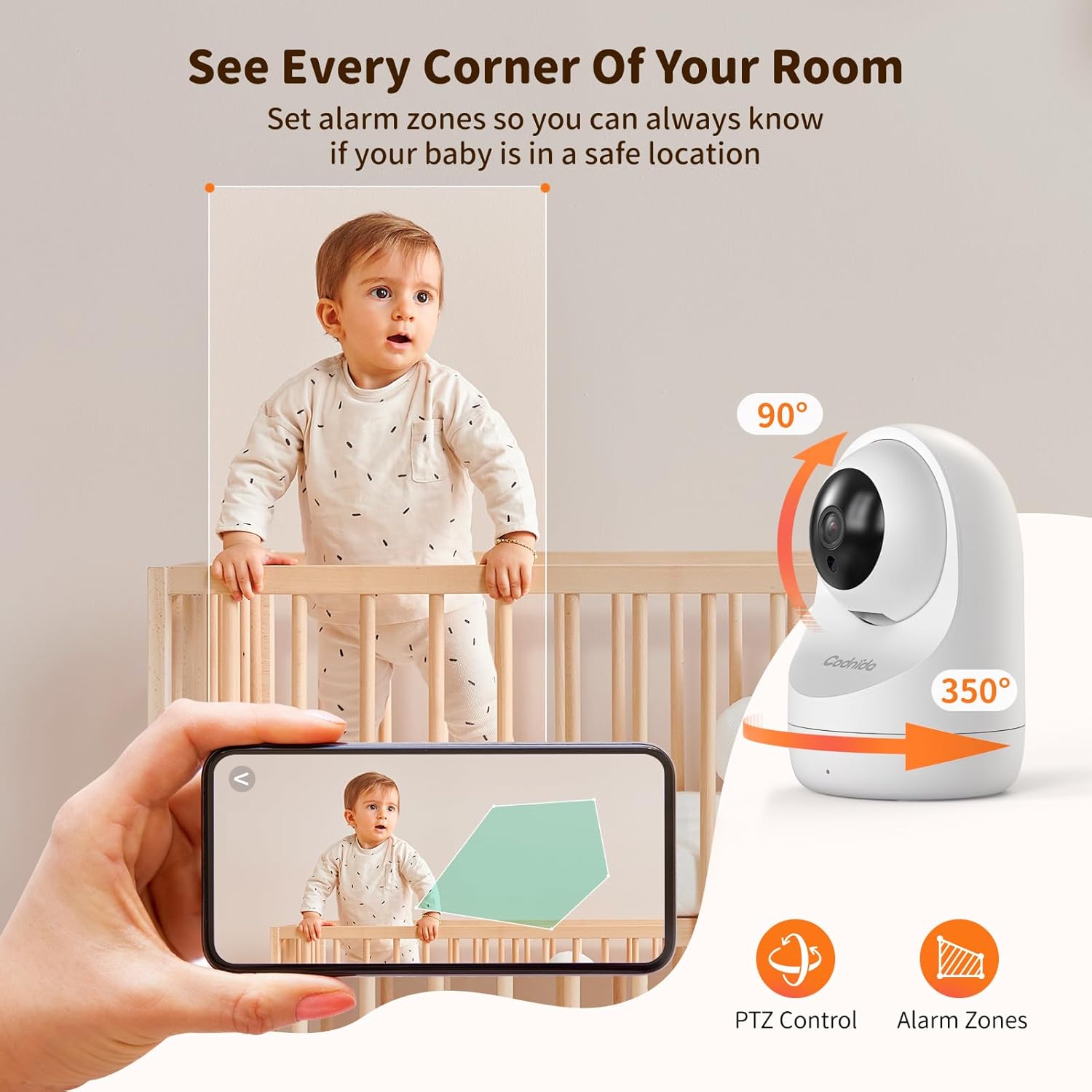
Image 5.2: PTZ control and alarm zone setup.
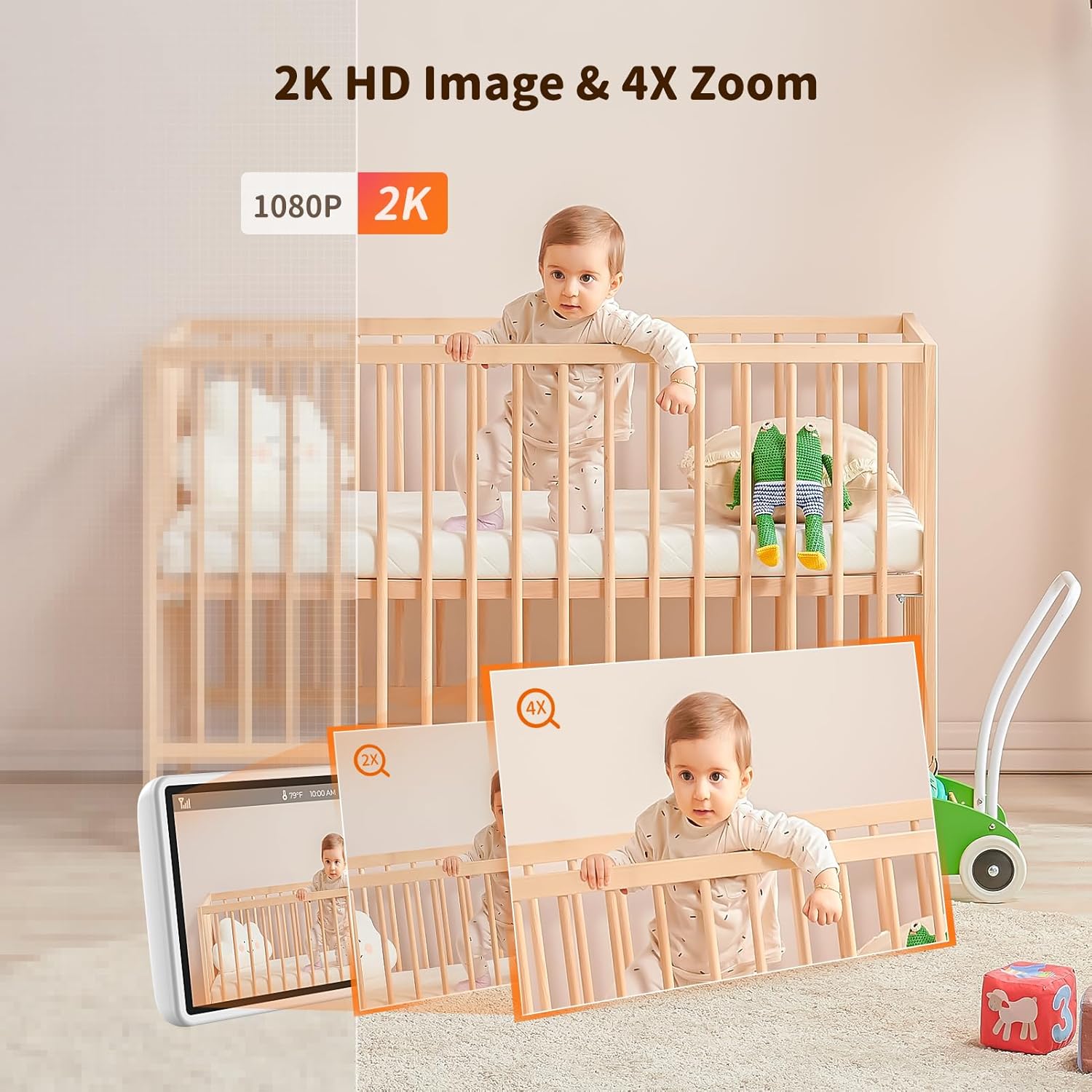
Image 5.3: 2K HD image quality and 4x digital zoom.
5.4 Two-Way Audio and Lullabies
Communicate with your baby or play soothing lullabies directly from the parent unit.
- Dwukierunkowy dźwięk: Press and hold the 'Talk' button on the parent unit to speak to your baby through the camera's speaker. Release the button to listen.
- Kołysanki: Access the menu to select and play built-in lullabies. You can adjust the volume and set a timer for playback.

Image 5.4: Two-way audio communication.

Image 5.5: Night vision and lullaby function.
5.5 Funkcje monitorowania
- Monitorowanie temperatury i wilgotności: The baby unit continuously monitors the room's temperature and humidity. These readings are displayed on the parent unit. You can set alert thresholds in the menu.
- Przypomnienie o karmieniu: Set up feeding reminders through the parent unit's menu to help maintain a consistent feeding schedule.
- Strefy alarmowe: Zdefiniuj określone obszary w obrębie kamery view as alarm zones. The monitor will alert you if motion is detected within these zones.

Image 5.6: Temperature and humidity detection.

Image 5.7: Feeding reminder function.
5.6 Recording to SD Card
The Codnida Baby Monitor supports Micro SD cards (FAT32 format, up to 256GB) for video recording. Insert the Micro SD card into the designated slot on the parent unit. You can initiate recording manually or set it to record automatically upon motion/sound detection via the menu settings.
6. Konserwacja
6.1 Czyszczenie
To clean the monitor and camera units, use a soft, dry cloth. Do not use abrasive cleaners or solvents. For the camera lens, use a lens cleaning cloth to avoid scratches.
6.2 Pielęgnacja baterii
- Avoid fully discharging the parent unit's battery frequently.
- Charge the parent unit regularly to maintain battery health.
- Jeśli urządzenie nie będzie używane przez dłuższy czas, należy je przechowywać w chłodnym i suchym miejscu.
7. Rozwiązywanie Problemów
If you encounter issues with your Codnida Baby Monitor, please refer to the following common solutions:
| Problem | Możliwa przyczyna | Rozwiązanie |
|---|---|---|
| Brak obrazu/dźwięku na monitorze | Urządzenia nie są włączone, znajdują się poza zasięgiem lub nie są sparowane. | Ensure both units are powered. Move units closer. Re-pair units via menu settings (refer to manual for specific steps). |
| Niska jakość obrazu | Low light, dirty lens, interference. | Ensure adequate lighting. Clean camera lens. Move units away from other electronic devices. |
| Monitor loses connection frequently | Out of range, signal interference, obstacles. | Move units closer. Reduce obstacles (walls, furniture). Avoid placing near thick walls or metal structures. |
| Bateria szybko się rozładowuje | Ciągły na żywo view, high brightness, aging battery. | Activate VOX mode. Reduce screen brightness. Ensure full charge before use. |
| Temperature/Humidity readings incorrect | Sensor obstruction, extreme environmental conditions. | Ensure sensor is not covered. Allow time for sensor to adjust to room conditions. |
8. Specyfikacje
| Funkcja | Szczegół |
|---|---|
| Numer modelu | YM-MWM553+MWZ553C-EU |
| Rozmiar wyświetlacza | 5.5 cali |
| Rozdzielczość wideo | 2K HD (1296p) |
| Rozdzielczość kamery | 3 megapiksela |
| Technologia bezprzewodowa | FHSS (widmo rozproszone z przeskokiem częstotliwości) |
| Zasięg transmisji | Do 700 metrów (otwarta przestrzeń) |
| Zakres noktowizora | Do 8 metrów |
| Pan / Tilt Angle | Pan 350 °, pochylenie 90 ° |
| Zoom cyfrowy | 4x |
| Bateria jednostki rodzicielskiej | 4000mAh Lithium-ion (1 AAA included for internal components) |
| Wsparcie magazynowania | Micro SD card up to 256GB (FAT32 format) |
| Cechy specjalne | Two-Way Audio, Motion Detector, VOX Mode, Temperature/Humidity Sensor, Lullabies, Feeding Reminder |
| Tworzywo | Plastikowy |
| Wymiary (dł. x szer. x wys.) | Wymiary 10 x 5 x 5 cm |
| Waga | 860 gramów |
9. Gwarancja i wsparcie
Codnida offers a 1-letnia gwarancja for this product and a 30-dniowa polityka zwrotów. For any questions regarding your baby monitor or other Codnida products, please contact customer support through your Amazon account:
- Navigate to "Your account"
- Select "Your orders"
- Locate your Codnida Baby Monitor order
- Click on "Ask a question"
Our support team will assist you with any inquiries or issues you may have.
Ask a question about this manual
Ask about setup, troubleshooting, compatibility, parts, safety, or missing instructions. Manuals+ will review the question and use this page’s manual context to help answer it.