
YiBiChin ERF2R36H
YiBiChin ERF2R36H Replacement Remote Control User Manual
For Hisense Smart UHD 4K TVs
1. Wprowadzenie
This manual provides instructions for the YiBiChin ERF2R36H Replacement Remote Control. This remote is designed to be a direct replacement for your original Hisense Smart UHD 4K TV remote, offering immediate functionality without the need for complex programming. It is compatible with a wide range of Hisense Smart UHD 4K TV models, including those that originally used the ERF3A80 remote.
Please note that this remote control operates using infrared technology and does not support voice control functions.
2. Konfiguracja
2.1 Instalacja baterii
The ERF2R36H remote control requires two AAA batteries (not included) for operation. Follow these steps to install the batteries:
- Znajdź pokrywę komory baterii z tyłu pilota.
- Aby otworzyć komorę, naciśnij zakładkę i przesuń pokrywę w dół.
- Włóż dwie baterie AAA, upewniając się, że bieguny dodatni (+) i ujemny (-) są prawidłowo ustawione względem oznaczeń wewnątrz komory.
- Przesuń pokrywę komory baterii z powrotem na miejsce, aż zatrzaśnie się pewnie.

Image: Back of the remote control with the battery compartment open, illustrating the correct insertion of two AAA batteries.
2.2 Initial Use (No Programming Required)
This remote control is pre-programmed for compatible Hisense Smart UHD 4K TVs. Once batteries are installed, it should function immediately with your television. No additional programming or pairing steps are necessary.
3. Instrukcja obsługi
The ERF2R36H remote control features standard television functions and dedicated shortcut keys for popular streaming services.
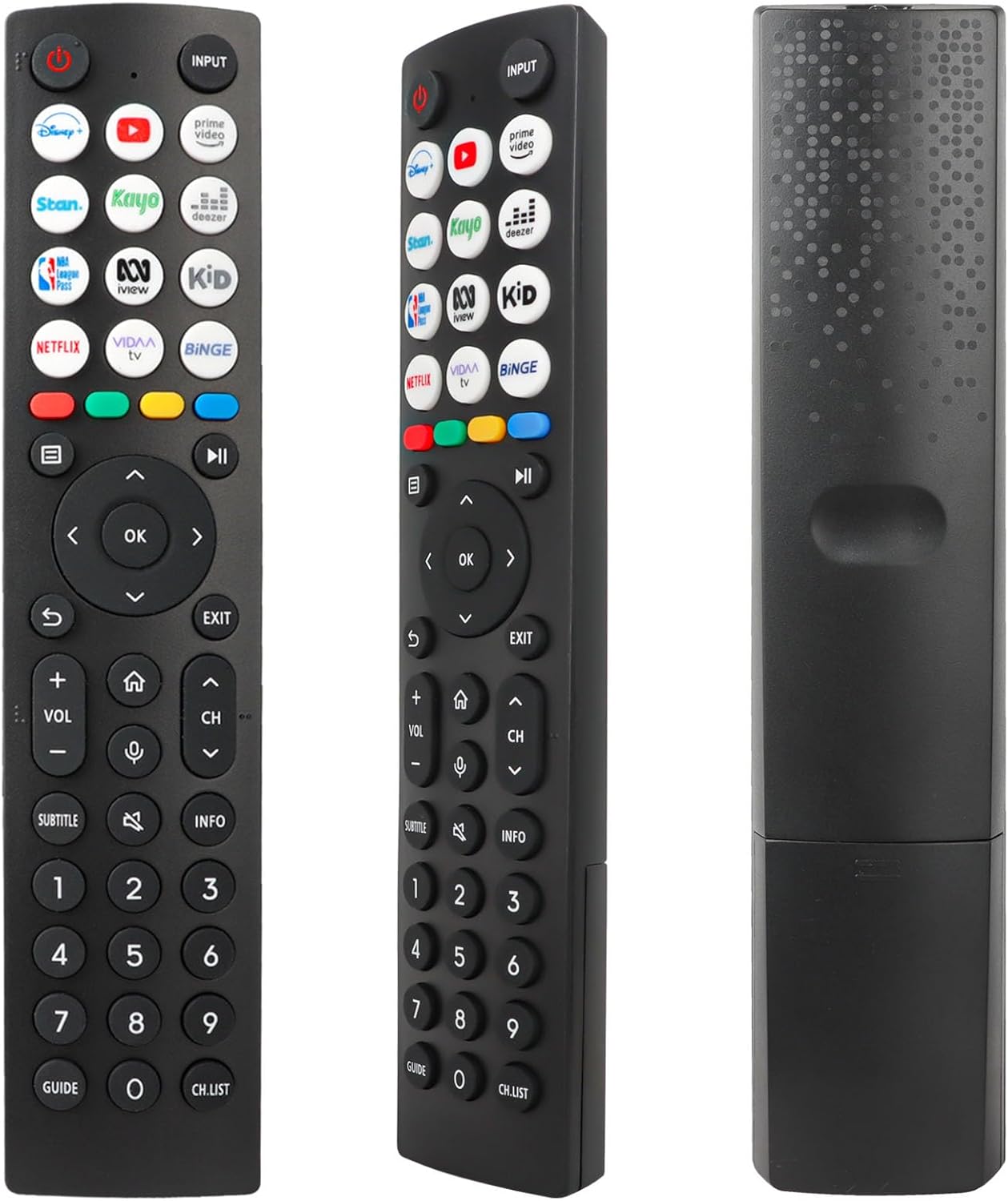
Obraz: Przód view of the remote control, displaying the layout of all buttons.
3.1 Podstawowe funkcje
- Moc (Czerwony okrąg z linią): Włącza lub wyłącza telewizor.
- Wejście: Selects the input source (e.g., HDMI 1, HDMI 2, AV).
- Zwiększanie/zmniejszanie głośności (VOL +/-): Reguluje głośność dźwięku.
- Zmiana kanału w górę/w dół (CH +/-): Zmienia kanał telewizyjny.
- Niemy (Speaker with X): Wycisza lub włącza dźwięk telewizora.
- Panel nawigacyjny (góra, dół, lewo, prawo, OK): Służy do poruszania się po menu i potwierdzania wyborów.
- Z powrotem (Curved Arrow): Powrót do poprzedniego ekranu lub menu.
- Wyjście: Wychodzi z bieżącego menu lub aplikacji.
- Dom (Ikona domu): Accesses the TV's main home screen or smart hub.
- Informacja: Wyświetla informacje o bieżącym programie lub treści.
- Podtytuł: Włącza lub wyłącza napisy.
- Przewodnik: Otwiera elektroniczny przewodnik po programach.
- LISTA KAN.: Wyświetla listę kanałów.
- Przyciski numeryczne (0-9): Wprowadź bezpośrednio numery kanałów.
3.2 klawiszy skrótów
The remote control includes 12 dedicated shortcut buttons for quick access to popular streaming applications. To use these buttons, ensure the corresponding applications are installed and configured on your Hisense Smart TV.
- Disney+: Launches the Disney+ streaming service.
- YouTube: Uruchamia aplikację YouTube.
- Wideo Prime: Launches Amazon Prime Video.
- Stan: Launches the Stan streaming service.
- Kayo: Launches the Kayo Sports streaming service.
- Deezer: Launches the Deezer music streaming service.
- NBA: Launches the NBA League Pass application.
- iView: Launches the ABC iView aplikacja.
- Dziecko: Likely a shortcut to a Kids' content section or app.
- Netflix: Launches the Netflix streaming service.
- Telewizja VIDAA: Launches the VIDAA Smart TV platform interface.
- Binge: Launches the Binge streaming service.
4. Konserwacja
4.1 Wymiana baterii
Replace the batteries when the remote control's response becomes sluggish or stops working. Always replace both AAA batteries at the same time with new ones. Do not mix old and new batteries, or different types of batteries.
4.2 Czyszczenie
Do czyszczenia pilota należy używać miękkiej, suchej ściereczki. W przypadku uporczywych zabrudzeń należy delikatnie przetrzeć.ampPrzetrzyj ściereczkę wodą lub delikatnym, nieściernym środkiem czyszczącym. Unikaj stosowania silnych środków chemicznych lub materiałów ściernych, ponieważ mogą one uszkodzić powierzchnię pilota lub jego wewnętrzne elementy.
4.3 Przechowywanie
Store the remote control in a dry place, away from direct sunlight and extreme temperatures. If the remote will not be used for an extended period, it is advisable to remove the batteries to prevent leakage.
5. Rozwiązywanie Problemów
- Pilot nie odpowiada:
- Sprawdź, czy baterie zostały prawidłowo włożone, z zachowaniem właściwej polaryzacji.
- Wymień baterie na nowe baterie AAA.
- Upewnij się, że między pilotem a odbiornikiem podczerwieni telewizora jest wyraźna linia widzenia. Przeszkody mogą blokować sygnał.
- Upewnij się, że pilot jest skierowany bezpośrednio na telewizor.
- Ograniczony zasięg działania:
- This remote has a maximum range of 10 meters. If you are further away, move closer to the TV.
- Weak batteries can reduce the effective range. Replace them if necessary.
- Shortcut keys not working:
- Ensure the corresponding streaming applications are installed and updated on your Hisense Smart TV.
- Verify your TV has an active internet connection.
- Brak sterowania głosowego:
- This remote control operates via infrared and does not support voice control functionality. This is a design characteristic, not a malfunction.
6. Specyfikacje
| Funkcja | Opis |
|---|---|
| Marka | YiBiChin |
| Nazwa modelu | ERF2R36H |
| Technologia łączności | Podczerwony |
| Kompatybilne urządzenia | Hisense Smart UHD 4K Televisions |
| Funkcja specjalna | Nie wymaga programowania |
| Kolor | Czarny |
| Liczba przycisków | 12 shortcut buttons plus standard controls |
| Typ kontrolera | Kontrola na podczerwień |
| Maksymalny zasięg | 10 metrów |
| Wymagania dotyczące baterii | 2 baterie AAA (brak w zestawie) |
7. Wsparcie
If you receive an incorrect or damaged remote control, please contact the seller for assistance. They will respond as soon as possible to provide a satisfactory solution.
Prosimy zachować tę instrukcję do wykorzystania w przyszłości.
Ask a question about this manual
Ask about setup, troubleshooting, compatibility, parts, safety, or missing instructions. Manuals+ will review the question and use this page’s manual context to help answer it.