1. Wprowadzenie
This manual provides essential information for the safe and efficient use of the SPACSCO-26G A1 N55-PAC-1100W 341-415-01 Switch Power Supply. Please read this manual thoroughly before installation, operation, or maintenance to ensure proper functionality and to prevent damage or injury. This power supply is designed for specific industrial and scientific applications, providing reliable power to compatible systems.
2. Informacje dotyczące bezpieczeństwa
WARNING: Risk of electric shock. Do not open the power supply unit. Refer all servicing to qualified personnel.
- Ensure the power supply is disconnected from the main power source before installation, removal, or maintenance.
- Operate the power supply within the specified voltage i aktualne oceny.
- Nie wystawiaj urządzenia na działanie wilgoci, ekstremalnych temperatur ani środowiska powodującego korozję.
- Zapewnij prawidłowe uziemienie sprzętu.
- Only use compatible cables and connectors.
3. Koniec produktuview
The N55-PAC-1100W is a high-efficiency AC-DC power converter designed for reliable performance in demanding environments. It features robust construction and standard connectors for integration into compatible switch systems.
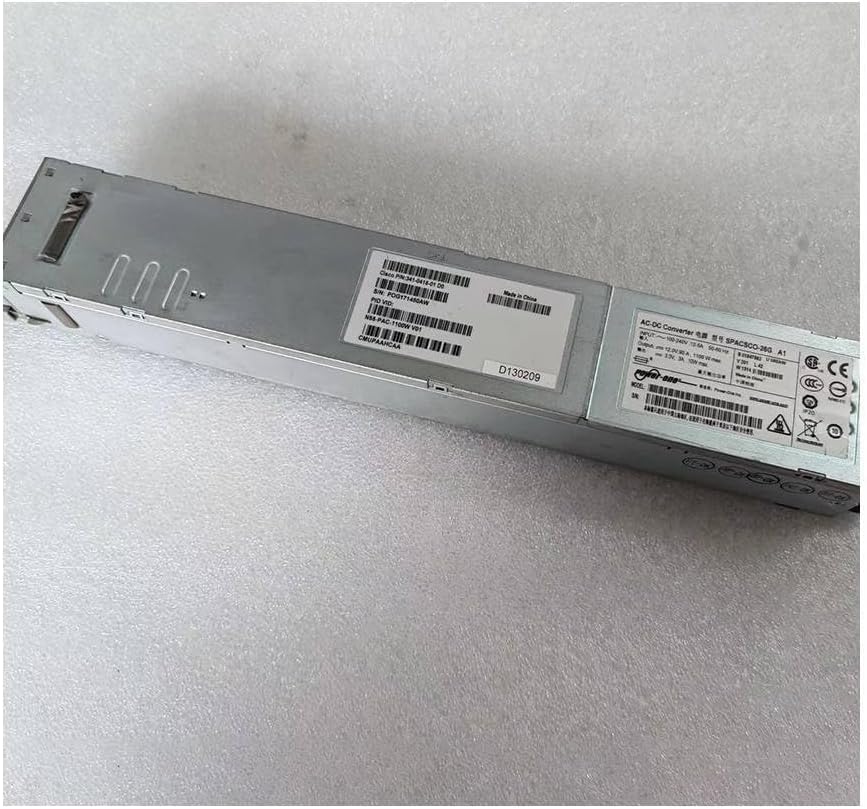
Rysunek 3.1: Ogólnie view of the N55-PAC-1100W power supply unit, showing its elongated metallic casing.
3.1. Identification Labels
The power supply unit includes several labels providing critical information such as model number, serial number, and electrical specifications.

Rysunek 3.2: Zbliżenie view of the product label, displaying the model number N55-PAC-1100W V01, Cisco P/N: 341-0415-01 D0, and serial number POG171450AW. This label also indicates "Made in China" and various compliance marks.

Rysunek 3.3: Szczegółowy view of the power supply's main label, showing input voltage (100-240V), current (12.0A-6.0A), frequency (50-60Hz), and output (12.0V, 91.7A, 1100W max). It also includes safety certifications like CE, UL, and EAC.
3.2. Connectors and Indicators
The power supply features a standard AC input connector and status indicators on the front panel, along with a multi-pin DC output connector on the rear.

Figure 3.4: Front panel of the power supply, featuring the standard IEC C14 AC power inlet and two LED indicators: 'FAIL' (red) and 'OK' (green), which indicate the operational status of the unit.

Figure 3.5: Rear panel of the power supply, showing the multi-pin DC output connector designed for integration with compatible switch or server chassis. The connector features numerous gold-plated pins for power delivery and signaling.
4. Konfiguracja i instalacja
Follow these steps for proper installation of the power supply unit into your compatible system chassis.
- Przygotowanie: Ensure the system chassis is powered off and disconnected from all power sources.
- Zlokalizuj gniazdo: Identify the designated power supply slot in your system chassis.
- Insert PSU: Carefully slide the N55-PAC-1100W power supply into the slot until it is fully seated and latches securely. Ensure the DC output connector aligns correctly with the chassis backplane.
- Bezpieczna jednostka: If applicable, use any retaining screws or mechanisms to secure the power supply in place.
- Podłącz zasilanie sieciowe: Connect a compatible AC power cord to the power inlet on the front of the power supply.
- Podłącz do gniazdka: Podłącz drugi koniec przewodu zasilającego do uziemionego gniazdka elektrycznego.
- Włączanie: Power on the system chassis. Observe the status indicators on the power supply.

Rysunek 4.1: Strona view of the power supply, demonstrating its compact form factor suitable for hot-swappable installation in compatible network switches or servers.
5. Działanie
Once installed and connected, the power supply operates automatically to provide power to the system. Monitor the status indicators for proper operation.
5.1. Wskaźniki stanu
- OK LED (Green):
- Jednolity zielony: The power supply is operating normally and providing power to the system.
- Wyłączony: The power supply is not receiving AC input, is powered off, or has failed.
- FAIL LED (Red):
- Jednolity czerwony: The power supply has detected an internal fault or an issue with power delivery.
- Wyłączony: The power supply is operating normally or is powered off.
6. Konserwacja
The N55-PAC-1100W power supply is designed for minimal maintenance. However, periodic checks can help ensure its longevity and reliable operation.
- Usuwanie kurzu: Periodically inspect the ventilation openings for dust accumulation. If necessary, gently clean with compressed air to ensure proper airflow and prevent overheating. Ensure the unit is powered off and disconnected before cleaning.
- Kontrola kabla: Regularly check power cables and connectors for any signs of wear, damage, or loose connections. Replace damaged cables immediately.
- Kontrola środowiskowa: Ensure the operating environment remains within the specified temperature and humidity ranges to prevent stress on the components.
7. Rozwiązywanie Problemów
This section provides solutions to common issues you might encounter with the power supply.
| Problem | Możliwa przyczyna | Rozwiązanie |
|---|---|---|
| Power Supply Not Powering On (OK LED Off) |
|
|
| FAIL LED is Solid Red |
|
|
| System Instability or Unexpected Shutdowns |
|
|
8. Specyfikacje
Key technical specifications for the N55-PAC-1100W power supply:
| Atrybut | Wartość |
|---|---|
| Model | N55-PAC-1100W |
| Numer części | 341-415-01 |
| Wejście Voltage | 100-240V AC |
| Częstotliwość wejściowa | 50-60 XNUMX Hz |
| Objętość wyjściatage | 12.0V prądu stałego |
| Maksymalna moc wyjściowa | 1100W (as per label), 1500 Watts (as per specifications) |
| Producent | Ogólny |
| ASIN | B0CSJPCXWK |
| Data pierwszej dostępności | 16 stycznia 2024 r. |
Note: There is a discrepancy between the label's stated max output (1100W) and the product specifications (1500 Watts). Please refer to your system's power requirements for compatibility.
9. Gwarancja i wsparcie
This product is covered by the manufacturer's standard warranty. For specific warranty terms and conditions, please refer to the documentation provided with your purchase or contact the seller directly.
9.1. Wsparcie techniczne
If you encounter issues that cannot be resolved using the troubleshooting guide, or require further assistance, please contact your product vendor or the manufacturer's technical support. Have your product model number (N55-PAC-1100W) and serial number (POG171450AW) ready when contacting support.
Relevant links extracted from product images:
Note: The provided links are placeholders as specific URLs for these identifiers were not available in the input data.


