
1. Wprowadzenie
The NVX XDSP28 is an advanced 8-channel Digital Signal Processor (DSP) designed to enhance your car audio system. It features a 15-band parametric equalizer, adjustable high and low-pass filters, and various crossover types for precise sound customization. With 2 RCA inputs and 8 RCA outputs, built-in Bluetooth for audio streaming, and a remote level controller, the XDSP28 provides comprehensive control over your vehicle's sound environment. This manual provides detailed instructions for installation, operation, and troubleshooting to ensure optimal performance of your device.
2. Informacje dotyczące bezpieczeństwa
- Przed instalacją i użytkowaniem przeczytaj uważnie wszystkie instrukcje.
- Disconnect the vehicle's negative battery terminal before making any electrical connections.
- Zapewnij właściwe uziemienie, aby zapobiec zagrożeniom elektrycznym.
- Nie wystawiaj urządzenia na działanie wilgoci i ekstremalnych temperatur.
- Mount the unit securely to prevent movement during vehicle operation.
- Jeśli nie jesteś pewien któregokolwiek etapu instalacji, skonsultuj się z profesjonalnym instalatorem systemów car audio.
3. Zawartość opakowania
Sprawdź, czy w opakowaniu znajdują się wszystkie elementy:
- NVX XDSP28 Digital Signal Processor Unit
- Remote Level Controller with Cable
- Instrukcja obsługi
- Sprzęt montażowy (śruby itp.)
4. Koniec produktuview
Familiarize yourself with the components and controls of the NVX XDSP28.

Figure 4.1: NVX XDSP28 Front Panel with Labeled Components
- Remote Out Sequencer: Activates other devices in sequence through a remote connection.
- Wejście zdalne (REM IN): Obraca amplifier on automatically with the radio or player.
- Ground Connector (GND): Connect to the battery's negative terminal.
- Positive Power Connector (+BAT): Connect to the battery's positive terminal.
- Wyświetlacz LCD: Displays information and allows interaction with the processor.
- Main Control: A rotating knob to adjust processor system settings and navigate menus.
- Input LED Indicator: Shows when the channel's limiter is active or output is saturated.
- Remote Level Input: Connects the external remote level controller. Controls all eight outputs simultaneously.
- Audio Input (Inputs A, B): Independent RCA connectors for channels A and B.
- Audio Output (Outputs 1-8): RCA connectors for outputting processed audio.
- Wyjściowy wskaźnik LED: Signals when the input signal is at maximum level.
- Wybór wyjścia: Quickly press to adjust output channels or hold to mute.

Rysunek 4.2: Góra view of the NVX XDSP28 unit, showing the main control knob, LCD display, and input/output connections.

Rysunek 4.3: Tył view of the NVX XDSP28, highlighting the power and remote connections.
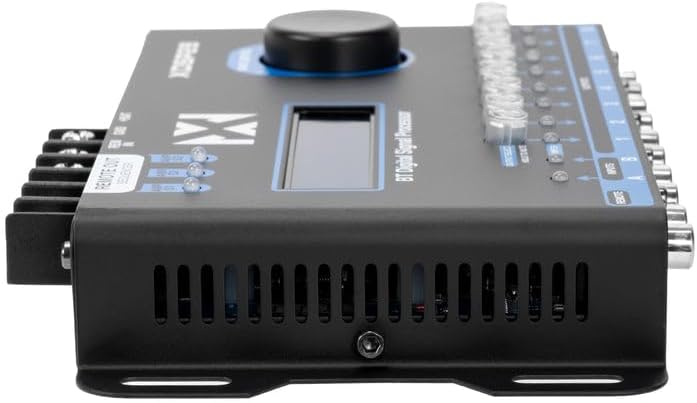
Figure 4.4: The remote level controller for the NVX XDSP28, used for simultaneous output control.
5. Konfiguracja i instalacja
Prawidłowa instalacja jest kluczowa dla optymalnej wydajności. Postępuj dokładnie według poniższych kroków:
- Montowanie: Select a secure, dry location in your vehicle, away from heat sources and moisture. Use the provided mounting hardware to firmly attach the DSP unit.
- Połączenia zasilania:
- Połącz +NIETAT terminal to the vehicle's positive battery terminal (or a constant 12V source) using appropriate gauge wire and an inline fuse (not included).
- Połącz GND zacisk do czystej, niemalowanej metalowej powierzchni podwozia pojazdu, zapewniając solidne połączenie uziemiające.
- Połącz REM W terminal to the remote turn-on output of your head unit or ignition switch.
- Połączenia wejściowe audio: Podłącz wyjścia RCA jednostki głównej do Inputs A I B on the XDSP28.
- Połączenia wyjściowe audio: Połącz Wyjścia 1-8 of the XDSP28 to the RCA inputs of your amplifiers. Ensure correct channel assignment for your speaker configuration.
- Remote Level Controller: Plug the remote level controller cable into the ZDALNY port on the DSP unit. Mount the controller in an accessible location for easy adjustment.
- Początkowe uruchomienie: Reconnect the vehicle's negative battery terminal. The DSP should power on, and the LCD display will illuminate.
6. Działanie
The NVX XDSP28 offers extensive control over your audio system. All settings are adjusted via the Main Control knob and the LCD display.
6.1 Nawigacja po menu
- Obróć Kontrola główna pokrętło do przewijania opcji menu.
- Naciśnij Kontrola główna knob to select an option or confirm a setting.
- Naciśnij i przytrzymaj Kontrola główna knob to exit a menu or return to the previous screen.
6.2 Equalization (EQ)
The XDSP28 features a 15-band parametric equalizer for precise frequency adjustments.
- Graphic EQ Presets: Select from 12 pre-defined graphic equalization presets such as Rock, Hip Hop, Pop, Vocal, and more.
- Korektor parametryczny: Manually adjust gain, frequency, and Q-factor for each of the 15 bands on both input and output channels.
6.3 Crossover Function
Configure high-pass and low-pass filters for each output channel to optimize speaker performance.
- Adjust cut frequencies for high-pass and low-pass filters.
- Select various crossover types and filter slopes (e.g., Butterworth, Linkwitz-Riley).
6.4 Time Alignment and Phase
Achieve perfect sound staging by adjusting the delay for each output channel.
- Adjust time delays in 0.02 ms increments.
- Set phase adjustments to 0° or 180° for each output.
6.5 Independent Gain and Limiter
- Independent Gain: Adjust the gain level for each output channel individually.
- Ogranicznik: The integrated Limiter with Dynamic Attack-Release system protects your amplifiers and speakers from over-excursion and clipping.
6.6 Generator dźwięku
Utilize the built-in audio tone generator for precise tuning and system diagnostics.
- Generate frequency sweeps.
- Generate pink noise for RTA (Real-Time Analyzer) measurements.
6.7 Łączność Bluetooth
The XDSP28 features built-in Bluetooth for wireless audio streaming from your mobile device.
- Pair your device with the XDSP28 via Bluetooth settings on your phone.
- Bluetooth is for audio playback only; it does not support app-based control of DSP settings.
6.8 Remote Level Controller
The external remote level controller allows for convenient, simultaneous adjustment of all eight output levels.
7. Konserwacja
- Utrzymuj urządzenie w czystości i bez kurzu. Do czyszczenia używaj miękkiej, suchej ściereczki.
- Unikaj stosowania silnych środków chemicznych i ściernych środków czyszczących.
- Ensure all connections remain secure. Periodically check wiring for any signs of wear or damage.
8. Rozwiązywanie Problemów
| Problem | Możliwa przyczyna | Rozwiązanie |
|---|---|---|
| No power to the DSP. | Incorrect power wiring; Blown fuse; Loose ground connection. | Check +BAT, GND, and REM IN connections. Verify fuse integrity. Ensure a solid ground connection. |
| Brak dźwięku. | Incorrect input/output connections; DSP muted; Amplifier not powered on; Incorrect source selection. | Verify all RCA connections. Check DSP mute status (Output Select button). Ensure amplifiers are receiving remote turn-on signal. Confirm correct input source (A, B, or A+B). |
| Zniekształcona lub słaba jakość dźwięku. | Incorrect EQ settings; Improper crossover settings; Input signal too high/low; Limiter engaged excessively. | Adjust EQ settings. Review crossover frequencies and slopes. Check input gain levels. Monitor Input LED indicators for clipping. |
| Problemy z połączeniem Bluetooth. | Urządzenie nie jest w trybie parowania; Zakłócenia; Jest już połączone z innym urządzeniem. | Ensure Bluetooth is enabled on your device and the DSP. Disconnect from other Bluetooth devices. Move closer to the DSP. |
| Main Control knob is overly sensitive. | Characteristic of the control mechanism. | Exercise caution and precision when rotating and pressing the knob for menu navigation and setting adjustments. |
| Remote Level Controller causes input glitches. | Potential unit-specific issue or interference. | Ensure the remote cable is securely connected and not damaged. If issues persist, try operating without the remote controller to isolate the problem. Contact support if necessary. |
9. Specyfikacje
| Funkcja | Specyfikacja |
|---|---|
| Model | NVX XDSP28 |
| Liczba kanałów | 8 (wyjście) |
| Kanały wejściowe | 2 RCA |
| Kanały wyjściowe | 8 RCA (up to 2 Volts output) |
| Wyrównywacz | 15-pasmowy korektor parametryczny |
| Stosunek sygnału do szumu | > 94 dB |
| Całkowite zniekształcenie harmoniczne (THD) | 0.01% |
| Time Adjustment Increments | 0.02 milisekund |
| Regulacja fazy | 0° lub 180° |
| Graphic EQ Presets | 12 (Rock, Hip Hop, Pop, Vocal, etc.) |
| Minimalna podaż objtage | 10 V (prąd stały) |
| Maksymalna objętość dostawtage | 16 V (prąd stały) |
| Wymiary (dł. x szer. x wys.) | 7.87" x 3.98" x 1.46" (200 mm x 101 mm x 37 mm) |
| Waga przedmiotu | 0.7 kilograma |
| Bluetooth | Built-in (for audio streaming) |
| Remote Level Controller | Included, for simultaneous output control |
10. Gwarancja i wsparcie
NVX products are designed for reliability and performance. For specific warranty details, please refer to the warranty card included with your product or contact the retailer where the product was purchased. Keep your proof of purchase for warranty claims.
For technical assistance, troubleshooting beyond this manual, or service inquiries, please contact NVX customer support or the authorized dealer. Contact information can typically be found on the manufacturer's official webna stronie internetowej lub u sprzedawcy.