
1. Rozpoczęcie pracy
1.1. Co znajduje się w pudełku
Before you begin, ensure all components are present in your product packaging:
- Smartfon Xiaomi Redmi Note 13 4G LTE
- Kabel USB
- Adapter ścienny
- Wysuwacz tacy na kartę SIM
- Fast Car charger (Note: This item is listed in the product details, but typically a car charger is a separate accessory. Please verify your specific package contents.)
1.2. Urządzenie ponadview
Familiarize yourself with the physical layout of your Redmi Note 13 4G LTE.

Obraz: przód i tył view of the Xiaomi Redmi Note 13 4G LTE in Ice Blue, highlighting the display and the triple camera setup on the rear.
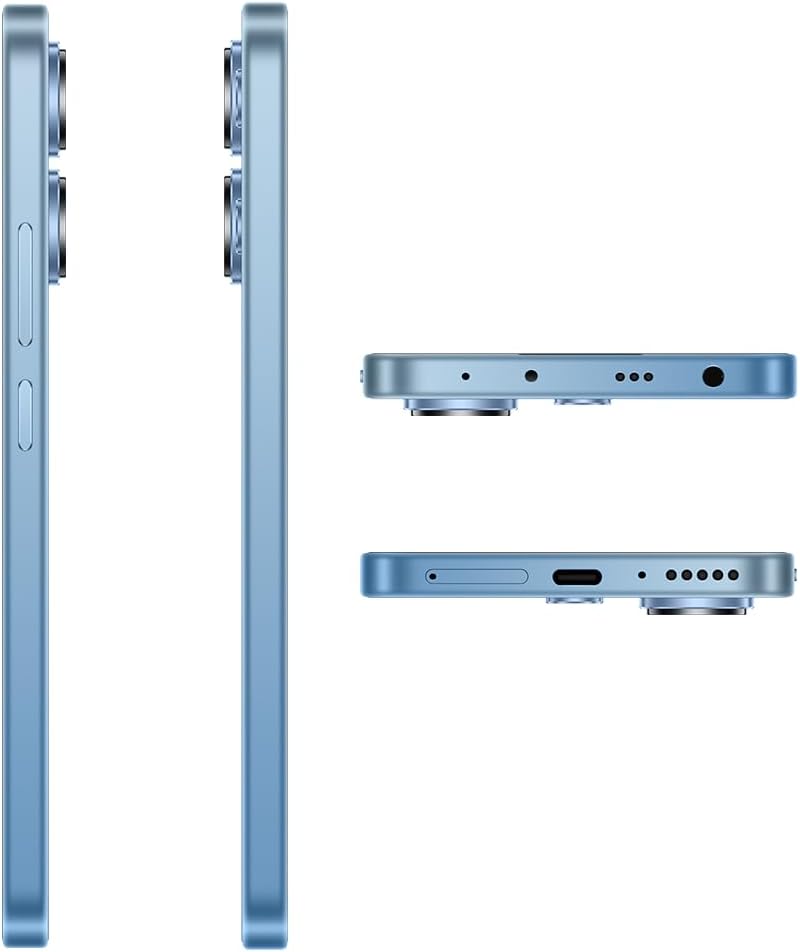
Obraz: Szczegółowy views of the Xiaomi Redmi Note 13 4G LTE's sides, top, and bottom, illustrating the placement of the SIM tray, USB port, 3.5mm headphone jack, and speaker grilles.
1.3. Instalacja karty SIM i MicroSD
The Redmi Note 13 4G LTE supports a hybrid SIM tray, allowing for either two SIM cards or one SIM card and one MicroSD card for expanded storage.
- Znajdź tackę na kartę SIM znajdującą się z boku urządzenia.
- Włóż narzędzie do wyjmowania tacki karty SIM w mały otwór obok tacki i delikatnie naciśnij, aż tacka wyskoczy.
- Umieść kartę(y) Nano-SIM i/lub kartę MicroSD w przeznaczonych do tego gniazdach na tacce. Upewnij się, że złote styki są skierowane w dół.
- Ostrożnie włóż tackę z powrotem do urządzenia, aż zatrzaśnie się na swoim miejscu.
Note: This device is designed for the USA market and primarily works on T-Mobile, Mint, Tello, or any network under the T-Mobile umbrella. Outside the USA, it works with any GSM carrier SIM. An already activated SIM card is required for network functionality.
1.4. Pierwsze włączenie i ładowanie
To power on your device for the first time, press and hold the Power button until the Xiaomi logo appears. If the battery is depleted, connect the device to the wall adapter using the provided USB cable to charge it. It is recommended to fully charge the device before first use.
2. Obsługa urządzenia
2.1. Wyświetlacz i nawigacja
The Redmi Note 13 features a 6.67-inch FHD+ AMOLED DotDisplay with a refresh rate of up to 120Hz, providing a smooth and responsive user experience. Navigation is primarily done via the touchscreen.

Obraz: Przód view Xiaomi Redmi Note 13 4G LTE, pokażasing its vibrant AMOLED display and punch-hole front camera.
- Gesty na ekranie dotykowym: Swipe, tap, pinch-to-zoom, and long-press are standard gestures for interacting with the MIUI 14 operating system.
- Regulacja jasności: The display offers 4096 levels of brightness for comfortable viewing. Adjust this in the Quick Settings panel or Display settings.
- Funkcje pielęgnacji oczu: The device includes SGS eye care certification and circadian rhythm adjustment to reduce eye strain, especially during night use.
2.2. Funkcje aparatu
Capture high-quality photos and videos with the advanced camera system.

Image: Close-up of the Xiaomi Redmi Note 13 4G LTE's rear camera module, featuring the 108MP main sensor, ultra-wide, and macro lenses, along with the LED flash.
- Główna kamera: 108MP (f/1.8) ultra-clear main camera with built-in zoom technology for telephoto effects.
- Aparat ultraszerokokątny: 8MP (f/2.2) for capturing broader scenes.
- Kamera makro: 2MP (f/2.4) for detailed close-up shots.
- Przednia kamera: 13MP (wide) for selfies and video calls.
- Silnik obrazowania Xiaomi: Ensures faster startup speeds and clearer photos.
2.3. Łączność
Twoje urządzenie obsługuje różne opcje łączności:
- Komórkowy: Dual 4G support (SIM1 + Hybrid SIM/MicroSD). Supports various LTE, WCDMA, and GSM bands.
- Wi-Fi: 802.11a/b/g/n/ac protocol for high-speed internet access.
- Bluetooth: Wersja 5.2 do podłączania akcesoriów bezprzewodowych.
- GPS: GPS/AGPS and Glonass for accurate location services.
2.4. Funkcje audio
The Redmi Note 13 4G LTE is equipped with dual speakers for an immersive audio experience and a 3.5mm headphone jack for wired audio connections. It also supports Hi-Res Audio.
3. Konserwacja
3.1. Pielęgnacja baterii
The device is powered by a 5000 mAh Lithium Polymer battery. To maximize battery life:
- Unikaj ekstremalnych temperatur.
- Należy używać oryginalnej ładowarki i kabla dołączonego do zestawu.
- Unikaj częstego całkowitego rozładowywania baterii.
- Odłącz ładowarkę, gdy akumulator będzie w pełni naładowany.
3.2. Czyszczenie urządzenia
Use a soft, lint-free cloth to clean the screen and body of the phone. Avoid using harsh chemicals or abrasive materials that could damage the finish or screen coating.
3.3. Aktualizacje oprogramowania
Regularly check for and install system updates to ensure your device has the latest features, security patches, and performance improvements. You can usually find this option in the Settings menu under "About phone" or "System update."
4. Rozwiązywanie Problemów
If you encounter issues with your Redmi Note 13 4G LTE, try the following common troubleshooting steps:
- Urządzenie nie odpowiada: Naciśnij i przytrzymaj przycisk zasilania przez około 10–15 sekund, aby wymusić ponowne uruchomienie.
- Problemy z siecią: Check if your SIM card is properly inserted. Toggle Airplane Mode on and off. Restart the device. Verify your mobile data settings.
- Łączność Wi-Fi: Zrestartuj router Wi-Fi. Usuń sieć z telefonu i połącz się ponownie.
- Awarie aplikacji: Wyczyść pamięć podręczną i dane problematycznej aplikacji w Ustawieniach > Aplikacje. Jeśli problem nadal występuje, odinstaluj i zainstaluj aplikację ponownie.
- Szybkie rozładowywanie baterii: Review app usage in battery settings. Reduce screen brightness. Disable unnecessary background apps or features like GPS, Bluetooth, and Wi-Fi when not in use.
- Niska wydajność: Close unused apps. Clear cache. Consider performing a factory reset as a last resort (back up your data first).
For more complex issues, refer to the official Xiaomi support webodwiedź witrynę lub skontaktuj się z obsługą klienta.
5. Specyfikacje
Detailed technical specifications for the Xiaomi Redmi Note 13 4G LTE (Model: 23129RA5FL):
| Funkcja | Specyfikacja |
|---|---|
| Nazwa modelu | Uwaga 13 4G |
| System operacyjny | MIUI 14 |
| Edytor | Qualcomm Snapdragon 4 Gen 1 (2X Cortex-A78 @ 2.0GHz; 6X Cortex-A55 @ 1.8GHz) |
| Procesor graficzny | Adreno 619 |
| Wyświetlacz | 6.67 Inches FHD+ AMOLED DotDisplay, 120Hz Refresh Rate, 1200nits brightness, 4,500,000:1 Contrast Ratio |
| Rezolucja | 1920x1080 |
| Pamięć RAM | 8 GB |
| Pojemność magazynowa | 256 GB |
| Główna kamera | 108 MP (f/1.8) |
| Aparat ultraszerokokątny | 8 MP (f/2.2) |
| Aparat makro | 2 MP (f/2.4) |
| Przednia kamera | 13 MP |
| Bateria | 5000 mAh Lithium Polymer (5000 Watt Hours) |
| Technologie bezprzewodowe | Bluetooth 5.2, Wi-Fi (802.11a/b/g/n/ac), Cellular (4G LTE, WCDMA, GSM) |
| Gniazdo audio | 3.5 mm |
| Wymiary | 7.09 x 3.54 x 2.36 cala |
| Waga przedmiotu | 1.04 funta (470 gramów) |
| Kolor | Ice Blue Global ROM |
6. Gwarancja i wsparcie
6.1. Gwarancja na produkt
Your Xiaomi Redmi Note 13 4G LTE comes with a standard manufacturer's warranty. Please refer to the warranty card included in your product packaging or visit the official Xiaomi webSzczegółowe warunki gwarancji, jej czas trwania i procedury serwisowe można znaleźć na stronie internetowej.
6.2. Obsługa klienta
For technical assistance, service inquiries, or further information, please contact Xiaomi customer support through their official channels. You can typically find contact information on the Xiaomi global website or within the support section of the MIUI operating system on your device.
Online resources such as FAQs, user forums, and software downloads may also be available on the official Xiaomi support portal.