
1. Wprowadzenie
This manual provides detailed instructions for the installation, operation, and maintenance of your NUCOUN VCP-8370 Thermal Receipt Printer. Please read this manual thoroughly before using the printer to ensure proper function and longevity.

Image: The NUCOUN VCP-8370 Thermal Receipt Printer, a compact device designed for efficient receipt printing.
2. Funkcje produktu
- Szeroka kompatybilność: Supports ESC/POS commands and is compatible with Windows (2003/XP/7/8/10/11), Mac, and Linux operating systems, as well as OPOS. Note: Does not support Wi-Fi, Bluetooth, Square, or PayPal systems.
- Szybkie drukowanie: Achieves print speeds up to 220 mm/s. Utilizes thermal printing technology, eliminating the need for ink cartridges or ribbons, which reduces operating costs.
- Wysoka jakość wydruku: Features a high-definition print head with a resolution of 203 DPI, ensuring clear print quality with low operational noise.
- Automatic Cutter: Equipped with an auto-cutter designed for continuous use up to 1 million cuts, preventing manual tearing and label damage.
- Multi-function Interfaces: Includes USB, LAN (Ethernet), and RJ11 cash drawer interfaces (suitable for DC 24V/2.5A cash drawers).
- Ekonomiczna konstrukcja: Simple, elegant, dustproof, and waterproof button design. Features a sound and light alarm system to prevent missed receipts.
- Instalacja oszczędzająca miejsce: Two keyhole slots are provided for wall mounting, optimizing counter space.
- Wszechstronne zastosowania: Suitable for various environments including supermarkets, restaurants, medical facilities, banking, and government services.
3. Zawartość opakowania
Po otwarciu opakowania należy sprawdzić, czy zawiera ono wszystkie poniższe elementy:
- Termiczna drukarka pokwitowań NUCOUN VCP-8370
- Przewód zasilający
- Kabel danych USB
- Instrukcja obsługi
- Rolka papieru termicznego (rolka początkowa)

Image: The printer and its included accessories: power cord, USB data cable, and instruction manual.
4. Koniec produktuview
Familiarize yourself with the various components and interfaces of the VCP-8370 printer:

Image: Labeled diagram of the printer's front and rear panels, highlighting buttons and connection ports.
- Przycisk przełącznika: Power on/off the printer.
- Kontrolka: Displays printer status (e.g., power on, error, printing).
- Przycisk podawania: Manually feeds paper.
- Przycisk otwierania pokrywy: Zwalnia górną pokrywę w celu załadowania papieru.
- Port USB: Connects the printer to a computer via USB cable.
- Port LAN: Connects the printer to a network via Ethernet cable.
- CASH Port (RJ11): Connects to a compatible cash drawer (DC 24V/2.5A).
- Port zasilania: Łączy zasilacz.
5. Instrukcje konfiguracji
5.1. Montaż rolki papieru
- Press the "Cover Open Button" to open the printer's top cover.
- Insert the 80mm thermal paper roll into the paper compartment, ensuring the paper feeds out from the top and the leading edge is straight.
- Pull a small amount of paper past the cutter.
- Zamknij górną pokrywę, aż zatrzaśnie się na swoim miejscu.

Obraz: Szczegółowy view of the paper compartment, illustrating the correct placement for an 80mm thermal paper roll.
5.2. Podłączanie drukarki
- Podłączenie zasilania: Podłącz zasilacz do portu zasilania drukarki, a następnie do gniazdka sieciowego.
- Połączenie USB: For direct connection to a computer, use the provided USB data cable to connect the printer's USB port to an available USB port on your computer.
- Połączenie LAN (Ethernet): Aby drukować w sieci, podłącz kabel Ethernet do portu LAN drukarki i routera lub przełącznika sieciowego.
- Podłączenie szuflady kasowej: If using a cash drawer, connect its RJ11 cable to the printer's CASH port. Ensure the cash drawer is compatible with DC 24V/2.5A.
5.3. Instalacja sterownika
To use the printer with your computer, you must install the appropriate drivers. Drivers are available for Windows, Mac, and Linux operating systems.
- Visit the official NUCOUN webwitryna (np. www.nucoun.com) and navigate to the "Support" or "Downloads" section.
- Locate and download the driver package specific to the VCP-8370 model and your operating system.
- Follow the on-screen instructions to complete the driver installation. A successful installation will allow your computer to recognize the printer.
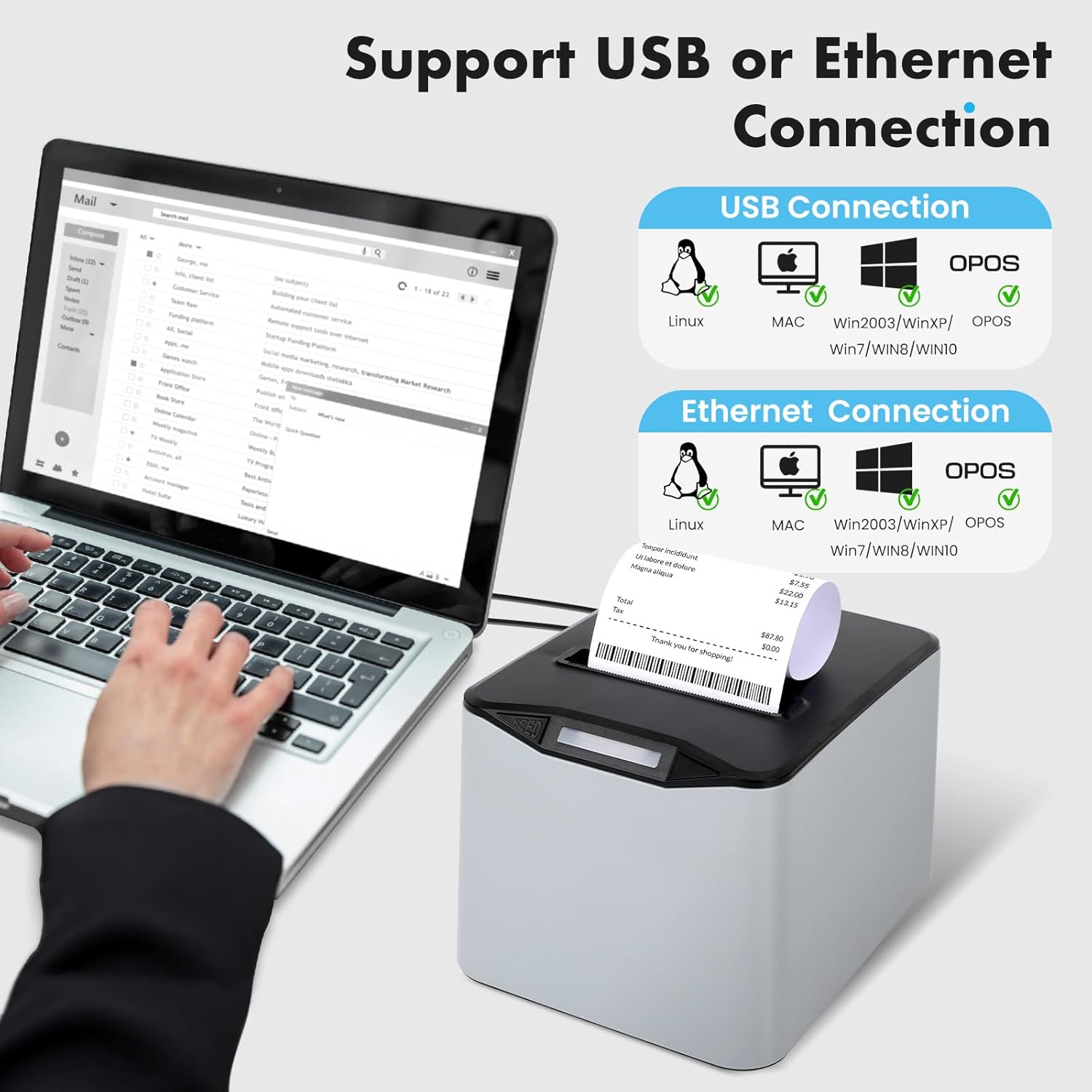
Image: Visual representation of USB and Ethernet connectivity options and supported operating systems.
6. Instrukcja obsługi
6.1. Włączanie/wyłączanie zasilania
- To power on, press the "Switch Button". The indicator light will illuminate.
- To power off, press the "Switch Button" again. The indicator light will turn off.
6.2. Podstawowe drukowanie
Once the printer is connected and drivers are installed, you can print receipts from your POS software or application. The printer will automatically cut the receipt after printing.

Image: The printer in operation, demonstrating its fast and clear printing of receipts.
6.3. Manual Paper Feed
Press the "Feed Button" to manually advance the paper roll by a small increment.
6.4. System alarmowy
The printer is equipped with a sound and light alarm system to notify users of printing status:
- A blue light flash indicates the printer is powered on.
- A red light flash indicates active printing or a potential error, ensuring no receipts are missed.
7. Zgodność
The NUCOUN VCP-8370 Thermal Receipt Printer offers broad compatibility:
- Systemy operacyjne: Windows (Win2003, WinXP, Win7, Win8, Win10, Win11), Mac, and Linux.
- Zestaw poleceń: ESC/POS compatible.
- Interfejsy: USB, LAN (Ethernet), and RJ11 for cash drawers.
Important Note: This printer does NOT support Wi-Fi, Bluetooth, Square, or PayPal systems.
8. Konserwacja
Regular maintenance ensures optimal performance and extends the lifespan of your thermal receipt printer.
8.1. Czyszczenie głowicy drukującej
- Wyłącz drukarkę i odłącz przewód zasilający.
- Open the printer cover and remove the paper roll.
- Gently wipe the thermal print head (the ceramic strip) with a cotton swab lightly dampened with isopropyl alcohol. Allow it to dry completely before closing the cover and reconnecting power.
8.2. Cleaning the Roller
- With the printer off, use a soft, lint-free cloth dampened with isopropyl alcohol to clean the rubber roller.
- Rotate the roller manually to clean its entire surface.
8.3. Ogólne czyszczenie
- Przetrzyj obudowę drukarki miękką, suchą ściereczką. Nie używaj środków czyszczących o właściwościach ściernych ani rozpuszczalników.
- Ensure no dust or debris accumulates in the paper exit slot or around the auto-cutter mechanism.
9. Rozwiązywanie Problemów
W tej sekcji opisano typowe problemy, które mogą wystąpić podczas korzystania z drukarki.
| Problem | Możliwa przyczyna | Rozwiązanie |
|---|---|---|
| Drukarka się nie włącza. | Przewód zasilający nie jest podłączony; gniazdko elektryczne jest uszkodzone. | Upewnij się, że przewód zasilający jest prawidłowo podłączony. Sprawdź gniazdko elektryczne, podłączając je do innego urządzenia. |
| No printing output. | No paper; paper loaded incorrectly; driver not installed; printer not selected. | Check paper roll and reload if necessary. Verify driver installation and printer selection in your software. |
| Słaba jakość wydruku (blade, puste linie). | Low quality thermal paper; dirty print head; print head damage. | Use high-quality thermal paper. Clean the print head as described in the Maintenance section. If problem persists, contact support. |
| Zacięcie papieru. | Papier załadowany nieprawidłowo; obcy przedmiot na ścieżce papieru. | Turn off printer, open cover, carefully remove jammed paper. Ensure paper is loaded correctly. |
| Cash drawer does not open. | Incorrect connection; cash drawer not compatible; software command issue. | Verify RJ11 cable connection. Ensure cash drawer is DC 24V/2.5A compatible. Check POS software settings. |
| Driver installation issues. | Incorrect driver version; corrupted download. | Pobierz najnowsze sterowniki z www.nucoun.com (Support section) and ensure it matches your OS. |
10. Specyfikacje techniczne
| Funkcja | Specyfikacja |
|---|---|
| Nazwa modelu | VCP-8370 |
| Marka | NUCOUN |
| Technologia druku | Termiczny |
| Rozdzielczość wydruku | 203 DPI |
| Maksymalna prędkość drukowania | 220 mm/s |
| Szerokość papieru | 80 mm (3 1/8 cala) |
| Maksymalny rozmiar nośnika | 80mm x 230mm (supports larger 230' rolls) |
| Łączność | USB, Ethernet (LAN) |
| Port szuflady na gotówkę | RJ11 (DC 24V/2.5A compatible) |
| Żywotność automatycznej obcinarki | 1 milion cięć |
| Zgodność z systemem operacyjnym | Windows (2003/XP/7/8/10/11), Mac, Linux, OPOS |
| Wymiary produktu | 8 x 7.52 x 5.47 cala (20.32 x 19.10 x 13.89 cm) |
| Waga przedmiotu | 2.7 funtów (1.22 kg) |
| Funkcja specjalna | Auto Cutter, Sound and Light Alarm |
11. Gwarancja i wsparcie
11.1. Informacje o gwarancji
The NUCOUN VCP-8370 Thermal Receipt Printer comes with a ograniczona gwarancja. Please refer to the warranty card included in your package or visit the official NUCOUN webna stronie szczegółowe warunki.
11.2. Obsługa klienta
For technical assistance, troubleshooting, or any inquiries regarding your NUCOUN product, please contact our professional after-sales support team. You can find contact information on the official NUCOUN webstronie lub w dołączonej dokumentacji.
Webstrona: www.nucoun.com