1. Wprowadzenie
Thank you for choosing the Symcode USB 1D Barcode Scanner. This handheld wired CCD laser barcode reader is designed for efficient and accurate scanning of 1D barcodes from both printed materials and digital screens. It is an ideal solution for various applications including warehouses, libraries, supermarkets, and point-of-sale (POS) systems.
This manual provides comprehensive instructions on setting up, operating, and maintaining your scanner to ensure optimal performance and longevity.

Ogólnie view of the Symcode 1D Barcode Scanner with its USB cable.
2. Główne cechy
- 1D CCD Image Scanning Technology: Equipped with an advanced CCD sensor for quick and accurate capture of 1D codes from paper and screens, including deformed, smudged, damaged, fuzzy, or reflective barcodes.
- Wszechstronne tryby skanowania: Features Key Trigger mode, Auto-induction mode, and Continuous Mode for flexible operation.
- Trwała konstrukcja: Ergonomic design with high-quality ABS material ensures resistance to drops from 2m high, providing long service life.
- Extensive 1D Barcode Support: Compatible with UPC/EAN, UCC/EAN 128, Code 39, Code 93, Code 128, Codabar, Interleaved 2 of 5, Discrete 2 of 5, MSI, Code 11, RSS variants, Chinese 2 of 5, and more.
- Możliwość dostosowania wyników: Offers 180 configurable options for prefix, suffix, and termination strings.
- Szeroki zakres zastosowań: Suitable for use in supermarkets, convenience stores, warehouses, libraries, bookstores, drugstores, and retail shops for various management tasks.
3. Zawartość opakowania
Sprawdź, czy w przesyłce znajdują się wszystkie elementy:
- 1 x Symcode CCD Barcode Scanner
- 1 x Instrukcja obsługi (ten dokument)
- 1 x kabel USB
4. Konfiguracja
4.1 Podłączanie skanera
The Symcode 1D Barcode Scanner is a plug-and-play device. No drivers are typically required for most operating systems.
- Locate an available USB port on your computer (Desktop, Laptop) or compatible device.
- Insert the USB connector of the scanner's cable into the USB port.
- The scanner will typically emit a short beep and/or a light indicator will turn on, signifying successful connection and readiness for use.

The scanner connects to a laptop via its 1.6m (5.2ft) USB cable, compatible with Linux, Windows, iOS, and Android operating systems.
5. Obsługa skanera
5.1 Podstawowe skanowanie
To scan a barcode, point the scanner's laser beam at the barcode you wish to read and press the trigger button (if in Key Trigger mode). The scanner will emit a successful scan beep and the data will be transmitted to your connected device as if typed by a keyboard.

The scanner can read 1D barcodes from both printed labels and digital screens, such as a smartphone display.
5.2 Tryby skanowania
Skaner obsługuje trzy podstawowe tryby skanowania:
- Kluczowy tryb wyzwalania: Press the trigger to activate the scan. Release to stop.
- Tryb automatycznej indukcji: Skaner automatycznie wykrywa kod kreskowy w swoim polu view i skanuje bez konieczności naciskania spustu.
- Tryb ciągły: The scanner continuously emits the laser beam, scanning any barcode that passes through its field.
Refer to the included configuration guide (often a set of barcodes) to switch between these modes. If auto-sensing is inactive, scan the appropriate configuration barcode to enable it.
5.3 Ustawienia dźwięku
The scanner provides audible feedback for successful scans. You can turn this sound on or off according to your preference by scanning specific configuration barcodes.
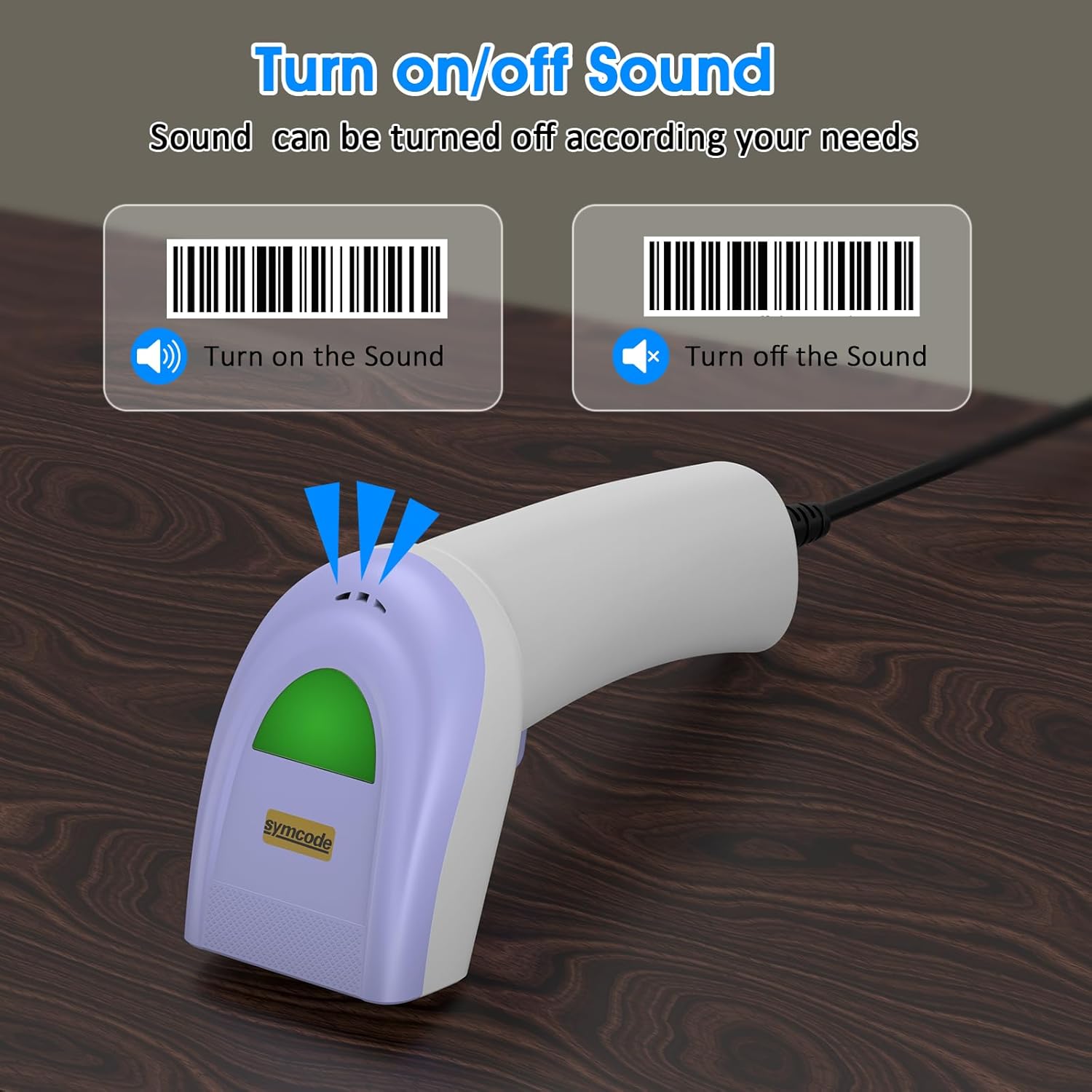
Scan specific barcodes to enable or disable the scanner's sound feedback.
5.4 Customizing Data Output (Prefix/Suffix)
The scanner allows you to add custom prefixes or suffixes to the scanned barcode data. This feature is useful for integrating scanned data into specific software or databases that require additional identifiers.

The scanner can customize scanned data by adding prefixes or suffixes. Examples: RL123456789 (with prefix), 12345RL6789 (with middle text), 123456789RL (with suffix).
5.5 Obsługiwane typy kodów kreskowych
The Symcode 1D Barcode Scanner has excellent decoding ability for a wide range of common 1D barcodes.

The scanner supports various 1D barcode types, including CODE 128 (1234567890), UPC A (123456789012), Frauded Barcode (1234567890135), Profiled Barcode (4603146002134), Industrial 2 of 5 (987612), ITF, Folded Barcode, and Color Barcode.
6. Konserwacja
Aby zapewnić długowieczność i optymalną wydajność skanera kodów kreskowych, należy przestrzegać poniższych prostych wskazówek dotyczących konserwacji:
- Czyszczenie: Use a soft, dry cloth to clean the scanner's exterior. For the scanning window, use a lens cleaning cloth or a soft cloth lightly dampCzyścić łagodnym, nieściernym środkiem czyszczącym. Unikać stosowania silnych środków chemicznych i materiałów ściernych.
- Składowanie: Przechowuj skaner w chłodnym i suchym miejscu, z dala od bezpośredniego światła słonecznego i ekstremalnych temperatur.
- Obsługiwanie: While the scanner is designed to be durable, avoid unnecessary drops or impacts. Do not pull the cable excessively or bend it sharply.
7. Rozwiązywanie Problemów
Jeśli napotkasz problemy ze skanerem kodów kreskowych Symcode, zapoznaj się z poniższymi typowymi problemami i ich rozwiązaniami:
| Problem | Możliwa przyczyna | Rozwiązanie |
|---|---|---|
| Skaner nie włącza się lub nie odpowiada. | Kabel USB nie jest prawidłowo podłączony lub port USB jest uszkodzony. | Ensure the USB cable is securely plugged into both the scanner and the computer. Try a different USB port. |
| Skaner wydaje sygnał dźwiękowy, ale dane nie są przesyłane. | Incorrect output mode or software not ready to receive input. | Ensure your cursor is in a text field or application ready to receive input. Check scanner configuration for output mode (e.g., HID Keyboard Emulation). |
| Scanner does not read certain barcodes. | Barcode type not enabled, damaged barcode, or insufficient lighting. | Refer to the configuration guide to enable all necessary barcode types. Ensure the barcode is clear and well-lit. Try scanning from a different angle or distance. |
| Skaner odczytuje dane powoli lub z przerwami. | Dirty scanning window or interference. | Clean the scanning window as described in the Maintenance section. Ensure no obstructions are blocking the laser. |
If the problem persists after trying these solutions, please contact Symcode customer support for further assistance.
8. Specyfikacje
| Funkcja | Specyfikacja |
|---|---|
| Wymiary | 165 × 63 × 87 mm (6.5 × 2.48 × 3.43 cala) |
| Waga | 156 g (5.5 uncji) |
| Źródło światła | Laser widzialny 650nm~670nm |
| Prędkość skanowania | 100 skanów/sek. |
| Precyzja odczytu | 0.1 mm (4 mil) |
| Kontrast wydruku | 30% minimum |
| Głębia ostrości | 0~600 mm (0.33 mm, PCS 90%) |
| Zakres skanowania | 10 mm~250 mm |
| Odległość czytania | 2.5~600 mm (100% UPC/EAN) |
| Zdolność dekodowania | EAN-8/13, UPC-A/E, Code 39/93/128, EAN-128, Codabar, Industrial 2 of 5, Interleave 2 of 5, Matrix 2 of 5, MSI itp. |
| Współczynnik błędów bitowych | 1/5 miliona |
| Bieżące zużycie | 85mA (praca), 36mA (przechowywanie) |
| Interfejs | USB |
| Temperatura pracy | 0℃~45℃ (32°F~113°F) |
| Temperatura przechowywania | -20°C~60°C (-4°F~140°F) |
| Wilgotność | 5%~95% bez kondensacji |
| Tworzywo | ABS+PC |
| Kompatybilne urządzenia | Komputer stacjonarny, laptop |
| Źródło zasilania | Elektryczny przewodowy |

The scanner is compact, with dimensions of 1.97in/5cm width, 2.76in/7cm depth, and 5.5in/14cm height, and weighs only 181g (excluding cable).

The compact and streamlined design of the Symcode scanner (left) offers a more comfortable and practical user experience compared to larger, heavier alternatives (right).
9. Gwarancja i wsparcie
Symcode products are manufactured to high-quality standards. This product comes with a standard manufacturer's warranty against defects in materials and workmanship. Please refer to the warranty card included in your package or visit the official Symcode webSzczegółowe warunki gwarancji można znaleźć na naszej stronie.
For technical support, troubleshooting assistance, or any inquiries regarding your Symcode 1D Barcode Scanner, please contact Symcode customer service through the contact information provided on the product packaging or the official Symcode webStrona. Kontaktując się z pomocą techniczną, przygotuj model produktu i szczegóły zakupu.