
1. Wprowadzenie
This manual provides essential instructions for the safe installation, operation, and maintenance of your PAL Lighting 500W Multi-Color Dual Zone Remote Control LED Controller, model PCR-3D-500. This unit is designed to power and control multi-color LED lighting systems, typically used in pool and spa environments, offering dual-zone control for enhanced lighting customization. Please read this manual thoroughly before installation and use, and retain it for future reference.
2. Informacje dotyczące bezpieczeństwa
- Zagrożenie elektryczne: Installation must be performed by a qualified electrician in accordance with all national and local electrical codes. Ensure power is disconnected at the circuit breaker before any installation or maintenance.
- Woda i wilgoć: The controller unit has an IP65 rating, indicating protection against dust and low-pressure water jets. However, it is not designed for submersion. Ensure the unit is mounted in a location that prevents direct exposure to heavy rain or standing water.
- Tomtage Kompatybilność: This unit operates with a supply voltage of 100-240V (50/60Hz) and provides a 24V DC output. Verify that your lighting system is compatible with 24V DC.
- Zabezpieczenie przed przeciążeniem: Do not exceed the maximum output power of 500 Watts. Overloading the unit can cause damage and create a fire hazard.
- Wentylacja: Ensure adequate ventilation around the unit to prevent overheating. Do not cover the controller.
- Dzieci i zwierzęta: Keep the unit and its remote control out of reach of children and pets.
3. Zawartość opakowania
Sprawdź, czy po rozpakowaniu wszystkie elementy są obecne i nieuszkodzone:
- PAL Lighting PCR-3D-500 LED Controller Unit
- PAL PCZ-2 Color Touch 2 Zone Remote Control
- Instrukcja obsługi (ten dokument)
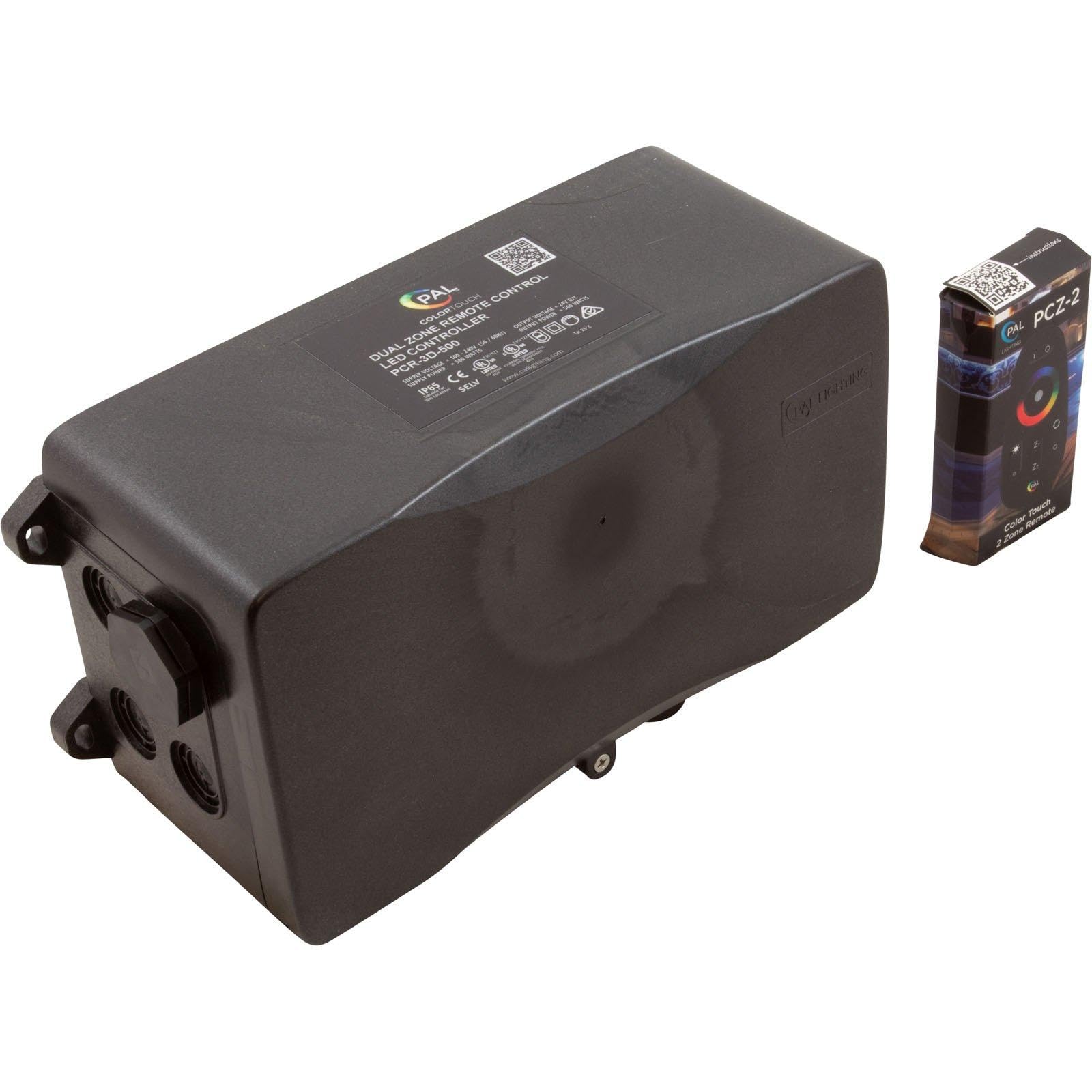
Image 1: The PAL Lighting PCR-3D-500 LED Controller unit (left) and the PAL PCZ-2 Color Touch 2 Zone Remote Control (right). The controller unit is a black rectangular box with connection ports, and the remote is a small, black, rectangular device with a color wheel and buttons.
4. Specyfikacje
| Model | PCR-3D-500 |
| Numer części | 64-PCR-3D-500 |
| Marka | PAL Lighting |
| Objętość dostawtage | Prąd zmienny 100-240 V, 50/60 Hz |
| Objętość wyjściatage | 24V prądu stałego |
| Zasilanie | 550 watów |
| Moc wyjściowa | 500 watów |
| Stopień ochrony IP | IP65 |
| Typ montażu | Montaż ścienny |
| Waga przedmiotu | 4 funta (ok. 1.8 kg) |
| Producent | PAL Lighting spółka z ograniczoną odpowiedzialnością |
5. Konfiguracja i instalacja
Ważny: Installation should only be performed by a qualified professional electrician. Ensure all power is disconnected before beginning installation.
- Wybierz miejsce montażu: Select a suitable wall-mount location that is easily accessible for wiring, protected from direct heavy weather, and allows for adequate ventilation. The IP65 rating provides protection against dust and water jets, but avoid areas prone to submersion or constant heavy water exposure.
- Zamontuj kontroler: Securely mount the PCR-3D-500 unit to a sturdy surface using appropriate fasteners. Ensure the unit is level.
- Okablowanie zasilania wejściowego: Connect the main power supply (100-240V AC, 50/60Hz) to the designated input terminals on the controller. Follow local electrical codes for wiring practices, including proper grounding.
- Output Wiring to Lights: Connect your 24V DC multi-color LED lights to the output terminals of the controller. Ensure correct polarity (+ and -) for all connections. This unit supports dual zones; connect lights for each zone to their respective output terminals. Do not exceed the total 500W output capacity.
- Sprawdź połączenia: Double-check all wiring connections for security and correctness before restoring power.
- Przywróć zasilanie: Once all connections are verified and secure, restore power to the circuit.

Obraz 2: Zbliżenie view of the PAL Lighting PCR-3D-500 LED Controller, highlighting the sealed wiring ports on the side, designed for secure electrical connections.
6. Instrukcja obsługi
The PAL Lighting PCR-3D-500 LED Controller is operated using the included PAL PCZ-2 Color Touch 2 Zone Remote Control.
6.1 Remote Control Functions (PAL PCZ-2)
- Włączanie/wyłączanie: Naciśnij Moc button to turn the connected lights on or off.
- Wybór strefy: Użyj Strefa 1 I Strefa 2 buttons to select which lighting zone you wish to control. The selected zone will typically be indicated on the remote.
- Wybór kolorów: Ten Color Touch Wheel allows you to select a specific color for your lights. Simply touch the desired color on the wheel.
- Regulacja jasności: Użyj Zwiększenie jasności (+) I Zmniejsz jasność (-) buttons to adjust the intensity of the selected color or lighting mode.
- Wybór trybu: The remote may include buttons for pre-programmed lighting modes (e.g., Znikać, Skok, Stroboskop). Refer to the remote's specific instructions for detailed mode descriptions.
- Regulacja prędkości: For dynamic lighting modes, Przyśpieszyć I Zwolnij buttons may be available to control the transition speed.
Ensure the remote control has fresh batteries and is within operational range of the controller unit for reliable performance.
7. Konserwacja
- Czyszczenie: Periodically clean the exterior of the controller unit with a soft, damp Ściereczką. Nie używaj środków czyszczących ani rozpuszczalników o działaniu ściernym. Przed czyszczeniem upewnij się, że urządzenie jest wyłączone.
- Kontrola: Regularly inspect the wiring connections for any signs of wear, corrosion, or damage. Ensure all connections remain secure.
- Wentylacja: Keep the area around the controller clear of obstructions to ensure proper airflow and prevent overheating.
- Baterie do pilota zdalnego sterowania: Replace the remote control batteries when performance degrades or it stops responding. Refer to the remote's specific instructions for battery type and replacement procedure.
8. Rozwiązywanie Problemów
| Problem | Możliwa przyczyna | Rozwiązanie |
|---|---|---|
| Światła nie włączają się. | Brak zasilania kontrolera. Wadliwe połączenie okablowania. Bateria pilota zdalnego sterowania jest wyczerpana. Lights are faulty. | Sprawdź wyłącznik obwodu i zasilanie. Inspect all wiring connections for security and correctness. Wymień baterie pilota. Test lights with a known working power source if possible. |
| Lights are not responding to remote control. | Bateria pilota zdalnego sterowania jest słaba lub rozładowana. Pilot jest poza zasięgiem. Ingerencja. Pilot nie jest sparowany (jeśli dotyczy). | Wymień baterie pilota. Move closer to the controller unit. Ensure no large metal objects or other wireless devices are interfering. Refer to remote instructions for pairing procedure if necessary. |
| Lights flicker or change colors erratically. | Luźne połączenie okablowania. Przeciążony obwód. Faulty lights or controller. | Sprawdź i zabezpiecz wszystkie połączenia przewodów. Zapewnij całkowitą wattage of connected lights does not exceed 500W. Contact support if problem persists after checking connections and load. |
| Only one zone is working. | Incorrect zone selection on remote. Wiring issue for the non-working zone. Faulty lights in the non-working zone. | Sprawdź, czy na pilocie wybrano właściwą strefę. Inspect wiring for the non-working zone. Test lights in the non-working zone. |
If troubleshooting steps do not resolve the issue, contact PAL Lighting customer support.
9. Gwarancja i wsparcie
This product is manufactured by PAL Lighting LLC. For warranty information, technical support, or service inquiries, please contact PAL Lighting directly.
Producent: PAL Lighting spółka z ograniczoną odpowiedzialnością
Webstrona: www.palighting.com
Please have your model number (PCR-3D-500) and purchase date available when contacting support.