
1. Wprowadzenie
Thank you for choosing the TECLAST Mini PC N15. This compact and powerful mini computer is designed for a wide range of applications, from home entertainment and office tasks to creative work and light gaming. Featuring an Intel N5095 processor, 16GB DDR4 RAM, and a 512GB PCI-e 3.0 SSD, it offers efficient performance in a small form factor. This manual provides essential information for setting up, operating, maintaining, and troubleshooting your device.
2. Zawartość opakowania
Please verify that all items listed below are included in your package. If any items are missing or damaged, please contact TECLAST customer support.
- 1x TECLAST N15 Mini PC
- 1x Instrukcja obsługi
- 1x kabel HDMI
- 1x mocowanie VESA
- 1x Zasilacz
- 1x Kabel zasilający

Image: Package contents of the TECLAST N15 Mini PC.
3. Koniec produktuview
3.1. Główne cechy
- Edytor: Intel N5095 (4 Cores, 4 Threads, up to 2.9GHz Turbo Frequency)
- Grafika: Grafika Intel UHD
- Pamięć: 16 GB pamięci RAM DDR4
- Składowanie: 512GB PCI-e 3.0 SSD
- Łączność: Dual 2.5GbE RJ45 Ethernet, Wi-Fi (2.4G+5G ac), Bluetooth 4.2
- Wyjście wideo: Supports up to three 4K displays (HDMI, DisplayPort, Full-Function Type-C)
- Porty: Multiple USB 3.2, USB 2.0, Full-Function Type-C, DisplayPort, HDMI, COM Port, Micro SD Card Reader, Headphone Output, Microphone Input
- Projekt: Compact (0.53L volume, 400g weight), Aluminum Body, VESA Mountable

Image: Intel N5095 Processor specifications and architecture.
3.2. Porty i interfejsy
The TECLAST N15 Mini PC offers a comprehensive set of ports for versatile connectivity:
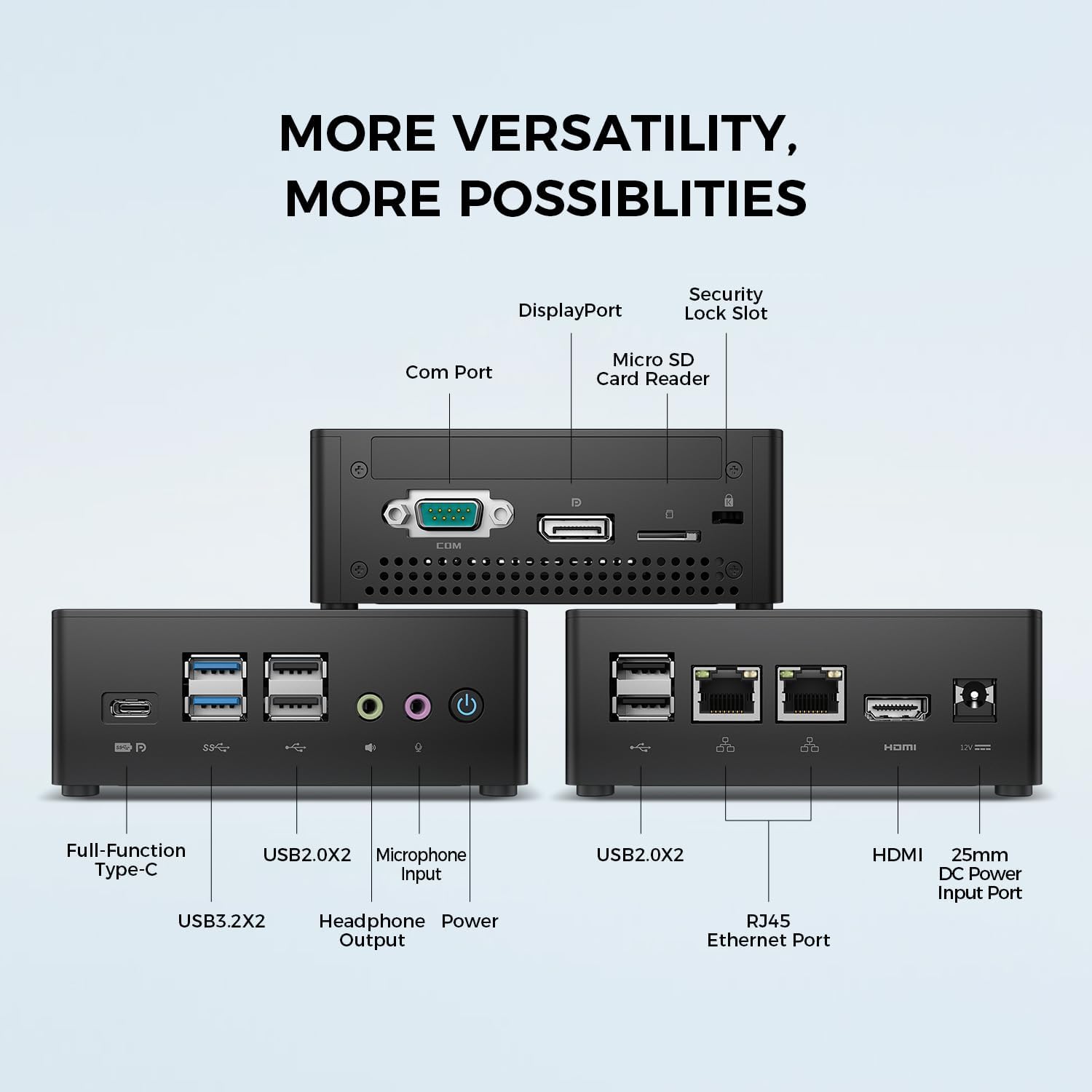
Obraz: Szczegółowy view of the TECLAST N15 Mini PC's front, side, and rear ports.
- Panel przedni: Full-Function Type-C (supports charging, data, video, audio), 2x USB 3.2, 2x USB 2.0, Headphone Output, Microphone Input, Power Button.
- Panel boczny: COM Port, DisplayPort, Micro SD Card Reader, Security Lock Slot.
- Tylny panel: 2x USB 2.0, 2x RJ45 Ethernet Ports (2.5GbE), HDMI, DC Power Input.

Image: Dual 2.5GbE RJ45 Ethernet Ports for high-speed networking.
3.3. Układ chłodzenia
The N15 Mini PC is designed for efficient heat dissipation to ensure stable and quiet operation. It features a 15W TDP, nickel-plated heat pipe, and a turbo fan, providing over 16000mm² of heat dissipation area.

Image: Internal cooling system design for quiet and efficient operation.
3.4 Kompaktowa konstrukcja
With a compact volume of approximately 0.53L and a weight of 400g, the N15 Mini PC is highly portable and can be easily integrated into any workspace. Its aluminum body ensures durability.

Image: Compact size and lightweight design of the Mini PC.
4. Instrukcje konfiguracji
4.1. Podłączanie urządzeń peryferyjnych
- Podłącz monitor: Use the provided HDMI cable to connect your monitor to the HDMI port on the Mini PC. Alternatively, use a DisplayPort cable or a Full-Function Type-C cable for compatible monitors.
- Podłącz klawiaturę i mysz: Podłącz klawiaturę i mysz USB do dowolnego dostępnego portu USB w komputerze Mini PC.
- Połącz się z siecią (opcjonalnie): For a wired connection, connect an Ethernet cable from your router or modem to one of the RJ45 ports on the Mini PC. For wireless, ensure your Wi-Fi network is available during initial setup.
- Podłącz zasilanie: Connect the power adapter to the DC Power Input port on the Mini PC, then plug the power cable into a wall outlet.
4.2. Włączanie i konfiguracja początkowa
- Press the Power Button on the front of the Mini PC.
- The system will boot up. If it's the first time, it will guide you through the Windows operating system setup process. Follow the on-screen instructions to configure language, region, network, and user accounts.
- Ensure all drivers are installed. Windows Update typically handles this automatically.
5. Instrukcja obsługi
5.1. Podstawowa obsługa
Once setup is complete, your TECLAST N15 Mini PC functions like a standard desktop computer. You can launch applications, browse the internet, and manage files using your connected keyboard and mouse.
5.2. Konfiguracja wielu wyświetlaczy
The Mini PC supports connecting up to three 4K displays simultaneously, enhancing productivity and entertainment experiences.
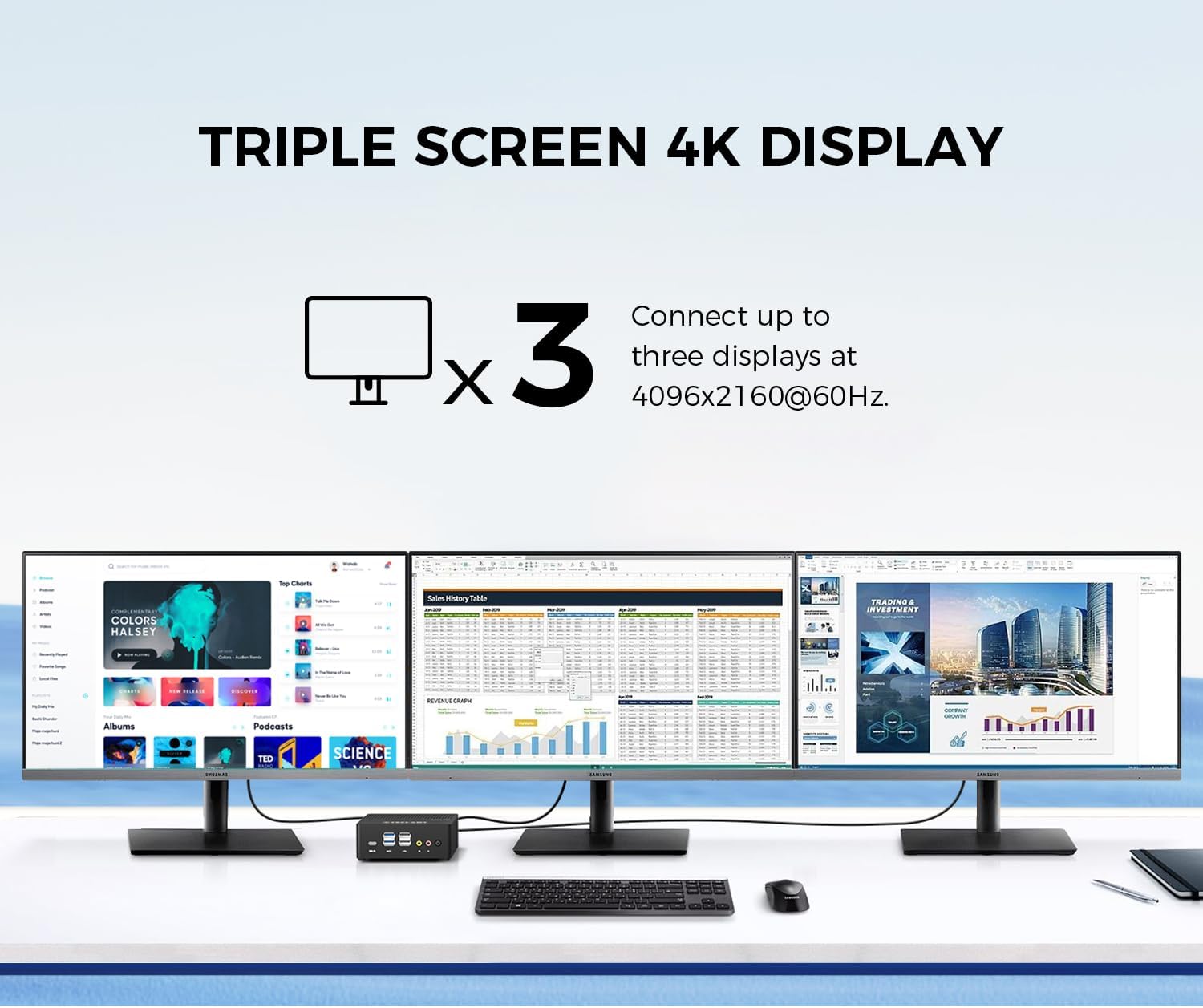
Image: Triple screen 4K display setup with the Mini PC.
- Connect your primary monitor via HDMI.
- Connect a second monitor via DisplayPort.
- Connect a third monitor via the Full-Function Type-C port (requires a compatible Type-C to DisplayPort/HDMI adapter or monitor).
- In Windows, right-click on the desktop and select "Display settings" to configure your multiple displays (extend, duplicate, or show only on one).
5.3. Łączność bezprzewodowa
The Mini PC supports 2.4G+5G ac Wi-Fi and Bluetooth 4.2 for wireless connections.
- Wi-Fi: Access Wi-Fi settings in Windows to connect to your preferred wireless network.
- Bluetooth: Pair Bluetooth devices like keyboards, mice, or headphones through Windows Bluetooth settings.
6. Konserwacja
Regularna konserwacja pomaga zapewnić długowieczność i optymalną wydajność Twojego komputera Mini PC.
- Czyszczenie: Use a soft, dry cloth to clean the exterior. For dust accumulation in vents, use compressed air. Ensure the device is powered off and unplugged before cleaning.
- Aktualizacje oprogramowania: Regularly check for and install Windows updates and driver updates to maintain system security and performance.
- Zarządzanie pamięcią masową: Okresowo czyść niepotrzebne files and applications to free up storage space and improve system responsiveness.
- Wentylacja: Aby zapobiec przegrzaniu, należy upewnić się, że Mini PC znajduje się w dobrze wentylowanym pomieszczeniu i że otwory wentylacyjne nie są zasłonięte.
7. Rozwiązywanie Problemów
If you encounter issues with your TECLAST N15 Mini PC, refer to the following common troubleshooting steps:
| Wydanie | Możliwe rozwiązanie |
|---|---|
| Brak obrazu na monitorze | Check all cable connections (HDMI, DisplayPort, Type-C). Ensure the monitor is powered on and set to the correct input source. Try a different cable or monitor if possible. |
| Mini PC się nie włącza | Verify the power adapter is securely connected to both the Mini PC and a working power outlet. Try a different power outlet. |
| Brak połączenia internetowego (Wi-Fi) | Check if Wi-Fi is enabled in Windows settings. Ensure you are connected to the correct network and have entered the password correctly. Restart your router/modem. |
| No internet connection (Wired) | Ensure the Ethernet cable is securely connected to both the Mini PC and your router/modem. Check the network status in Windows. Restart your router/modem. |
| Niska wydajność | Close unnecessary applications. Check for background processes consuming resources. Ensure sufficient free storage space. Run a system scan for malware. |
| Peripheral devices not recognized | Try connecting the device to a different USB port. Ensure device drivers are installed. Restart the Mini PC. |
If the issue persists after trying these steps, please contact TECLAST customer support for further assistance.
8. Specyfikacje
Detailed technical specifications for the TECLAST N15 Mini PC:
| Funkcja | Specyfikacja |
|---|---|
| Marka | TECLASTYKA |
| Numer modelu | N15 |
| Model procesora | Procesor Intel Celeron N5095 |
| Prędkość procesora | Up to 2.9 GHz (Turbo Frequency) |
| Liczba procesorów | 4 |
| Zainstalowana pamięć RAM | 16 GB DDR4 |
| Maksymalny rozmiar pamięci RAM | 16 GB |
| Pojemność pamięci masowej | 512 GB PCI-e 3.0 SSD |
| Koprocesor graficzny | Grafika Intel UHD |
| Maksymalna rozdzielczość wyświetlacza | 3840 x 2160 pikseli (4K) |
| Interfejsy wyjściowe wideo | HDMI, DisplayPort, Type-C |
| Technologia łączności | Ethernet (Dual RJ45 2.5GbE), HDMI, LAN, Wi-Fi (802.11ac), Bluetooth 4.2 |
| Łączna liczba portów USB | 6 (2x USB 3.2, 4x USB 2.0) |
| Waga przedmiotu | 400 gram |
| Pobór mocy | 15 watów |
| Metoda chłodzenia | Air (with Turbo Fan and Nickel-Plated Heat Pipe) |
| Kolor | Czarny |
9. Gwarancja i wsparcie
TECLAST products are designed for quality and reliability. For any product-related inquiries, technical support, or warranty claims, please contact TECLAST customer service. Most questions are answered within 24 hours.
Aby uzyskać dalszą pomoc, odwiedź oficjalną stronę TECLAST webodwiedź witrynę lub skontaktuj się bezpośrednio z ich kanałami wsparcia.
10. Film o produkcie
Obejrzyj ten oficjalny film o produkcie, aby uzyskać wizualny podglądview of the TECLAST N15 Mini PC's features and connectivity.
Wideo: Ponadview of the TECLAST N15 Mini PC, showcasing its design, ports, and internal components.