
1. Wprowadzenie
Thank you for choosing the WORKPRO 7.2V Cordless Rotary Tool. This manual provides essential information for the safe and effective operation, maintenance, and troubleshooting of your tool. Please read it thoroughly before use and retain it for future reference.
The WORKPRO 7.2V Cordless Rotary Tool is a versatile and compact device designed for various DIY and craft projects. Its lightweight design and variable speed settings make it suitable for tasks such as sanding, engraving, cutting, drilling, grinding, and polishing.

Figure 1: WORKPRO 7.2V Cordless Rotary Tool with included accessories and storage bag.
2. Informacje dotyczące bezpieczeństwa
Podczas obsługi elektronarzędzi należy zawsze przestrzegać podstawowych zasad bezpieczeństwa, aby zminimalizować ryzyko pożaru, porażenia prądem elektrycznym i obrażeń ciała.
- Przeczytaj wszystkie instrukcje: Zapoznaj się z obsługą narzędzia i wytycznymi bezpieczeństwa.
- Stosuj ochronę oczu: Zawsze noś okulary ochronne lub okulary ochronne z osłonami bocznymi.
- Zabezpieczanie przedmiotu obrabianego: Zawsze clamp lub w inny sposób zabezpieczyć obrabiany przedmiot, aby zapobiec jego przemieszczaniu się podczas pracy.
- Utrzymuj czyste miejsce pracy: Zagracone obszary sprzyjają wypadkom.
- Unikaj niebezpiecznych środowisk: Nie używaj elektronarzędzi wamp lub wilgotnych miejscach lub wystawiać je na deszcz. Miejsce pracy powinno być dobrze oświetlone.
- Trzymaj dzieci z daleka: Wszyscy goście powinni znajdować się w bezpiecznej odległości od miejsca pracy.
- Ubierz się odpowiednio: Do not wear loose clothing or jewelry. They can be caught in moving parts. Non-skid footwear is recommended. Wear protective hair covering to contain long hair.
- Użyj odpowiedniego narzędzia: Nie zmuszaj narzędzia ani osprzętu do wykonywania pracy, do której nie zostało zaprojektowane.
- Odłącz zasilanie: Disconnect the tool from its power source before making adjustments, changing accessories, or storing it.
- Nie przesadzaj: Zawsze zachowuj równowagę i równowagę.
- Ostrożnie konserwuj narzędzia: Utrzymuj narzędzia ostre i czyste, aby zapewnić lepszą i bezpieczniejszą pracę. Postępuj zgodnie z instrukcjami dotyczącymi smarowania i wymiany akcesoriów.
- Sprawdź, czy nie ma uszkodzonych części: Przed dalszym użyciem narzędzia należy dokładnie sprawdzić osłonę lub inną uszkodzoną część, aby określić, czy będzie działać prawidłowo i spełniać swoją funkcję.
- Do Not Operate While Charging: For safety reasons, do not use the tool while it is being charged.
3. Koniec produktuview
The WORKPRO 7.2V Cordless Rotary Tool is designed for precision work. Understanding its components is key to effective operation.
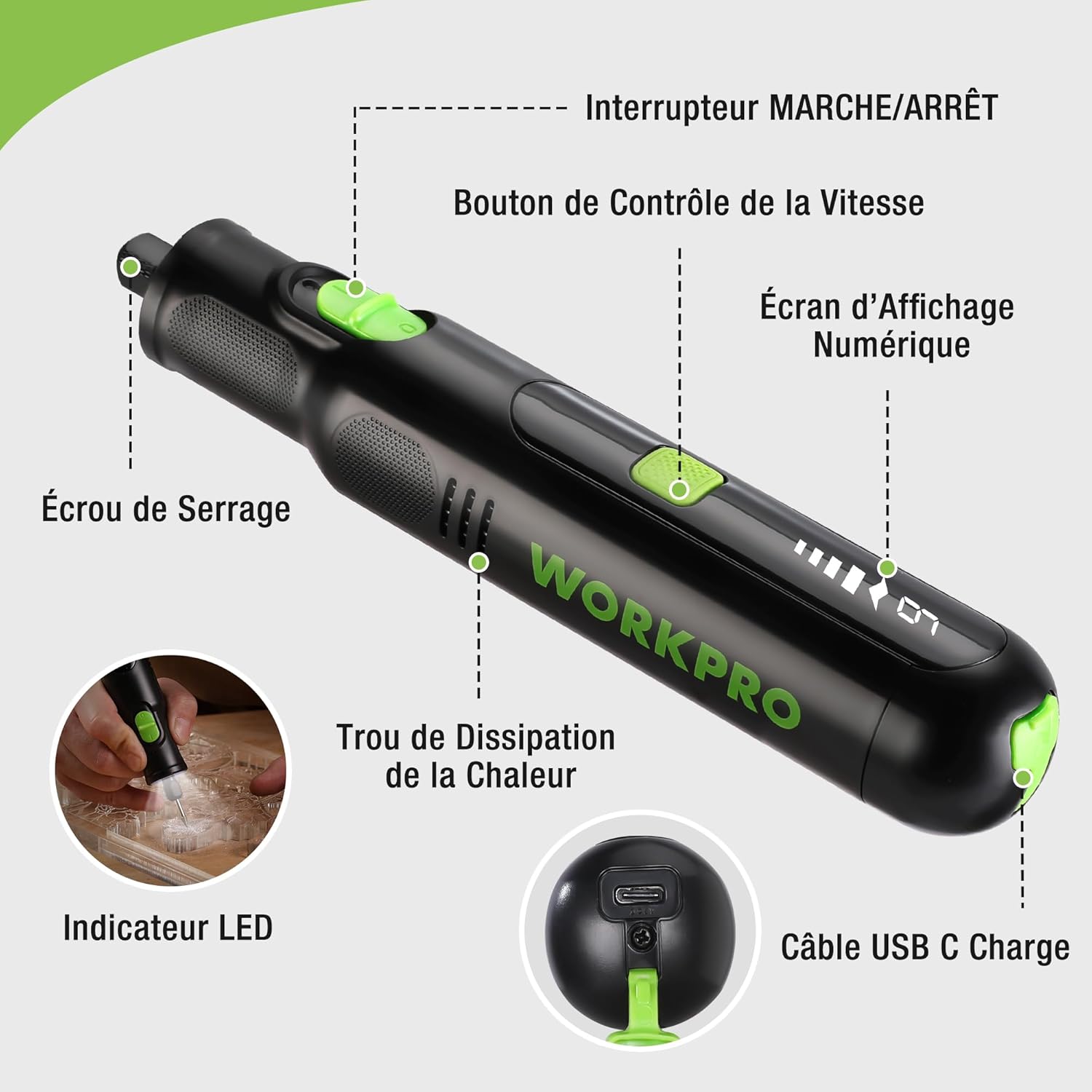
Figure 2: Key components of the rotary tool.
Składniki:
- Przełącznik włącz / wyłącz: Aktywuje i dezaktywuje narzędzie.
- Przycisk kontroli prędkości: Reguluje prędkość obrotową narzędzia.
- Cyfrowy ekran wyświetlacza: Shows the current speed setting.
- Nakrętka zaciskowa: Secures the accessory bits in place.
- Otwór odprowadzający ciepło: Ensures proper cooling of the motor during operation.
- Wskaźnik LED: Zapewnia oświetlenie miejsca pracy.
- Port ładowania USB-C: Do ładowania wewnętrznego akumulatora.
Dołączone akcesoria:
Your WORKPRO rotary tool comes with 117 diverse accessories, enabling a wide range of applications. These include:

Rysunek 3: Koniecview spośród 117 dołączonych akcesoriów.
- Szlifowanie/Ostrzenie: Grinding stones and wheels for material shaping and sharpening.
- Rzeźba: Diamond bits for detailed carving and engraving.
- Polerowanie: Wool felt wheels, felt wheels, screw mandrels, and metal brushes for achieving smooth, shiny finishes.
- Przemiał: Milling bits for precise material removal.
- Cięcie: Cutting discs and saw blades for various cutting tasks, along with a cutting disc holder.
- Szlifowanie: Sandpaper, rubber sanding drums, and sanding bands for surface preparation and finishing.
- Tuleje: 2.35mm and 3.2mm collets to accommodate different shank sizes.
- Wiercenie: 2.35mm and 3.2mm drill bits for small-scale drilling.
- Klucz: For securing and loosening collet nuts.
4. Konfiguracja
4.1 Ładowanie narzędzia
The tool is equipped with a 7.2V 1100mAh Lithium-ion rechargeable battery. Before first use, fully charge the tool.
- Connect the provided USB-C charging cable to the tool's USB-C charging port.
- Podłącz drugi koniec kabla USB do kompatybilnego źródła zasilania USB (np. komputera, zasilacza ściennego USB).
- The digital display will indicate charging status. A full charge typically takes approximately 2 hours.
- Po całkowitym naładowaniu odłącz kabel ładujący.
Note: For optimal battery life, it is recommended to store the tool with the battery charged between 50% and 75%. Recharge the tool at least once every 3 to 6 months if not used regularly.

Figure 4: Charging the rotary tool via USB-C.
4.2 Instalowanie akcesoriów
The WORKPRO rotary tool features an automatic spindle lock design for easy and secure accessory changes.
- Ensure the tool is turned OFF.
- Unscrew the collet nut at the front of the tool.
- Select the appropriate collet size for your desired accessory (2.35mm or 3.2mm). Insert the collet into the tool if not already present.
- Insert the shank of the accessory bit into the center of the collet nut. Ensure the bit is fully seated.
- Hand-tighten the collet nut. For a secure fit, use the included wrench to tighten the collet nut firmly. Do not overtighten.

Figure 5: Two-step accessory replacement process.

Figure 6: Detailed installation steps for various accessories.
Note: The automatic spindle lock engages when the tool is off, allowing for accessory changes without needing to press a separate button. A slight clicking sound when the tool stops is normal due to this mechanism.
5. Instrukcja obsługi
5.1 Włączanie/wyłączanie
To turn the tool ON, slide the ON/OFF switch to the 'ON' position. To turn it OFF, slide the switch to the 'OFF' position.
5.2 Regulacja prędkości
The tool features 6 variable speed settings, ranging from 5000 RPM to 30000 RPM. Press the Speed Control Button to cycle through the speeds. The current speed setting will be displayed on the digital screen.
- Speed I: 5000 RPM
- Speed II: 10000 RPM
- Speed III: 15000 RPM
- Speed IV: 20000 RPM
- Speed V: 25000 RPM
- Speed VI: 30000 RPM
Choose the appropriate speed for your task and material. Lower speeds are generally suitable for polishing, delicate work, and softer materials, while higher speeds are for cutting, grinding, and harder materials.

Figure 7: Variable speed settings and powerful motor.
5.3 Zintegrowane światło LED
The tool includes an integrated LED light that illuminates the work area, improving visibility in dimly lit spaces and for detailed tasks.

Figure 8: Using the LED light for precision engraving.
5.4 Zastosowania
The WORKPRO rotary tool is highly versatile and can be used for:
- Cięcie: Use appropriate cutting discs for various materials.
- Rzeźbienie/Grawerowanie: Utilize diamond bits for intricate designs on wood, plastic, or soft metals.
- Polerowanie: Apply felt wheels and polishing compounds to restore shine to surfaces.
- Szlifowanie: Use sanding bands and drums for smoothing rough edges or preparing surfaces.
- Wiercenie: Employ small drill bits for precision holes.

Rysunek 9: Examples of versatile applications.
6. Konserwacja
6.1 Czyszczenie
- Przed przystąpieniem do czyszczenia należy zawsze odłączyć narzędzie od źródła zasilania.
- Użyj miękkiego, damp Ściereczką przetrzyj zewnętrzną część narzędzia. Nie używaj silnych środków chemicznych ani ściernych środków czyszczących.
- Use a small brush or compressed air to clear dust and debris from the heat dissipation holes and around the collet area.
6.2 Pielęgnacja i przechowywanie baterii
- To prolong battery life, avoid completely discharging the battery regularly.
- For long-term storage, ensure the battery is charged to approximately 50-75%. Recharge the tool every 3 to 6 months to prevent deep discharge and maintain battery health.
- Store the tool in a cool, dry place, away from direct sunlight and extreme temperatures.
6.3 Przechowywanie akcesoriów
Keep all accessories organized in the provided storage bag or a suitable container to prevent loss and damage.
7. Rozwiązywanie Problemów
This section addresses common issues you might encounter with your WORKPRO rotary tool.
| Problem | Możliwa przyczyna | Rozwiązanie |
|---|---|---|
| Narzędzie nie włącza się. | Akumulator jest rozładowany. | Naładuj narzędzie całkowicie za pomocą kabla USB-C. |
| Tool stops unexpectedly during use. | Akumulator jest słaby lub narzędzie jest przeciążone. | Recharge the battery. Reduce pressure on the tool or use a lower speed setting for the task. |
| Clicking sound when turning off. | Normal operation of the automatic spindle lock. | This is a normal function and does not indicate a fault. |
| Accessory bit is loose or wobbles. | Nakrętka tulei zaciskowej nie jest odpowiednio dokręcona lub zastosowano niewłaściwy rozmiar tulei zaciskowej. | Ensure the correct collet size is used for the accessory. Tighten the collet nut firmly with the included wrench. |
| Reduced performance or short runtime. | Battery degradation or improper charging/storage. | Ensure proper charging and storage practices are followed (refer to Section 6.2). If the issue persists, the battery may need replacement. |
8. Specyfikacje
Below are the technical specifications for the WORKPRO 7.2V Cordless Rotary Tool (Model W123024A).
| Funkcja | Specyfikacja |
|---|---|
| Marka | WORKPRO |
| Numer modelu | W123024A |
| Tomtage | 7.2 wolty |
| Typ baterii | Litowo-jonowy (1 w zestawie) |
| Pojemność baterii | 1100 mAh |
| Maksymalna prędkość obrotowa | 30000 obr./min. |
| Zmienne prędkości | 6 (5000-30000 obr./min) |
| Czas ładowania | Około 2 godzin |
| Runtime (Max Speed) | Około 45 minut |
| Waga | 227 gram |
| Wymiary (dł. x szer. x wys.) | Wymiary 25.2 x 16.8 x 5.5 cm |
| Funkcja specjalna | Cordless, Integrated LED Light, Automatic Spindle Lock |
| Zawarte komponenty | 117 Akcesoria |
| Producent | Hang Zhou Great Star Industrial Co.,LTD |
9. Gwarancja i wsparcie
For warranty information, please refer to the documentation provided at the time of purchase or contact your retailer. WORKPRO is committed to providing quality products and customer satisfaction.
If you encounter any issues or have questions regarding your WORKPRO 7.2V Cordless Rotary Tool, please contact the seller or WORKPRO customer support through their official website or contact channels. Please have your model number (W123024A) and purchase details ready when seeking support.