
1. Wprowadzenie
The Panasonic CP-JNF01CW Smart Pet Feeder is designed to provide automated and precise feeding for small to medium-sized cats and dogs. This device offers convenience and peace of mind, ensuring your pet receives the correct amount of food at scheduled times, even when you are away. With app control, you can manage feeding schedules, monitor food levels, and ensure your pet's dietary needs are met.
2. Funkcje produktu
- Automated Feeding: Schedule up to 12 feeding intervals per day for precise portion control.
- Wszechstronna kompatybilność z żywnością: Suitable for dry, freeze-dried, and puffed pet food with diameters ranging from 4 mm to 12 mm.
- Inteligentna kontrola aplikacji: Manage feeding schedules, receive low food alerts, and adjust portions remotely via a dedicated application (compatible with Android and iOS).
- Łatwe czyszczenie: The hygienic stainless steel food bowl is dishwasher-safe for convenient maintenance.
- Integrated Desiccant Compartment: A compartment in the lid helps keep food fresh and dry.
- System zapobiegający zakleszczeniom: Designed to prevent food blockages, ensuring consistent food delivery.
- Podwójne zasilanie: Operates via AC adapter with an option for battery backup (batteries not included) to ensure uninterrupted feeding during power outagt.j.
- Bezpieczne umieszczenie: Suction cups on the base provide stable positioning on flat surfaces.
- Materiały wysokiej jakości: Food-contact materials are carefully selected for pet safety.

3. Przewodnik konfiguracji
3.1 Rozpakowanie i montaż
- Ostrożnie wyjąć wszystkie elementy z opakowania.
- Ensure all parts are present: main feeder unit, food bowl, power adapter.
- Place the stainless steel food bowl into its designated slot on the feeder base.
3.2 Połączenie zasilania
- Connect the power adapter to the feeder and plug it into a standard electrical outlet.
- For battery backup, insert appropriate batteries (not included) into the battery compartment located at the bottom of the unit. This ensures operation during power interruptions.
3.3 Pobieranie i parowanie aplikacji
The Panasonic CP-JNF01CW Smart Pet Feeder is compatible with the Smart Life application. Follow these steps to connect your feeder:
- Pobierz aplikację „Smart Life” ze sklepu z aplikacjami na swoim smartfonie (iOS App Store lub Google Play Store).
- Zarejestruj się lub zaloguj na swoje konto Smart Life.
- Ensure your feeder is powered on and your smartphone is connected to a 2.4GHz Wi-Fi network.
- W aplikacji dotknij „Dodaj urządzenie” lub ikony „+”.
- Select "Small Home Appliances" then "Pet Feeder (Wi-Fi)".
- Postępuj zgodnie z instrukcjami wyświetlanymi na ekranie, aby przełączyć podajnik w tryb parowania (zwykle polega to na naciśnięciu i przytrzymaniu przycisku na podajniku, aż kontrolka zacznie migać).
- Gdy zostaniesz o to poproszony, wprowadź hasło swojej sieci Wi-Fi.
- Once connected, the feeder will appear in your device list within the app.
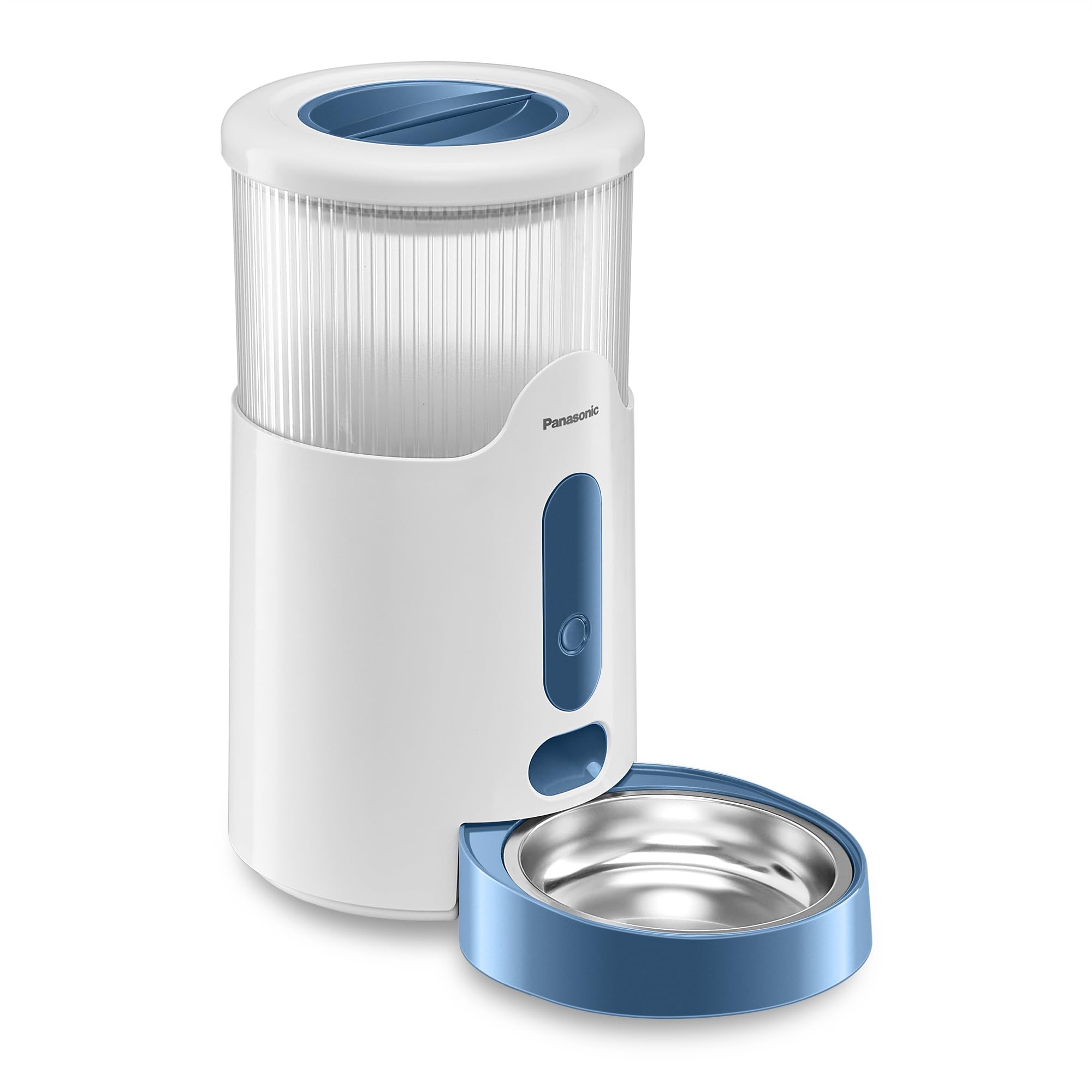
3.4 Napełnianie zbiornika na żywność
- Otwórz pokrywę zbiornika na żywność.
- Pour dry pet food into the tank. Ensure the food size is between 4mm and 12mm to prevent blockages.
- Dokładnie zamknij pokrywę.
- Place a desiccant packet (if desired) into the designated compartment in the lid to maintain food freshness.
4. Instrukcja obsługi
4.1 Ustawianie harmonogramów karmienia (kontrola aplikacji)
Use the Smart Life app to create and manage your pet's feeding schedule:
- Open the Smart Life app and select your Panasonic Pet Feeder.
- Przejdź do sekcji „Plan żywienia” lub „Harmonogram”.
- Tap to add a new feeding time.
- Ustaw pożądaną porę posiłku.
- Specify the number of portions to dispense for that meal. One portion typically corresponds to a specific volume of food. Refer to the app for exact portion size details.
- Repeat for all desired feeding times throughout the day (up to 12 intervals).
- Save your feeding plan. The feeder will now automatically dispense food according to your schedule.
4.2 Karmienie ręczne
You can manually dispense food at any time using the app or the physical button on the feeder:
- Za pośrednictwem aplikacji: On the feeder's control screen in the Smart Life app, locate the "Feed" or "Manual Feed" option. Select the number of portions and confirm to dispense food immediately.
- Poprzez przycisk podajnika: Press the manual feed button on the front of the feeder. Each press will dispense one portion of food.
4.3 Smart Food Level Monitoring
The feeder is equipped with a sensor to monitor the food level in the tank. When the food level is low, you will receive an alert via the Smart Life app, prompting you to refill the tank.

5. Konserwacja
5.1 Cleaning the Food Bowl
- Remove the stainless steel food bowl from the feeder base.
- The bowl is dishwasher-safe. Alternatively, wash it by hand with mild soap and water.
- Rinse thoroughly and dry completely before placing it back into the feeder.
5.2 Cleaning the Main Unit and Food Tank
- Unplug the feeder from the power outlet before cleaning.
- Przetrzyj zewnętrzną część podajnika miękką szmatką.amp szmatką. Nie zanurzaj jednostki głównej w wodzie.
- For the food tank, empty any remaining food. Wipe the interior with a dry or slightly damp cloth. Ensure it is completely dry before refilling.
- Regularly check the food dispensing mechanism for any food residue or blockages and clean as necessary.

5.3 Wymiana środka pochłaniającego wilgoć
- The desiccant packet in the lid helps absorb moisture and keep food fresh.
- Replace the desiccant packet every 1-2 months, or as recommended by the desiccant manufacturer, to maintain optimal freshness.
6. Rozwiązywanie Problemów
| Problem | Możliwa przyczyna | Rozwiązanie |
|---|---|---|
| Food not dispensing or dispensing inconsistently. |
|
|
| App cannot connect to the feeder. |
|
|
| Feeding schedule discrepancies (e.g., early feeding). |
|
|
| Low food alert not received. |
|
|
7. Specyfikacje
| Funkcja | Szczegół |
|---|---|
| Numer modelu | CP-JNF01CW |
| Wymiary (dł. x szer. x wys.) | Wymiary 33.8 x 19 x 36 cm |
| Waga | 1.85 kilogramów |
| Pojemność | 2.8 litrów |
| Zalecane gatunki | Small to Medium Dogs and Cats |
| Food Type Compatibility | Dry, freeze-dried, puffed food (4mm - 12mm diameter) |
| Tworzywo | Plastic (main unit), Stainless Steel (food bowl) |
| Kolor | Biały |
| Technologia łączności | Wi-Fi (2.4 GHz) |
| Moc wejściowa | 5 V (zasilacz sieciowy) |
| Zużycie energii | 1.0 W (normal use), < 0.5 W (standby) |
| Zapasowa bateria | Tak (baterie nie są dołączone) |
| Instrukcje pielęgnacji | Dishwasher-safe food bowl |
| Cechy specjalne | Smart App Control, Feeding Schedule, Portion Control, Low Food Alert, Anti-Jam System |

8. Informacje dotyczące bezpieczeństwa
- Always ensure the feeder is placed on a stable, flat surface to prevent tipping.
- Keep the power cord out of reach of pets to prevent chewing or entanglement.
- Używaj wyłącznie dołączonego zasilacza.
- Do not immerse the main feeder unit in water or other liquids.
- Regularnie sprawdzaj podajnik pod kątem uszkodzeń. W przypadku uszkodzenia zaprzestań użytkowania.
- Urządzenie przeznaczone jest wyłącznie do użytku wewnątrz pomieszczeń.
- Ensure that only dry pet food is used in the feeder. Wet food can cause blockages and hygiene issues.
- The materials in contact with pet food are carefully selected to be safe for animals.


