
Walfront WALFRONTyrz27s9i4p
Walfront 12-Hour Mechanical Outlet Timer User Manual
Model: WALFRONTyrz27s9i4p
Wstęp
The Walfront 12-Hour Mechanical Outlet Timer is designed to provide convenient and energy-efficient control over your home appliances. This device allows you to set specific operating times for various electrical items, helping to conserve energy and automate your daily routines. Its simple plug-and-play design and intuitive dial make it easy to use for a wide range of applications.

Obraz: Przód view of the Walfront 12-Hour Mechanical Outlet Timer, showing the 12-hour dial and two-prong plug.
Główne cechy
- Trwała konstrukcja: Made with environmental-friendly ABS material for safety and longevity.
- Łatwa obsługa: Simple plug-and-play design with an intuitive rotary knob for time setting.
- Oszczędność energii: Allows precise control of appliance operation within a 0-12 hour range, reducing unnecessary power consumption.
- Niski pobór mocy w trybie czuwania: Consumes less than 1W in standby mode, contributing to energy efficiency.
- Wszechstronne zastosowanie: Suitable for controlling various home appliances such as water dispensers, heaters, air conditioners, fans, rice cookers, and more.
- Clear Time Scale: Large, easy-to-read dial for quick and accurate time setting.
Instrukcje konfiguracji
- Rozpakuj timer: Carefully remove the timer from its packaging. Inspect for any visible damage.
- Identify the Dial: Locate the large rotary dial on the front of the timer. This dial is marked with numbers from 0 to 12, representing hours, and an "OFF" position.
- Podłącz do gniazdka: Insert the two-prong plug of the timer into a standard wall outlet. Ensure it is securely seated.
- Podłącz urządzenie: Podłącz urządzenie, którym chcesz sterować, do gniazda timera.

Obraz: kątowy view of the timer, showing the plug and the dial, ready for setup.
Instrukcja obsługi
The Walfront Mechanical Outlet Timer operates on a simple 0-12 hour cycle. Follow these steps to set the desired operating time for your appliance:
- Determine Desired ON Duration: Decide how many hours you want your appliance to remain ON. The timer supports durations from 0 to 12 hours.
- Obróć pokrętło: Gently turn the rotary dial clockwise to the desired number of hours. For example, if you want the appliance to run for 3 hours, turn the dial to the '3' mark. The timer will begin counting down immediately.
- Pozycja „WYŁ.”: To turn the appliance off immediately, rotate the dial to the "OFF" position.
- Automatyczne wyłączanie: Once the set time has elapsed, the timer will automatically turn off the connected appliance.
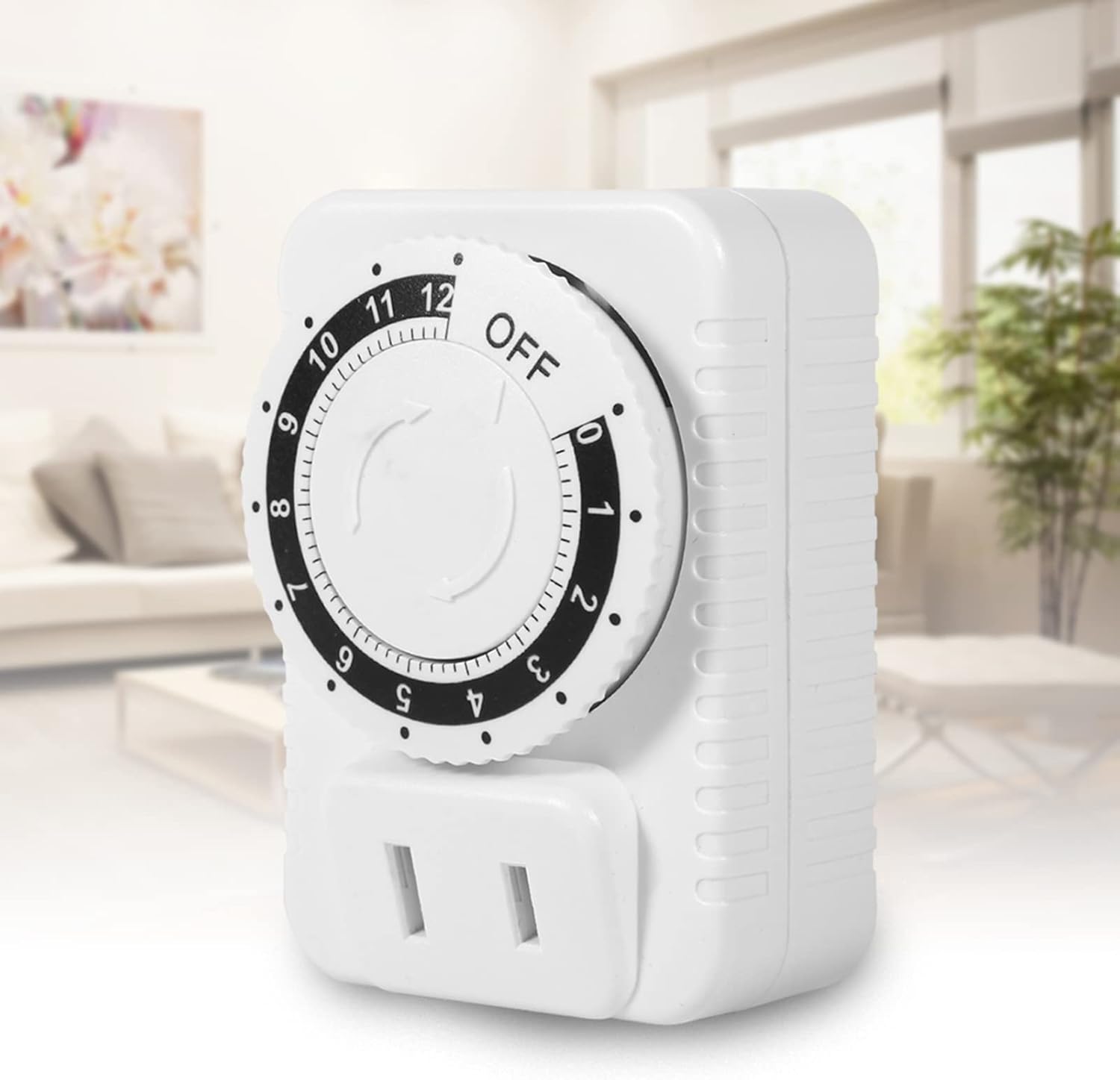
Image: The timer plugged into an outlet in a home environment, demonstrating its practical application.
Konserwacja
To ensure the longevity and proper functioning of your Walfront Mechanical Outlet Timer, follow these simple maintenance guidelines:
- Czyszczenie: Disconnect the timer from the power outlet before cleaning. Use a soft, dry cloth to wipe the exterior. Do not use liquid cleaners, sprays, or abrasive materials, as these can damage the device.
- Składowanie: Jeśli timer nie będzie używany przez dłuższy czas, należy przechowywać go w chłodnym, suchym miejscu, z dala od bezpośredniego światła słonecznego i ekstremalnych temperatur.
- Unikaj przeciążania: Do not connect appliances that exceed the timer's maximum power rating (2500W) or current rating (10A).
- Warunki środowiskowe: Avoid exposing the timer to water, high humidity, or dusty environments.
Rozwiązywanie problemów
If you encounter issues with your Walfront Mechanical Outlet Timer, refer to the following common problems and solutions:
| Problem | Możliwa przyczyna | Rozwiązanie |
|---|---|---|
| Timer się nie włącza. | No power from the wall outlet. | Check the wall outlet with another appliance. Ensure the outlet is live. |
| Appliance does not turn on when plugged into the timer. | Timer dial is set to "OFF" or has completed its cycle. Urządzenie samo w sobie nie działa. | Rotate the dial to a desired ON time. Check if the appliance works when plugged directly into a wall outlet. |
| Timer does not turn off after set time. | Problem z mechanizmem wewnętrznym (rzadki). | Unplug the timer and plug it back in. If the issue persists, contact customer support. |
| Dial is stiff or difficult to turn. | Minor debris or manufacturing tolerance. | Ensure no foreign objects are obstructing the dial. Apply gentle, consistent pressure. Do not force. |
Dane techniczne
| Atrybut | Szczegół |
|---|---|
| Numer modelu | WALFRONTyrz27s9i4p |
| Marka | Wallfront |
| Kolor | Biały |
| Materiał skorupy | Akrylonitryl-butadien-styren (ABS) |
| Tomtage | Prąd zmienny 250 V |
| Maksymalna moc | 2500 W |
| Maksymalny prąd | 10A |
| Zakres ustawień czasu | 0-12 godziny |
| Pobór mocy w trybie czuwania | Mniej niż 1W |
| Waga przedmiotu | 0.5 kilograma (ok. 1.1 funta) |
| Wymiary opakowania | 3.15 x 2.76 x 1.97 cala |
| Kraj pochodzenia | Chiny |

Obraz: Bok view of the timer showing approximate dimensions (5cm, 7cm, 4.8cm).
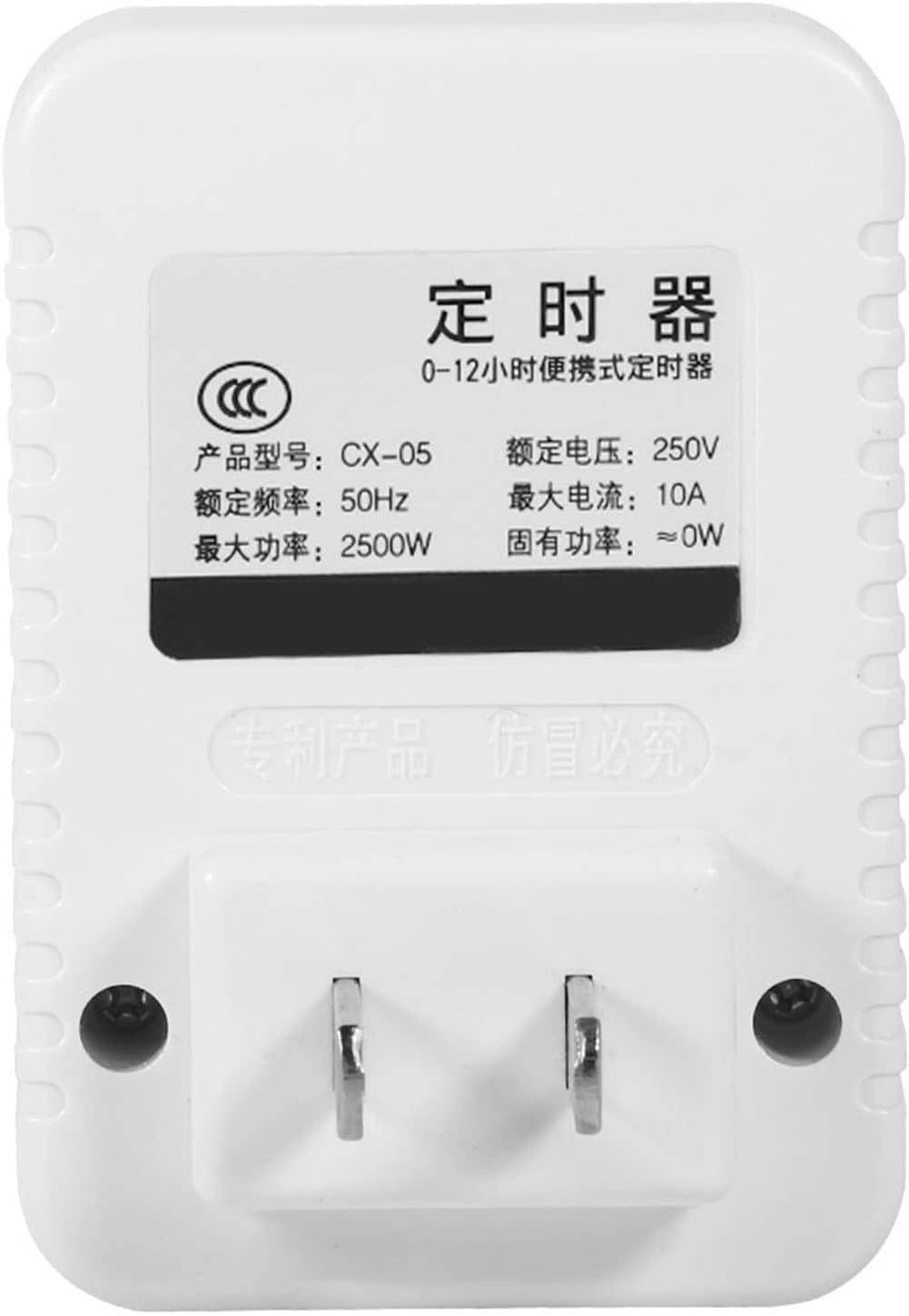
Obraz: Tył view of the timer showing the product label with electrical specifications.
Gwarancja i wsparcie
Walfront products are manufactured to high-quality standards. While specific warranty details are not provided in this manual, please retain your proof of purchase for any warranty claims. For technical support, troubleshooting assistance, or inquiries regarding your Walfront 12-Hour Mechanical Outlet Timer, please refer to the contact information provided with your purchase or visit the official Walfront webstrona.
Aby uzyskać dalszą pomoc, możesz odwiedzić stronę Sklep Walfront na Amazon.
Ask a question about this manual
Ask about setup, troubleshooting, compatibility, parts, safety, or missing instructions. Manuals+ will review the question and use this page’s manual context to help answer it.