
1. Koniec produktuview
The BOBLOV T5 is a compact and lightweight body camera designed for various recording needs, including law enforcement, security, and personal use. It features 1440P video recording, 40-megapixel photo capabilities, night vision, and a built-in 256GB memory for reliable evidence collection.
Główne cechy
- Nagrywanie w wysokiej rozdzielczości: Captures video at 1440P and photos at 40 megapixels.
- Dłuższa żywotność baterii: Equipped with two 1800mAh replaceable Li-polymer batteries, providing up to 10-12 hours of video recording (at 1080P with IR and screen off).
- Wygodna stacja ładująca: Includes a dedicated charging dock for easy battery recharging.
- Zintegrowana pamięć masowa: Features a built-in 256GB TF card for immediate use without external memory cards.
- Longer Video Fragments: Supports recording video clips up to 30 minutes in length.
- Powerful IR Night Vision: Auto/Manual night vision with high-intensity infrared LEDs for clear footagdo 32 stóp w warunkach słabego oświetlenia.
- Tryb ukryty: Allows recording without sound, hidden indicators, or visible lights.
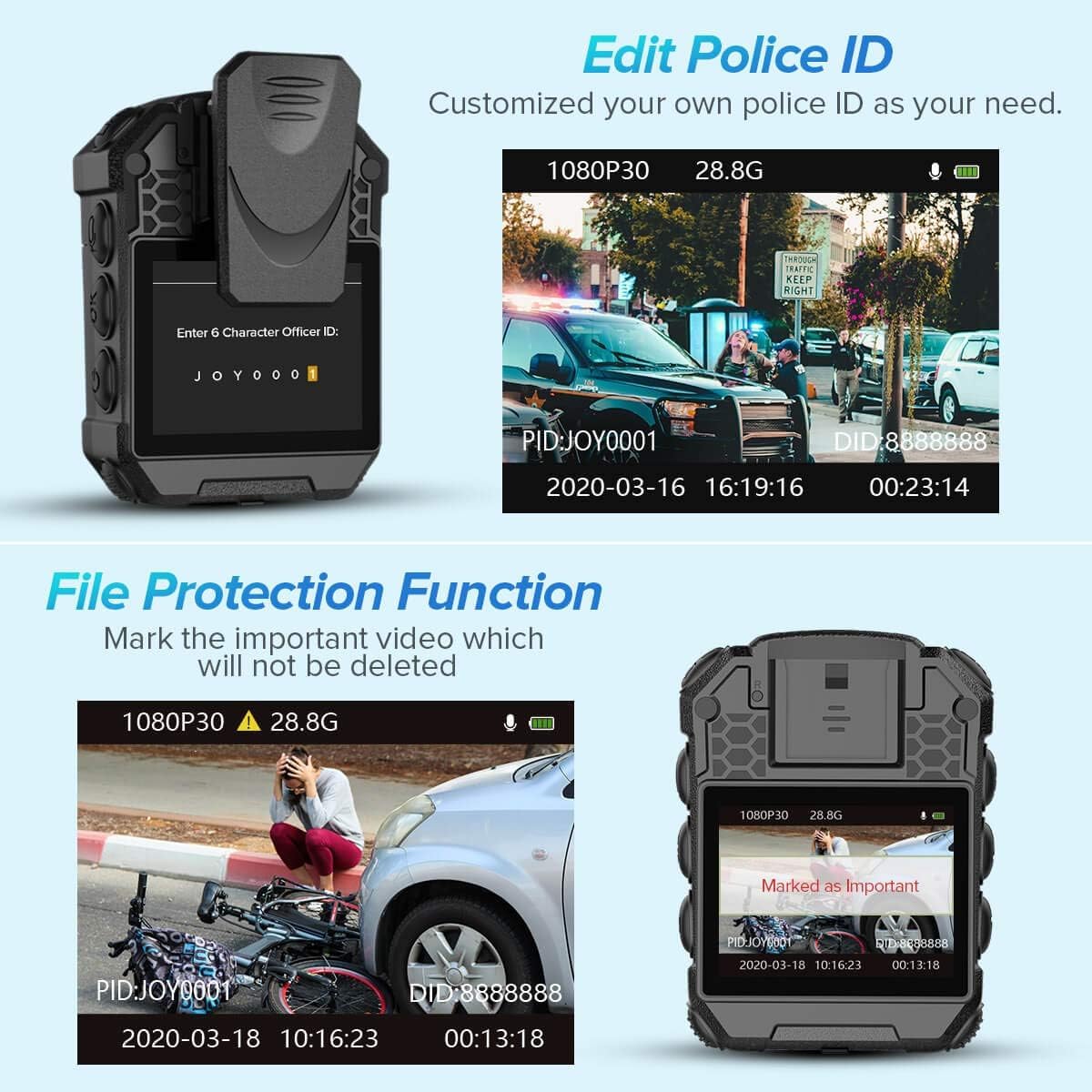
- File Ochrona: Mark important videos to prevent accidental deletion.
- Customizable Police ID: Edit the Police ID directly on the camera menu.
Co jest w pudełku
- 1x BOBLOV T5 Body Camera
- 1x Stacja ładująca
- 2x Batteries (One pre-installed in camera)
- 1x Instrukcja obsługi
- 1x kabel USB
- 1x 360 Degree Short Clip
- 1x 180 Degree Long Clip


2. Konfiguracja
2.1 Ładowanie akumulatora
Before initial use, fully charge the camera's battery. The BOBLOV T5 comes with two 1800mAh Li-polymer batteries, one of which is typically pre-installed. Use the provided charging dock for convenient charging.
- Insert a battery into the charging dock.
- Connect the charging dock to a power source using the supplied USB cable.
- The indicator light on the dock will show charging status. Ensure the battery is fully charged before use.

2.2 Włączanie/wyłączanie
- Włączanie: Press and hold the Power button until the device vibrates and the screen turns on.
- Aby wyłączyć: Press and hold the Power button until the device prompts you to shut down, then confirm.
2.3 Pamięć wewnętrzna
The BOBLOV T5 features a built-in 256GB internal memory. There is no external card slot under the battery. The available memory capacity will be displayed on the screen.
3. Działanie
3.1 Podstawowe nagrywanie
- Nagrywanie wideo: In standby mode, press the Video button to start recording. Press again to stop.
- Nagrywanie dźwięku: In standby mode, press the Audio button to start audio-only recording. Press again to stop.
- Ujęcie: In standby mode, press the Photo button to take a still image.
3.2 Nawigacja po menu
- Wejdź do menu: Long press the "OK" button to access the menu settings.
- Nawigować: Use the navigation buttons (Up/Down) to scroll through options.
- Wybierać: Press the "OK" button to select an option.
- Powrót: Short press the "Audio" button to go back to the previous screen or standby mode.
3.3 Resolution Switch (PTT Function)
The PTT (Push-To-Talk) function on the BOBLOV T5 is used to switch between video resolutions. Available resolutions include 720P, 1080P, 1296P, and 1440P.
3.4 Stealth Mode
Stealth Mode disables all indicators, sounds, and visible lights (red light positioning, white light) during recording, ensuring discreet operation.
- To activate/deactivate Stealth Mode, navigate to the menu settings and select the "Stealth Mode" option.

3.5 File Funkcja ochrony
This feature allows you to mark important video files to prevent them from being accidentally deleted or overwritten.
- During playback or in the file management menu, select the desired file and choose the "Protect" option.
3.6 Editing Police ID
You can customize the Police ID directly on the camera's menu.
- Access the menu settings and locate the "Officer ID" option to input or modify the ID.
3.7 Widzenie nocne
The camera features automatic and manual infrared (IR) night vision for clear recording in low-light conditions.
- Automatyczna wizja nocna: The camera will automatically switch to night vision when light levels are low.
- Ręczna wizja nocna: You can manually enable or disable night vision through the menu settings.

4. Konserwacja
4.1 Czyszczenie urządzenia
- Do czyszczenia korpusu aparatu należy używać miękkiej, suchej ściereczki.
- Do czyszczenia soczewek należy używać specjalnej ściereczki i płynu do czyszczenia soczewek, aby uniknąć zarysowań.
- Nie używaj żrących środków chemicznych ani materiałów ściernych.
4.2 Przesyłanie danych
Aby przesłać nagrane filedo komputera:
- Podłącz aparat do komputera za pomocą dostarczonego kabla USB.
- Aparat będzie widoczny jako dysk wymienny.
- Access the camera's internal storage to copy files.
4.3 Przechowywanie
Przechowuj aparat w chłodnym, suchym miejscu, z dala od bezpośredniego światła słonecznego i ekstremalnych temperatur. Upewnij się, że bateria jest częściowo naładowana, jeśli przechowujesz ją przez dłuższy czas.
5. Rozwiązywanie Problemów
5.1 Kamera się nie włącza
- Ensure the battery is fully charged. Connect the camera to the charging dock and verify the charging indicator.
- Jeśli masz taką możliwość, spróbuj użyć drugiej baterii.
- Press and hold the Power button for at least 10 seconds to attempt a forced restart.
5.2 Problemy z nagrywaniem
- Sprawdź, czy pamięć wewnętrzna jest pełna. Przenieś files to a computer to free up space.
- Ensure the camera is not in Stealth Mode if you expect audio or visible indicators.
- Verify that the correct recording mode (video/audio/photo) is selected.
5.3 Night Vision Not Working
- Check the IR Filter setting in the menu. Ensure it is set to "Auto" or "Manual" and enabled.
- Upewnij się, że nie ma żadnych przeszkód blokujących diody LED IR.
5.4 Computer Not Recognizing Camera
- Sprawdź, czy kabel USB jest prawidłowo podłączony do aparatu i komputera.
- Spróbuj podłączyć do innego portu USB w komputerze.
- Uruchom ponownie kamerę i komputer.
- Upewnij się, że kamera jest włączona podczas podłączania jej do komputera.
6. Specyfikacje
| Funkcja | Specyfikacja |
|---|---|
| Nazwa marki | BOBLOV |
| Waga przedmiotu | 12.3 uncji |
| Wymiary opakowania | 5.59 x 3.82 x 2.83 cala |
| Numer modelu przedmiotu | 02US-T5-256GB |
| Baterie | Wymagana 1 bateria litowo-polimerowa (w zestawie) |
| Nazwa koloru | Czarny |
| Cechy specjalne | 1440P Body Camera, Built-in 256GB Memory Card, Camcorder with Two Batteries with Dock, For Law Enforcement, Obtain Evidence |
| Technologia czujnika fotograficznego | CMOS |
| Rozdzielczość przechwytywania wideo | 1440p |
| Maksymalna ogniskowa | 100 milimetrów |
| Typ pamięci flash | Micro SD (Internal) |
| Format przechwytywania wideo | Ruch |
| Obsługiwany format audio | AAC |
| Rozmiar ekranu | 2 cali |
| Technologia łączności | USB |
7. Gwarancja i pomoc techniczna
BOBLOV provides product coverage for 24 months. For technical assistance or warranty claims, please contact BOBLOV customer support. They offer quick response within 24 hours and lifetime technical support.
Więcej informacji znajdziesz w oficjalnym sklepie BOBLOV: Sklep BOBLOV na Amazonie