
1. Wprowadzenie
The Belkin BoostCharge 3-Port USB-C Wall Charger with PPS 67W is designed to provide efficient and fast charging for multiple USB-C compatible devices. Featuring three USB-C ports and Power Delivery (PD) 3.1 with Programmable Power Supply (PPS) technology, this charger delivers optimized power to your devices. Its compact design and foldable prongs make it suitable for both home and travel use.
Wideo: Produkt ponadview of the Belkin BoostCharge 3-Port USB-C Wall Charger. This video demonstrates the charger's features and compact design.
Video: Belkin BoostCharge 3-Port USB-C Charger. This video highlights the charger's multi-port capabilities and fast charging.
2. Informacje dotyczące bezpieczeństwa
Please read and follow all safety instructions before using this product to prevent injury or damage. This charger is equipped with a 6-point safety system to protect against voltage, load, current, and temperature overages, short circuiting, and fire.
- Nie wystawiaj ładowarki na działanie płynów, wilgoci ani ekstremalnych temperatur.
- Stosować wyłącznie w suchych pomieszczeniach zamkniętych.
- Unikaj upuszczania ładowarki i narażania jej na silne uderzenia.
- Nie należy podejmować prób rozmontowania, naprawy ani modyfikacji ładowarki.
- Podczas użytkowania należy zapewnić odpowiednią wentylację wokół ładowarki.
- Przechowywać w miejscu niedostępnym dla dzieci.

Image: The charger plugged into a wall outlet, illustrating its safety features and compact design.
3. Zawartość opakowania
Sprawdź, czy w przesyłce znajduje się następujący element:
- 1 x Belkin BoostCharge 3-Port USB-C Wall Charger
4. Konfiguracja
To set up your Belkin BoostCharge 3-Port USB-C Wall Charger:
- Unfold the prongs from the charger body. The foldable prongs are designed for easy packing and carrying, preventing them from catching on other items.
- Plug the charger into a standard wall outlet. The compact design allows it to plug in flat to the wall, saving space.
- Connect your USB-C charging cables (not included, unless specified) to the charger's USB-C ports.
- Connect the other end of the cables to your compatible devices.

Image: The charger with its foldable prongs extended, ready for use or storage.
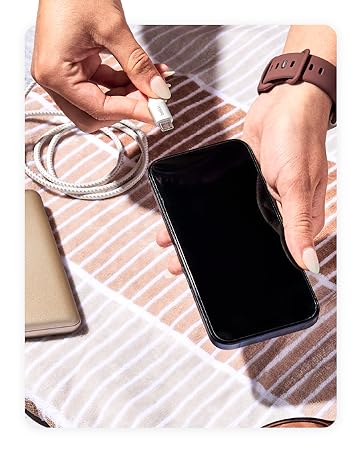
Image: A hand connecting a USB-C cable to a smartphone, demonstrating device connection.
5. Obsługa
The Belkin BoostCharge 3-Port USB-C Wall Charger is designed for optimal charging performance for various devices.
Użycie jednego portu
When using a single port, the charger can deliver up to 67W of power, suitable for charging laptops and other high-power USB-C PD enabled devices.

Image: The charger providing 67W of power to a laptop via a single USB-C port.
Jednoczesne ładowanie
The charger features three dedicated USB-C ports, allowing you to charge multiple devices simultaneously. The power distribution is dynamically managed by PPS technology to ensure efficient and safe charging for each connected device.
- One port can deliver up to 25W/67W Max.
- Two additional ports can deliver up to 20W/67W Max each.
The total output is intelligently distributed across the ports. For example, you can charge an iPhone, a Galaxy phone, and a tablet concurrently.

Image: The charger simultaneously charging a tablet, smartphone, and another device.

Image: Visual representation of the three USB-C ports and their maximum power output, alongside various compatible devices.
6. Konserwacja
Aby zapewnić długą żywotność i optymalną wydajność ładowarki:
- Czyszczenie: Przed czyszczeniem odłącz ładowarkę od gniazdka elektrycznego i wszystkie urządzenia. Do przecierania powierzchni użyj miękkiej, suchej ściereczki. Nie używaj płynnych środków czyszczących ani aerozoli.
- Składowanie: Store the charger in a cool, dry place away from direct sunlight and extreme temperatures. Ensure the prongs are folded for compact storage.
- Odpowiedzialność za środowisko: The product housing is made from a minimum of 72% post-consumer recycled content. Please dispose of the product responsibly according to local electronic waste regulations.

Image: The charger highlighting its environmentally friendly construction with recycled materials.
7. Rozwiązywanie Problemów
Jeśli masz problemy z ładowarką, zapoznaj się z poniższymi typowymi rozwiązaniami:
- Urządzenie się nie ładuje:
- Sprawdź, czy ładowarka jest prawidłowo podłączona do sprawnego gniazdka ściennego.
- Sprawdź, czy kabel USB-C jest prawidłowo podłączony do ładowarki i urządzenia.
- Spróbuj użyć innego kabla USB-C, aby wykluczyć awarię kabla.
- Aby sprawdzić działanie ładowarki, przetestuj ją przy użyciu innego urządzenia.
- Powolne ładowanie:
- Ensure your device supports fast charging via USB-C PD and PPS.
- Check if multiple devices are connected. When charging multiple devices, the total power output is shared, which may result in slower charging for individual devices compared to single-port use.
- Verify that your cable is rated for the power output required for fast charging.
- Ładowarka jest ciepła:
- It is normal for the charger to become warm during operation, especially when charging multiple devices or high-power devices. If it becomes excessively hot, disconnect it immediately and contact support.
- Upewnij się, że ładowarka ma odpowiednią wentylację i nie jest przykryta.
8. Specyfikacje
| Marka | Belkin |
| Numer modelu | WCC002dq |
| Typ złącza | USB typu C |
| Łączna liczba portów USB | 3 |
| Cotage | 67 watów |
| Wejście Voltage | 240 wolty |
| Objętość wyjściatage | 20 V (prąd stały) |
| Ampwymazać | 5 Amps |
| Prąd wyjściowy | 3.25 Amps |
| Funkcja specjalna | Compact, Flat to Wall Design, Fast Charging, Travel |
| Kolor | Biały |
| Tworzywo | Plastikowy |
| Producent | Belkin |
9. Gwarancja
Ten produkt firmy Belkin zawiera standardowy 2-letnia gwarancja. Additionally, it comes with up to $2,500 in Connected Equipment Warranty (CEW), zapewniając spokój ducha w zakresie korzystania z podłączonych urządzeń.
For detailed terms and conditions regarding the warranty and Connected Equipment Warranty, please refer to the official Belkin webwitrynę lub dokumentację dołączoną do produktu.

Image: Belkin Connected Equipment Coverage details, including 2-year warranty and $2,500 CEW.
10. Wsparcie
Aby uzyskać dalszą pomoc, wsparcie techniczne lub złożyć reklamację, odwiedź oficjalną stronę pomocy technicznej firmy Belkin website or contact their customer service. You can typically find contact information and support resources on the Belkin webstrona.
Zasoby online mogą obejmować:
- Często zadawane pytania i artykuły bazy wiedzy
- Driver and firmware downloads (if applicable)
- Contact forms or phone numbers for direct support