
1. Wprowadzenie
The AIOMEST TS58 is a professional digital megohmmeter tester designed for measuring insulation resistance and voltage. It features a wide measurement range, easy-to-read LCD display, and various functions for efficient electrical testing. This manual provides detailed instructions for safe and effective use of the device.
2. Informacje dotyczące bezpieczeństwa
Always adhere to safety precautions when operating electrical testing equipment. Failure to do so may result in electric shock, injury, or damage to the device.
- Nie należy używać urządzenia, jeśli wygląda na uszkodzone lub jeśli przewody pomiarowe są uszkodzone.
- Ensure proper battery installation before use.
- Nie należy przekraczać maksymalnych wartości znamionowych napięcia wejściowego określonych dla urządzenia.
- Avoid touching exposed wiring or circuit components during testing.
- Always disconnect power to the circuit under test before connecting or disconnecting test leads for insulation resistance measurements.
- Należy nosić odpowiedni sprzęt ochrony osobistej (PPE), taki jak rękawice termoizolacyjne i okulary ochronne.
- The device is designed for use in environments up to 35 degrees Celsius.
3. Koniec produktuview
3.1 Składniki
Familiarize yourself with the various parts of your AIOMEST TS58 tester:
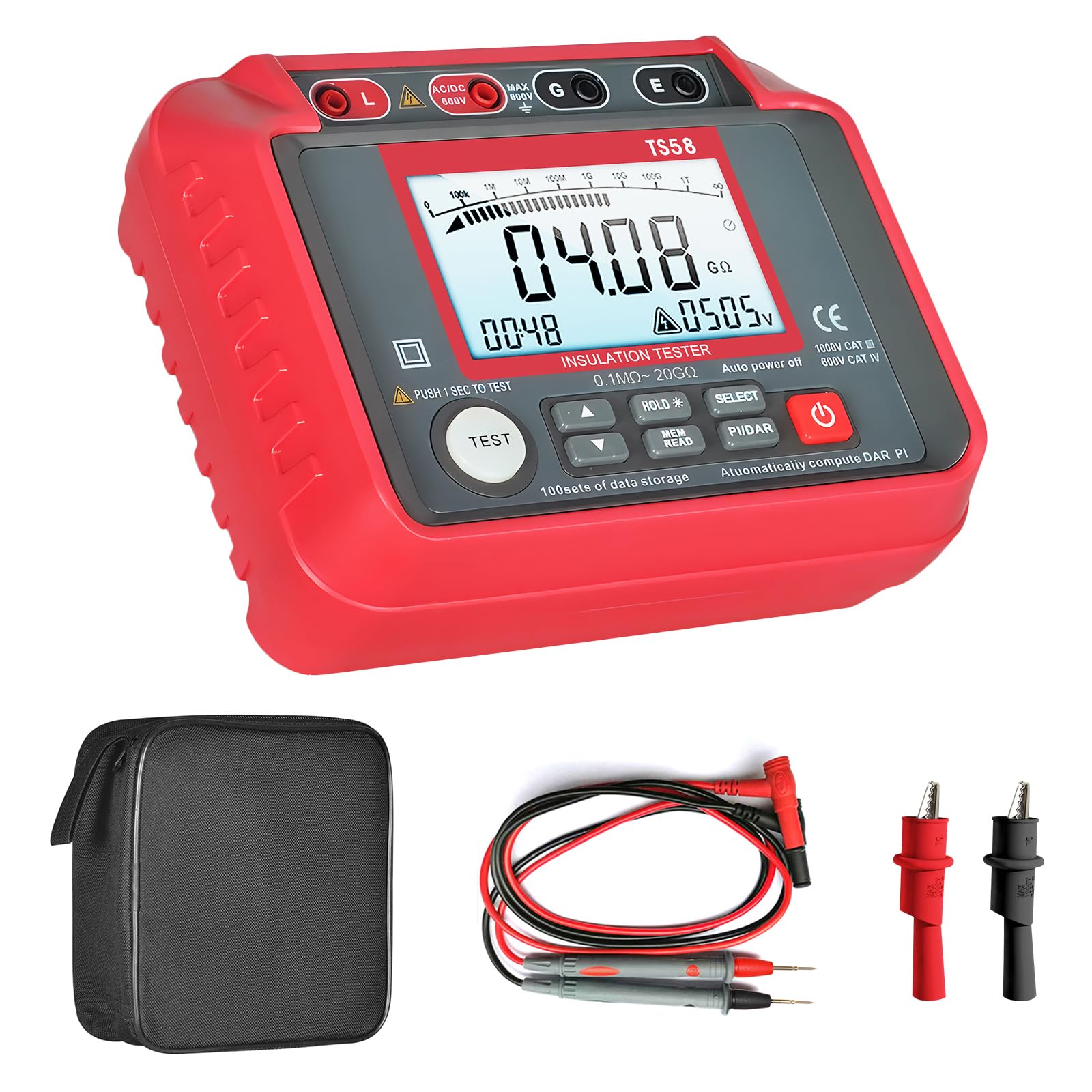
Figure 1: AIOMEST TS58 Digital Megohmmeter Tester with labeled components.
- Insulation Resistance Output (L)
- AC/DC Positive VoltagTerminal
- Tomtage Measurement Shield (G)
- Insulation Resistance Sampling (E)
- Wyświetlacz LCD
- Wysoka głośnośćtage Rozpocznij
- Tomtage Selection Up Button
- Tomtage Selection Down Button
- Data Hold/Backlight Button
- Data Read/Save Button
- Function Selection (Insulation/AC/DC Voltage)
- PI and DAR Buttons (Polarization Index and Absorption Ratio)
- Wyłącznik zasilania
3.2 Funkcje wyświetlacza
The large LCD screen provides clear readings and indicators:

Rysunek 2: Szczegółowy view of the AIOMEST TS58's large LCD backlight display.
- Large LCD Backlight Display: Zapewnia łatwą czytelność w różnych warunkach oświetleniowych.
- Zakres automatyczny: Automatycznie wybiera odpowiedni zakres pomiarowy.
- Wstrzymanie danych (HOLD): Zamraża aktualny pomiar na wyświetlaczu.
- Data Storage (REC): Supports storing up to 100 sets of measurement data.
- Wskaźnik niskiego poziomu naładowania baterii: An icon appears when battery power is low.
- Tomtage Pomiar: Displays AC/DC voltage.
- Polarization Index (PI) and Absorption Ratio (DAR): For advanced insulation testing.

Figure 3: Low Battery Warning indicator on the display.
4. Konfiguracja
4.1 Instalacja baterii
The AIOMEST TS58 requires 8 x 1.5V AA batteries for operation.
- Sprawdź, czy urządzenie jest wyłączone.
- Znajdź komorę baterii z tyłu testera.
- Za pomocą śrubokręta otwórz pokrywę komory baterii.
- Insert 8 x 1.5V AA batteries, observing the correct polarity (+/-).
- Załóż pokrywę komory baterii i zabezpiecz ją śrubą.

Figure 4: Battery compartment location on the AIOMEST TS58.
4.2 Podłączanie przewodów pomiarowych
Connect the test leads to the appropriate terminals on the tester.
- For insulation resistance measurements, connect the red test lead to the 'L' (Insulation Resistance Output) terminal and the black test lead to the 'E' (Insulation Resistance Sampling) terminal.
- Dla AC/DC objtage measurements, connect the red test lead to the 'AC/DC 600V' terminal and the black test lead to the 'G' (Voltage Measurement Shield) terminal.
5. Instrukcja obsługi
5.1 Włączanie/wyłączanie zasilania
Naciśnij Wyłącznik zasilania (13) to turn the device on or off. The device features an automatic shutdown function after 25 minutes of inactivity to conserve battery life.
5.2 Wybór funkcji
Użyj Wybór funkcji button (11) to cycle through measurement modes: Insulation Resistance and AC/DC Voltage.
5.3 Pomiar rezystancji izolacji
- Select the Insulation Resistance mode using the Function Selection button.
- Użyj Tomtage Selection Up (7) i W dół (8) buttons to choose the desired test voltagnp. 250V, 500V, 1000V).
- Connect the test leads to the circuit under test (L and E terminals). Ensure the circuit is de-energized.
- Naciśnij TEST button (located near 6) to initiate the measurement. The Wysoka głośnośćtage Rozpocznij indicator (6) will illuminate.
- The insulation resistance value will be displayed on the LCD screen.
- The device has an automatic discharge design after the test is complete.

Figure 5: Automatic discharge design for safety after testing.
5.4 AC/DC objtage Pomiar
- Select the AC/DC Voltage mode using the Function Selection button.
- Podłącz przewody pomiarowe do obwodu, w którym znajduje się napięcietage needs to be measured (AC/DC 600V and G terminals).
- tomtagWartość zostanie wyświetlona na ekranie LCD.
5.5 Przechowywanie i przechowywanie danych
- Naciśnij TRZYMAĆ button (9) to freeze the current reading on the display. Press again to release.
- To save data, press the REK (Data Read/Save) button (10). The device supports storing up to 100 sets of data.
- Aby przywołać zapisane dane, naciśnij REK Naciśnij przycisk kilkakrotnie.

Figure 6: Display indicating data storage functionality.
5.6 PI and DAR Measurement
The TS58 can calculate Polarization Index (PI) and Absorption Ratio (DAR) for comprehensive insulation analysis. Refer to advanced electrical testing guides for detailed procedures on using these functions.
- Naciśnij PI/DAR button (12) to initiate these measurements.
6. Konserwacja
6.1 Czyszczenie
Przetrzyj urządzenie suchą, miękką ściereczką. Nie używaj środków czyszczących o właściwościach ściernych ani rozpuszczalników.
6.2 Wymiana baterii
Wymień baterie, gdy na wyświetlaczu pojawi się wskaźnik niskiego poziomu naładowania baterii. Postępuj zgodnie z instrukcjami instalacji baterii opisanymi w rozdziale 4.1.
6.3 Przechowywanie
When not in use for extended periods, remove the batteries to prevent leakage. Store the device in a cool, dry place, preferably in its protective storage bag.

Figure 7: The included storage bag for protection and portability.
7. Rozwiązywanie Problemów
| Problem | Możliwa przyczyna | Rozwiązanie |
|---|---|---|
| Urządzenie nie włącza się. | Rozładowane lub nieprawidłowo zainstalowane baterie. | Check battery polarity and replace with new batteries if necessary. |
| Niedokładne odczyty. | Poor test lead connection, dirty terminals, or incorrect mode selection. | Ensure test leads are securely connected. Clean terminals. Verify the correct measurement mode is selected. |
| Na wyświetlaczu pojawia się komunikat „OL” (Przeciążenie). | Measurement exceeds the device's range. | Ensure the test voltage is appropriate for the expected resistance. The device has an auto-range feature, but extreme values may still exceed its limits. |
| Data cannot be saved. | Pamięć pełna. | Clear existing data to free up memory. (Refer to the full user manual for data clearing instructions if not covered here). |
8. Specyfikacje
| Parametr | Wartość |
|---|---|
| Marka | NAJLEPSZE |
| Numer modelu | TS58 |
| Typ pomiaru | Ohmmeter (Insulation Resistance) |
| Zakres rezystancji izolacji | 0.1 MΩ to 20 GΩ |
| Objętość wyjściatage (Insulation Test) | 250V, 500V, 1000V |
| AC/DC Objętośćtage Pomiar | Do 600V |
| Źródło zasilania | Battery-Powered (8 x 1.5V AA) |
| Waga przedmiotu | 800 gram |
| Wymiary opakowania | Wymiary 20.6 x 19.2 x 8.2 cm |
| Temperatura pracy | Do 35 stopni Celsjusza |
| Zgodność | CE, RoHS |
| Przechowywanie danych | 100 zestawów |
9. Zawartość opakowania
The AIOMEST TS58 package includes the following items:

Figure 8: Package contents of the AIOMEST TS58.
- AIOMEST TS58 Insulation Resistance Tester x 1
- Test Leads x 2
- Alligator Clips x 2
- Wkrętak x 1
- Baterie AA 1.5 V x 8
- Instrukcja obsługi x 1
- Torba do przechowywania x 1
10. Gwarancja i wsparcie
For warranty information or technical support, please refer to the contact details provided in the separate warranty card or contact the seller directly. Keep your purchase receipt as proof of purchase.


