
1. Koniec produktuview
The PAUTIX SP645E RGB+CCT LED Controller Kit is designed for controlling PAUTIX RGB+CCT COB LED strip lights. This kit offers versatile control options including a 2.4G RF wireless remote, smartphone APP control, and a one-button switch on the control box. It supports various lighting effects, music synchronization, group control, and includes timer and memory functions for enhanced user experience.
Główne cechy:
- Zgodność: Specifically designed for PAUTIX RGB+CCT COB LED strips (6-pin, 2700K-6500K).
- Wiele metod sterowania: Smartphone APP (BanlanX), 2.4G RF remote control, and a physical control box button.
- Dynamiczne oświetlenie: Built-in music mode and multiple dynamic lighting effects.
- Kontrola grupy: Manage multiple controllers simultaneously via the mobile APP or a single remote.
- Funkcje wygody: Timer function for scheduled on/off, and memory function to retain settings after power loss.
- Kalibracja temperatury barwowej: Supports channel order calibration via the APP.
2. Zawartość opakowania
Sprawdź, czy w opakowaniu znajdują się wszystkie elementy:
- 1 × Pilot zdalnego sterowania RF 2.4G
- 1 × Controller Box
- 1 × Instrukcja obsługi
3. Instrukcje konfiguracji
3.1 Sprawdzenie zgodności
This controller is ONLY compatible with PAUTIX RGB+CCT COB LED strips that use a 6-pin connector. It is not compatible with other types of LED strip lights, such as single color temperature, CCT, RGB, RGBW LED, or other PWM strip lights. Please ensure your LED strip light matches these specifications before proceeding.

Image: The controller is shown connected to a 6-pin RGB+CCT COB LED strip. A diagram illustrates the 6-pin connector dimensions (16mm/0.62in width, 6mm/0.23in height) for compatibility verification. The image emphasizes that the controller is designed for PAUTIX 6-PIN RGB+CCT COB LED Strip Light and may not be compatible with other brands.
3.2 Schemat połączeń
Follow these steps to connect the controller to your LED strip light and power supply:
- Przed podłączeniem upewnij się, że wszystkie komponenty są wyłączone.
- Connect the 6-pin output of the SP645E controller box to the 6-pin input of your PAUTIX RGB+CCT COB LED strip light.
- Connect a DC5-24V power supply (not included) to the input of the SP645E controller box.
- Ensure the total power of the strip lights does not exceed the maximum output of the controller (6A). The controller supports simultaneous connection of two rolls of strip lights, provided the total power limit is respected.
- Once all connections are secure, you may power on the system.

Image: A diagram illustrating the connection sequence: Power Supply (DC5-24V, not included) connects to the Controller (SP645E, not included), which then connects to the RGB Strip Light (not included). The diagram also shows the RF Remote and a smartphone with the APP for control.
3.3 APP Installation and Pairing
To use smartphone APP control, download the "BanlanX" app:
- Szukaj "BanlanX" in your device's app store (e.g., Apple App Store, Google Play Store).
- Alternatively, scan the QR code provided on the controller box or in the included user manual to download the app.
- Once installed, open the app and follow the on-screen instructions to add and pair your SP645E controller. Ensure Bluetooth is enabled on your smartphone.

Image: A three-step visual guide showing the BanlanX app interface for adding a device. Step 1: "My Devices" screen with "Add Device" button. Step 2: "Add Device" screen showing scanning for SP645E. Step 3: Device successfully added, showing control interface for "White Color Breathe" mode.
4. Instrukcja obsługi
Metody sterowania 4.1
The SP645E controller offers three ways to manage your LED strip lights:

Image: This image displays the three control methods: Smartphone APP control with Bluetooth connection, 2.4G RF Remote Control, and a simple One-Key Switch on the control box. Each method is depicted with its respective interface or device.
4.1.1 Smartphone APP Control (BanlanX)
The BanlanX app provides comprehensive control over your LED strip lights:
- Kolor i jasność: Select any color and adjust brightness levels.
- Efekty dynamiczne: Access a variety of dynamic modes, music synchronization, and DIY effects.
- Tryb muzyczny: Capture music through your phone's microphone, player streaming, or the controller's built-in microphone.
- Funkcja timera: Set schedules for the light strip to turn on or off automatically.
- Channel Calibration: Perform sequential channel calibration for color temperature adjustment.
4.1.2 Pilot zdalnego sterowania RF 2.4G
The included 2.4G RF remote control allows for convenient wireless operation:
- Zakres: Control your strip lights from any angle within 30 meters (99 feet) in an open area.
- Regulacja jasności: Features 17 built-in brightness levels, adjustable via the "BRI" buttons.
- Łączenie w pary:
- To Bind: Short press the ON button to turn on the light. Within 20 seconds after the controller is powered on, long press the ON button on the remote to bind/unbind the remote control.
- To Unbind/Clear All: Short press the OFF button to turn off the light. Within 20 seconds after the controller is powered on, first turn off the lights completely, and then long press the OFF button to clear all bound remote controls.
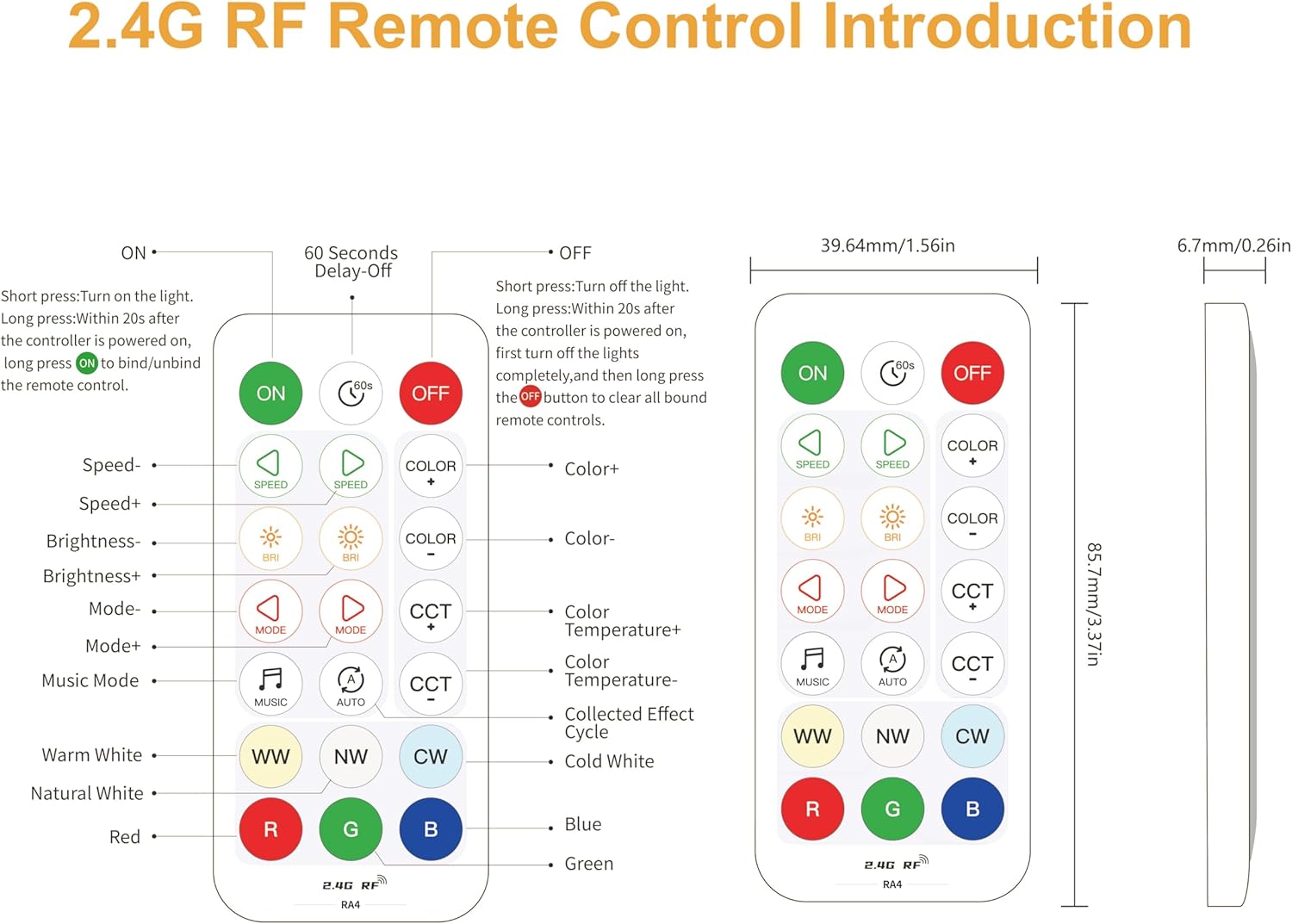
Image: A detailed diagram of the 2.4G RF remote control, showing all buttons and their corresponding functions. Buttons include ON/OFF, Speed+/-, Brightness+/-, Mode+/-, CCT+/-, Color+/-, Music Mode, WW (Warm White), NW (Natural White), CW (Cold White), Red, Green, Blue. Dimensions of the remote are also provided.
4.1.3 One-Button Switch (Control Box)
The control box itself features a simple one-button switch for basic on/off functionality. It also retains the last settings due to its memory function.
4.2 Funkcje zaawansowane
4.2.1 Kontrola grupowa
The system supports flexible group control configurations:
- APP Grouping: Create groups within the mobile APP to add multiple controllers for simultaneous control.
- Kontrola jeden do wielu: Use a single remote to control multiple controllers (no limit as long as they are within 30m/99ft).
- Kontrola „wiele do jednego”: Up to 5 remotes can control one controller simultaneously.
- Kontrola indywidualna: Each strip can be controlled individually by pairing its controller with its dedicated remote.
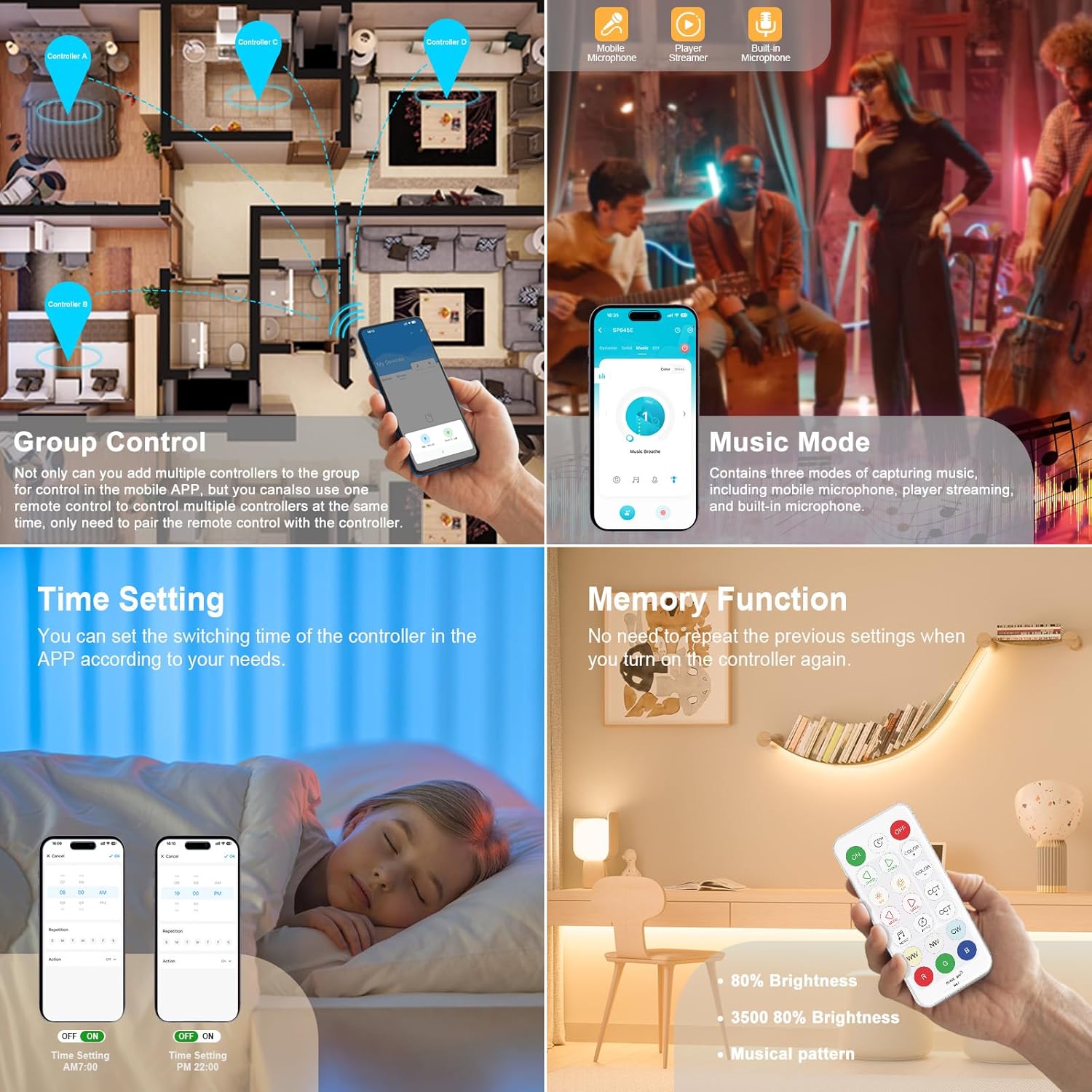
Image: A collage demonstrating several features. Top-left shows "Group Control" with a floor plan indicating multiple controllers (A, B, C, D) managed by a smartphone app. Top-right shows "Music Mode" with a smartphone displaying music capture options (mobile microphone, player streaming, built-in microphone). Bottom-left shows "Time Setting" with a smartphone app interface for scheduling. Bottom-right shows "Memory Function" with a remote control and a light strip retaining its settings.

Image: An illustration showing multiple rooms in a house, each with LED strip lights. The image demonstrates how multiple identical kits can be added to one group for control via a smartphone app, and how multiple remotes can control the same light strip/controller.
4.2.2 Tryb muzyczny
The music mode allows your LED lights to synchronize with audio. It supports three methods for capturing music:
- Mikrofon do telefonu komórkowego
- Player streaming
- Built-in microphone on the controller

Image: A split image showing two features. On the left, LED lights are syncing with music, with icons for mobile microphone, player streaming, and built-in microphone. On the right, three dynamic modes are highlighted: Breath, Strobe, and Heart Beat, with corresponding visual effects.
4.2.3 Funkcja timera
Use the BanlanX app to set specific times for your LED strip lights to turn on or off automatically. This eliminates the need for manual operation.
4.2.4 Funkcja pamięci
The controller features a memory function, which means it will retain the last used settings (color, brightness, mode) even after being powered off and on again. You do not need to reconfigure your preferred settings each time.
4.2.5 Funkcjonalność ściemniania
Adjust the brightness of your LED strip lights from 0% to 100% using either the BanlanX app or the 2.4G RF remote control. The remote offers 17 distinct brightness levels.

Image: This image demonstrates the dimmable feature, showing a range of brightness from 20% to 100%. It displays a smartphone app interface for color and brightness selection, and highlights the "BRI" buttons on the RF remote for brightness adjustment, indicating 17 dimming levels.
4.2.6 Color Temperature Calibration
If you notice that the color temperature displayed by your strip light does not match your expectation, you can use the BanlanX app to easily calibrate the color temperature corresponding to the strip light and the remote control.

Image: A smartphone screen displaying the "Color Correction" interface within the BanlanX app. It prompts the user to select the current state of the light, with options for Red, Green, Blue, Cold White, and Warm White, to facilitate calibration.
5. Konserwacja
To ensure the longevity and optimal performance of your PAUTIX SP645E LED Controller Kit, follow these maintenance guidelines:
- Czyszczenie: Gently wipe the controller box and remote control with a dry, soft cloth. Avoid using abrasive cleaners, solvents, or harsh chemicals.
- Środowisko: Keep the device in a dry environment. Avoid exposure to moisture, high humidity, or extreme temperatures.
- Wyłączone: Zawsze odłączaj zasilanie przed przystąpieniem do czyszczenia lub konserwacji.
- Wymiana baterii (zdalna): If the remote control's performance degrades, replace its battery. Refer to the remote's specific instructions for battery type and replacement procedure.
6. Rozwiązywanie Problemów
If you encounter issues with your PAUTIX SP645E LED Controller Kit, refer to the following troubleshooting steps:
| Problem | Możliwa przyczyna | Rozwiązanie |
|---|---|---|
| LED strip lights do not turn on. |
|
|
| Pilot zdalnego sterowania nie reaguje. |
|
|
| APP cannot connect to the controller. |
|
|
| Controller or LED strip overheats. |
|
|
| Incorrect colors or color temperature. |
|
|
7. Specyfikacje
| Funkcja | Szczegół |
|---|---|
| Numer modelu | RA4 (SP645E) |
| Wejście Voltage | Prąd stały 5-24 V |
| Maksymalny prąd wyjściowy pojedynczego kanału PWM | 2A |
| Całkowity maksymalny prąd wyjściowy | 6A |
| Zgodność | PAUTIX RGB+CCT COB LED strips (6-pin, 2700K-6500K) |
| Metody kontroli | Smartphone APP (BanlanX), 2.4G RF Remote Control, One-button switch |
| RF Remote Control Range | 30m / 99ft (otwarta przestrzeń) |
| Waga przedmiotu | 1.44 uncji |
| Wymiary opakowania | 5.87 x 3.23 x 0.71 cala |
| Kolor | Biały |
8. Gwarancja i wsparcie
PAUTIX provides every customer with a 5-letnia gwarancja for this product. If you encounter any difficulties during the use of the product or have any questions, please do not hesitate to contact PAUTIX customer service. We are committed to providing professional solutions and fast customer service response.
For support, please refer to the contact information provided with your purchase or visit the official PAUTIX webstrona.