
hosabely SK80
hosabely SK80 Audio Interface User Manual
Model: SK80
1. Wprowadzenie
Thank you for choosing the hosabely SK80 Audio Interface. This device is designed to enhance your audio experience for live streaming, podcasting, recording, and gaming. It features 48V phantom power, noise reduction, customizable sound pads, and various audio effects. Please read this manual carefully to understand the product's functions and ensure proper operation.

Rycina 1: Przód view of the hosabely SK80 Audio Interface.
2. Zawartość opakowania
Sprawdź, czy w przesyłce znajdują się wszystkie elementy:
- 1 x hosabely SK80 Live Sound Card (Audio Interface)
- 1 x kabel ładujący USB
- 2 x kable audio
- 1 x Instrukcja obsługi w języku angielskim (ten dokument)
Note: Microphone is not included. The device is not compatible with USB microphones.
3. Koniec produktuview
3.1. Układ panelu sterowania

Rysunek 2: Szczegółowy view of the SK80 Audio Interface control panel.
The SK80 features a comprehensive control panel with various knobs and buttons for audio adjustment and effect activation. Key areas include:
- Regulacja głośności mikrofonu: Separate knobs for high, middle, and low frequencies, plus overall microphone volume.
- Tone Volume & Recording Controls: Adjust tone and recording levels.
- Line Volume & Instrumental Volume: Controls for line input and instrument input.
- Sound Effects Pads: Buttons for various live sound effects and customizable pads.
- Reverb & Voice Changer Controls: Knobs and buttons for reverb modes and voice modulation.
- Przycisk zasilania fantomowego 48 V: Aktywuje zasilanie fantomowe dla mikrofonów pojemnościowych.
- Przycisk redukcji szumów: Engages the noise reduction feature.
- Bluetooth (BT) On/Off: Toggles Bluetooth connectivity.
3.2. Porty łączności
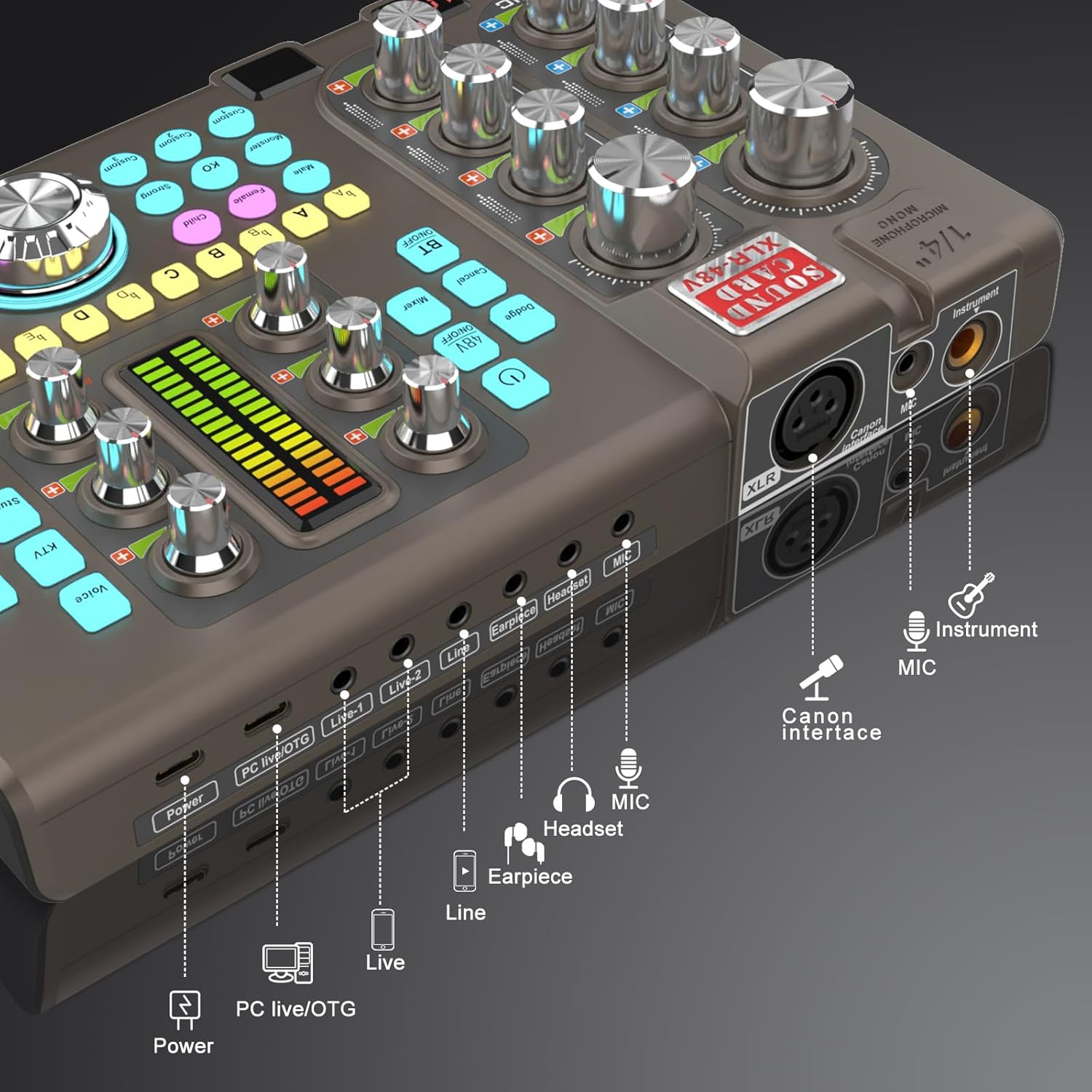
Figure 3: Labeled input and output ports on the SK80 Audio Interface.
The rear panel provides essential connection points:
- Port zasilania: USB-C for power supply.
- PC Live/OTG Port: USB-C for connection to a computer or OTG-compatible smartphone/tablet.
- Live 1, Live 2, Line-1, Line-2 Ports: 3.5mm audio output ports for connecting to streaming devices or other audio equipment.
- Earpiece Port: 3.5mm output for monitoring audio with an earpiece.
- Port zestawu słuchawkowego: 3.5mm output for connecting a headset.
- Port MIC: Wejście mikrofonowe 3.5 mm.
- XLR-48V Interface: XLR input for condenser microphones requiring 48V phantom power.
- Instrument Port: 1/4" (6.35mm) input for connecting instruments like guitars.
4. Konfiguracja
4.1. Włączanie urządzenia
- Connect the USB Charging Cable to the Moc port on the SK80 and to a USB power adapter (not included) or a computer USB port.
- Press and hold the power button on the control panel to turn on the device.
4.2. Podłączanie mikrofonów

Figure 4: XLR-48V and Instrument input ports.
- For Condenser Microphones (requiring 48V Phantom Power): Connect your XLR microphone cable to the XLR-48V Interface port. Naciśnij 48V WŁ./WYŁ. button on the control panel to activate phantom power. (Note: 48V is off by default to conserve battery. A light indicator will confirm activation.)
- For Dynamic Microphones or Microphones with 3.5mm Jack: Podłącz mikrofon do MIKROFON portu za pomocą kabla audio 3.5 mm.
4.3. Podłączanie instrumentów
Podłącz swój instrument (np. gitarę) do Instrument port using a 1/4" (6.35mm) cable.
4.4. Connecting to a Computer or Smartphone
- Przez USB: Use the USB Charging Cable to connect the PC Live/OTG port to your computer. The device will be recognized as an audio input/output device.
- Przez Bluetooth: Naciśnij BT WŁ./WYŁ. button on the control panel. On your smartphone or tablet, search for and connect to the SK80 via Bluetooth settings.
4.5. Connecting Monitoring Devices
- Podłącz słuchawki do Zestaw słuchawkowy port for monitoring your audio.
- Connect an earpiece to the Słuchawki port for discreet monitoring.
5. Instrukcja obsługi
5.1. Regulacja poziomów dźwięku

Figure 5: Audio adjustment knobs.
- Użyj GŁOŚNOŚĆ MIKROFONU knobs (High, Middle, Low) to fine-tune your microphone's equalization.
- Dostosuj Tone Vol knob for overall microphone tone.
- Control the output level with the Nagranie pokrętło.
- Dostosuj Objętość linii for line input sources and Instrumental Vol for connected instruments.
- Ten Monitoruj objętość knob controls the volume of your monitoring headphones/earpiece.
5.2. Using Reverb Effects
The SK80 offers 6 reverb modes: VOICE, KTV, STUDIO, CONCERT, CORRECT, and MC. Select your desired mode using the dedicated buttons. Adjust the reverb depth and width using the corresponding knobs.
5.3. Customizing Sound Pads

Figure 6: Customizable sound pads.
The SK80 features 3 customizable sound pads. Each pad can record up to 30 seconds of audio. To record:
- Naciśnij i przytrzymaj jeden z Zwyczaj buttons (Custom 1, 2, or 3) until it starts blinking.
- Record your desired audio (e.g., from a microphone, connected device, or Bluetooth input).
- Naciśnij to samo Zwyczaj button again to stop recording. The button will stop blinking.
- Naciśnij Zwyczaj button once to play the recorded sound. You can adjust the volume of each pad.
5.4. Voice Changer Functions
Transform your voice using the Zmieniacz głosu feature. Select from Male, Female, Child, or Monster voices. Adjust the ZMIANA GŁOSU knob to modify the pitch and create various vocal effects.
5.5. Redukcja szumów

Figure 7: Noise reduction display.
Aktywuj Redukcja szumów button to minimize environmental background noise. The device features a 15-level noise reduction system. The display shows the current noise reduction level.
5.6. Live Sound Effects
The SK80 includes 11 dynamic live sound effects (e.g., Dodge, Muffled, Play In, Laughter, Kiss, Gunfire). Press the corresponding buttons to trigger these effects during your live stream or recording. Each effect typically lasts for approximately 4 seconds.
6. Konserwacja
- Utrzymuj urządzenie w czystości, przecierając je miękką, suchą ściereczką. Unikaj stosowania płynnych środków czyszczących i rozpuszczalników.
- Przechowywać urządzenie w chłodnym i suchym miejscu, z dala od bezpośredniego światła słonecznego i ekstremalnych temperatur.
- Unikaj upuszczania i narażania urządzenia na silne uderzenia.
- The built-in 3000mAh battery provides approximately 3-5 hours of operation. Recharge the device when the battery indicator is low.
7. Rozwiązywanie Problemów
- Brak dźwięku:
- Check all cable connections (microphone, headphones, output to PC/streaming device).
- Ensure volume knobs (MIC VOL, Recording, Monitor Vol) are turned up.
- Verify that the correct audio input/output device is selected on your computer or streaming software.
- Mikrofon nie działa:
- W przypadku korzystania z mikrofonu pojemnościowego należy upewnić się, że włączone jest zasilanie fantomowe 48 V.
- Check microphone cable integrity.
- Confirm the microphone is properly connected to the correct input port (XLR or 3.5mm MIC).
- Szumy lub zakłócenia w dźwięku:
- Activate the Noise Reduction feature.
- Sprawdź, czy nie ma luźnych połączeń kablowych.
- Upewnij się, że w pobliżu nie ma silnych źródeł zakłóceń elektromagnetycznych.
- Adjust input gain levels to avoid clipping.
- Problemy z łącznością Bluetooth:
- Ensure the BT ON/OFF button is activated.
- Make sure the SK80 is discoverable and within range of your device.
- Spróbuj rozparować i ponownie sparować urządzenie.
8. Specyfikacje
| Numer modelu przedmiotu | SK80 |
| Marka | hosabely |
| Technologia łączności | Bluetooth, USB |
| Liczba kanałów | 4 |
| Waga przedmiotu | 1.67 funtów (0.76 kg) |
| Wymiary opakowania | 12.28 x 7.56 x 2.36 cala |
| Typ baterii | Polimer litowy (3000 mAh) |
| Kompatybilne urządzenia | Smartphone, PC, Guitar |
| Wsparcie systemu operacyjnego | Linux, Windows, macOS |
| Obsługiwane oprogramowanie | Ableton Live, FL Studio, Pro Tools, Logic Pro, Cubase (and others) |
9. Gwarancja i wsparcie
For any questions or issues regarding your hosabely SK80 Audio Interface, please refer to the seller's contact information provided at the point of purchase. Please retain your proof of purchase for warranty claims.
Ask a question about this manual
Ask about setup, troubleshooting, compatibility, parts, safety, or missing instructions. Manuals+ will review the question and use this page’s manual context to help answer it.