
KALOR TECH AC829F
KALOR TECH Wi-Fi Smart Thermostat User Manual
Model: AC829F
1. Koniec produktuview
The KALOR TECH Wi-Fi Smart Thermostat (Model AC829F) is designed for electric baseboard heating systems operating on 120-240V. It features an LCD display, Wi-Fi connectivity, and compatibility with popular smart home platforms like Alexa, Google Home, Smart Life, and Tuya App. This thermostat provides precise temperature control and energy management for your home.

Obraz 1.1: Przód view of the KALOR TECH Wi-Fi Smart Thermostat displaying temperature in Fahrenheit.
Główne cechy:
- Zdalne sterowanie aplikacją: Manage your heating system from anywhere using the Smart Life or Tuya App.
- Zgodność z asystentem głosowym: Control your thermostat with voice commands via Alexa or Google Assistant.
- Ustawienia programowalne: Schedule heating cycles for optimal comfort and energy savings.
- Wyświetlacz LCD: Clear display shows current temperature, target temperature, time, and Wi-Fi connectivity status.
- Wyświetlacz Fahrenheita/Celsjusza: Supports both Fahrenheit (USA) and Celsius (Canada) temperature units.
- Proprietary Wall Plate: Includes a custom-designed wall plate for standard American and Canadian electrical boxes.
- Child-Lock Capable: Zapobiega nieautoryzowanym zmianom ustawień.
2. Informacje dotyczące bezpieczeństwa
Please read all safety warnings and installation instructions carefully before installing or operating this thermostat. Failure to follow these instructions may result in electric shock, fire, or property damage.
- Kompatybilność elektryczna: This thermostat is designed for 120-240V electric baseboard heating systems ONLY. It is NOT compatible with 24V central heating systems or single pole systems.
- Zalecana profesjonalna instalacja: Jeśli nie masz pewności co do instalacji elektrycznej, skonsultuj się z wykwalifikowanym elektrykiem.
- Odłączenie zasilania: Przed przystąpieniem do instalacji termostatu lub wykonywania jakichkolwiek czynności konserwacyjnych należy zawsze wyłączyć zasilanie za pomocą wyłącznika automatycznego.
- Sieć Wi-Fi: Wymaga dostępu do 2.4 MHz Wi-Fi network for installation and smart features. It is not compatible with 5 GHz networks.
- Tylko do użytku wewnątrz pomieszczeń: Urządzenie przeznaczone jest do użytku wewnątrz pomieszczeń, w suchych miejscach.
3. Co znajduje się w pudełku
Przed rozpoczęciem instalacji sprawdź, czy wszystkie komponenty są obecne:
- Digital Wi-Fi Thermostat (Model AC829F)
- Custom Wall Plate
- Installation Wires (Pigtail electrical wires)
- Śruby montażowe
- Large-Print Instructions (This manual)
4. Konfiguracja i instalacja
Follow these steps for proper installation of your KALOR TECH Smart Thermostat. Ensure power is OFF at the circuit breaker before proceeding.
- Wyłącz zasilanie: Locate the circuit breaker controlling your electric baseboard heater and turn off the power. Verify power is off using a voltagtester.
- Usuń stary termostat: Carefully remove your existing thermostat from the wall. Disconnect the wires, noting their connections if necessary.
- Montaż płytki ściennej: Secure the custom wall plate to your electrical box using the provided mounting screws. Ensure it is level and flush with the wall.
- Podłącz termostat: Connect the pigtail electrical wires from the thermostat to your home's electrical wiring. This thermostat is designed for 120-240V systems. Ensure all connections are secure and insulated.
- Attach Thermostat to Wall Plate: Align the thermostat with the mounted wall plate and gently push it into place until it clicks securely.
- Przywróć zasilanie: Turn the power back on at the circuit breaker. The thermostat display should illuminate.
- Początkowe ustawienia: Follow the on-screen prompts for initial setup, including time and date.
- Połącz się z Wi-Fi:
- Download the "Smart Life" or "Tuya App" from your smartphone's app store.
- Zarejestruj się lub zaloguj na swoje konto.
- Add a new device (usually by tapping the "+" icon). Select "Thermostat" or "Heater".
- Follow the in-app instructions to connect your thermostat to your 2.4 MHz Wi-Fi network. This may involve putting the thermostat into pairing mode (refer to the thermostat's display for specific instructions, often indicated by a blinking Wi-Fi icon).
5. Instrukcja obsługi
5.1. Obsługa ręczna
The thermostat features a clear LCD display and touch controls for direct operation.
- Przycisk zasilania: Located at the top right, press to turn the thermostat On/Off.
- Regulacja temperatury: Use the "+" and "-" buttons (bottom right) to increase or decrease the target temperature.
- Przycisk trybu (M): Located at the bottom left, press to cycle through operating modes (e.g., Manual, Program).
- Przycisk zegara: Located at the bottom left, press to adjust time settings.
- Wyświetl informacje: The LCD shows current room temperature, set target temperature, time, and Wi-Fi status.

Image 5.1: The thermostat displaying temperature in Celsius, indicating its dual unit capability.
5.2. App Control (Smart Life / Tuya App)
Once connected to Wi-Fi, you can control your thermostat remotely via the Smart Life or Tuya App.
- Zdalna regulacja temperatury: Change the target temperature from anywhere.
- Harmonogram: Utwórz niestandardowe harmonogramy ogrzewania na różne dni i godziny, aby zoptymalizować zużycie energii.
- Wybór trybu: Switch between manual and programmed modes.
- Blokada dziecięca: Enable or disable the child lock feature to prevent accidental changes.
- Jednostka temperatury: Adjust the display unit between Fahrenheit and Celsius within the app settings.
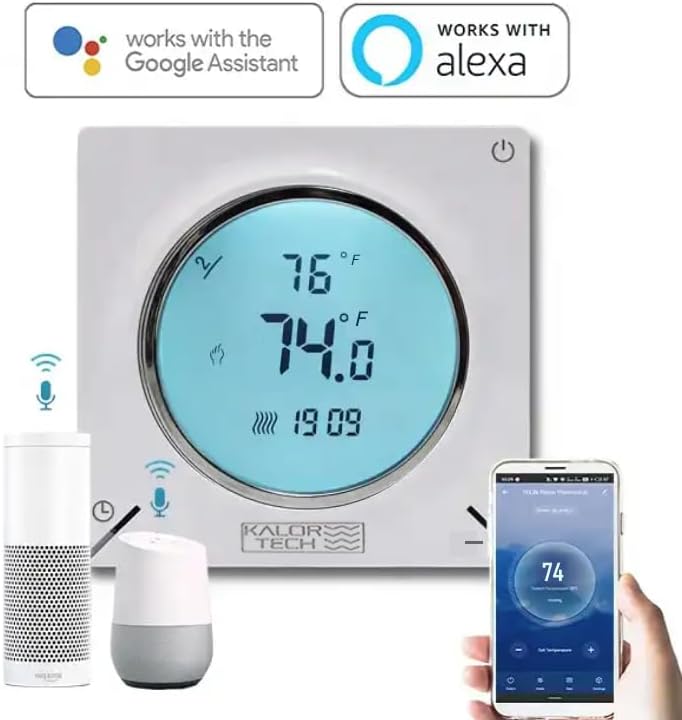
Image 5.2: The thermostat integrated with Google Assistant and Alexa devices, demonstrating app control via a smartphone.
5.3. Voice Control (Alexa / Google Home)
Zintegruj termostat z Amazon Alexa lub Google Home, aby uzyskać wygodne sterowanie głosowe.
- Połącz konto: In your Alexa or Google Home app, enable the "Smart Life" or "Tuya Smart" skill/action. Link your Smart Life/Tuya account to your voice assistant account.
- Odkryj urządzenia: Poproś asystenta głosowego o „Wykryj urządzenia” lub ręcznie zainicjuj wykrywanie w aplikacji.
- Polecenia głosowe: Po odkryciu możesz użyć poleceń takich jak:
- „Alexa, ustaw [Nazwa termostatu] na 72 stopnie”.
- „Hej Google, jaka jest temperatura w [Nazwa pokoju]?”
- „Alexa, włącz [nazwa termostatu]”.
- "Hey Google, lower the temperature in [Room Name] by 2 degrees."
6. Konserwacja
The KALOR TECH Smart Thermostat requires minimal maintenance to ensure optimal performance.
- Czyszczenie: Wytrzyj wyświetlacz termostatu iasing z miękkim, damp cloth. Do not use abrasive cleaners, solvents, or spray cleaners directly on the unit.
- Zasypka: Periodically dust the vents on the thermostat to prevent accumulation that could affect temperature sensing.
- Aktualizacje oprogramowania: Ensure your Smart Life/Tuya App is up to date to receive the latest features and performance improvements. Firmware updates for the thermostat may also be pushed through the app.
7. Rozwiązywanie Problemów
Jeśli masz problemy z termostatem, zapoznaj się z poniższymi typowymi problemami i rozwiązaniami:
| Problem | Możliwa przyczyna | Rozwiązanie |
|---|---|---|
| Termostat nie włącza się. | Brak zasilania z wyłącznika obwodu; nieprawidłowe okablowanie. | Check circuit breaker and ensure it is ON. Verify wiring connections are secure and correct (120-240V). |
| Nie można połączyć się z siecią Wi-Fi. | Incorrect Wi-Fi password; 5 GHz network; thermostat not in pairing mode; weak signal. | Ensure correct 2.4 MHz Wi-Fi network and password. Put thermostat into pairing mode (blinking Wi-Fi icon). Move thermostat closer to router if signal is weak. |
| Odczyt temperatury wydaje się niedokładny. | Sensor obstruction; calibration needed. | Ensure no objects are blocking the thermostat's vents. Check the app for a temperature calibration setting (offset adjustment) and adjust if available. |
| Display goes dark quickly. | Domyślne ustawienie czasu wygaszania wyświetlacza. | This is a normal power-saving feature. The display will illuminate when touched or interacted with. There may be a setting in the app to adjust display brightness or timeout, if available. |
| Sterowanie głosowe nie działa. | Account not linked; device not discovered; incorrect commands. | Ensure Smart Life/Tuya skill/action is enabled and linked in your Alexa/Google Home app. Ask voice assistant to "Discover devices." Use correct voice commands as listed in section 5.3. |
8. Specyfikacje
| Marka | TECHNOLOGIA KALOR |
| Nazwa modelu | AC829F |
| Tomtage | 120-240 V |
| Źródło zasilania | Elektryczny przewodowy |
| Technologia łączności | Hard-wired, Wireless (Wi-Fi 2.4 MHz) |
| Typ kontrolera | Hand Control, IFTTT, Google Assistant, Amazon Alexa |
| Typ wyświetlacza | LCD |
| Rodzaj kontroli temperatury | Heating in Fahrenheit/Celsius |
| Typ montażu | Montaż ścienny |
| Waga przedmiotu | 0.5 funta (ok. 8 uncji) |
| Kolor | Biały |
| Producent | Dorado Services, LLC |
9. Gwarancja i wsparcie
For warranty information and technical support, please contact the manufacturer, Dorado Services, LLC, or refer to the product's official webZachowaj paragon jako dowód zakupu.
Notatka: Brak oficjalnych filmów produktu od sprzedawcy, które można by umieścić w niniejszej instrukcji.
Ask a question about this manual
Ask about setup, troubleshooting, compatibility, parts, safety, or missing instructions. Manuals+ will review the question and use this page’s manual context to help answer it.