
Wstęp
This manual provides detailed instructions for the installation, operation, and maintenance of your GREATHTEK HDMI KVM Switch. This device allows you to control up to four computers using a single monitor, keyboard, and mouse, enhancing workspace efficiency and reducing cable clutter. Please read this manual thoroughly before use to ensure proper functionality and to maximize your product experience.
Zawartość opakowania
Sprawdź, czy wszystkie wymienione poniżej elementy znajdują się w Twojej paczce. Jeśli brakuje któregokolwiek z nich lub jest on uszkodzony, skontaktuj się z obsługą klienta.
- KVM Switch Unit x1
- Kabel HDMI 2.0 x1
- Kabel USB 3.0 x4
- USB C Power Cable x1
- Desktop Controller x1
- Instrukcja obsługi x1
- Podnóżek x4

Cechy produktu
- 4-Port KVM Functionality: Control up to four computers (PCs) with a single set of keyboard, mouse, and monitor.
- Obsługa wysokiej rozdzielczości: Supports resolutions up to 4K@60Hz (3840x2160@60Hz), and is backward compatible with 2K and 1080P. Ensure your source devices, monitor, and HDMI cables all support 4K@60Hz for optimal performance.
- High-Speed USB 3.0 Ports: Equipped with 3 USB 3.0 ports and 1 USB C port, offering data transfer speeds up to 5 Gbit/s, which is ten times faster than USB 2.0. These ports can connect keyboards, mice, USB drives, printers, scanners, and other USB devices.
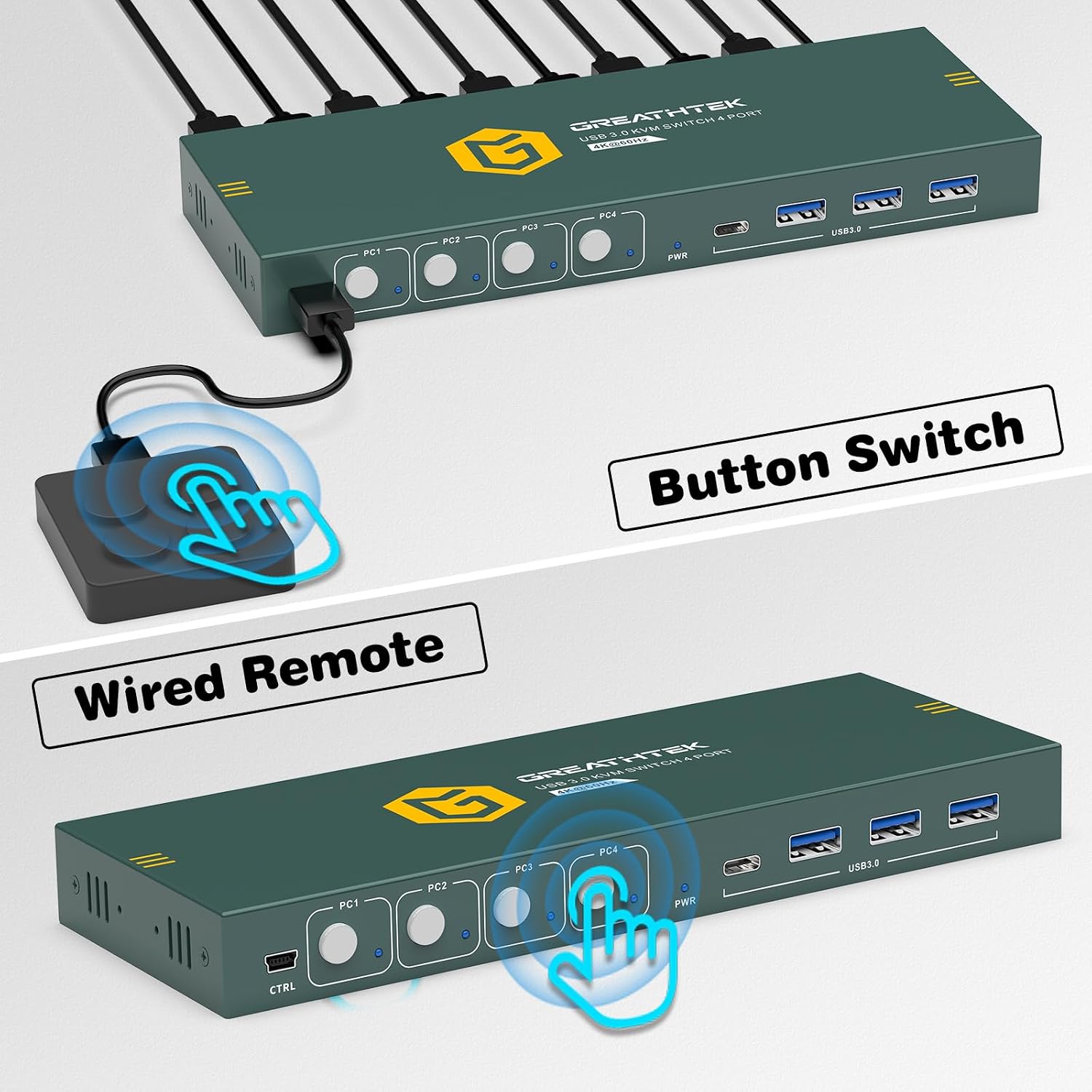
- Podwójne metody przełączania: Easily switch between connected computers using either the physical button on the KVM switch or the included 1.5m wired desktop controller.
- EDID Adaptation: Features EDID adaptation to maintain consistent window and resolution settings when switching between computers, preventing display disruption.
- Szeroka kompatybilność: Compatible with various operating systems including Windows, Linux, Unix, and Mac.


Instrukcje konfiguracji
Follow these steps to properly set up your GREATHTEK HDMI KVM Switch:
- Wyłącz wszystkie urządzenia: Before starting, ensure all computers and your monitor are powered off and unplugged from their power sources.
- Podłącz monitor: Connect your monitor to the "HD OUT" port on the KVM switch using an HDMI cable.
- Connect Computers (HDMI): For each computer, connect an HDMI cable from the computer's HDMI output to an available "HD IN" port (PC1, PC2, PC3, PC4) on the KVM switch.
- Connect Computers (USB): For each computer, connect a USB 3.0 cable from the computer's USB port to the corresponding "USB 3.0" input port (PC1, PC2, PC3, PC4) on the KVM switch. These connections enable keyboard, mouse, and other USB device sharing.
- Podłącz klawiaturę i mysz: Connect your keyboard and mouse to the dedicated USB 3.0 ports on the KVM switch. You can also connect other USB peripherals like a USB drive or printer to the remaining USB 3.0 ports.
- Podłącz zasilanie: Connect the USB C power cable to the KVM switch's power input and then to a suitable USB power adapter (not included) or a powered USB port.
- Włączanie: Power on the KVM switch, then your monitor, and finally your computers.

Instrukcja obsługi
Once the KVM switch is set up, you can easily switch between your connected computers.
Przełączanie między komputerami
The GREATHTEK HDMI KVM Switch offers two methods for switching:
- Przycisk na panelu przednim: Press the corresponding button (PC1, PC2, PC3, or PC4) on the front panel of the KVM switch to select the desired computer. The LED indicator next to the button will illuminate to show the active computer.
- Przewodowy kontroler biurkowy: Use the included wired desktop controller. Press the button on the controller to cycle through the connected computers. This allows for convenient switching without reaching for the KVM unit itself.

Konserwacja
Aby zapewnić długą żywotność i optymalną wydajność przełącznika KVM, należy przestrzegać poniższych wskazówek dotyczących konserwacji:
- Czyszczenie: Use a soft, dry cloth to clean the exterior of the device. Avoid using liquid cleaners or aerosols, which may damage the unit.
- Wentylacja: Ensure the KVM switch is placed in a well-ventilated area to prevent overheating. Do not block any ventilation openings.
- Zarządzanie kablami: Keep cables organized and free from kinks or excessive bending to prevent damage and ensure stable connections.
- Warunki środowiskowe: Unikaj wystawiania urządzenia na działanie ekstremalnych temperatur, wilgoci lub bezpośredniego światła słonecznego.
Rozwiązywanie problemów
Jeśli napotkasz problemy z przełącznikiem KVM, zapoznaj się z poniższymi typowymi problemami i ich rozwiązaniami:
- Brak wyjścia wyświetlacza:
- Ensure all HDMI cables are securely connected to both the KVM switch and the computers/monitor.
- Verify that the KVM switch is powered on.
- Check if the correct input source is selected on your monitor.
- Try restarting the KVM switch and the connected computers.
- Confirm that your HDMI cables support the desired resolution (e.g., 4K@60Hz).
- Klawiatura/mysz nie odpowiada:
- Ensure the USB 3.0 cables from the computers to the KVM switch are properly connected.
- Verify that the keyboard and mouse are connected to the dedicated USB 3.0 ports on the KVM switch.
- Try connecting the keyboard and mouse directly to the computer to confirm they are functional.
- Some specialized gaming keyboards/mice may require direct connection or specific drivers; try a standard keyboard/mouse first.
- Display Resolution/Refresh Rate Issues:
- Ensure all connected devices (computers, monitor, HDMI cables) support the desired resolution and refresh rate (e.g., 4K@60Hz).
- Adjust display settings on your computer to match the capabilities of your monitor and KVM switch.
- Opóźnienie przełączania:
- A slight delay during switching is normal as the system re-establishes connections. Excessive delays might indicate a cable issue; try replacing HDMI or USB cables.
If these steps do not resolve your issue, please contact GREATHTEK customer support for further assistance.
Specyfikacje
| Funkcja | Specyfikacja |
|---|---|
| Numer modelu | GHT-S7415H-01 |
| Marka | GREATTEK |
| Porty KVM | 4 Computers, 1 Monitor |
| Rozdzielczość wideo | Up to 4K@60Hz (3840x2160@60Hz) |
| Porty USB | 3 x USB 3.0, 1 x USB C |
| USB Transfer Speed | Do 5 Gb/s |
| Metody przełączania | Przełącznik przyciskowy, kontroler stacjonarny |
| Desktop Controller Cable Length | 1.5m |
| Zgodność | Windows, Linux, Unix, Mac |
| Typ złącza | HDMI, USB-A, USB-C |
| Tworzywo | Miedź (materiał stykowy) |
| Kolor | Czarny |
| Wymiary (paczka) | Wymiary 25.2 x 18.3 x 6.9 cm |
| Waga (paczki) | 810 gramów |
Gwarancja i wsparcie
GREATHTEK products are designed for reliability and performance. This product comes with a standard manufacturer's warranty. For specific warranty details, please refer to the warranty card included in your package or contact GREATHTEK customer support.
If you encounter any issues or have questions regarding your KVM switch, please do not hesitate to contact our customer support team. We are committed to providing prompt and helpful assistance.