1. Wprowadzenie
The Barracuda No Break SR600 is an Uninterruptible Power Supply (UPS) and voltage regulator designed to protect your electronic devices from power outages, przepięcia i objtage fluctuations. With a capacity of 600VA/240W, it provides reliable backup power and stable voltage for computers, monitors, gaming consoles, routers, and other sensitive equipment. This manual provides essential information for the proper setup, operation, maintenance, and troubleshooting of your SR600 unit.

Figure 1: Barracuda SR600 No Break Unit
This image shows the Barracuda SR600 No Break unit from an angled perspective, highlighting its compact design and front panel.
2. Informacje dotyczące bezpieczeństwa
Please read and follow all safety instructions carefully to prevent injury or damage to the unit and connected equipment.
- Nie otwierać UPS-aasing. Wewnątrz nie ma żadnych części nadających się do samodzielnej naprawy przez użytkownika.
- Do not expose the UPS to rain, moisture, or excessive humidity.
- Ensure the UPS is placed in a well-ventilated area, away from direct sunlight or heat sources.
- Podłączaj UPS wyłącznie do uziemionego gniazdka zasilania prądem zmiennym.
- Do not connect non-computer related equipment (e.g., medical equipment, life support systems) to the UPS.
- In case of fire, use a dry chemical extinguisher. Water may cause electrical shock.
3. Koniec produktuview
3.1 Panel przedni
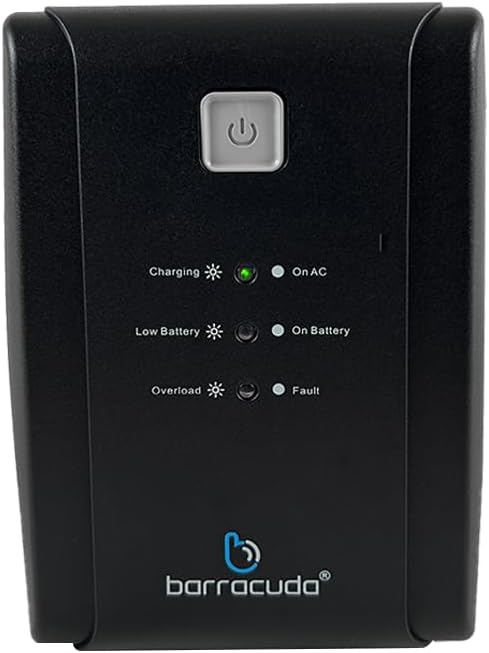
Figure 2: Front Panel of Barracuda SR600
This image displays a close-up of the Barracuda SR600's front panel, showing the power button and LED indicators for Charging, On AC, Low Battery, On Battery, Overload, and Fault.
- Przycisk zasilania: Naciśnij, aby włączyć lub wyłączyć UPS.
- Wskaźniki LED:
- Ładowanie: Wskazuje, że bateria jest ładowana.
- On AC: Oznacza, że UPS jest zasilany z sieci.
- Niski poziom naładowania baterii: Indicates the battery level is low.
- Na baterii: Indicates the UPS is operating on battery power.
- Przeciążać: Indicates the connected load exceeds the UPS capacity.
- Wada: Indicates a system error.
3.2 Panel tylny

Figure 3: Rear Panel of Barracuda SR600
This image shows the rear panel of the Barracuda SR600, detailing the eight power outlets (four for AVR/Backup and four for Surge Only), the circuit breaker, the USB port, and the AC input.
- AVR/Backup Outlets (4): Provide battery backup power and surge protection. Connect critical devices like computers and monitors here.
- Gniazdka tylko przeciwprzepięciowe (4): Provide surge protection only. Connect non-critical devices like printers or scanners here.
- Wyłącznik obwodu: Resetowalna ochrona przed przeciążeniem.
- Port USB: For connecting to a computer for monitoring software (if applicable).
- Wejście AC: Łączy UPS z gniazdkiem zasilania sieciowego.
4. Konfiguracja
4.1 Rozpakowanie
Carefully remove the UPS from its packaging. Inspect the unit for any shipping damage. Retain the original packaging for future use or return.
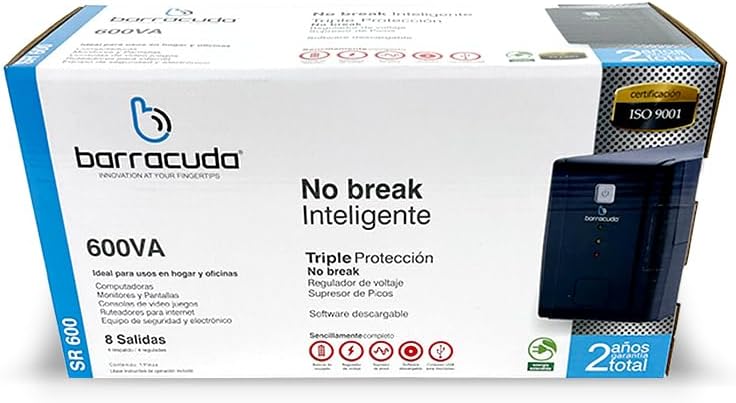
Figure 4: Barracuda SR600 Retail Packaging
This image displays the retail box for the Barracuda SR600, showing product information and branding.
4.2 Umieszczenie
Place the UPS on a flat, stable surface in a clean, dry, and well-ventilated area. Avoid placing it near heat-emitting appliances or in direct sunlight. Ensure there is adequate space around the unit for proper airflow.
4.3 Podłączanie urządzeń
- Plug the UPS power cord into a grounded 120VAC wall outlet.
- Connect your critical devices (e.g., computer, monitor) to the AVR/Backup Outlets na tylnym panelu.
- Connect non-critical devices (e.g., printer, scanner) to the Gniazda tylko przepięciowe.
- Ensure all connected devices are turned off before plugging them into the UPS.
4.4 Pierwsze ładowanie
For optimal performance, charge the UPS battery for at least 8 hours before initial use. The unit will charge automatically when connected to AC power, even if the UPS is turned off.
5. Działanie
5.1 Włączanie/wyłączanie
- Włączyć: Press and hold the power button on the front panel for approximately 3 seconds until you hear a beep and the 'On AC' LED illuminates.
- Wyłączyć: Press and hold the power button for approximately 3 seconds until you hear a beep and all LEDs turn off.
5.2 Tryb AC
When the UPS is connected to utility power and the 'On AC' LED is lit, it is operating in AC mode. In this mode, the UPS provides regulated power to connected devices and charges its internal battery.
5.3 Tryb bateryjny
Podczas zasilaniatage lub znacząca objętośćtage fluctuation, the UPS automatically switches to battery mode. The 'On Battery' LED will illuminate, and the unit will emit an audible alarm (beeping) to indicate it is running on battery power. The alarm will sound more frequently as the battery level becomes critically low.
5.4 LED Indicators Explanation
Refer to Section 3.1 for a detailed description of each LED indicator and its meaning during operation.
6. Konserwacja
6.1 Pielęgnacja baterii
- To maximize battery life, ensure the UPS is connected to AC power at all times to keep the battery fully charged.
- Unikaj częstego głębokiego rozładowywania akumulatora.
- If the UPS is to be stored for an extended period, fully charge the battery and then disconnect it from AC power. Recharge the battery every 3 months to prevent permanent damage.
6.2 Czyszczenie
Disconnect the UPS from AC power and all connected devices before cleaning. Use a soft, dry cloth to wipe the exterior of the unit. Do not use liquid or aerosol cleaners.
6.3 Przechowywanie
Store the UPS in a cool, dry place, away from direct sunlight and extreme temperatures. Ensure the battery is fully charged before storage and recharged periodically as mentioned above.
7. Rozwiązywanie Problemów
If you experience issues with your Barracuda SR600, refer to the table below for common problems and their solutions.
| Problem | Możliwa przyczyna | Rozwiązanie |
|---|---|---|
| UPS nie włącza się. | Akumulator jest całkowicie rozładowany. | Connect the UPS to AC power and allow it to charge for at least 8 hours. |
| UPS is on but provides no power to outlets. | Zadziałał wyłącznik automatyczny. | Reduce the load on the UPS and press the circuit breaker button on the rear panel to reset. |
| UPS constantly beeps in AC mode. | Stan przeciążenia. | Disconnect non-essential equipment from the UPS. Ensure total load does not exceed 240W. |
| Krótki czas tworzenia kopii zapasowej. | Battery not fully charged or battery end-of-life. | Allow the battery to charge for 8 hours. If the problem persists, the battery may need replacement (contact support). |
| Fault LED is lit. | Błąd wewnętrzny. | Turn off the UPS, disconnect all devices, and unplug from AC. Wait 5 minutes, then reconnect and restart. If the fault persists, contact customer support. |
8. Specyfikacje
Technical specifications for the Barracuda No Break SR600.
| Funkcja | Specyfikacja |
|---|---|
| Pojemność | 600VA/240W |
| Wejście Voltage | 120 V AC |
| Wejście Voltage Zakres | 120VAC -30% +25% |
| Objętość wyjściatage | 120 V AC |
| Tomtage Regulation (typical) | +- 10% |
| Częstotliwość | 50Hz lub 60Hz |
| Regulacja częstotliwości | +- 1% |
| Kontakty wyjściowe | 4 Energy Backup / 4 Surge Protection |
| Typ baterii | 12V/4.5Ah |
| Czas ładowania | Średnio 5 godzin |
| Wymiary (dł. x szer. x wys.) | 60 x 30 x 25 cm (przybliżone wymiary opakowania) |
| Waga | 6 kg (przybliżona waga paczki) |
| Tworzywo | Metal |
9. Gwarancja i wsparcie
The Barracuda No Break SR600 comes with a 2-year total warranty Gwarancja obowiązuje od daty zakupu, obejmując wady produkcyjne i usterki powstałe w trakcie normalnego użytkowania. Prosimy zachować dowód zakupu na potrzeby roszczeń gwarancyjnych.
For technical support, warranty service, or inquiries, please contact Barracuda customer service. Refer to the product packaging or the Barracuda official webna tej stronie znajdziesz najbardziej aktualne dane kontaktowe.