
1. Wprowadzenie
This manual provides instructions for the installation, operation, and maintenance of your ENVIO USB Wireless WiFi Adapter. This adapter is designed to connect DVR/NVR systems to a local area network wirelessly, eliminating the need for network cables. It simplifies the setup process for your DVR/NVR by enabling a wireless connection to your router.
2. Zawartość opakowania
- ENVIO USB Wireless WiFi Adapter (Model: B0CPYPJM1X)
- Instrukcja obsługi (ten dokument)
Notatka: Prosimy o sprawdzenie zawartości przesyłki po jej otrzymaniu. Jeśli brakuje któregokolwiek z elementów lub jest on uszkodzony, prosimy o kontakt ze sprzedawcą.
3. Koniec produktuview
The ENVIO USB Wireless WiFi Adapter provides wireless connectivity for compatible DVR and NVR systems. It operates on the 2.4 GHz frequency band and supports IEEE 802.11 b/g/n standards, offering data transfer speeds up to 150 Mbps.

Figure 1: ENVIO USB Wireless WiFi Adapter with antenna in extended position.
The compact design allows for easy integration with your existing surveillance equipment. Its primary function is to enable wireless network access for DVRs and NVRs, facilitating remote viewing and management without the need for physical Ethernet connections.
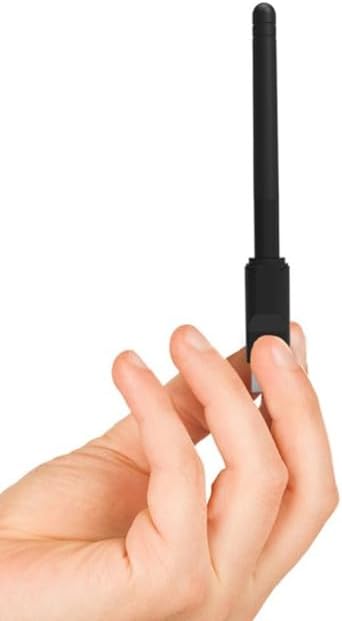
Figure 2: The adapter's compact size, shown held in a hand.
3.1. Główne cechy
- Wireless connectivity for DVR/NVR systems.
- IEEE 802.11 b/g/n compliant.
- Up to 150 Mbps data transfer rate.
- 2.4 GHz frequency band operation.
- USB interface for easy connection.
3.2. Compatible DVR/NVR Models
This adapter is compatible with a wide range of DVR/NVR models, including but not limited to:
- ADH2-416v3, ADH304v3, ADH-304v3, ADH308v3, ADH-308v3
- ADM2-516, ADM-504, ADM-508
- ADN2-416v3, AGS-404, AGS-408, AGS-416
- AMS2-816, AMS-804, AMS-808
- ESS2M04-NRT, ESS2M08-NRT, ESS4M04-NRT, ESS4M08-NRT, ESS4M16-NRT, ESS5M04-NRT, ESS5M08-NRT, ESS5M16-NRT, ESS8M04-NRT, ESS8M08-NRT, ESS8M16-NRT
- HS-NH-3808BW-T4
- NVR164K-N, NVR324K-N, NVR-328M325, NVR-85M245FHD2
- PNNR-404, PNV504-P, PNV508-P, PNVR-408, PNVR-804, PNVR804P, PNVR-808, PNVR808P
- XVR2604HN, XVR2608HN
Notatka: Compatibility may vary depending on the firmware version of your DVR/NVR. Refer to your DVR/NVR manual or manufacturer's website for specific wireless adapter support.
4. Instrukcje konfiguracji
Follow these steps to install and configure your ENVIO USB Wireless WiFi Adapter:
- Prepare your DVR/NVR: Ensure your DVR/NVR system is powered off before connecting the adapter.
- Podłącz adapter: Insert the ENVIO USB Wireless WiFi Adapter into an available USB port on your DVR/NVR. Ensure it is firmly seated.
- Włączanie: Power on your DVR/NVR system. The system should detect the new hardware.
- Dostęp do ustawień sieciowych: Navigate to the network settings menu on your DVR/NVR. The exact path may vary depending on your device model (e.g., Menu > Network > Wi-Fi Settings).
- Skanuj w poszukiwaniu sieci: Select the option to scan for available wireless networks. Your DVR/NVR should display a list of nearby Wi-Fi networks.
- Wybierz swoją sieć: Wybierz interesującą Cię sieć Wi-Fi z listy.
- Wprowadź hasło: If your network is secured, enter the Wi-Fi password (WPA/WPA2 key) when prompted. Ensure the password is entered correctly.
- Łączyć: Confirm the settings and initiate the connection. The DVR/NVR should now connect to your wireless network.
- Sprawdź połączenie: Check the network status on your DVR/NVR to ensure it has obtained an IP address and is successfully connected to the internet (if applicable).

Figure 3: ENVIO USB Wireless WiFi Adapter with antenna in folded position, ready for insertion.
Ważny: If the DVR/NVR does not detect the adapter or connect to the network, ensure your DVR/NVR firmware supports this specific adapter model. You may need to update your DVR/NVR firmware or consult its manufacturer's support resources.
5. Instrukcja obsługi
Once the ENVIO USB Wireless WiFi Adapter is successfully connected to your DVR/NVR and configured with your wireless network, its operation is largely automatic. The adapter facilitates the wireless communication between your DVR/NVR and your router.
- Automatyczne ponowne połączenie: The adapter is designed to automatically reconnect to the last configured Wi-Fi network upon DVR/NVR startup, provided the network is available and its credentials have not changed.
- Stabilność sieci: For optimal performance, ensure the adapter is within a reasonable range of your wireless router and free from major obstructions that could interfere with the signal.
- Dostęp zdalny: With a stable wireless connection, you can now access your DVR/NVR remotely via its dedicated mobile application or web interface, as configured by your DVR/NVR system.
6. Konserwacja
The ENVIO USB Wireless WiFi Adapter requires minimal maintenance. Follow these guidelines to ensure its longevity and optimal performance:
- Zachowaj czystosc: Okresowo przecieraj adapter miękką, suchą ściereczką, aby usunąć kurz. Unikaj stosowania płynnych środków czyszczących i rozpuszczalników.
- Ochrona fizyczna: Avoid exposing the adapter to extreme temperatures, humidity, or direct sunlight. Do not drop or subject it to physical shock.
- Bezpieczne połączenie: Ensure the adapter remains securely plugged into the USB port of your DVR/NVR. Loose connections can lead to intermittent network issues.
- Aktualizacje oprogramowania układowego: While the adapter itself typically does not require user-initiated firmware updates, ensure your DVR/NVR's firmware is kept up-to-date, as this can improve compatibility and performance with network devices.
7. Rozwiązywanie Problemów
If you encounter issues with your ENVIO USB Wireless WiFi Adapter, refer to the following troubleshooting steps:
- Adapter nie został wykryty:
- Sprawdź, czy adapter jest całkowicie włożony do portu USB.
- Try a different USB port on your DVR/NVR.
- Restart your DVR/NVR system.
- Verify that your DVR/NVR model is listed as compatible and has the latest firmware.
- Nie można połączyć się z siecią Wi-Fi:
- Sprawdź dokładnie hasło Wi-Fi. Hasła rozróżniają wielkość liter.
- Upewnij się, że router Wi-Fi jest włączony i nadaje sygnał.
- Move the DVR/NVR closer to the Wi-Fi router to improve signal strength.
- Check if your Wi-Fi network is using a hidden SSID. If so, you may need to manually enter the network name (SSID).
- Uruchom ponownie router Wi-Fi.
- Intermittent Connection/Slow Speed:
- Ensure the adapter's antenna is positioned optimally for signal reception.
- Ogranicz zakłócenia wywoływane przez inne urządzenia elektroniczne (np. kuchenki mikrofalowe, telefony bezprzewodowe).
- Check for congestion on your Wi-Fi channel. You might need to change the channel on your router.
- Verify that your internet service provider (ISP) is not experiencing issues.
If the problem persists after trying these steps, contact ENVIO customer support or your DVR/NVR manufacturer for further assistance.
8. Specyfikacje
| Marka | ZAPYTANIE |
| Producent | ENVIO SECURITY |
| Numer modelu (ASIN) | B0CPYPJM1X |
| Interfejs sprzętowy | USB |
| Standardy bezprzewodowe | IEEE 802.11n, IEEE 802.11g, IEEE 802.11b |
| Protokół łącza danych | IEEE 802.11n, IEEE 802.11 |
| Szybkość przesyłu danych | Up to 150 Megabits per second |
| Pasmo częstotliwości | 2.4 GHz |
| Kompatybilne urządzenia | DVR, NVR, Desktop Computer, Laptop |
| Pierwsza dostępna data | 11 grudnia 2023 r. |
9. Gwarancja i wsparcie
ENVIO products are designed for reliability and performance. For specific warranty information, please refer to the documentation included with your purchase or visit the official ENVIO website. If you require technical assistance or have questions regarding your USB Wireless WiFi Adapter, please contact ENVIO customer support.
Informacje kontaktowe: Please refer to your purchase receipt or the ENVIO official webstrona zawierająca najnowsze dane kontaktowe działu obsługi klienta.