
1. Wprowadzenie
The Vivolink USB-C 4K KVM Extender (Model W126974534) is designed to extend USB-C signals, including 4K video, USB data (for keyboard, mouse, and other peripherals), and control signals, over long distances using HDBaseT 3.0 technology. This system consists of a Transmitter (TX) unit and a Receiver (RX) unit, connected by a single Cat6a/7 Ethernet cable. It enables users to operate a computer or other USB-C source device from a remote location with a display, keyboard, and mouse, maintaining high-quality 4K resolution.
2. Informacje dotyczące bezpieczeństwa
- Przed przystąpieniem do użytkowania urządzenia należy uważnie przeczytać wszystkie instrukcje.
- Do not expose this unit to rain, moisture, or excessive humidity.
- Zapewnij odpowiednią wentylację, aby zapobiec przegrzaniu. Nie blokuj otworów wentylacyjnych.
- Use only the power adapters provided with the unit.
- Nie próbuj otwierać ani modyfikować urządzenia. Wszelkie prace serwisowe zlecaj wykwalifikowanemu personelowi.
- Trzymaj urządzenie z dala od silnych pól elektromagnetycznych.
- Odłączaj zasilanie podczas burzy z piorunami lub jeśli urządzenie nie jest używane przez dłuższy czas.
3. Zawartość opakowania
Prosimy o dokładne sprawdzenie zawartości opakowania. Jeśli brakuje któregokolwiek z elementów lub jest on uszkodzony, prosimy o natychmiastowy kontakt ze sprzedawcą.
- 1x Vivolink USB-C 4K KVM Extender Transmitter (TX) Unit
- 1x Vivolink USB-C 4K KVM Extender Receiver (RX) Unit
- 2 zasilacze (DC 12 V)
- 1x kabel USB-C do USB-C
- 1x Instrukcja obsługi
- Mounting accessories (if included)
4. Koniec produktuview
The Vivolink USB-C 4K KVM Extender leverages HDBaseT 3.0 technology to provide uncompressed 4K video, audio, USB 2.0, and control signals over a single Cat6a/7 cable up to 100 meters. This solution is ideal for applications requiring remote access to a USB-C enabled computer, such as control rooms, medical imaging, digital signage, and educational facilities.
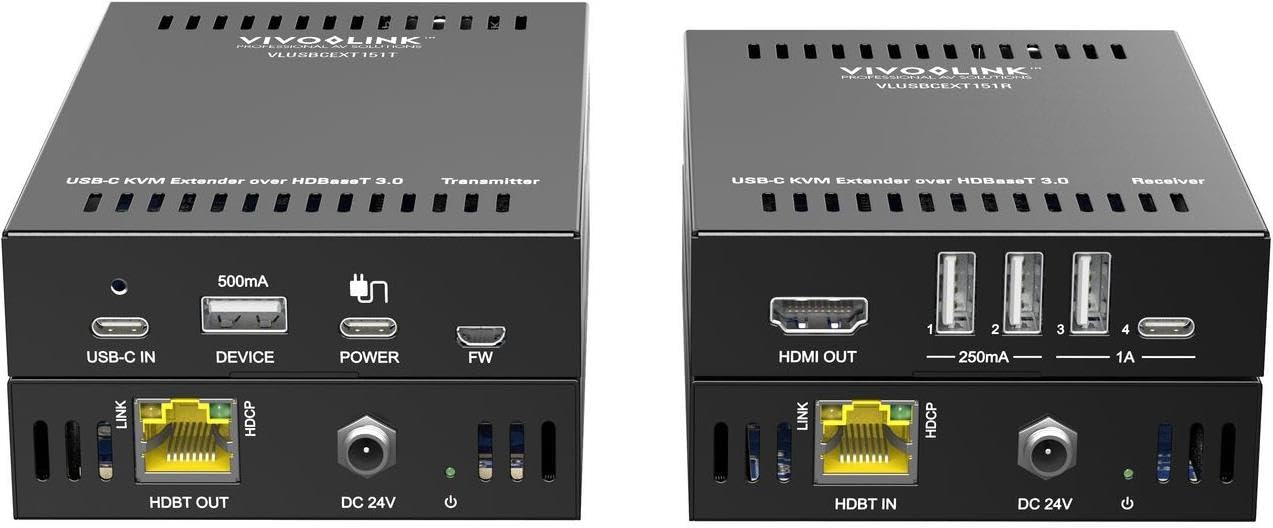
Obraz 1: Vivolink USB-C 4K KVM Extender units. This image displays the compact design of both the transmitter and receiver units, highlighting their various ports for connectivity.
The Transmitter unit connects to your USB-C source device (e.g., laptop, PC), while the Receiver unit connects to your display, keyboard, mouse, and other USB peripherals at the remote location. The HDBaseT 3.0 link ensures reliable and high-bandwidth transmission.
5. Instrukcje konfiguracji
Follow these steps to set up your Vivolink USB-C 4K KVM Extender:
- Wyłącz urządzenia: Ensure all devices, including your source computer, display, and the KVM extender units, are powered off before making any connections.
- Connect Source to Transmitter: Connect your USB-C source device (e.g., PC, laptop) to the USB-C input port on the Transmitter (TX) unit using the provided USB-C cable.
- Connect Display to Receiver: Connect your display (monitor) to the HDMI output port on the Receiver (RX) unit using an HDMI cable.
- Connect Peripherals to Receiver: Connect your USB keyboard, mouse, and any other USB peripherals to the USB ports on the Receiver (RX) unit.
- Connect TX and RX Units: Connect the HDBaseT OUT port on the Transmitter (TX) unit to the HDBaseT IN port on the Receiver (RX) unit using a single, high-quality Cat6a or Cat7 Ethernet cable. Ensure the cable length does not exceed 100 meters for optimal performance.
- Zastosuj moc: Connect the provided 12V DC power adapters to both the Transmitter (TX) and Receiver (RX) units, then plug them into power outlets.
- Włącz urządzenia: Power on your display, then your source computer. The extender units will typically power on automatically when connected to power.
- Sprawdź połączenie: Check for signal on your remote display and test the functionality of your keyboard and mouse.
6. Instrukcja obsługi
Once the Vivolink USB-C 4K KVM Extender is set up correctly, operation is straightforward:
- Automatyczne wykrywanie sygnału: The extender units are designed to automatically detect and transmit the video, audio, and USB signals from your source device to the remote display and peripherals.
- Rezolucja: The system supports resolutions up to 4K (3840x2160) at 60Hz, depending on the capabilities of your source and display devices.
- Funkcjonalność USB: All connected USB devices (keyboard, mouse, USB drives, etc.) should function as if directly connected to the source computer.
- Kolarstwo mocy: If you encounter any issues, try power cycling both the Transmitter and Receiver units, as well as your source computer and display.
7. Konserwacja
To ensure the longevity and optimal performance of your Vivolink USB-C 4K KVM Extender, follow these maintenance guidelines:
- Czyszczenie: Do czyszczenia zewnętrznych powierzchni urządzeń należy używać miękkiej, suchej ściereczki. Nie należy używać środków czyszczących w płynie ani w aerozolu.
- Wentylacja: Ensure that the ventilation openings on both units are not obstructed to prevent overheating.
- Zarządzanie kablami: Keep cables neatly organized and avoid sharp bends or excessive tension on connectors.
- Środowisko: Store and operate the device in a cool, dry environment, away from direct sunlight, heat sources, and extreme temperatures.
8. Rozwiązywanie Problemów
If you experience issues with your KVM extender, refer to the following troubleshooting steps:
| Problem | Możliwe rozwiązanie |
|---|---|
| No video on remote display |
|
| Klawiatura/mysz nie reaguje |
|
| Intermittent signal or flickering video |
|
9. Specyfikacje
- Marka: Żywotność
- Model: W126974534 (VLUSBCEXT150)
- Technologia: HDBaseT 3.0
- Rozdzielczość wideo: Do 4K (3840x2160) przy 60 Hz
- Wejście: USB-C (on TX unit)
- Wyjście: HDMI (on RX unit)
- USB: USB 2.0 (on RX unit for peripherals)
- Odległość przedłużenia: Up to 100 meters (328 feet) over Cat6a/7 cable
- Zasilanie: DC 12V (via included power adapters)
- Producent: Żywotność
- ASIN: B0CPWLBPGF
10. Gwarancja i wsparcie
Vivolink products are designed for reliability and performance. For information regarding warranty coverage, technical support, or service, please refer to the warranty card included with your product or visit the official Vivolink webStrona. Kontaktując się z pomocą techniczną, przygotuj numer modelu produktu (W126974534) i dane dotyczące zakupu.
Zasoby internetowe: For the latest drivers, firmware updates, and additional support documentation, please visit the Vivolink support page.