1. Wprowadzenie
This manual provides essential information for the proper use and maintenance of your replacement remote control. Designed to operate various devices including air conditioners, televisions, and other audio/video equipment, this remote offers a convenient solution for lost or broken original controls. Please read this manual thoroughly before use to ensure optimal performance and longevity of the product.
2. Koniec produktuview
The replacement remote control is designed for ease of use with a clear button layout and an ergonomic design. It features dedicated buttons for power, mode selection, temperature/volume adjustment, and specific functions like fan speed and swing for air conditioning units.
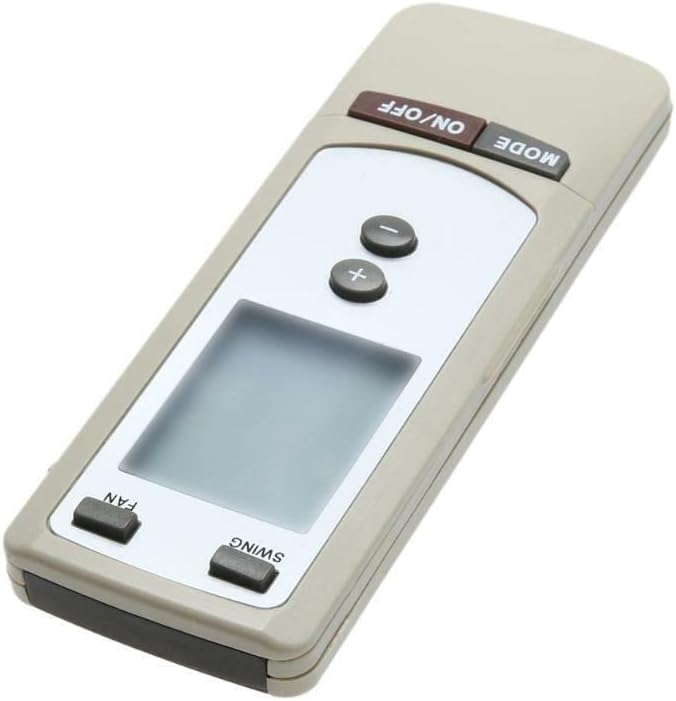
Rysunek 2.1: Kątowy view of the remote control. This image displays the overall shape and the primary control buttons, including the power and mode buttons at the top, temperature controls in the middle, and fan/swing controls at the bottom, along with the LCD screen.
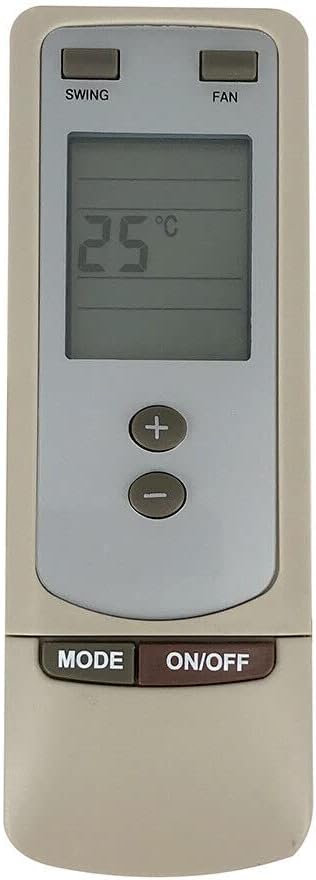
Rysunek 2.2: Przód view of the remote control. This image provides a clear, straight-on view of the remote, highlighting the digital display which shows '25°C', and the arrangement of all functional buttons for easy identification.
3. Konfiguracja
3.1 Instalacja baterii
- Znajdź komorę baterii z tyłu pilota.
- Odsuń pokrywę komory baterii.
- Insert two (2) new AAA batteries (not included), ensuring the correct polarity (+ and -) as indicated inside the compartment.
- Dokładnie zamknij pokrywę komory baterii.
Ważna uwaga: This replacement remote control typically requires no programming or complex setup. Once batteries are inserted correctly, it should be ready for immediate use with compatible devices.
4. Instrukcja obsługi
This remote control is designed to operate various devices. While its appearance and specific buttons are highly indicative of an air conditioner remote, it is also listed as compatible with Set Top Boxes, Televisions, Stereo Systems, DVD/Blu-ray Players, and Home Theater systems. Functionality may vary depending on the specific device being controlled.
4.1 Basic Functions (Typical for AC Units)
- Przycisk WŁ./WYŁ.: Press to power on or power off the connected device.
- Przycisk TRYB: Cycles through various operating modes (e.g., Cool, Heat, Fan, Dry, Auto for AC units).
- Przyciski +/-: Adjusts temperature settings (for AC units) or volume levels (for audio/video devices).
- Przycisk WENTYLATORA: Adjusts the fan speed (e.g., Low, Medium, High, Auto for AC units).
- Przycisk SWING: Włącza lub wyłącza funkcję automatycznego wachlowania żaluzji klimatyzatora.
For other compatible devices (TV, DVD, etc.), the ON/OFF and +/- buttons (for volume/channel) are generally universal. Specific functions like 'MODE', 'FAN', and 'SWING' may not be applicable or may control different features depending on the device's original remote mapping.
5. Konserwacja
5.1 Wymiana baterii
Replace batteries when the remote's response becomes sluggish or it stops functioning. Always replace both batteries simultaneously with new ones of the same type (AAA). Do not mix old and new batteries, or different types of batteries.
5.2 Czyszczenie
To clean the remote control, wipe it gently with a soft, dry cloth. For stubborn dirt, a slightly damp Można użyć ściereczki, a następnie suchej ściereczki. Nie należy używać środków czyszczących o działaniu ściernym, rozpuszczalników ani środków chemicznych w sprayu, ponieważ mogą one uszkodzić powierzchnię pilota lub jego wewnętrzne elementy.
6. Rozwiązywanie Problemów
- Pilot nie odpowiada:
- Sprawdź, czy baterie są włożone prawidłowo, zachowując właściwą polaryzację.
- Wymień stare baterie na nowe.
- Upewnij się, że między pilotem a czujnikiem urządzenia nie ma żadnych przeszkód.
- Make sure you are within the effective operating range of the device.
- Niektóre funkcje nie działają:
- This is a replacement remote control and may not support all functions of your original device's remote. Refer to your device's original manual for specific functions.
- Verify that the remote model (Y512F Y512FA) is compatible with your specific device model.
7. Specyfikacje
| Funkcja | Szczegół |
|---|---|
| ASIN | B0CPLH6Q19 |
| Data pierwszej dostępności | 6 grudnia 2023 r. |
| Producent | Ogólny |
| Marka | Ogólny |
| Funkcja specjalna | Ergonomic |
| Kolor | Czarny czy biały |
| Maksymalna liczba obsługiwanych urządzeń | 2 |
| Kompatybilne urządzenia | Set Top Box, Television, Stereo System, DVD/Blu-ray Player, Home Theater |
8. Gwarancja i wsparcie
Specific warranty information for this replacement remote control is not provided in the product details. For any warranty claims, technical support, or further inquiries, please contact the seller or manufacturer directly through your purchase platform. Keep your purchase receipt as proof of purchase.
