
1. Wprowadzenie
The Sygonix SY-5044422 Digital Timer Switch is designed for easy programming and operation, helping to manage power consumption for various appliances. This device features 20 ON/OFF programs, 3 random settings, and a countdown function, with switching intervals as short as 1 minute. Programs can be set for specific days, combinations of days, or daily. Its IP44 splash-proof rating allows for outdoor use, and an integrated battery retains settings during power outages. The timer supports a maximum switching capacity of 1800 W and includes enhanced touch protection.
2. Instrukcje bezpieczeństwa
- Przed użyciem należy uważnie przeczytać wszystkie instrukcje.
- This device is rated IP44, making it splash-proof for outdoor use. However, do not immerse it in water or expose it to direct jets of water.
- Ensure the total load of connected appliances does not exceed 1800 W.
- Do not open the device housing. Repairs should only be performed by qualified personnel.
- Keep out of reach of children. The device features enhanced touch protection.
- Przed czyszczeniem należy zawsze odłączyć timer od gniazdka elektrycznego.
3. Zawartość opakowania
- Sygonix SY-5044422 Digital Timer Switch
- Instrukcja obsługi
- Informacje o gwarancji
4. Koniec produktuview
Familiarize yourself with the components and controls of your digital timer switch.
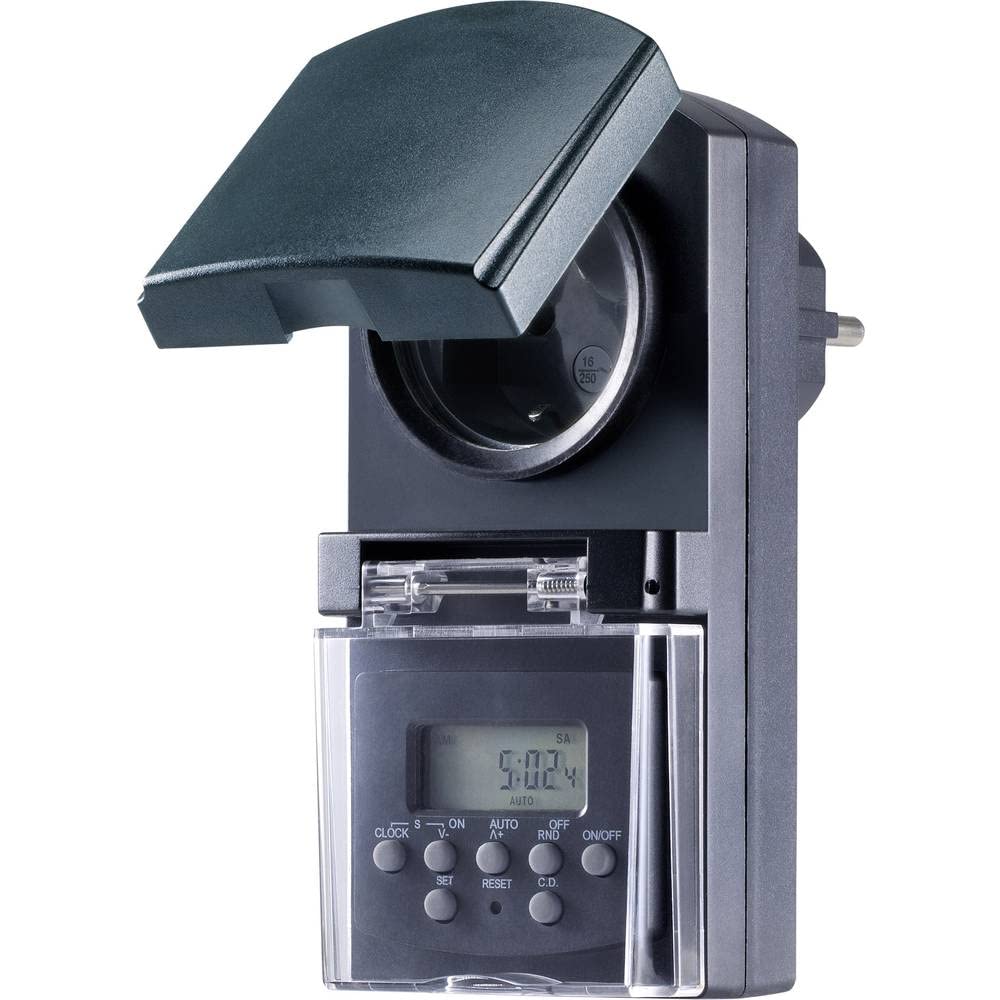
Rysunek 1: Przód view of the Sygonix SY-5044422 Digital Timer Switch. This image displays the LCD screen, which shows the current time and day, along with various control buttons including CLOCK, ON/OFF, SET, RESET, AUTO/A+, OFF/RND, and C.D. (Countdown).

Rysunek 2: Przód view of the timer with the protective cover opened, showing the integrated power socket. The display and control buttons are visible below the socket.
Przyciski sterujące:
- ZEGAR: Służy do ustawiania aktualnego czasu i dnia.
- WŁ./WYŁ.: Manually switches the timer output ON or OFF.
- ZESTAW: Enters programming mode and confirms settings.
- RESETOWANIE: Usuwa wszystkie ustawienia i resetuje timer do ustawień fabrycznych.
- AUTO/A+: Cycles through automatic mode, program settings, and adjusts values.
- OFF/RND: Activates or deactivates the Random function.
- C.D. (Countdown): Activates or deactivates the Countdown function.
5. Konfiguracja
5.1 Pierwsze ładowanie
Before first use, plug the timer into a power outlet for approximately 30 minutes to charge the internal battery. This ensures the display is active and settings are retained during power outaglub gdy jest odłączony od zasilania.
5.2 Ustawianie aktualnego czasu i dnia
- Naciśnij i przytrzymaj ZEGAR przycisk.
- Podczas trzymania ZEGAR, naciskać AUTO/A+ repeatedly to set the current day (MO, TU, WE, TH, FR, SA, SU).
- Podczas trzymania ZEGAR, naciskać USTAWIĆ repeatedly to set the current hour.
- Podczas trzymania ZEGAR, naciskać OFF/RND wielokrotnie, aby ustawić aktualną minutę.
- Uwolnij ZEGAR przycisk, aby zapisać ustawienia.
5.3 Zmiana czasu letniego
The timer supports a summer time function. To activate or deactivate:
- Naciśnij i przytrzymaj ZEGAR przycisk i WŁ./WYŁ. button simultaneously for 3 seconds. The display will show "SUMMER" or "WINTER" to indicate the mode.
6. Instrukcja obsługi
6.1 Programming ON/OFF Times (Weekly Program)
Timer umożliwia zaprogramowanie do 20 programów WŁ./WYŁ. Każdy program można ustawić na konkretne dni lub kombinacje dni.
- Naciśnij USTAWIĆ Naciśnij przycisk raz, aby wejść w tryb programowania. Na wyświetlaczu pojawi się „1 ON”.
- Naciskać AUTO/A+ to select the desired day(s) for the program (e.g., MO, TU, WE, TH, FR, SA, SU, MO-FR, SA-SU, MO-SA, etc.).
- Naciskać USTAWIĆ aby potwierdzić wybór dnia.
- Naciskać AUTO/A+ aby ustawić żądaną godzinę WŁ.
- Naciskać OFF/RND aby ustawić żądaną minutę WŁ.
- Naciskać USTAWIĆ again. The display will now show "1 OFF".
- Repeat steps 2-5 to set the OFF time for the same program.
- Kontynuuj naciskanie USTAWIĆ to cycle through all 20 ON/OFF programs. To exit program mode at any time, press the ZEGAR przycisk.
Notatka: After programming, ensure the timer is in AUTOMATYCZNY mode for the programs to execute. Press WŁ./WYŁ. repeatedly until "AUTO" is displayed.
6.2 Funkcja odliczania
The countdown function allows you to switch the connected appliance ON or OFF after a set duration.
- Naciśnij płyta CD button once. The display will show "CD ON" or "CD OFF".
- Naciskać AUTO/A+ aby ustawić żądaną godzinę odliczania.
- Naciskać OFF/RND to set the desired countdown minute.
- Naciskać płyta CD again to start the countdown. The display will show the remaining time.
- Aby anulować odliczanie, naciśnij płyta CD jeszcze raz.
6.3 Random Function (Presence Simulation)
The random function simulates presence by randomly switching the connected appliance ON and OFF within a set time window, deterring potential intruders.
- Upewnij się, że timer jest włączony AUTOMATYCZNY tryb.
- Naciśnij OFF/RND button. The display will show "RND" to indicate the random function is active.
- The timer will now randomly switch the output ON and OFF for short periods within the programmed ON/OFF times.
- To deactivate the random function, press OFF/RND again. "RND" will disappear from the display.
6.4 Ręczne włączanie/wyłączanie
You can manually override the programmed settings at any time.
- Naciśnij WŁ./WYŁ. button repeatedly to cycle through "ON", "OFF", and "AUTO" modes.
- "ON" means the output is continuously ON.
- "OFF" means the output is continuously OFF.
- "AUTO" means the timer will follow the programmed settings.
7. Konserwacja
- Before cleaning, always unplug the timer from the power outlet.
- Przetrzyj urządzenie miękką, suchą ściereczką. Nie używaj środków czyszczących o właściwościach ściernych ani rozpuszczalników.
- Ensure no liquids enter the device.
8. Rozwiązywanie Problemów
| Problem | Możliwa przyczyna | Rozwiązanie |
|---|---|---|
| Wyświetlacz jest pusty lub przyciemniony. | Akumulator wewnętrzny jest rozładowany. | Podłącz timer do gniazdka elektrycznego na co najmniej 30 minut, aby naładować baterię. |
| Programy nie są wykonywane. | Timer nie jest w trybie AUTO. | Naciśnij WŁ./WYŁ. button repeatedly until "AUTO" is displayed. |
| Incorrect time or day displayed. | Time/day was not set correctly or reset. | Refer to Section 5.2 "Setting Current Time and Day" to re-set. |
| All settings lost after power outage. | Internal battery not charged or faulty. | Ensure the timer is regularly plugged in to keep the internal battery charged. If the issue persists, contact support. |
9. Specyfikacje
| Numer modelu: | SY-5044422 |
| Max. Switching Capacity: | 1800 W |
| Klasa ochrony: | IP44 (odporny na zachlapanie) |
| Typ wyświetlacza: | Cyfrowy |
| Programy: | 20 programów włączania/wyłączania |
| Minimum Switching Interval: | 1 minuta |
| Cechy szczególne: | Countdown function, Random function (presence simulation), Summer time, Integrated battery for settings retention, Enhanced touch protection. |
| Wymiary produktu: | Wymiary 14 x 10 x 6 cm |
| Producent: | Sygonix |
| Kraj pochodzenia: | Chiny |
10. Gwarancja i wsparcie
This product comes with a minimum 2-year warranty from the date of purchase. In case of any issues or defects, please contact your retailer or Sygonix customer support for assistance. Keep your proof of purchase for warranty claims.