
Wstęp
This manual provides essential information for the safe and efficient assembly, operation, and maintenance of your ErGear Electric Standing Desk with Drawers, Model EGESD38V-US. Please read all instructions carefully before use and retain this manual for future reference.
Informacje dotyczące bezpieczeństwa
Aby zapewnić bezpieczną eksploatację i zapobiec uszkodzeniom, należy przestrzegać następujących wskazówek:
- Należy wykonać prawidłowy montaż, postępując zgodnie z dostarczoną instrukcją.
- Nie przekraczaj maksymalnego limitu wagowego wynoszącego 132 funtów.
- Anchor the desk if using at maximum height for enhanced stability.
- Podczas regulacji wysokości biurka należy trzymać dzieci i zwierzęta z dala od niego.
- Ensure no obstacles are in the path of the desk during movement to prevent collisions.
Cechy produktu
Your ErGear Electric Standing Desk is designed with several features to enhance your workspace:
- Maksymalna stabilność: Crafted with automotive-grade cold-rolled steel and a powerful motor tested to withstand 50,000 lift cycles, ensuring durable and reliable support for up to 176 lbs of weight.
- C-Clamp Mount Compatible: Designed with an extended 2.95″ rear edge, compatible with C-clamp monitor mounts on the top platform. Monitors can also be placed directly on the stand to elevate screens closer to eye level.
- Customize Your Height: Features a wide adjustable height range from 28″ to 47″ tall, allowing easy switching between sitting and standing work positions.
- Triple Desktop Storage: Boasts a deeper 27.3″ desktop with two drawers for concealed storage. Includes an open storage cubicle for keyboard, mouse, and accessories, and an integrated monitor riser.
- Loaded with Ergonomic Features: Includes 4 custom height presets for one-press adjustment. Raised anti-drop edges keep items secure, and advanced anti-collision detection helps avoid damage during height adjustment.
Wymiary produktu
Szczegółowe wymiary produktu przedstawiono na poniższym schemacie.
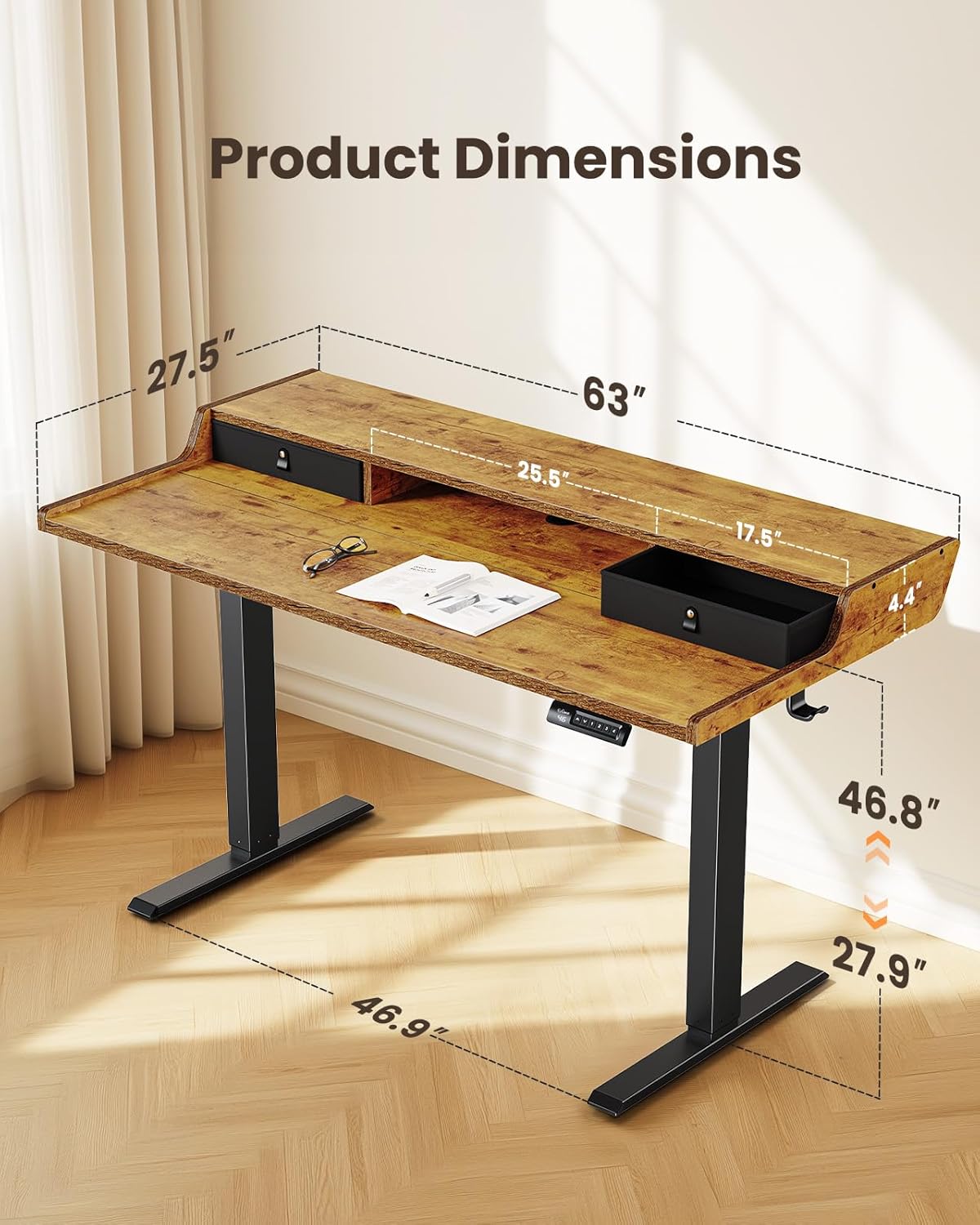
- Wymiary przedmiotu: 28 x 63 x 28.3 cale (głębokość x szerokość x wysokość)
- Minimalna wysokość: 28 cali
- Maksymalna wysokość: 47 cali
- Grubość blatu: 15 milimetrów
- Długość przekątnej powierzchni roboczej: 70.71 cali
Konfiguracja i montaż
Follow these steps to assemble your ErGear Electric Standing Desk. For a visual guide, please refer to the assembly video below.
Kroki montażu:
- Dostarczone części i sprzęt: Unpack all components and verify against the parts list in your physical manual. Ensure all parts are present and undamaged before proceeding.
- Step 1: Assembling the Frame: Attach the motor and crossbar to the desk legs using the provided screws. Ensure all connections are secure.
- Step 2: Assembling the Top Stand: Secure the side supports to the main monitor stand panel using the dowels and screws.
- Step 3: Assembling the Desktop: Connect the two main desktop panels using the wooden dowels and metal plates. Press firmly to ensure no gap remains between the panels. Attach the side panels of the desktop.
- Step 4: Attaching the Desktop to the Frame: Carefully place the assembled desktop onto the frame. Align the screw holes and secure the desktop to the frame using the provided screws. Attach the headphone hook.
- Step 5: Connecting the Cables: Connect the motor cables to the control box. Route the cables neatly using the cable management grommets and ties. Insert the cable hole cover.
- Step 6: Attaching the Drawers: Place the fabric drawers into their designated slots on the desktop.
Instrukcja obsługi
Your ErGear Electric Standing Desk features an intuitive control panel for easy height adjustment and preset management.
Regulacja wysokości:
- Use the up (▲) and down (▼) arrows on the control panel to manually adjust the desk height.
- The desk has a wide adjustable height range from 28 inches to 47 inches.
Preset Heights:
The desk offers 4 custom height presets for quick transitions between your preferred sitting and standing positions.
- Aby ustawić ustawienie wstępne: Adjust the desk to your desired height. Press the 'M' button, then press one of the number buttons (1, 2, 3, or 4) within 3 seconds. The height is now saved to that preset.
- Aby użyć ustawienia wstępnego: Simply press the corresponding number button (1, 2, 3, or 4) to automatically move the desk to the saved height.

Wykrywanie antykolizyjne:
The desk is equipped with advanced anti-collision detection. If the desk encounters an obstacle during height adjustment, it will automatically stop and reverse slightly to prevent damage to the desk or surrounding objects.
Konserwacja
Regular maintenance ensures the longevity and optimal performance of your standing desk:
- Czyszczenie: Przetrzyj powierzchnię biurka miękką,amp płótno. Unikaj ściernych środków czyszczących lub ostrych środków chemicznych, które mogą uszkodzić wykończenie.
- Zarządzanie kablami: Okresowo sprawdzaj i porządkuj kable, aby zapobiec ich plątaniu się i utrudnianiu ruchu biurka.
- Elementy złączne: Ensure all screws and fasteners are tight. Retighten if necessary to maintain stability.
- Kontrola silnika: If you notice any unusual noises or irregular movement, discontinue use and contact customer support.
Rozwiązywanie problemów
If you encounter issues with your ErGear Electric Standing Desk, refer to the following common solutions:
- Biurko się nie rusza: Check if the power cord is securely plugged into both the desk and the wall outlet. Ensure no cables are pinched or disconnected.
- Kod błędu na wyświetlaczu: Refer to your physical manual for specific error code meanings and troubleshooting steps. Often, unplugging the desk for 10 seconds and plugging it back in can reset the system.
- Nierównomierny ruch: Ensure the desk is placed on a level surface. Check that all leg components are securely fastened.
- Anti-Collision Triggered Frequently: Ensure there are no objects under or above the desk that could interfere with its movement.
- Hałas podczas pracy: A slight motor hum is normal. Excessive or unusual noise may indicate an issue; contact customer support.
If problems persist after attempting these steps, please contact ErGear customer support.
Specyfikacje
| Specyfikacja | Wartość |
|---|---|
| Marka | Przekładnia |
| Numer modelu | EGESD38V-US |
| Kształt | Prostokątny |
| Kolor | Winotage Brązowy |
| Materiał bazowy | Metal |
| Liczba szuflad | 2 |
| Zalecane zastosowania | Biuro, gry |
| Materiał nóg meblowych | Drewno inżynieryjne |
| Rozmiar | 63 x 28 cali |
| Kolor górny | Brązowy |
| Kolor podstawowy | Brązowy |
| Zawarte komponenty | Gaming Desk, Dedicated Monitor Stand, Built-in Drawers, Storage Shelf |
| Wymagany montaż | Tak |
| Maksymalna zalecana waga | 132 funtów |
| Grubość blatu | 15 milimetrów |
| Minimalna wysokość | 28 cali |
| Maksymalna wysokość | 47 cali |
| Głębokość przedmiotu | 28 cali |
| Rodzaj materiału ramy | Stal |
| Mechanizm podnoszący | Elektryczny |
| Opcje przechowywania | Drawers, Open Storage Cubicle |
| Liczba pozycji wysokości | 4 |
| Czy elektryczny | Tak |
Gwarancja i wsparcie
ErGear provides a Limited Warranty for this product. For specific details regarding the warranty period and coverage, please refer to the documentation included with your purchase.
For any questions, technical assistance, or warranty claims, please visit the official ErGear Store or contact their customer support directly.


