
1. Wprowadzenie
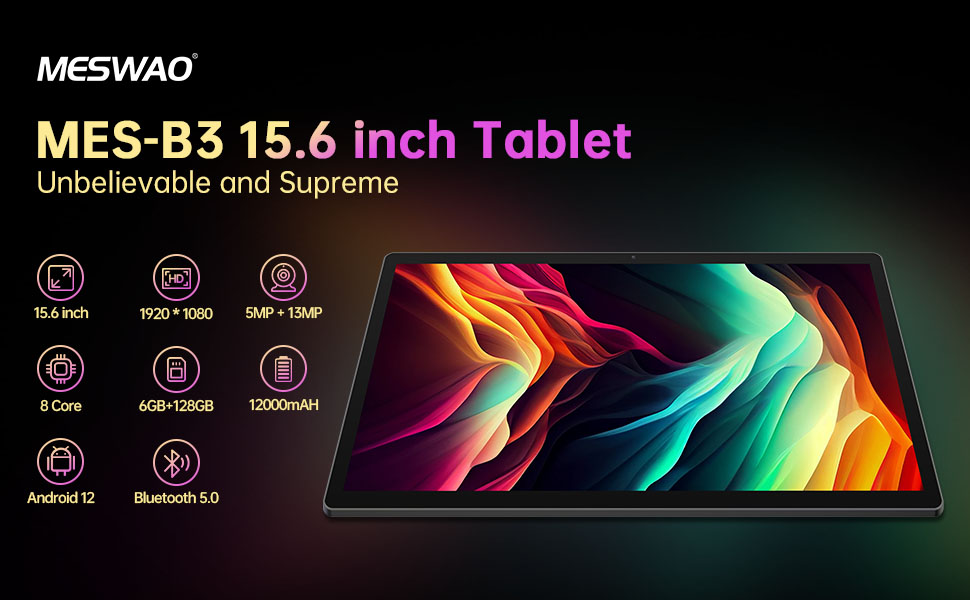
Welcome to the user manual for your MESWAO MES-B3 15.6-inch Android 13 Tablet. This document provides essential information for setting up, operating, maintaining, and troubleshooting your device. The MES-B3 tablet features a large 15.6-inch IPS HD display, an Octa-Core processor, 6GB RAM, 128GB internal storage (expandable), and a 12000mAh battery, designed for a versatile user experience.

Figure 1: MESWAO MES-B3 Tablet Overview
2. Informacje dotyczące bezpieczeństwa
Please read all safety instructions carefully before using your tablet to prevent injury or damage to the device. Keep this manual for future reference.
- Bezpieczeństwo baterii: Do not attempt to replace the battery yourself. Do not expose the tablet to extreme temperatures, direct sunlight, or fire. Do not puncture, drop, or disassemble the battery.
- Woda i wilgoć: This tablet is not waterproof. Avoid exposing it to water, rain, or high humidity.
- Czyszczenie: Use a soft, dry cloth to clean the tablet. Do not use liquid cleaners or aerosols.
- Obsługiwanie: Unikaj upuszczania tabletu i narażania go na silne uderzenia.
- Ochrona słuchu: When using headphones, set the volume to a moderate level to avoid hearing damage.
3. Zawartość opakowania
Sprawdź, czy w opakowaniu znajdują się wszystkie elementy:
- MESWAO MES-B3 15.6-inch Android 13 Tablet
- Zasilacz
- Kabel USB-C
- Instrukcja obsługi (ten dokument)
4. Urządzenie ponadview
Familiarize yourself with the physical components of your MESWAO MES-B3 tablet.

Figure 2: Buttons and Connectors
- Przycisk zasilania: Press and hold to turn the tablet on or off. Press briefly to turn the screen on or off.
- Przyciski głośności: Dostosuj głośność dźwięku.
- Przednia kamera: Do połączeń wideo i selfie (5 MP).
- Rear Camera with Flashlight: Do robienia zdjęć i filmów (13MP).
- Port typu C: Do ładowania tabletu i podłączania go do komputera.
- Gniazdo karty TF: Insert a MicroSD card to expand storage.
- Głośniki stereo: Zapewnij wyjście audio.
5. Konfiguracja
5.1 Ładowanie tabletu
Before first use, fully charge your tablet. Connect the USB-C cable to the tablet's Type-C port and the other end to the power adapter. Plug the adapter into a wall outlet. The battery indicator on the screen will show charging status.
5.2 Włączanie/wyłączanie
- Włączanie: Press and hold the Power Button until the MESWAO logo appears.
- Aby wyłączyć: Press and hold the Power Button until the power options appear, then select 'Power off'.
- Zrestartować: Press and hold the Power Button until the power options appear, then select 'Restart'.
5.3 Kreator konfiguracji początkowej
Po pierwszym włączeniu tablet przeprowadzi Cię przez proces początkowej konfiguracji:
- Wybierz preferowany język.
- Połącz się z siecią Wi-Fi.
- Zaloguj się za pomocą konta Google lub utwórz nowe.
- Review i zaakceptuj regulamin.
- Ustaw blokadę ekranu (PIN, wzór, hasło).
5.4 Wkładanie karty MicroSD
To expand the tablet's storage, you can insert a MicroSD card (up to 256GB, as per some product information, though 1TB is also mentioned in images, please verify with product packaging for exact maximum). Locate the TF card slot on the side of the tablet. Gently insert the MicroSD card with the gold contacts facing down until it clicks into place.

Figure 3: Storage Expansion with MicroSD Card
6. Korzystanie z tabletu
6.1 Podstawowa nawigacja
The MESWAO MES-B3 runs on Android 13, offering an intuitive touch interface.
- Uzyskiwać: Wybierz element lub otwórz aplikację.
- Trzepnąć: Poruszaj się po ekranach, przewijaj listy i ignoruj powiadomienia.
- Powiększanie za pomocą szczypania: Powiększ lub zmniejsz zawartość ekranu.
- Ekran główny: Access your apps and widgets. Swipe down from the top for notifications and quick settings.
Rysunek 4: Interfejs Androida 13
6.2 Połączenie Wi-Fi
- Idź do Ustawienia > Sieć i internet > Internet.
- Włącz Wi-Fi.
- Wybierz żądaną sieć z listy i wpisz hasło, jeśli zostaniesz o to poproszony.
6.3 parowanie Bluetooth
The tablet supports Bluetooth 5.0 for connecting wireless accessories.
- Idź do Ustawienia > Podłączone urządzenia > Preferencje połączenia > Bluetooth.
- Włącz Bluetooth.
- Upewnij się, że Twoje urządzenie Bluetooth jest w trybie parowania.
- Select your device from the 'Available devices' list and follow on-screen prompts to pair.
6.4 Zarządzanie aplikacjami
- Zainstaluj aplikacje: Otwórz aplikację Google Play Store, wyszukaj interesującą Cię aplikację i kliknij „Zainstaluj”.
- Odinstaluj aplikacje: Press and hold an app icon on the home screen or app drawer, then drag it to 'Uninstall' or select 'App info' and choose 'Uninstall'.
- Zarządzaj aplikacjami: Idź do Ustawienia > Aplikacje Do view, force stop, or clear data for installed applications.
6.5 Ustawienia wyświetlania
Dostosuj swój viewdoświadczenie:
- Idź do Ustawienia > Wyświetlacz.
- Regulować Poziom jasności.
- Ustawić Czas wygaszenia ekranu (sleep duration).
- Zmiana Rozmiar czcionki I Rozmiar wyświetlacza.
- Włączać Ciemny motyw for reduced eye strain.
6.6 Zarządzanie baterią
The MES-B3 features a 12000mAh battery for extended use.

Rysunek 5: Wydłużony czas pracy baterii
- Idź do Ustawienia > Bateria Do view usage and optimize settings.
- Włączać Oszczędzanie baterii tryb wydłużający czas pracy baterii, gdy jest to potrzebne.
- Zamknij nieużywane aplikacje działające w tle.
- Zmniejsz jasność ekranu.
7. Konserwacja
7.1 Czyszczenie
- Do delikatnego przecierania ekranu i obudowy używaj miękkiej, niepozostawiającej włókien ściereczki.
- W przypadku uporczywych plam delikatnieampPrzetrzyj ściereczkę wodą lub specjalnym środkiem do czyszczenia ekranów przeznaczonym do urządzeń elektronicznych.
- Avoid using abrasive materials, alcohol, or chemical solvents.
7.2 Przechowywanie
- Przechowywać tablet w chłodnym, suchym miejscu, z dala od bezpośredniego światła słonecznego i ekstremalnych temperatur.
- If storing for an extended period, ensure the battery is charged to about 50% to prolong its lifespan.
7.3 Aktualizacje oprogramowania
Regularnie sprawdzaj dostępność aktualizacji oprogramowania, aby zapewnić optymalną wydajność i bezpieczeństwo.
- Idź do Ustawienia > System > Aktualizacja systemu.
- The tablet will check for available updates. Follow the on-screen instructions to download and install any updates.
8. Rozwiązywanie Problemów
Oto rozwiązania typowych problemów, z którymi możesz się spotkać:
| Problem | Rozwiązanie |
|---|---|
| Tablet się nie włącza | Upewnij się, że tablet jest naładowany. Podłącz go do ładowarki na co najmniej 30 minut, a następnie spróbuj ponownie go włączyć. |
| Problemy z połączeniem Wi-Fi | Restart your Wi-Fi router and the tablet. Go to Settings > Network & internet > Internet, forget the network, and reconnect. |
| Niska wydajność | Close unused apps. Clear cache for frequently used apps (Settings > Apps > [App Name] > Storage & cache > Clear cache). Restart the tablet. |
| Bateria szybko się rozładowuje | Reduce screen brightness. Disable Wi-Fi/Bluetooth when not in use. Close background apps. Check battery usage in Settings > Battery to identify power-hungry apps. |
| Aplikacje ulegają awarii lub zawieszają się | Force stop the app (Settings > Apps > [App Name] > Force stop). Clear the app's cache. If the problem persists, uninstall and reinstall the app. |
9. Specyfikacje
Detailed technical specifications for the MESWAO MES-B3 tablet:

Rysunek 6: Główne cechy i specyfikacje
| Funkcja | Specyfikacja |
|---|---|
| Marka | MESWAO |
| Numer modelu | MES-B3 |
| System operacyjny | Android 13 |
| Edytor | MediaTek Octa-Core (MTK6789) |
| BARAN | 6 GB |
| Pamięć wewnętrzna | 128 GB |
| Możliwość rozbudowy pamięci masowej | Up to 256 GB (via TF/MicroSD card) |
| Rozmiar ekranu | 15.6 cali |
| Rozdzielczość ekranu | 1920 x 1080 pikseli (IPS HD) |
| Przednia kamera | 5 MP |
| Kamera tylna | 13 MP |
| Pojemność baterii | 12000 mAh |
| Żywotność baterii | Około 10 godzin (w zależności od użytkowania) |
| Łączność | Bluetooth 5.0, Wi-Fi (802.11ac, 2.4G/5G) |
| Porty | USB Type-C, TF Card Slot |
| Kolor | Szary |
| Wymiary (dł. x szer. x wys.) | Wymiary 36.85 x 22.25 x 0.93 cm |
| Waga | 1.1 kilograma |
10. Gwarancja i wsparcie
Your MESWAO MES-B3 tablet is covered by a standard manufacturer's warranty. Please refer to the warranty card included in your package for specific terms and conditions, including warranty duration and coverage details.
For technical support, troubleshooting assistance beyond this manual, or warranty claims, please contact MESWAO customer service through the retailer where you purchased the product or visit the official MESWAO webwitryna do informacji kontaktowych.