
Wstęp
Thank you for choosing the TECNO TRUE 1 TWS Earbuds. This manual provides essential information on setting up, operating, maintaining, and troubleshooting your new earbuds. Please read it carefully before use to ensure optimal performance and longevity of your device.
The TECNO TRUE 1 TWS Earbuds are designed to deliver a superior audio experience with advanced features such as 42 dB Active Noise Cancellation, deep bass from 10mm drivers, and a long-lasting battery life of up to 45 hours with the charging case. They are also IPX5 rated for sweat, water, and dust resistance, making them suitable for various activities.
Co jest w pudełku
- TECNO TRUE 1 TWS Earbuds (Left and Right)
- Etui ładujące
- Instrukcja obsługi
- Ear Tip Pairs (various sizes)
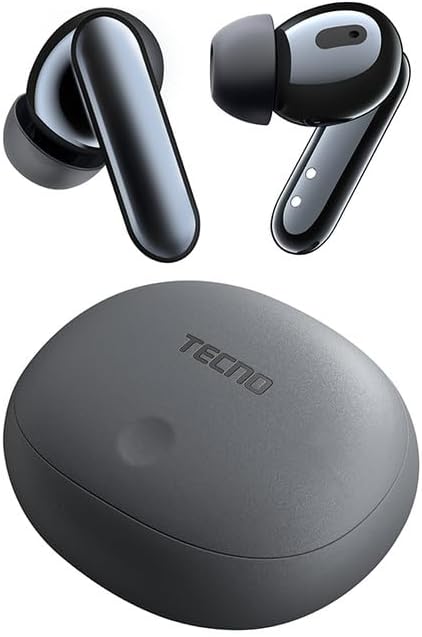
Image: The TECNO TRUE 1 TWS Earbuds and their charging case, showcasing elegancki design.
Organizować coś
1. Ładowanie słuchawek i etui
Before first use, fully charge the earbuds and the charging case. Connect the charging case to a power source using a compatible USB cable. The indicator lights on the case will show the charging status.

Image: The TECNO TRUE 1 TWS charging case connected to a charging cable, illustrating the charging process.
Place the earbuds into the charging case. They will begin charging automatically. A full charge provides up to 6 hours of playback for the earbuds, and the case extends total playtime to 45 hours.
2. Parowanie z urządzeniem
- Sprawdź, czy słuchawki znajdują się w etui ładującym i czy pokrywa etui jest otwarta.
- Włącz Bluetooth na swoim urządzeniu (smartfonie, tablecie itp.).
- Szukaj new Bluetooth devices. The earbuds should appear as "TECNO TRUE 1" or similar.
- Wybierz słuchawki do sparowania. Komunikat głosowy potwierdzi pomyślne połączenie.
The earbuds support pop-up connection for compatible devices, simplifying the pairing process.
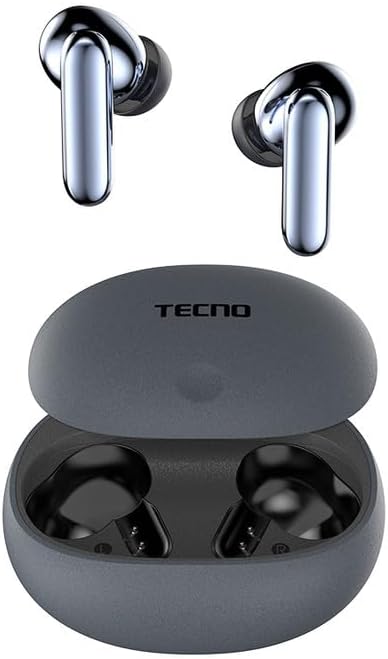
Image: The TECNO TRUE 1 TWS Earbuds resting inside their open charging case, ready for pairing.
3. Noszenie słuchawek dousznych
Gently insert the earbuds into your ear canals. Rotate them slightly to find a comfortable and secure fit. Choose the appropriate ear tip size from the included pairs for optimal sound quality and noise cancellation.
Instrukcja obsługi
Sterowanie dotykowe
The TECNO TRUE 1 TWS Earbuds feature intuitive touch controls on each earbud. The specific functions may vary slightly based on your device and app, but common controls include:
- Pojedyncze dotknięcie: Odtwarzaj/wstrzymuj muzykę, odbieraj/kończ połączenia.
- Podwójne dotknięcie (lewo/prawo): Next/Previous track (may vary).
- Potrójne dotknięcie: Aktywuj Asystenta Głosowego.
- Długie naciśnięcie: Przełączaj się między aktywną redukcją szumów (ANC) a trybem przejrzystości.
Aktywna redukcja szumów (ANC) i tryb przezroczystości
The earbuds offer 42 dB Active Noise Cancellation to minimize ambient sounds, providing a more immersive listening experience. Transparency Mode allows you to hear your surroundings without removing the earbuds, which is useful for awareness in busy environments.
To switch between ANC and Transparency Mode, perform a long press on either earbud's touch sensor.
Konserwacja
Czyszczenie
Regularne czyszczenie pomaga zachować jakość dźwięku i higienę:
- Do czyszczenia słuchawek i etui ładującego używaj miękkiej, suchej i niepozostawiającej włókien ściereczki.
- W przypadku końcówek dousznych wyjmij je ze słuchawek i wyczyść za pomocąamp W razie potrzeby użyj ściereczki i delikatnego mydła. Dokładnie wypłucz i całkowicie wysusz przed ponownym założeniem.
- Delikatnie usuń woskowinę uszną i zanieczyszczenia z siateczki słuchawek za pomocą małej, miękkiej szczoteczki lub patyczka kosmetycznego.
Składowanie
Gdy nie używasz słuchawek, zawsze przechowuj je w etui ładującym, aby chronić je przed kurzem, uszkodzeniami i utrzymać je w stanie naładowania.
Wodoodporność (IPX5)
The earbuds are IPX5 rated, meaning they are resistant to sweat and splashes of water. They are not designed for submersion in water. Avoid exposing them to heavy rain or showering with them. Ensure the earbuds and charging port are dry before charging to prevent damage.
Rozwiązywanie problemów
| Problem | Możliwa przyczyna | Rozwiązanie |
|---|---|---|
| Słuchawki douszne nie parują się | Low battery, out of range, not in pairing mode, previously paired to another device. | Charge earbuds and case. Ensure Bluetooth is on and within range. Place earbuds in case, close and reopen lid to re-enter pairing mode. Disconnect from other devices. |
| Brak dźwięku lub niska głośność | Volume too low, earbuds not properly seated, debris in earbud mesh, connection issue. | Increase volume on device and earbuds. Adjust earbud fit. Clean earbud mesh. Re-pair earbuds. |
| Problemy z ładowaniem | Cable or adapter fault, dirty charging contacts, case battery empty. | Try a different cable/adapter. Clean charging contacts on earbuds and case. Charge the charging case. |
| ANC nie działa efektywnie | Improper fit, ear tips not sealed, very high-frequency noise. | Adjust earbud fit and try different ear tip sizes for a better seal. ANC is most effective on low-frequency sounds. |
Specyfikacje
| Funkcja | Szczegół |
|---|---|
| Marka | Technologiczny |
| Nazwa modelu | 10309821 |
| Kolor | Szary |
| Tworzywo | Plastikowy |
| Umieszczenie ucha | Douszne |
| Współczynnik kształtu | Douszne |
| Izolacja szumów | Aktywna redukcja szumów (42 dB) |
| Technologia łączności | Bezprzewodowy |
| Technologia komunikacji bezprzewodowej | Bluetooth |
| Kompatybilne urządzenia | Smartphones, Tablets, Laptops, Desktop Computers, Smart Speakers |
| Konkretne zastosowania produktu | Travel, Sport |
| Poziom wodoodporności | IPX5 (odporność na wodę) |
| Zakres częstotliwości | 20 do 20,000 Hz |
| Czas odtwarzania | Do 6 godzin (słuchawki douszne), do 45 godzin (z etui ładującym) |
| Zawarte komponenty | Charging Case, User Manual, Ear Tip Pairs |
Gwarancja i wsparcie
For warranty information and customer support, please refer to the official TECNO webOdwiedź witrynę lub skontaktuj się z lokalnym sprzedawcą. Zachowaj dowód zakupu na wypadek roszczeń gwarancyjnych.
Aby uzyskać dalszą pomoc, możesz odwiedzić stronę strona produktu na Amazon.com.be or contact TECNO customer service directly.