1. Wprowadzenie
This manual provides essential information for the safe and efficient operation of your Devoko 0428-1822 Height Adjustable Electric Standing Desk. This desk is designed to promote healthy working habits by allowing seamless transitions between sitting and standing positions. It features a spacious 180 x 80 cm desktop, integrated USB A charging ports, and a cable management system for an organized workspace. Please read this manual thoroughly before assembly and use, and retain it for future reference.

Image 1.1: The Devoko Electric Standing Desk in a typical office setup, showcasing its large surface area and integrated features.
2. Instrukcje bezpieczeństwa
- Przed użyciem upewnij się, że wszystkie elementy są bezpiecznie zamocowane.
- Aby zapobiec obrażeniom, podczas pracy biurka należy trzymać dzieci i zwierzęta z dala od niego.
- Do not overload the desk. Refer to the specifications for weight limits.
- Unikaj stawiania płynów bezpośrednio na panelu sterowania lub w pobliżu podzespołów elektrycznych.
- Przed przystąpieniem do czyszczenia lub wykonywania prac konserwacyjnych należy odłączyć zasilanie.
- Do not attempt to modify the desk's electrical or mechanical components. Contact support for assistance.
- The desk is equipped with an anti-collision system. Ensure the area around the desk is clear during height adjustments to prevent damage or injury.
3. Zawartość opakowania
Przed rozpoczęciem montażu należy sprawdzić, czy wszystkie elementy są kompletne i nieuszkodzone. W przypadku braku lub uszkodzenia jakiejkolwiek części prosimy o kontakt z obsługą klienta.
- Desktop sections (typically 3 pieces for this model)
- Desk frame (legs, crossbar)
- Silnik elektryczny i skrzynka sterownicza
- Control panel with USB A charging ports
- Taca do zarządzania kablami
- 360° Swivel Wheels (pre-installed or to be attached)
- Zaczep na słuchawki
- Sprzęt montażowy (śruby, nakrętki, klucze imbusowe)
- Zasilacz i kabel
- Instrukcja obsługi
4. Instalacja i montaż
Assembly typically takes approximately 30 minutes. Tools required for assembly are included. An electric screwdriver may expedite the process for attaching the desktop sections.
- Rozpakuj komponenty: Ostrożnie wyjmij wszystkie części z opakowania i połóż je na czystej, miękkiej powierzchni, aby zapobiec zarysowaniom.
- Złóż ramę biurka: Follow the included assembly diagram to connect the desk legs to the crossbar and motor assembly. Ensure all bolts are tightened securely.
- Dołącz pulpit: Place the desktop sections onto the assembled frame. Align the pre-drilled holes and secure the desktop to the frame using the provided screws.
- Zainstaluj Panel sterowania: Mount the control panel to the underside of the desktop in a convenient location. Connect the control panel cable to the motor control box.
- Install Cable Management Tray: Attach the cable management tray to the underside of the desk to organize power strips and cables.
- Zamontuj haczyk na słuchawki: Zamocuj haczyk na słuchawki w wybranym miejscu na ramie biurka.
- Podłącz zasilanie: Podłącz zasilacz do skrzynki sterowniczej, a następnie do gniazdka ściennego.

Image 4.1: An illustration of the desk frame assembly, highlighting the ease of installation with included tools.

Image 4.2: The integrated cable management tray, designed to keep power cords and adapters neatly organized beneath the desktop.
5. Instrukcja obsługi
5.1. Regulacja wysokości
Użyj Up (▲) I W dół (▼) buttons on the control panel to adjust the desk height. The desk can be adjusted smoothly and quietly within a range of 72 cm to 118 cm.
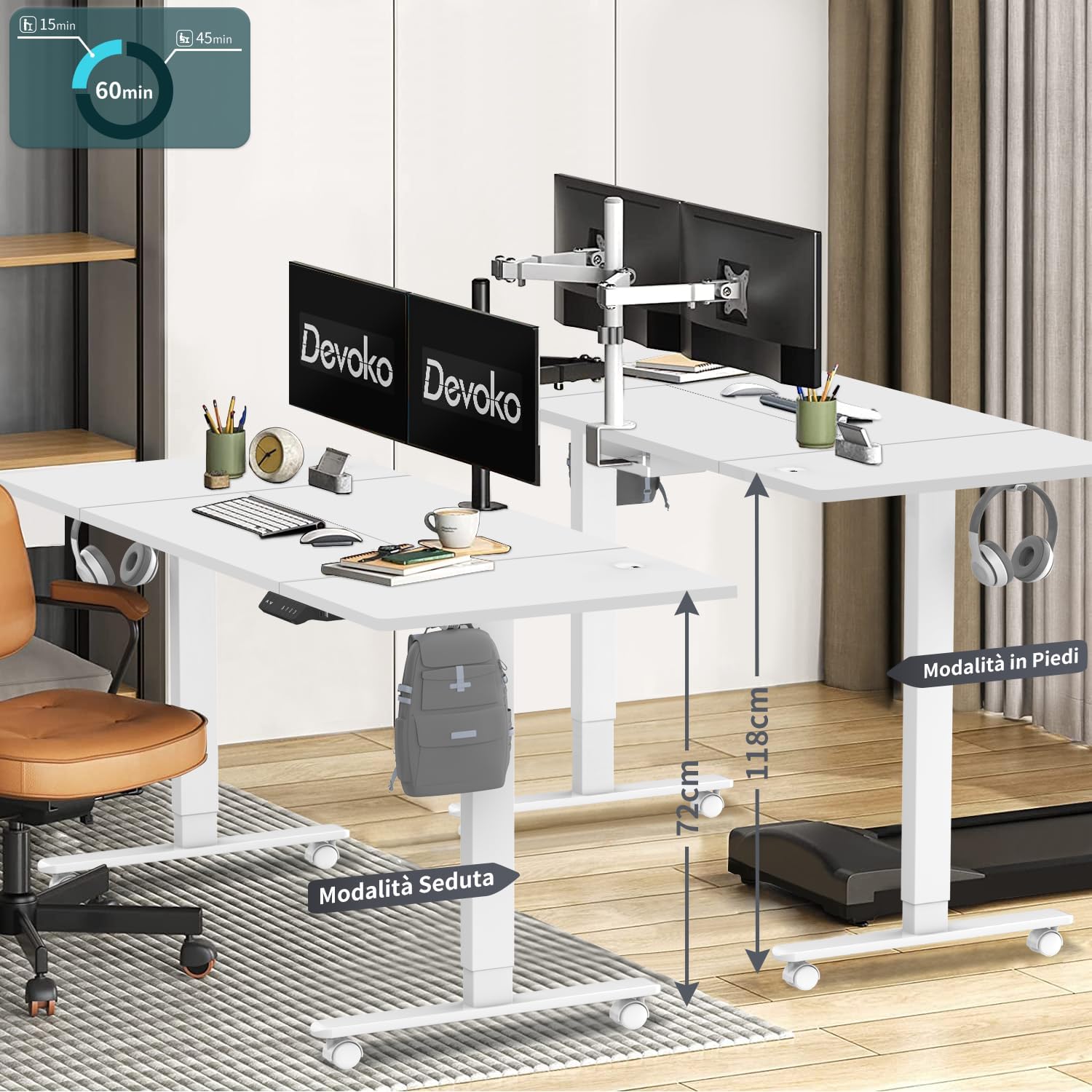
Image 5.1: The desk illustrating its adjustable height range, suitable for both sitting (72 cm) and standing (118 cm) positions.
5.2. Ustawienia pamięci
The control panel features three memory keys (1, 2, 3) to save your preferred sitting and standing heights.
- Aby zapisać wysokość: Adjust the desk to your desired height. Press the "S" button, then press one of the number buttons (1, 2, or 3) within 3 seconds. The display will confirm the setting.
- Aby użyć zapisanej wysokości: Press the corresponding number button (1, 2, or 3). The desk will automatically move to the saved height.
5.3. USB A Charging Ports
The control panel includes integrated USB A charging ports for convenient charging of mobile devices. Simply connect your device's USB cable to the port. Note: While the product description specifies USB A, some visual representations of the control panel may show a USB-C port. Please refer to your specific product's control panel.
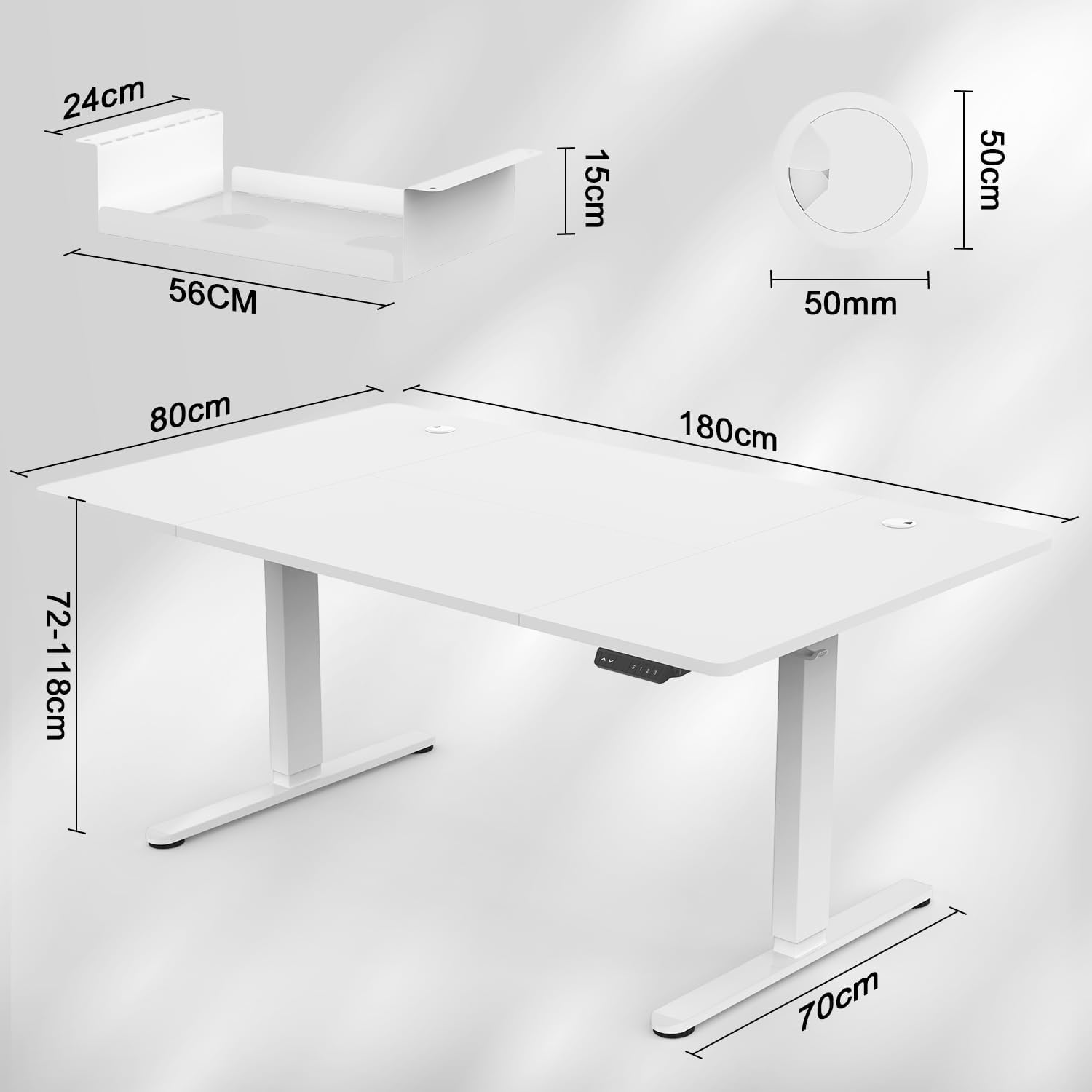
Image 5.2: The intelligent multifunction control panel, featuring memory presets, up/down controls, and a charging port (shown here as USB-C, but product features USB-A).
5.4. System antykolizyjny
The desk is equipped with a sensitive anti-collision system that detects reaction forces. If the desk encounters an obstruction during height adjustment, it will automatically stop and reverse slightly to prevent damage or injury. Ensure the area around the desk is clear during operation for optimal safety.
5.5. 360° Wheels
The desk is fitted with 360° swivel wheels, allowing for easy mobility and repositioning within your workspace. Lock the wheels when the desk is in its desired position to ensure stability.
6. Konserwacja
- Czyszczenie: Przetrzyj blat i ramę miękką szmatką.amp ściereczką. Unikaj środków czyszczących o działaniu ściernym i silnych środków chemicznych.
- Kontrola: Okresowo sprawdzaj wszystkie śruby i nakrętki, aby upewnić się, że są dobrze dokręcone. W razie potrzeby dokręć.
- Zarządzanie kablami: Regularly inspect cables for wear or damage. Ensure cables are neatly organized within the cable management tray to prevent snagging.
7. Rozwiązywanie Problemów
| Problem | Możliwa przyczyna | Rozwiązanie |
|---|---|---|
| Biurko się nie porusza. | Power cable disconnected; control panel cable loose; motor error. | Check power connections. Ensure control panel cable is securely plugged in. Unplug the desk for 10 seconds and plug it back in to reset. |
| Biurko porusza się nierównomiernie lub wydaje nietypowe dźwięki. | Nierównomierne obciążenie, luźne połączenia, przeszkoda. | Ensure weight is evenly distributed. Check all assembly screws. Clear any obstructions. |
| Częsta aktywacja systemu zapobiegającego kolizjom. | Przeszkoda na drodze ruchu. | Ensure the area around the desk is clear of objects during height adjustment. |
| Port ładowania USB nie działa. | Device not compatible; cable issue; power issue. | Try a different device or cable. Ensure the desk is powered on. |
If you encounter issues not listed here or require further assistance, please contact Devoko customer support.
8. Specyfikacje

Image 8.1: Detailed dimensions of the desk, including desktop size (180x80 cm) and height range (72-118 cm).

Rysunek 8.2: Widok z góry view confirming the 180 cm by 80 cm desktop dimensions.
- Model: 0428-1822
- Marka: Devoko
- Wymiary pulpitu: 180 cm (długość) x 80 cm (szerokość)
- Grubość pulpitu: 15 mm
- Zakres wysokości: od 72 cm do 118 cm
- Mechanizm podnoszący: Elektryczny
- Prędkość podnoszenia: 20 mm/s
- Poziom hałasu: Mniej niż 45 dB
- Certyfikaty: TÜV, CE
- Zawarte funkcje: USB A Charging Ports, Cable Management Tray, 360° Wheels, Headphone Hook, Anti-Collision System, 3 Height Memory Keys
- Materiał ramy: Metal
- Waga przedmiotu: 35 kilograma
- Wymagany montaż: Tak
9. Gwarancja i wsparcie
Gwarancja: The Devoko 0428-1822 Electric Standing Desk comes with a 5-year warranty on the motor and table frame, ensuring long-term reliability and performance.
Zwroty: A 30-day unconditional return policy is provided.
Obsługa klienta: For any installation issues, operational questions, or warranty claims, please contact Devoko customer support through the Amazon platform. Our team is committed to responding within 24 hours to assist you.