
1. Wprowadzenie
Thank you for choosing the HUANUO 63" L-Shaped Electric Standing Desk. This manual provides detailed instructions for assembly, operation, maintenance, and troubleshooting to ensure optimal performance and longevity of your desk. This adjustable standing desk is designed to enhance your workstation comfort and efficiency, allowing seamless transitions between sitting and standing positions.

Image: The HUANUO 63" L-Shaped Electric Standing Desk set up in an office environment, showcasing its spacious design and ability to accommodate multiple monitors and a laptop.
2. Informacje dotyczące bezpieczeństwa
- The desk has a maximum weight limit of 220 lbs. Do not exceed this capacity to prevent damage or injury.
- Należy ściśle przestrzegać wszystkich instrukcji montażu. Nieprawidłowy montaż może prowadzić do niestabilności i potencjalnych zagrożeń.
- Handle the electric lifting mechanism with care. Avoid placing hands or objects in the path of moving parts during height adjustment.
- Ensure proper cable management to prevent tripping hazards and damage to electrical components.
- Podczas pracy urządzenia należy trzymać dzieci i zwierzęta z dala od biurka.
- Nie siadaj i nie stawaj na biurku.
- Przed przystąpieniem do czyszczenia lub wykonywania prac konserwacyjnych należy odłączyć zasilanie.
3. Instalacja i montaż
Assembly of the HUANUO L-Shaped Standing Desk typically requires two people due to the weight and size of the components. Please follow the provided assembly instructions and use the included tools. A drill may be helpful for some steps.
- Rozpakuj komponenty: Ostrożnie wyjmij wszystkie części z opakowania i sprawdź je na liście części.
- Złóż ramę: Follow the step-by-step instructions to assemble the steel frame and legs. Ensure all screws are tightened securely.
- Dołącz sekcje pulpitu: The L-shaped desktop consists of multiple sections. You can choose to install the longer desktop section on either the left or right side to suit your workspace configuration.
- Zainstaluj Panel sterowania: Mount the control panel in your desired location on the desktop.
- Podłącz elementy elektryczne: Connect the motor cables and power supply according to the diagram in the assembly guide. Ensure all connections are secure.
- Zarządzanie kablami: Utilize the included cable management tray and clips to organize wires neatly under the desk.
- Początkowe uruchomienie: Before placing heavy items, plug in the desk and perform an initial height adjustment test. Ensure both legs move smoothly and evenly. If the legs are not at the same height, refer to the troubleshooting section for synchronization instructions.
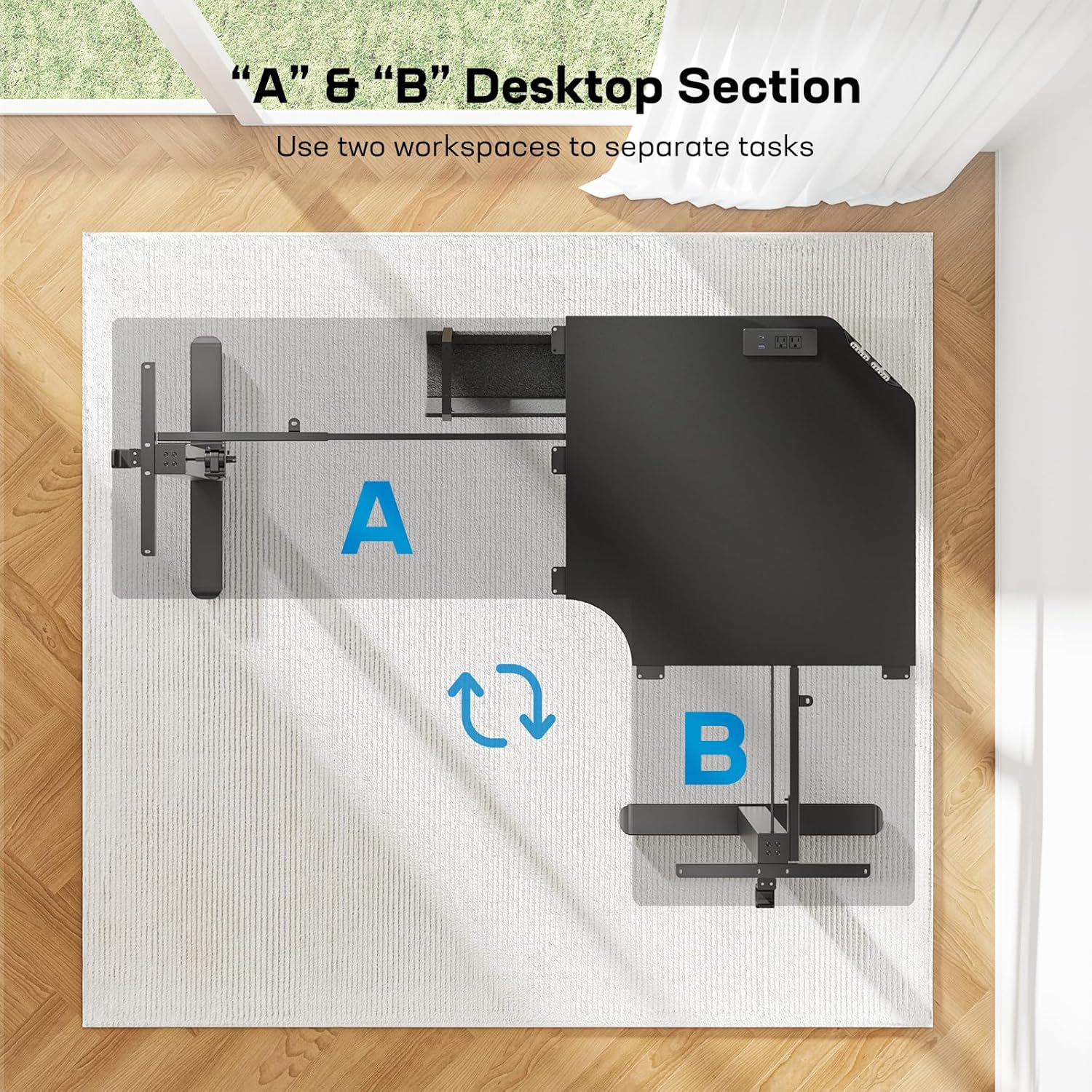
Image: A diagram illustrating the reversible "A" and "B" desktop sections, allowing customization of the L-shape for different workspace layouts.
Montaż wideo
Video: Official HUANUO Electric Standing Desk Assembly Video. This video provides a visual guide to the assembly process, demonstrating how to put together the desk frame and attach the desktop sections.
4. Instrukcja obsługi
Regulacja wysokości
The desk height can be adjusted electrically from 28 inches to 46 inches. Use the control panel located on the desktop to raise or lower the desk.
- Przyciski w górę/w dół: Naciśnij i przytrzymaj W górę (^) or W dół (v) arrow buttons to continuously adjust the desk height. Release the button to stop at your desired height.
- Ustawienia pamięci: The desk features three memory presets to save your favorite sitting and standing heights.
- Dostosuj wysokość biurka do swoich potrzeb za pomocą przycisków Góra/Dół.
- Naciśnij "S" przycisk (Ustaw). Wyświetlacz zacznie migać.
- Naciśnij jeden z ponumerowanych przycisków pamięci (1, 2 lub 3) w ciągu 3 sekund, aby zapisać aktualną wysokość w wybranym ustawieniu.
- Aby przywołać zapisaną wysokość, wystarczy nacisnąć odpowiedni przycisk pamięci o odpowiednim numerze. Biurko automatycznie ustawi się w zapisanej pozycji.

Image: Visual representation of the desk's height adjustment range, from 28 inches (sitting) to 46 inches (standing).
Zintegrowane gniazdka elektryczne
The main desktop includes a flush-mounted power strip for convenient device charging and power access.
- Gniazdka elektryczne: Two standard AC power outlets are available for laptops, monitors, or other devices.
- Porty ładowania USB: One USB Type-A port and one USB Type-C port are provided for charging phones, tablets, and other USB-powered devices.
- Ensure devices are compatible with the power output specifications.

Image: Detail of the integrated power outlets (AC, USB-A, USB-C) on the desktop and the large power strip holder for cable management.
Zarządzanie kablami
A long cable management tray is included to help keep your workspace tidy. Cable clips are also provided for routing wires.
- Attach the cable management tray to the underside of the desktop to hold surge protectors or excess cables.
- Use the cable clips to secure wires along the desk frame, preventing them from dangling or becoming entangled.
- A storage hook on each side of the desk provides a convenient place to hang headphones or bags.
Film prezentujący funkcje produktu
Video: This video highlights the features of the HUANUO 63" L-Shape Electric Standing Desk, including its power outlets and ergonomic design.
5. Konserwacja
Regular maintenance helps preserve the appearance and functionality of your desk.
- Czyszczenie: Wyczyść pulpit i ramkę reklamąamp cloth to remove dust and spills. Follow with a dry cloth to prevent water spots. Avoid abrasive cleaners or harsh chemicals that could damage the finish.
- Sprawdzanie połączeń: Periodically check all electrical connections and screws to ensure they remain tight and secure.
- Zarządzanie kablami: Re-organize cables as needed to maintain a tidy and safe workspace.
6. Rozwiązywanie Problemów
| Problem | Możliwa przyczyna | Rozwiązanie |
|---|---|---|
| Biurko nie porusza się i nie reaguje na polecenia. | Power cable disconnected; control panel cable loose; overload protection activated. |
|
| Desk moves unevenly or one leg is higher than the other. | Legs are not synchronized. |
|
| Desk makes unusual noises during adjustment. | Normalna praca silnika, luźne elementy. |
|
| Gniazdka elektryczne lub porty USB nie działają. | Desk not powered; internal connection issue. |
|
| Cable management clips do not stick. | Adhesive quality; surface not clean. |
|
7. Specyfikacje
| Funkcja | Szczegół |
|---|---|
| Marka | HUANUO |
| Numer modelu | HNESD47B-N1-US |
| Kształt | Kształt litery L. |
| Kolor | Czarny |
| Zakres regulacji wysokości | od 28" do 46" |
| Ustawienia pamięci | 3 |
| Nośność | 220 funtów |
| Materiał ramy | Stal węglowa |
| Gniazdka elektryczne | 2 gniazdka sieciowe |
| Porty ładowania USB | 1 USB Type-A, 1 USB Type-C |
| Grubość blatu | 1.91 cm |
| Zalecenie dotyczące montażu | 2 osób |
| Instrukcje pielęgnacji | Wytrzyj Damp Ściereczka, wytrzeć suchą ściereczką |

Image: A diagram detailing the dimensions of the L-shaped standing desk, including desktop lengths and height range.
8. Gwarancja i wsparcie
Informacje o gwarancji
This HUANUO L-Shaped Electric Standing Desk comes with a limited warranty. Please refer to the warranty card included in your product packaging for specific terms and conditions, including coverage duration and what is covered.
Obsługa klienta
For any questions, concerns, or assistance with your HUANUO product, please contact our customer support team. You can typically find contact information on the manufacturer's webstronie lub poprzez platformę zakupową.
When contacting support, please have your model number (HNESD47B-N1-US) and proof of purchase readily available.