
1. Koniec produktuview
The ATOMSTACK A6 Pro is a versatile 2-in-1 laser engraving and cutting machine designed for both beginners and enthusiasts. Featuring a unibody frame, it requires no assembly, allowing for immediate use right out of the box. It boasts a 6000mW output laser power with advanced beam compression technology for stable cuts and precise engraving on a variety of materials.
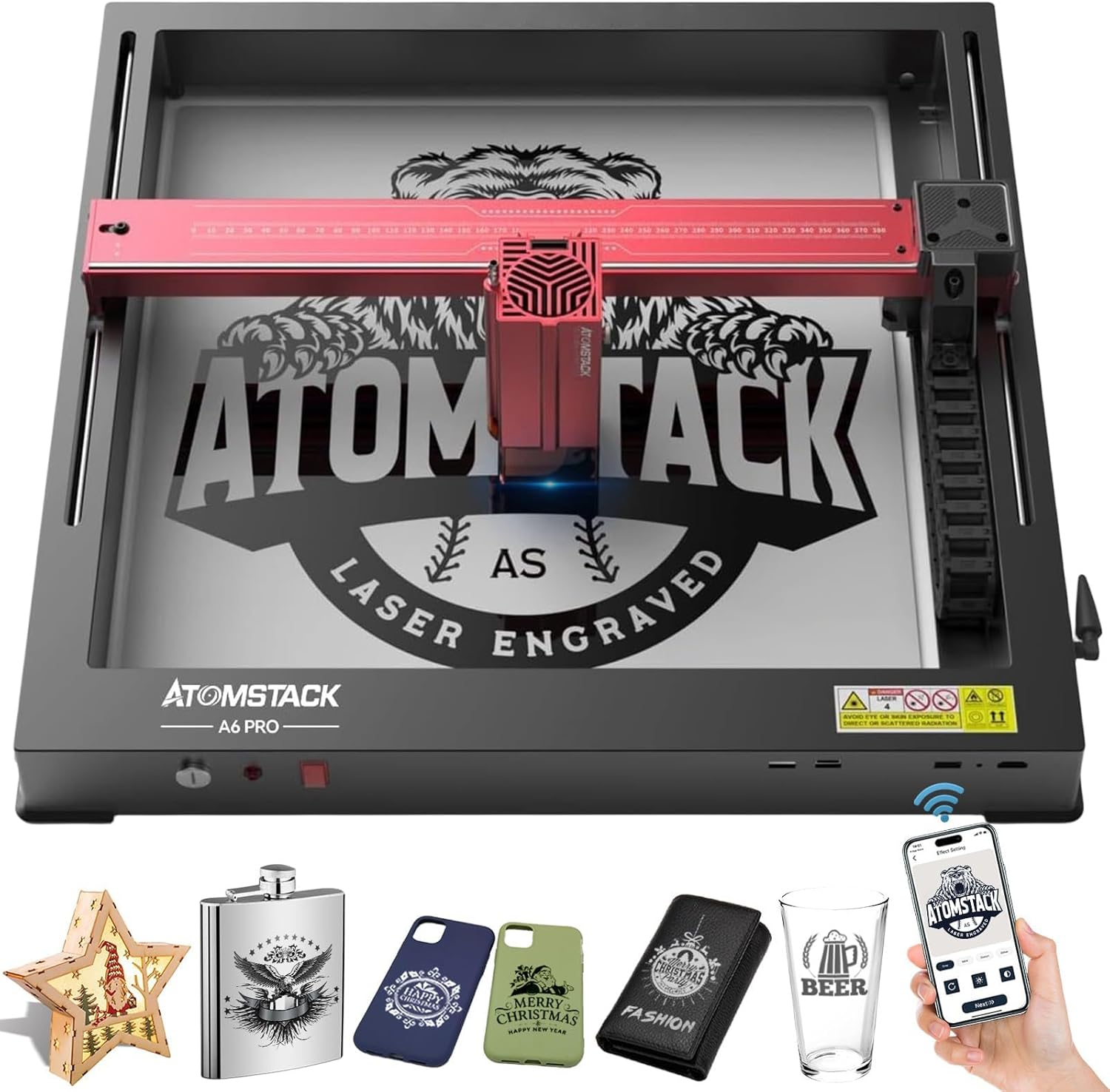
Figure 1: ATOMSTACK A6 Pro Laser Engraver with various engraved samples.
2. Informacje dotyczące bezpieczeństwa
Operating a laser engraver requires strict adherence to safety guidelines to prevent injury. The ATOMSTACK A6 Pro is a Laser Class 4 device. Always wear the provided UV-filtering eye protection during operation. Ensure the machine is placed on a stable, level surface. The integrated tilt detector will trigger an alarm if the machine is moved or tilted excessively during operation. An emergency stop button is provided for immediate shutdown in critical situations.
- Zawsze noś odpowiednią ochronę oczu.
- Aby rozproszyć opary i dym, należy zapewnić odpowiednią wentylację.
- Nie pozostawiaj maszyny bez nadzoru podczas pracy.
- Trzymać materiały łatwopalne z dala od miejsca pracy.
- Zapoznaj się z procedurą zatrzymania awaryjnego.
- Trzymać dzieci i zwierzęta domowe z dala od pracującej maszyny.
3. Zawartość opakowania
The ATOMSTACK A6 Pro comes pre-assembled in a unibody frame, minimizing setup time. Upon unboxing, verify that all components are present and undamaged.

Figure 2: The ATOMSTACK A6 Pro is ready to use directly from its packaging.
Zawartość zestawu:
- ATOMSTACK A6 Pro Laser Engraver (Unibody Frame)
- Moduł laserowy (moc wyjściowa 6000 mW)
- Zasilacz
- Kabel USB
- UV-Filtering Eye Protection Goggles
- Instrukcja obsługi (ten dokument)
- Basic Material Samples for Testing
4. Konfiguracja
The ATOMSTACK A6 Pro is designed for minimal setup. Its unibody frame means no complex assembly is required.
Początkowe kroki konfiguracji:
- Rozpakować: Ostrożnie wyjmij grawerkę z opakowania.
- Umieszczenie: Place the machine on a stable, flat, and heat-resistant surface in a well-ventilated area.
- Podłącz zasilanie: Plug the power adapter into the machine and then into a suitable power outlet.
- Połącz się z komputerem (opcjonalnie): Connect the engraver to your computer using the provided USB cable if you plan to use PC software.
- Install Software/App: Download and install the recommended software (AtomStack Studio, LightBurn, or LaserGRBL for PC) or the ATOMSTACK mobile app (for Android/iOS) on your control device.
Video 1: Unboxing and quick setup of the ATOMSTACK A6 Pro, demonstrating its no-assembly design.
5. Instrukcja obsługi
The ATOMSTACK A6 Pro offers multiple control methods for flexibility in your projects.

Figure 3: Diverse control methods for the ATOMSTACK A6 Pro.
Metody kontroli:
- Oprogramowanie komputerowe: Use AtomStack Studio (exclusive, free), LightBurn, or LaserGRBL for detailed control and design.
- Aplikacja na smartfona: Control the engraver via Wi-Fi using the ATOMSTACK mobile app (available on Android and Apple App Store).
Proces grawerowania i cięcia:
- Projekt: Create or import your design using your chosen software/app.
- Umieszczenie materiału: Place the material to be engraved or cut within the working area. The enlarged working area of 365x305mm (14.37x12 inches) allows for multitasking.
- Regulacja ostrości: Utilize the fixed-focus design for rapid and precise focusing in approximately 10 seconds. The newly added cross laser positioning feature provides clear visibility of the laser's location for perfect alignment.
- Ustawienia: Adjust laser power, speed, and passes according to the material type and desired effect. Refer to the material compatibility section for general guidelines.
- Rozpocznij operację: Initiate the engraving or cutting process from your control device.
- Power Failure Recovery: The advanced automatic power failure recovery system memorizes the exact engraving position and resumes from the paused point, ensuring uninterrupted production and material saving.
Video 2: Demonstration of the ATOMSTACK A6 Pro's engraving and cutting capabilities on various materials.
6. Materials Compatibility
The ATOMSTACK A6 Pro is capable of engraving and cutting a wide range of materials due to its 6000mW output laser power and ultra-fine laser focus area (0.05x0.05mm).

Figure 4: Diverse materials compatible with the ATOMSTACK A6 Pro.
Engraving Capabilities:
- Directly engrave stainless steel, ceramics, and glass.
- Achieves clear effects on wood, leather, paper, acrylic, and more.
Możliwości cięcia:
- Cuts 3mm paulownia wood, 3mm black acrylic, and 3mm plywood in a single pass.
- Cuts 6mm thick plywood and 6mm black acrylic in multiple passes.
- Suitable for basswood, pine wood, bamboo, and leather.

Figure 5: The ATOMSTACK A6 Pro provides stable laser cuts on various materials.
7. Advanced Features and Technology
- Wysoka precyzja: Mechanical precision can reach 0.02mm, benefiting from the unibody frame and modular assembly.
- Amazing Work Speed: Maximum engraving speed up to 600mm/s, significantly faster than traditional frame machines.
- 32-Bit Smart Motherboard: Features the ATOMSTACK self-developed ESP-32 built-in motherboard for intelligent and simple operation.
- Wyłączniki krańcowe 4-drożne: Located on X and Y axes to prevent equipment collision with edges.
- Danger Alert System: Includes flame detector and gyroscope (tilt detector) to trigger emergency stops for safety.
- Tank Chain Design: New wiring harness design for aesthetics and extended machine lifespan.
- Blokada bezpieczeństwa: Prevents unauthorized use, especially by children, and deters theft.
- Dual-Axis Guideway: High-precision wear-resistant slide rails and 4-way hard limiters reduce wear and tear.
- Detachable Eye Protection: Laser shield with magnetic absorption protects eyes and prevents laser lenses from smoke and dust accumulation.

Figure 6: The ATOMSTACK A6 Pro offers significantly faster engraving speeds.
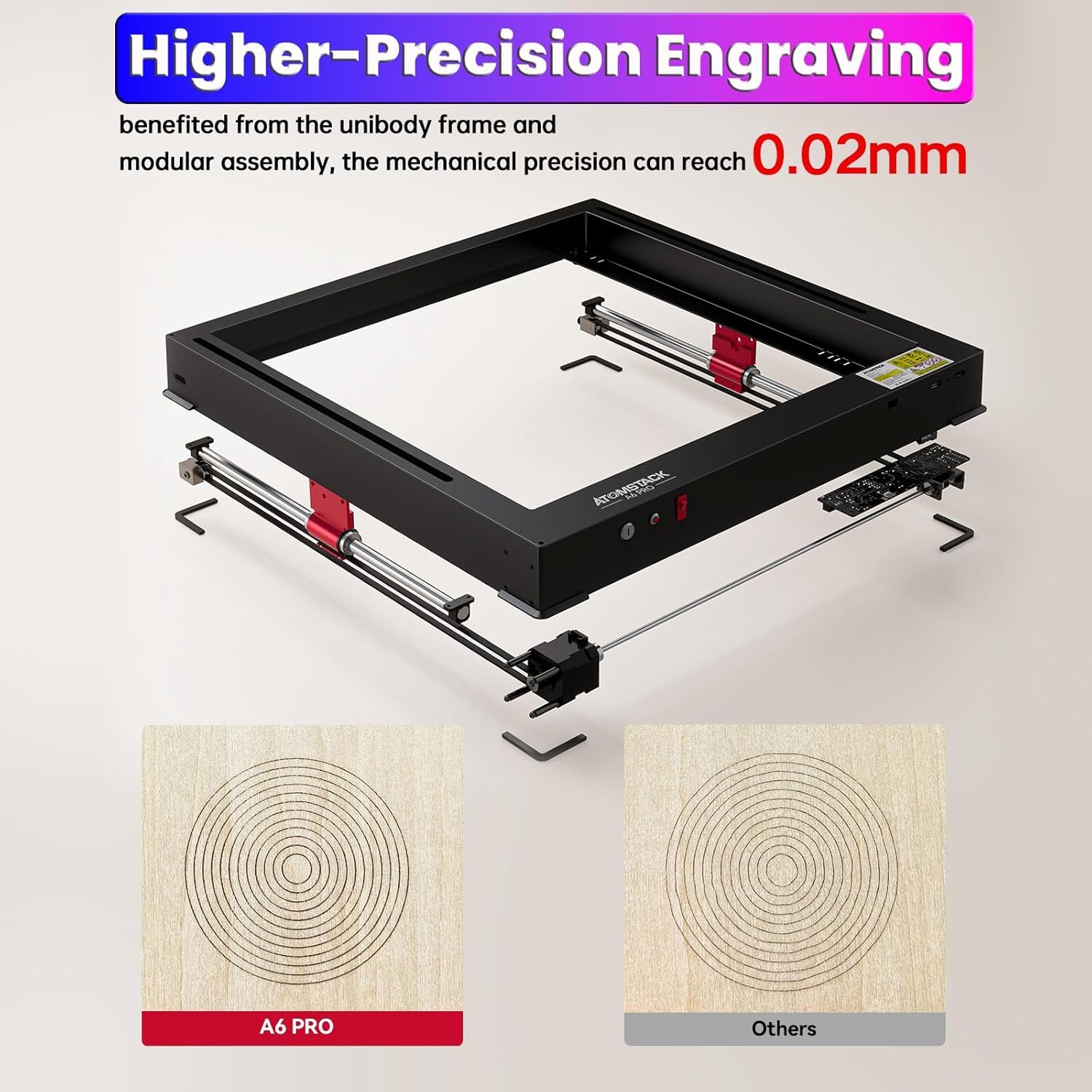
Figure 7: The ATOMSTACK A6 Pro provides higher precision engraving.
8. Konserwacja
Regular maintenance ensures the longevity and optimal performance of your ATOMSTACK A6 Pro.
- Czyszczenie: Regularly clean the laser lens and the working area to prevent dust and debris buildup, which can affect engraving quality. Use a soft, lint-free cloth.
- Smarowanie: Periodically check and lubricate the guide rails to ensure smooth movement of the laser module.
- Aktualizacje oprogramowania układowego: Sprawdź oficjalną stronę ATOMSTACK website or app for any available firmware updates to ensure your machine has the latest features and improvements.
- Składowanie: Gdy nie używasz grawerki, przechowuj ją w czystym i suchym miejscu, z dala od bezpośredniego światła słonecznego i ekstremalnych temperatur.
9. Rozwiązywanie Problemów
This section provides general guidance for common issues. For detailed troubleshooting, refer to the official ATOMSTACK support resources.
| Problem | Możliwa przyczyna | Rozwiązanie |
|---|---|---|
| Laser nie działa lub jego moc jest słaba | Incorrect focus; dirty lens; low power setting; material incompatibility. | Adjust focus; clean lens; increase power setting; verify material compatibility. |
| Engraving/Cutting not precise | Loose belts/components; unstable surface; incorrect speed setting. | Check and tighten components; ensure stable surface; adjust speed. |
| Machine not connecting to PC/App | USB cable issue; Wi-Fi connectivity problem; driver issue; software conflict. | Try different USB port/cable; check Wi-Fi connection; reinstall drivers/software. |
| Nieoczekiwanie nastąpiło zatrzymanie awaryjne | Machine tilted; flame/smoke detected; limit switch activated. | Check machine stability; ensure proper ventilation; verify limit switch clearance. |
10. Specyfikacje
| Funkcja | Szczegół |
|---|---|
| Model | A6 Pro |
| Moc wyjściowa lasera | 6 000 mW (40 W) |
| Rozmiar plamki lasera | 0.05 x 0.05mm (Ultra-fine compressed spot) |
| Precyzja grawerowania | 0.02mm |
| Prędkość grawerowania (maks.) | 600 mm/s |
| Obszar roboczy | 365 x 305 mm (14.37 x 12 cala) |
| Materiał ramy | Aluminum Alloy (Unibody) |
| Metody kontroli | PC Software (AtomStack Studio, LightBurn, LaserGRBL), Smartphone App (Wi-Fi) |
| Funkcje bezpieczeństwa | 4-Way Limit Switches, UV-Filtering Eye Protection, Tilt Detector, Emergency Stop Button, Safety Lock |
| Źródło zasilania | Prąd zmienny/stały |
| Tomtage | 24 wolty |
| Waga przedmiotu | 17.91 funta |
| Wymiary produktu | 23.22 x 23.22 x 7.08 cala |
11. Gwarancja i wsparcie
The ATOMSTACK A6 Pro comes with a 1-letnia gwarancja producenta. For technical support, troubleshooting assistance, or warranty claims, please contact ATOMSTACK customer service through their official webstronę internetową lub dane kontaktowe znajdujące się na opakowaniu produktu.
Visit the official ATOMSTACK Store for additional accessories and product information: Oficjalny sklep ATOMSTACK