
1. Wprowadzenie
Thank you for choosing the ORDRO Z88 4K Video Camera. This manual provides essential information for setting up, operating, and maintaining your device. Please read it thoroughly before use to ensure proper functionality and to maximize your camera's potential. Keep this manual for future reference.
2. Informacje dotyczące bezpieczeństwa
- Do not expose the camera to water or moisture. This device is not waterproof.
- Unikaj upuszczania aparatu i narażania go na silne uderzenia.
- Trzymaj aparat z dala od silnych pól magnetycznych.
- Nie należy podejmować prób demontażu ani modyfikacji aparatu. Naprawy powinny być wykonywane wyłącznie przez autoryzowany personel serwisowy.
- Należy używać wyłącznie wskazanego zasilacza i akcesoriów.
- Kiedy aparat nie jest używany, przechowuj go w chłodnym i suchym miejscu.
3. Zawartość opakowania
Sprawdź, czy w przesyłce znajdują się wszystkie elementy wymienione poniżej:
- ORDRO Z88 4K Video Camera
- Kabel USB-C
- Kabel Micro HDMI do HDMI
- Zasilacz/ładowarka
- Lithium-ion Batteries (2 included)
- Zdalne sterowanie
- Karta SD 32 GB
- Adapter karty SD
- Camera Bag/Pouch
- Pasek na nadgarstek

Image: The ORDRO Z88 4K camera displayed with its full set of accessories, including cables, batteries, remote, and storage card.
4. Koniec produktuview
The ORDRO Z88 is a compact 4K video camera designed for ease of use and high-quality recording. It features a 3.0-inch IPS touchscreen, 10x optical zoom, and various connectivity options.

Obraz: Przód view of the ORDRO Z88 camera, highlighting its 4K resolution, 1/3" CMOS sensor, 28.0MP still image capability, 3.0" IPS touchscreen, and 10x optical zoom.
Komponenty kamery
- Obiektyw: 10x optical zoom lens.
- Ekran LCD: 3.0-inch IPS touchscreen, rotatable for various viewkąty.
- Mikrofon: Wbudowany mikrofon do nagrywania dźwięku.
- Głośnik: Do odtwarzania dźwięku.
- Przyciski sterujące: Power, Record, Zoom lever, Menu, Playback, etc.
- Porty: USB-C, Mini HDMI, External Microphone input.
- Gwint statywu: Standard 1/4 inch thread for mounting on tripods.

Obraz: Szczegółowy widok boczny view of the ORDRO Z88 camera, illustrating the external microphone input, Mini HDMI port, and USB-C output.
5. Konfiguracja
5.1 Instalacja baterii
- Otwórz pokrywę komory baterii znajdującą się na spodzie aparatu.
- Insert the Lithium-ion battery, ensuring the correct polarity.
- Dokładnie zamknij pokrywę komory baterii.
5.2 Instalacja karty pamięci
The camera supports SDHC flash memory cards up to 256GB. A 32GB SD card is included.
- Znajdź gniazdo karty SD, zazwyczaj z boku lub na spodzie aparatu.
- Włóż kartę SD, kierując metalowe styki we właściwym kierunku, aż do zatrzaśnięcia.
- Aby wyjąć kartę, delikatnie naciśnij ją, aż wyskoczy.
5.3 Ładowanie akumulatora
Connect the camera to a power source using the provided USB-C cable and power adapter. The camera supports recording while charging.
5.4 Pierwsze włączenie zasilania
Press and hold the Power button to turn on the camera. The LCD screen will illuminate. You may need to set the date and time upon first use.
6. Instrukcja obsługi
6.1 Podstawowe nagrywanie wideo i robienie zdjęć
- Włączanie: Włącz kamerę.
- Wybierz tryb: Use the mode dial or touchscreen menu to select video recording or photo capture mode.
- Centrum: The camera features automatic focus. Ensure your subject is within the focus range.
- Nagrywanie/Przechwytywanie: Press the Record button to start/stop video recording. Press the Shutter button to take a photo.
6.2 Funkcja zoomu
The ORDRO Z88 features a 10x optical zoom and a 120x intelligent (digital) zoom.
- Zoom optyczny: Use the zoom lever to adjust the optical zoom. This maintains image quality.
- Zoom cyfrowy: Beyond the 10x optical zoom, the camera can engage 120x digital zoom. Note that digital zoom may reduce image quality.

Image: A visual comparison demonstrating the clarity of 10x optical zoom versus the extended reach of 120x digital zoom, showing a distant tower.
6.3 Połączenie Wi-Fi
Connect your camera to a smartphone via Wi-Fi using the "D Video" application for remote control, preview, sharing, and downloading files. The effective range is up to 10 meters.
- Download and install the "D Video" app on your smartphone.
- Enable Wi-Fi on your camera through the menu settings.
- Na swoim smartfonie połącz się z siecią Wi-Fi aparatu.
- Open the "D Video" app to establish the connection and control the camera.
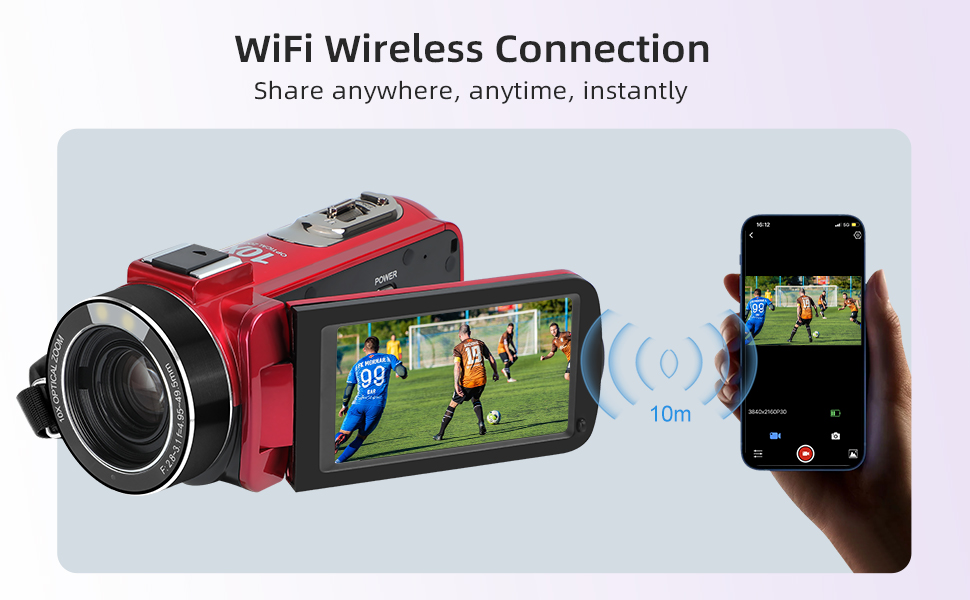
Image: The ORDRO Z88 camera wirelessly connected to a smartphone, demonstrating remote viewing and control capabilities via the "D Video" app.
6.4 WebTryb kamery
The camera can function as a high-definition webcam for live streaming.
- Podłącz kamerę do komputera za pomocą kabla USB-C.
- On the camera's screen, select "PC Camera" mode when prompted.
- Twój komputer powinien rozpoznać kamerę jako webcam, allowing you to use it with video conferencing or streaming software.

Image: The ORDRO Z88 camera mounted on a mini tripod, connected to a laptop via USB-C, demonstrating its functionality as a webkamera do rozmów wideo.
6.5 Playback and Connecting to TV
Review your recorded videos and photos directly on the camera's LCD screen or connect to a larger display.
- Przed kamerą: Naciśnij przycisk odtwarzania, aby view swoje media files. Use the touchscreen or navigation buttons to browse.
- Do telewizji: Connect the camera to a 4K compatible television using the Mini HDMI to HDMI cable. This allows for high-resolution playback of your 4K content on a larger screen.
6.6 Funkcje specjalne
The ORDRO Z88 offers several advanced shooting modes:
- Czas wygaśnięcia: Capture a series of images over time and combine them into a video.
- Zwolnione tempo: Nagrywaj filmy z większą liczbą klatek na sekundę, aby uzyskać płynne odtwarzanie w zwolnionym tempie.
- Funkcja pauzy: Pause and resume recording within the same video file.
- Wykrywanie twarzy: Automatycznie wykrywa i ustawia ostrość na twarzach w kadrze.
- Strzelanie na czas: Ustaw timer do robienia zdjęć.
- Szybki strzał serią 3 strzałów: Zrób wiele zdjęć jedno po drugim.

Obraz: Pokaz kolażuasing the camera's diverse shooting capabilities, including time-lapse, slow motion, pause function, and various event recordings like weddings and graduations.
7. Konserwacja
7.1 Czyszczenie
- Do czyszczenia korpusu aparatu należy używać miękkiej, suchej ściereczki.
- Do czyszczenia soczewek należy używać specjalnej ściereczki i płynu do czyszczenia soczewek.
- Nie należy używać środków czyszczących o właściwościach ściernych ani rozpuszczalników.
7.2 Przechowywanie
- Jeśli nie używasz urządzenia przez dłuższy czas, wyjmij baterię.
- Store the camera in its protective bag in a cool, dry, dust-free environment.
8. Rozwiązywanie Problemów
If you encounter issues with your ORDRO Z88 camera, refer to the following common solutions:
- Kamera się nie włącza: Sprawdź, czy akumulator jest prawidłowo zainstalowany i całkowicie naładowany.
- Nie można nagrać: Check if the SD card is inserted correctly and has sufficient free space. Ensure the camera is in the correct mode.
- Słaba jakość obrazu: Upewnij się, że soczewka jest czysta. Sprawdź warunki oświetleniowe.
- Problemy z połączeniem Wi-Fi: Ensure the "D Video" app is installed and updated. Verify Wi-Fi is enabled on the camera and your smartphone.
- Webcam mode not recognized: Ensure the USB-C cable is securely connected and "PC Camera" mode is selected on the camera. Try a different USB port on your computer.
Aby uzyskać dalszą pomoc, skontaktuj się z obsługą klienta.
9. Specyfikacje
| Funkcja | Specyfikacja |
|---|---|
| Marka | ORDRO |
| Numer modelu | HDR-Z88 |
| Technologia czujnika fotograficznego | CMOS |
| Rozdzielczość nagrywania wideo | 1080p, 4K (2880x2160@24fps) |
| Rozdzielczość zdjęć | 5 MP (Interpolated to 28.0MP) |
| Zoom optyczny | 10x |
| Zoom cyfrowy | 120x |
| Rozmiar ekranu | 3.0 cale (ekran dotykowy IPS) |
| Typ pamięci flash | SDHC (up to 256GB expansion) |
| Technologia łączności | HDMI, USB-C, Wi-Fi (802.11ac) |
| Stabilizacja obrazu | Optical (Note: Product specs state 'No' for 'Posiada stabilizację obrazu' but 'Optyczny' for 'Stabilizacja obrazu'. Assuming optical stabilization is present as per feature bullets.) |
| Poziom wodoodporności | Nie wodoodporny |
| Waga przedmiotu | 300 gram |
| Baterie w zestawie | Tak (2 litowo-jonowy) |
| Zalecane zastosowania | Vlogging, daily video recording, beginner use |
10. Gwarancja i wsparcie
The ORDRO Z88 4K Video Camera comes with a standard manufacturer's warranty. Please refer to the warranty card included in your package for specific terms and conditions. For technical support, troubleshooting, or warranty claims, please contact ORDRO customer service through the contact information provided with your purchase or on the official ORDRO webstrona.