
syitren R300
syitren R300 CD Player User Manual
Model: R300
Marka: syitren
1. Wprowadzenie
The syitren R300 is a portable desktop retro CD player designed for home use. It features Bluetooth connectivity and fiber optic output, allowing users to connect to various external audio systems. This manual provides detailed instructions for setting up, operating, maintaining, and troubleshooting your R300 CD player.

Figure 1: syitren R300 CD Player - Front View
2. Co znajduje się w pudełku
Sprawdź zawartość paczki, aby upewnić się, że znajdują się w niej wszystkie elementy:
- syitren R300 CD Player
- Kabel zasilający typu C
- 1 bateria AAA (w zestawie)
3. Konfiguracja
3.1 Włączanie i ładowanie
The R300 CD player is powered via a Type-C cable. It includes a built-in 2000mAh battery, providing over 6 hours of playback on a full charge. Connect the provided Type-C power cable to the DC IN 5V port on the back of the unit and plug the other end into a compatible USB power adapter (not included).

Figure 2: Rear Ports (DC IN 5V and SPDIF)
3.2 Podłączanie do urządzeń audio
The R300 CD player does not have a built-in speaker. It requires connection to external audio devices for sound output. This design helps reduce the impact of audio vibration on the CD player, allowing users to choose their preferred speakers and power ampsprzęt lufowy.
3.2.1 Połączenie Bluetooth
The R300 CD player can connect wirelessly to Bluetooth headphones or speakers.
- Ensure your external Bluetooth audio device is in discovery mode.
- On the R300, activate Bluetooth pairing mode by holding the designated Bluetooth button (refer to controls section for button identification).
- Once connected, a solid Bluetooth icon will appear on the R300's display.
Video 1: Demonstrates how to connect the R300 CD Player to an external stereo system using Bluetooth. The video shows activating Bluetooth on the R300 and pairing it with a separate speaker, confirming connection via the display icon.
3.2.2 Fiber Optic (SPDIF) Output
For high-quality digital audio output, connect the R300 to an audio receiver or amplifier using a fiber optic cable (not included) via the SPDIF port on the back of the unit.
3.2.3 AUX Output
The R300 also features an AUX output for analog audio connection to compatible devices using a 3.5mm audio cable (not included).
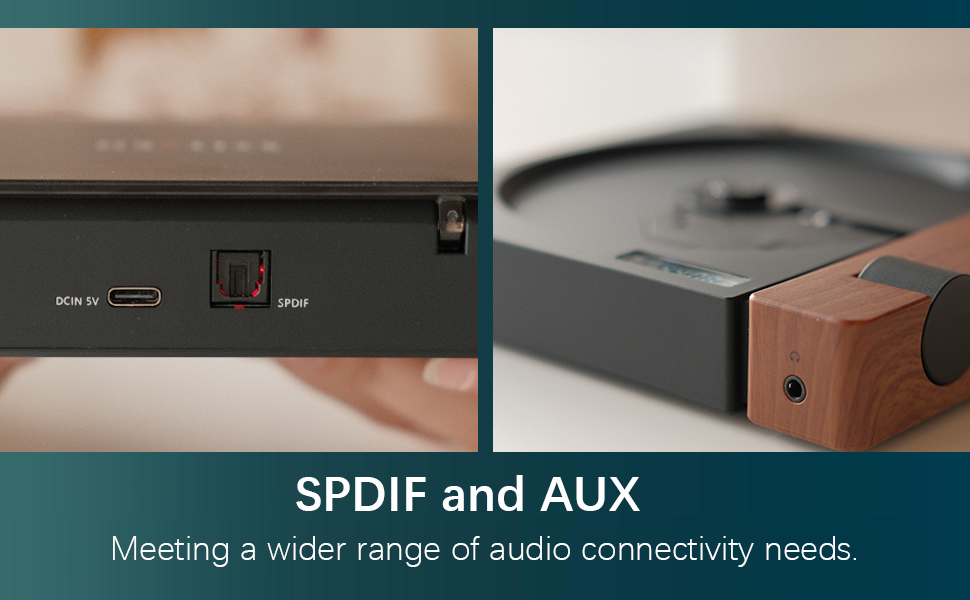
Figure 3: SPDIF and AUX Connectivity Options
4. Instrukcja obsługi
4.1 Odtwarzanie płyt CD
- Delikatnie otwórz pokrywę płyty.
- Umieść płytę CD na wrzecionie i upewnij się, że jest prawidłowo osadzona.
- Zamknij pokrywę płyty.
- Press the Play/Pause button (orange button) to begin playback.
- Use the Skip Forward and Skip Backward buttons to navigate between tracks.
- Wyreguluj głośność za pomocą pokrętła głośności.

Figure 4: Opening the Disc Cover

Rysunek 5: Panel sterowania i wyświetlacz
4.2 kontroli nadview
The R300 features a minimalist control panel on the right side of the unit:
- Przycisk zasilania: Located on the back/side of the unit (refer to Figure 2).
- Pokrętło głośności: Rotates to adjust audio output level.
- Przycisk Odtwórz/Pauza: Orange button to start or pause CD playback.
- Przyciski pomijania: Black buttons for skipping tracks forward or backward.
- Bluetooth Activation Button: (Likely one of the black buttons, or the top one, as shown in video) Used to initiate Bluetooth pairing.
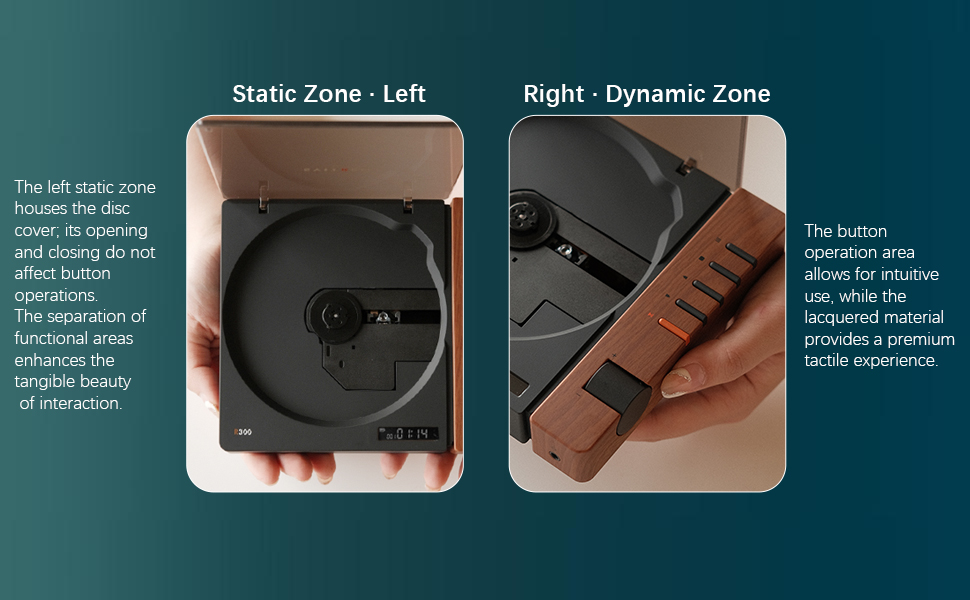
Figure 6: Functional Zones of the R300
5. Konserwacja
- Utrzymuj urządzenie w czystości, przecierając je miękką, suchą ściereczką. Unikaj środków czyszczących o właściwościach ściernych i rozpuszczalników.
- Ensure the disc tray is free of dust and debris to prevent playback issues.
- When not in use, store the CD player in a cool, dry place away from direct sunlight and extreme temperatures.
- Trzymaj płyty CD za krawędzie, aby uniknąć śladów odcisków palców i zarysowań.
6. Rozwiązywanie Problemów
| Problem | Możliwa przyczyna | Rozwiązanie |
|---|---|---|
| Odtwarzacz się nie włącza. | Battery is depleted or power cable is not connected. | Charge the unit using the Type-C power cable. Ensure the power cable is securely connected. |
| "NO CD" message displayed. | No CD inserted, CD is dirty/scratched, or CD is not properly seated. | Insert a CD. Clean the CD with a soft cloth. Ensure the CD is placed correctly on the spindle. |
| Brak dźwięku. | No external speaker connected, volume too low, or incorrect output mode selected. | Connect an external speaker via Bluetooth, SPDIF, or AUX. Increase the volume. Ensure the external device is properly configured for input. |
| Problemy z połączeniem Bluetooth. | Urządzenie nie jest w trybie parowania, znajduje się poza zasięgiem lub jest zakłócane. | Upewnij się, że oba urządzenia są w trybie parowania. Przysuń urządzenia bliżej siebie. Zredukuj zakłócenia powodowane przez inne urządzenia bezprzewodowe. |
| Player randomly shuts off. | Niski poziom naładowania baterii lub wewnętrzna awaria. | Upewnij się, że bateria jest w pełni naładowana. Jeśli problem będzie się powtarzał, skontaktuj się z obsługą klienta. |
7. Specyfikacje
- Nazwa modelu: R300
- Marka: syitren
- Wymiary produktu: 6.38 x 5.79 x 1.28 cala
- Waga przedmiotu: 14.1 uncji
- Baterie: Wymagane 1 baterie AAA (w zestawie)
- Technologia łączności: Bluetooth, SPDIF, AUX
- Dodatek specjalny: Przenośny
- Producent: syitren/Guangdong Kaiping Electronics Co., Ltd
- Pojemność baterii: Built-in 2000mAh (more than 6 hours playback)
8. Gwarancja i wsparcie
For warranty information and customer support, please refer to the product's official Amazon listing page or visit the syitren official webZachowaj paragon zakupu na wypadek ewentualnych roszczeń gwarancyjnych.
Producent: syitren/Guangdong Kaiping Electronics Co., Ltd
Sklep firmowy: Visit the syitren Store on Amazon
Ask a question about this manual
Ask about setup, troubleshooting, compatibility, parts, safety, or missing instructions. Manuals+ will review the question and use this page’s manual context to help answer it.