
1. Wprowadzenie
The Dosilkc Dual Lens Indoor Camera is an advanced home security solution designed to provide comprehensive surveillance with its innovative dual-camera system. Featuring two 1080P cameras, it offers a unique 2-in-1 dual screen display, allowing for both a wide monitoring area and detailed tracking of human motion. This camera supports both 5G and 2.4G WiFi connectivity, ensuring stable and flexible placement. Key features include 360-degree pan/tilt linkage, full-color night vision with multiple modes, two-way audio communication, and smart motion detection with real-time alerts. It offers versatile storage options including local Micro SD card support (up to 128GB) and cloud service, making it an ideal choice for monitoring pets, children, or general home security.
2. Co znajduje się w pudełku
- Aparat bezpieczeństwa z dwoma obiektywami
- Nawias
- Zasilacz 5 V.
- Kabel typu C
- Instrukcja obsługi
3. Przewodnik konfiguracji
3.1 Rozpakowanie i pierwsze uruchomienie
Carefully remove all components from the packaging. Connect the provided Type-C cable to the camera's power port and plug the 5V power adapter into a standard electrical outlet. The camera will power on and initiate its self-check sequence.

Figure 1: Dosilkc Dual Lens Indoor Camera and its accompanying mobile application interface.
3.2 Pobieranie aplikacji i rejestracja konta
Download the official Dosilkc security camera app from your mobile phone's app store (available for Android and iOS). Follow the on-screen instructions to register a new account or log in if you already have one.
3.3 Parowanie urządzeń
Within the app, select 'Add Device' and follow the prompts to connect your camera to your home Wi-Fi network. Ensure your phone is connected to the same 2.4GHz or 5GHz Wi-Fi network during the pairing process. The app will guide you through scanning a QR code with the camera or other pairing methods.
3.4 Montaż kamery
The camera comes with an adjustable angle wall mount bracket for flexible installation. Choose a location that provides the desired viewing angle and coverage. Secure the bracket using screws and then attach the camera to the bracket. Ensure the camera is positioned to capture the intended monitoring area effectively.

Figure 2: The camera's adjustable wall mount bracket allows for versatile placement to achieve a full 360-degree view.
4. Instrukcja obsługi
4.1 Dual Lens & 360° View
The Dosilkc camera features two integrated 1080P lenses: a fixed bullet camera and a pan/tilt dome camera. The bullet camera provides a constant live view of a designated monitoring area, while the pan/tilt dome camera can track human motion within that area, offering a comprehensive 360-degree view. Możesz przełączać się między views or utilize the Picture-in-Picture (PIP) live view feature within the app.

Figure 3: The camera's pan (355°) and tilt (90°) functionality, controlled via the mobile app.
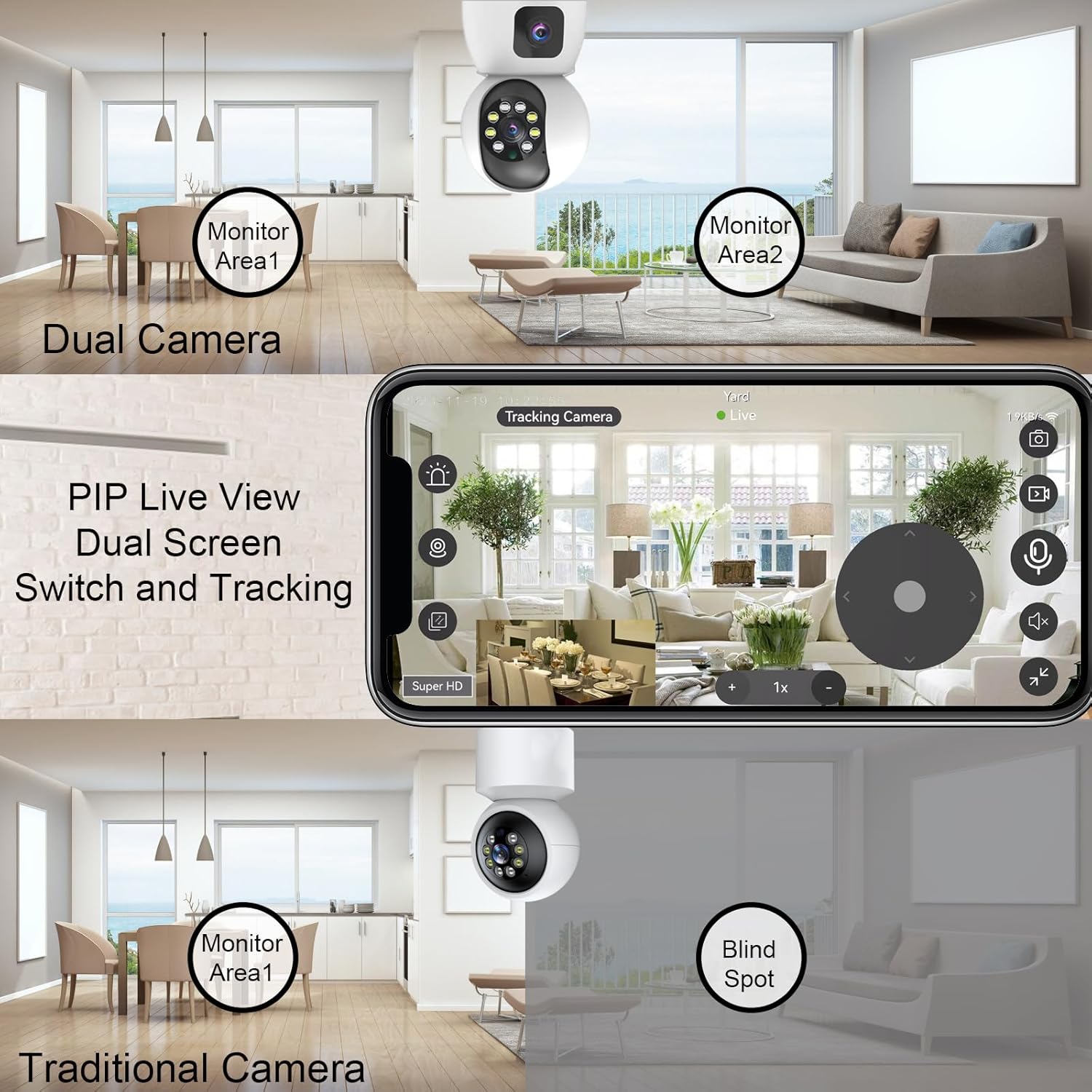
Figure 4: Illustrates the advantage of Dual Camera PIP Live View over traditional cameras, eliminating blind spots.
4.2 Inteligentne wykrywanie ruchu
The camera is equipped with smart motion detection capabilities. When suspicious motion is detected, the camera will push alarm notifications to your mobile app, often accompanied by pictures, video clips, alarm lighting, or an alarm voice. This feature helps in real-time monitoring and immediate response to potential security events.

Figure 5: The camera's human detection smart alarm system, providing app push notifications, siren, and starlight color light vision.
4.3 Pełnokolorowa wizja nocna
The camera features 8 infrared LEDs and 4 high-power white lights, offering three night vision modes:
- Low Environmental Illumination: Automatic full color or infrared at night via the IR-Cut sensor.
- Automatic Full Color: When motion is detected.
- Zdalne sterowanie aplikacją: Switch between modes via the app.

Figure 6: Visual representation of the three night vision modes: Full-Color, Infrared, and Smart (full color when motion detected).
4.4 Dźwięk dwukierunkowy
With a built-in microphone and speaker, the camera supports two-way audio communication. You can listen to the environment through the app and also speak through the camera to interact with individuals or pets in the monitored area.

Figure 7: Demonstrates the two-way communication feature, allowing interaction through the camera.
4.5 Multi-Storage Options
The camera offers flexible video storage solutions:
- Karta micro sd: Obsługuje do 128 GB (brak w zestawie) do ciągłego nagrywania 24/7.
- Usługa chmury: Provides 30 days of free storage for motion-detected video clips.
5. Konserwacja
- Czyszczenie: Gently wipe the camera lens and body with a soft, dry cloth to remove dust and smudges. Do not use harsh chemicals or abrasive materials.
- Aktualizacje oprogramowania układowego: Regularly check the mobile app for available firmware updates. Keeping your camera's firmware up-to-date ensures optimal performance, new features, and enhanced security.
- Bezpieczne umieszczenie: Ensure the camera is securely mounted and its cables are not easily accessible or tripped over.
- Stabilność sieci: Maintain a stable Wi-Fi connection for uninterrupted monitoring and recording.
6. Rozwiązywanie Problemów
| Wydanie | Możliwa przyczyna | Rozwiązanie |
|---|---|---|
| Kamera nie łączy się z siecią Wi-Fi | Incorrect Wi-Fi password; Camera too far from router; Router not supporting 2.4G/5G; Network interference. | Double-check Wi-Fi password. Move camera closer to router. Ensure router supports both 2.4G and 5G, and select the correct band. Reduce interference from other devices. |
| Niska jakość obrazu | Insufficient lighting; Dirty lens; Weak Wi-Fi signal; App resolution settings. | Ensure adequate lighting or enable night vision. Clean the camera lens. Improve Wi-Fi signal strength. Adjust video quality settings in the app to 'Super HD' or 'HD'. |
| Wykrywanie ruchu nie działa | Motion detection disabled in app; Sensitivity too low; Incorrect detection zone setup. | Enable motion detection in the app settings. Increase sensitivity. Adjust the detection zone to cover the desired area. |
| Brak dwukierunkowej transmisji dźwięku | Microphone/speaker muted in app; Volume too low; Network issues. | Check and unmute microphone/speaker icons in the app. Increase device volume. Ensure stable network connection. |
| Karta SD nie nagrywa | Karta SD jest pełna lub uszkodzona; nieprawidłowe ustawienia nagrywania; karta SD nie została prawidłowo włożona. | Format or replace the SD card. Check recording settings in the app (e.g., continuous recording, event recording). Reinsert the SD card properly. |
7. Specyfikacje
| Funkcja | Szczegół |
|---|---|
| Marka | Dosilkc |
| Numer modelu | DS-K122W |
| Zastosowanie wewnątrz/na zewnątrz | Wnętrz |
| Technologia łączności | Wi-Fi (2.4G i 5G) |
| Rozdzielczość przechwytywania wideo | 1080p (Dual 1080P cameras) |
| Cechy specjalne | Local Recording, Easy to Install, 2-Way Audio, Night Vision, PTZ Technology, Motion Detection |
| Typ montażu | Montaż ścienny |
| Źródło zasilania | Przewodowy elektryczny (5 V DC) |
| Zakres noktowizora | 8 metrów |
| Viewing kąt | 130 stopni |
| Składowanie | Micro SD Card (up to 128G), Cloud Service |
| Kolor | Biały |
| Tworzywo | Plastikowy |
| Pozycja Wymiary (dł. x szer. x wys.) | 2.75 x 2.75 x 5.5 cala |
| Waga przedmiotu | 13.4 uncji |
| Zawarte komponenty | Bracket, User Manual, 5V Power Adapter, Dual Lens Security Camera, Type-C Cable |
8. Gwarancja i pomoc techniczna
This Dosilkc product is covered by a standard manufacturer's warranty. For specific warranty terms and conditions, please refer to the warranty card included in your product packaging or visit the official Dosilkc webstrona.
For technical support, troubleshooting assistance, or any product-related inquiries, please contact Dosilkc customer service through the contact information provided on the official webstronie internetowej lub w aplikacji mobilnej.