
Wstęp
Dziękujemy za zakupasing the Volkano Griffin Series Dual Party Speaker. This manual provides essential information for the safe and optimal use of your speaker. Please read these instructions thoroughly before operating the device and retain them for future reference.
Instrukcje bezpieczeństwa
- Nie wystawiaj głośnika na działanie wody, wilgoci ani ekstremalnych temperatur.
- Unikaj umieszczania głośnika w pobliżu źródeł ciepła lub w bezpośrednim świetle słonecznym.
- Nie próbuj samodzielnie demontować ani naprawiać urządzenia. Wszelkie prace serwisowe zleć wykwalifikowanemu personelowi.
- Aby zapobiec przegrzaniu, należy zapewnić odpowiednią wentylację wokół głośnika.
- Trzymaj głośnik z dala od dzieci i zwierząt domowych.
- Używaj wyłącznie dołączonego zasilacza i akcesoriów.
Zawartość opakowania
Sprawdź, czy w opakowaniu znajdują się wszystkie elementy:
- Volkano Griffin Series Dual Party Speaker
- Zasilacz
- Instrukcja obsługi
- Kabel pomocniczy (3.5 mm)
- Pilot zdalnego sterowania (jeśli jest dołączony)
- Wired Microphone (if included)

Image: The Volkano Griffin Series Dual Party Speaker shown with its instruction manual and auxiliary cable, illustrating the typical package contents.
Głośnik ponadview
Sterowanie na górnym panelu
Obraz: szczegółowy view of the speaker's top control panel, featuring various buttons, knobs, and sliders for audio adjustments and mode selection.
- Przycisk zasilania: Włącza/wyłącza głośnik.
- Przycisk trybu: Switches between Bluetooth, FM Radio, USB, SD, and AUX modes.
- Regulacja głośności: Reguluje główną głośność.
- Regulacja tonów niskich/wysokich: Reguluje poziom basów i sopranów.
- Microphone Volume/Echo: Controls microphone input volume and echo effect.
- Port USB: Do odtwarzania z dysku flash USB.
- Gniazdo karty SD: Do odtwarzania z karty SD.
- Przycisk Odtwórz/Pauza: Steruje odtwarzaniem multimediów.
- Przyciski poprzedniego/następnego utworu: Nawiguje po ścieżkach.
- Przycisk trybu światła LED: Changes or turns off the LED lighting effects.
Połączenia na tylnym panelu

Image: The back panel of the speaker, displaying the power input, auxiliary input, and other connection ports.
- Wejście zasilania prądem stałym: Podłącz tutaj zasilacz.
- Wejście AUX: Connect external audio devices using a 3.5mm auxiliary cable.
- Wejście mikrofonowe (6.35 mm): Podłącz przewodowy mikrofon.
Organizować coś
Włączanie głośnika
- Connect the provided power adapter to the DC Power Input port on the rear of the speaker.
- Podłącz zasilacz do standardowego gniazdka ściennego.
- Naciśnij i przytrzymaj Przycisk zasilania on the top panel for a few seconds until the speaker powers on and the LED lights illuminate.
Wstępne parowanie Bluetooth
- Upewnij się, że głośnik jest włączony.
- Naciśnij Przycisk trybu until "Bluetooth" mode is announced or displayed. The speaker will enter pairing mode, indicated by a flashing Bluetooth indicator light.
- Na swoim urządzeniu mobilnym (smartfonie, tablecie itp.) włącz Bluetooth i wyszukaj dostępne urządzenia.
- Select "Volkano Griffin" (or similar name) from the list of found devices.
- Once paired, the speaker will confirm with an audible prompt, and the Bluetooth indicator light will become solid.
- Teraz możesz odtwarzać dźwięk ze swojego urządzenia przez głośnik.
Instrukcja obsługi
Changing Playback Modes
Naciśnij Przycisk trybu repeatedly to cycle through available input sources: Bluetooth, FM Radio, USB, SD Card, and AUX Input.
Adjusting Volume and Audio
- Głośność: Rotate the main Kontrola głośności pokrętło służące do zwiększania lub zmniejszania ogólnego poziomu dźwięku.
- Bas/Góra: Użyj dedykowanego Bas I Potroić knobs to fine-tune the audio equalization.
Odtwarzanie z USB/karty SD
- Włóż dysk flash USB lub kartę SD (z dźwiękiem MP3) files) into the respective port/slot on the top panel.
- The speaker will automatically switch to USB or SD mode and begin playing the first compatible track. If not, press the Przycisk trybu aby wybrać właściwe źródło.
- Użyj Odtwórz/Pauza, Poprzedni utwór, I Następny utwór przyciski do sterowania odtwarzaniem.
Obsługa radia FM
- Naciśnij Przycisk trybu aby wybrać tryb radia FM.
- Naciśnij i przytrzymaj Przycisk Odtwórz/Pauza to initiate an automatic scan for available FM stations. The speaker will save all found stations.
- Użyj Poprzedni utwór I Następny utwór przyciski umożliwiające nawigację pomiędzy zapisanymi stacjami.
Wejście AUX
- Connect one end of the 3.5mm auxiliary cable to the AUX Input port on the rear of the speaker.
- Podłącz drugi koniec do gniazda słuchawkowego lub wyjścia audio w urządzeniu zewnętrznym.
- Naciśnij Przycisk trybu aby wybrać tryb AUX.
- Steruj odtwarzaniem i głośnością z urządzenia zewnętrznego.
Użycie mikrofonu
- Plug a wired microphone into the 6.35mm Microphone Input port on the rear panel.
- Dostosuj głośność mikrofonu za pomocą dedykowanego pokrętła Głośność mikrofonu knob on the top panel.
- Użyj Echo pokrętło, aby dodać efekt echa do głosu.
Efekty świetlne LED

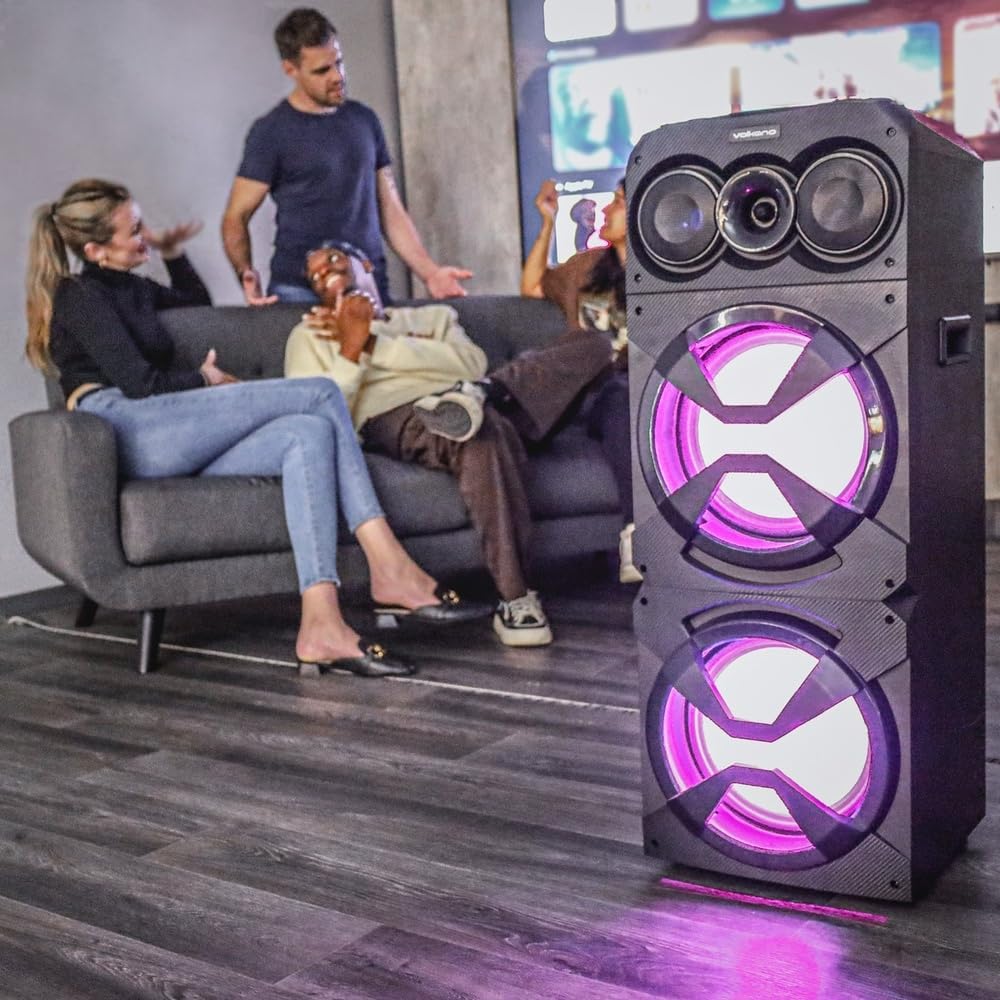
Image: The Volkano Griffin Series Dual Party Speaker in a social setting, showcasing its dynamic LED lighting effects in purple.

Image: The front of the speaker with its woofers illuminated by vibrant red LED lights, demonstrating another lighting option.
Naciśnij Przycisk trybu oświetlenia LED to cycle through different lighting patterns or to turn the lights off.
Konserwacja
- Czyszczenie: Use a soft, dry cloth to wipe the exterior of the speaker. Do not use abrasive cleaners, waxes, or solvents.
- Składowanie: Jeśli głośnik nie będzie używany przez dłuższy czas, należy przechowywać go w chłodnym i suchym miejscu, z dala od bezpośredniego światła słonecznego i ekstremalnych temperatur.
- Wentylacja: Aby zapobiec przegrzaniu, należy upewnić się, że otwory wentylacyjne głośnika nie są zablokowane.
Rozwiązywanie problemów
| Problem | Możliwa przyczyna | Rozwiązanie |
|---|---|---|
| Głośnik nie włącza się. | Brak połączenia z zasilaniem lub uszkodzony zasilacz. | Ensure the power adapter is securely connected to both the speaker and a working power outlet. Try a different outlet. |
| Brak dźwięku z głośnika. | Volume too low, incorrect input mode, or device not connected properly. | Increase the master volume. Press the Mode Button to select the correct input source. Re-pair Bluetooth or re-connect AUX cable. Check volume on the connected device. |
| Nie można sparować urządzenia Bluetooth. | Głośnik nie jest w trybie parowania, urządzenie znajduje się za daleko lub występują zakłócenia. | Ensure the speaker is in Bluetooth pairing mode (flashing indicator). Move your device closer to the speaker. Turn off other Bluetooth devices to reduce interference. Try restarting both the speaker and your device. |
| Karta USB/SD nie jest obsługiwana. | Błędny file format, karta/napęd nie zostały prawidłowo włożone lub nośnik jest uszkodzony. | Zapewnij dźwięk files are in a compatible format (e.g., MP3). Re-insert the USB drive or SD card. Try a different USB drive or SD card. |
Specyfikacje
| Nazwa modelu: | Griffin Series Dual Party Speaker |
| Marka: | Wulkan |
| Rozmiar głośnika: | Podwójne 12-calowe głośniki niskotonowe |
| Łączność: | Bluetooth, USB, SD Card, AUX Input, FM Radio, Microphone Input |
| Moc wyjściowa: | (Typical for similar speakers, e.g., 80W RMS) |
| Pasmo przenoszenia: | (Typical for similar speakers, e.g., 40Hz - 20kHz) |
| Zasilanie: | Prąd zmienny 100-240 V, 50/60 Hz |
| Wymiary: | (Approximate, based on dual 12-inch design) |
| Waga: | (Przybliżony) |
Note: Specifications are subject to change without prior notice. Values marked with (Typical...) are estimates for general guidance.
Informacje o gwarancji
Volkano products are backed by a 1-letnia ograniczona ochrona from the date of purchase, reflecting our commitment to quality and dependable performance.
You may be eligible for an additional Przedłużenie o 12 miesięcy, for a total of 24 months coverage, by registering your product. Please visit the official Volkano webstrona zawierająca szczegóły dotyczące rejestracji oraz regulamin.
This warranty covers manufacturing defects and workmanship under normal use. It does not cover damage caused by misuse, accidents, unauthorized modifications, or normal wear and tear.
Obsługa klienta
Your satisfaction is important to us. If you have any questions, require assistance with your Volkano Griffin Series Dual Party Speaker, or need to claim warranty service, please contact us:
- W sieci: Message us via the official Volkano Page on Amazon or visit the Volkano webstrona.
- Webstrona: Visit the Volkano Store on Amazon
Please have your product model name (Griffin Series Dual Party Speaker) and purchase details ready when contacting support.