
Wstęp
Thank you for choosing the luxceo RGB Tube Light Bar. This manual provides detailed instructions for the safe and efficient use of your new lighting equipment. Please read this manual thoroughly before operation and retain it for future reference.
Zawartość opakowania
Sprawdź, czy wszystkie wymienione poniżej elementy znajdują się w Twojej paczce. Jeśli brakuje któregokolwiek z nich lub jest on uszkodzony, skontaktuj się z obsługą klienta.
- 4 x luxceo RGB Tube Light Bar
- 4 x Pilot zdalnego sterowania
- 4 x Statyw
- 4 x kabel ładujący USB
- 4 x Instrukcja obsługi
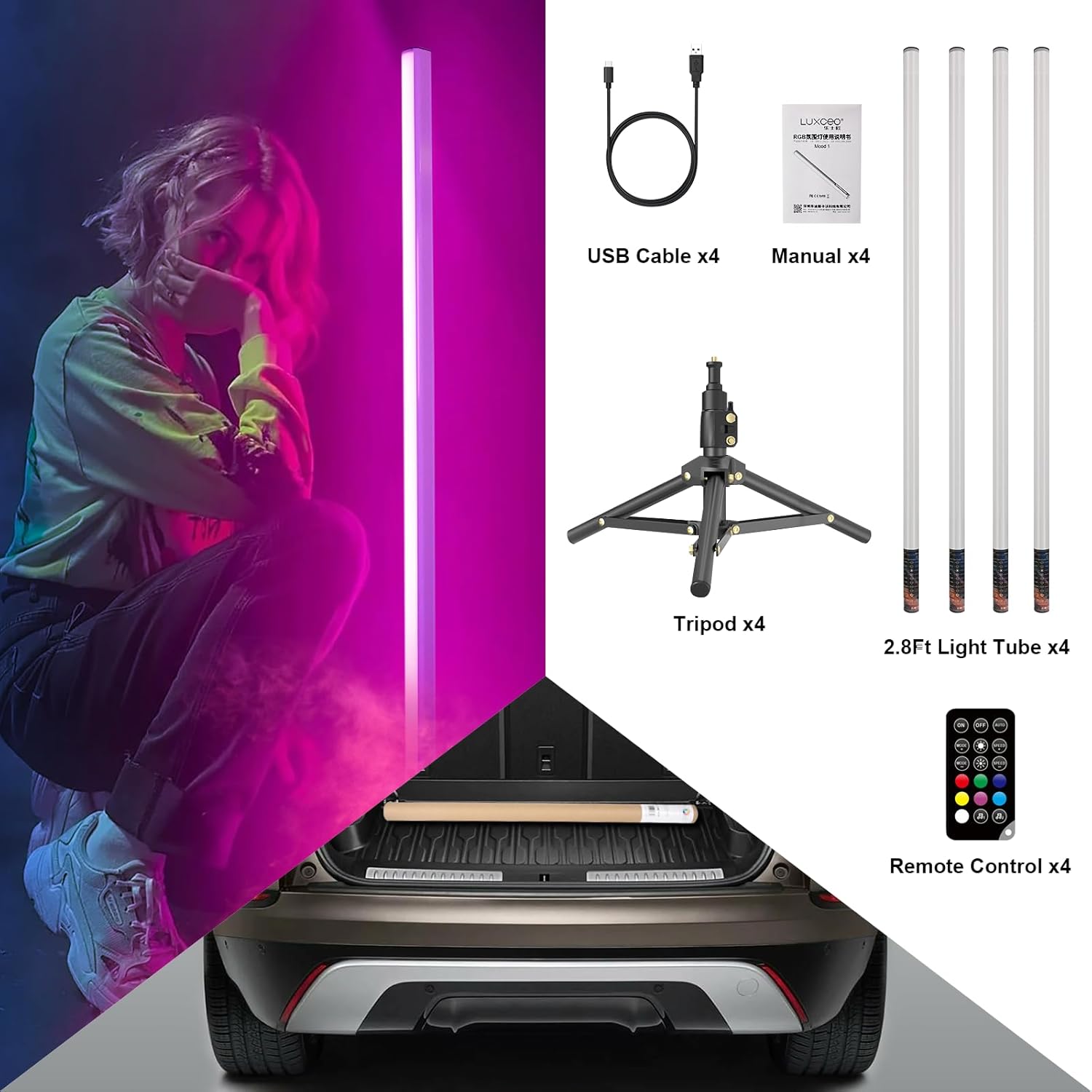
This image displays the complete package contents for the luxceo RGB Tube Light Bar set. It includes four light bars, four remote controls, four tripods, four USB charging cables, and four user manuals, all neatly arranged.
Organizować coś
1. Charging the Light Bar
Before first use, fully charge the light bar. Connect the provided USB charging cable to the Type-C port on the light bar and to a compatible USB power source (e.g., computer, adapter, power bank). The charging time is approximately 3 hours.
2. Attaching to the Tripod
The light bar features a 1/4-inch screw interface at its base for tripod mounting.
- Locate the 1/4-inch screw on the top of the tripod.
- Align the light bar's screw interface with the tripod screw.
- Gently rotate the light bar clockwise until it is securely fastened to the tripod. Do not overtighten.

A visual guide demonstrating how to attach the luxceo RGB Tube Light Bar to its tripod. The image shows the 1/4 screw interface on the light bar and the process of screwing it onto different tripod types, including a standard tripod and a mini tripod.
Instrukcja obsługi
1. Włączanie/wyłączanie zasilania
Short press the power button on the light bar to switch it on or off. Long press the power button after powering on to enter RGB music mode. Short press again to exit music mode.
2. Korzystanie z pilota zdalnego sterowania
The light bar comes with a remote control for convenient operation. Ensure you remove the insulation clip from the remote's battery compartment before use. The effective remote control distance is up to 7 meters. For optimal performance, target the remote control at the light-emitting surface of the light bar.

Ten diagram przedstawia szczegółowy view of the control panel on the luxceo RGB Tube Light Bar, labeling buttons for mode switching, brightness adjustment, dimming speed, and auto mode. It also illustrates the light bar's length of 2.8 feet (85 cm) and the dimensions of the two included tripod sizes (25cm and 40cm).
3. Lighting Modes and Adjustments
The RGB Tube Light Bar offers a 260° light-emitting surface and over 500 kinds of light-changing modes. Use the remote control or the buttons on the light bar to adjust settings:
- Mode Switch (+/-): Cycle through various lighting effects and colors.
- Jasność (+/-): Adjust the light intensity. There are 11 levels of brightness.
- Dimming Speed (+/-): Kontroluj prędkość dynamicznych trybów oświetlenia.
- Auto Mode Cycle: Automatically cycle through different modes.
- Music Beating Mode: Long press the dedicated button (or power button after power on) to enter this mode, where the light changes according to music intensity. Short press to exit.

This diagram details the various brightness levels (from 1 to 11) and constant light color options (purple, red, green, blue, orange, white) available on the luxceo RGB Tube Light Bar. It also reiterates the control panel buttons for mode, brightness, speed, and auto cycle, and how to enter/exit music beating mode.
4. Czas pracy baterii
The built-in 3.7V/2000mAh rechargeable battery provides up to 4.5 hours of continuous lighting at 100% brightness. At the lowest brightness setting, the light bar can operate for up to 30 hours.

This image shows the luxceo RGB Tube Light Bar mounted on its included tripod, displaying a vibrant blue light. The light bar is positioned vertically, illustrating its use as an ambient or accent light.

A DJ is shown performing with two luxceo RGB Tube Light Bars positioned vertically on either side of the DJ console. The lights are actively changing colors, demonstrating the music synchronization feature, where the light dances with the beat.

Pokaz kolażuasing diverse applications of the luxceo RGB Tube Light Bar, including photography, mood lighting in a living room, a wedding setting, and a DJ event. This highlights the versatility of the light bar for different environments and creative purposes.
Konserwacja
1. Czyszczenie
To clean the light bar, use a soft, dry cloth. Do not use abrasive cleaners, solvents, or harsh chemicals, as these may damage the surface or internal components. Ensure the device is powered off and unplugged before cleaning.
2. Przechowywanie
When not in use, store the light bar in a cool, dry place away from direct sunlight and extreme temperatures. If storing for an extended period, ensure the battery is partially charged (around 50%) to prolong its lifespan. Recharge the battery every few months to prevent deep discharge.
Rozwiązywanie problemów
- Pasek świetlny się nie włącza:
- Ensure the battery is charged. Connect the light bar to a power source using the USB cable.
- If the light bar was powered off using its physical button (deep sleep mode), it cannot be turned on with the remote control. Use the physical button to power it on first.
- Pilot zdalnego sterowania nie działa:
- Check if the insulation clip has been removed from the remote's battery compartment.
- Ensure the remote control battery is not depleted. Replace if necessary.
- Point the remote directly at the light-emitting surface of the light bar. The effective range is up to 7 meters.
- Ensure there are no obstructions between the remote and the light bar.
- Light intensity is low or inconsistent:
- Adjust the brightness settings using the remote control or the light bar buttons.
- Ensure the battery is sufficiently charged. Low battery levels can affect light output.
- Music sync mode is not responding:
- Ensure the light bar is in music beating mode (long press power button after power on).
- Verify that music is playing loudly enough for the light bar's microphone to detect the beat.
Specyfikacje
| Funkcja | Szczegół |
|---|---|
| Numer modelu | 4X MOOD1 |
| ASIN | B0CMTKCWHR |
| Źródło światła | Dioda LED RGB |
| Powierzchnia emitująca światło | 260° |
| Tryby oświetlenia | Over 500 kinds, including music sync |
| Poziomy jasności | 11 poziomy |
| Typ baterii | Built-in 3.7V/2000mAh Lithium Ion |
| Port ładowania | USB Typ C |
| Czas ładowania | Około 3 godzin |
| Żywotność baterii (100% jasności) | Do 4.5 godzin |
| Battery Life (Lowest Brightness) | Do 30 godzin |
| Łączność zdalnego sterowania | Podczerwony |
| Zasięg pilota | Do 7 metrów |
| Długość rury | 2.8 stopy (85 cm) |
| Item Weight (4-pack) | 6.38 funta |
| Wymiary opakowania | 35.43 x 7.28 x 6.89 cala |
Gwarancja i wsparcie
Informacje o gwarancji
Szczegółowe warunki gwarancji znajdują się w karcie gwarancyjnej dołączonej do opakowania. Zachowaj paragon jako dowód zakupu na wypadek roszczeń gwarancyjnych.
Obsługa klienta
If you encounter any issues or have questions regarding your luxceo RGB Tube Light Bar that are not covered in this manual, please contact our customer support team. Contact details can typically be found on the product packaging or the official luxceo webstrona.