
1. Koniec produktuview
The ALLIMITY RM-D657 is a replacement remote control designed for various LG television models. It offers direct functionality without the need for complex programming, serving as a direct substitute for original LG remote models such as MKJ32022830 and MKJ32022833.
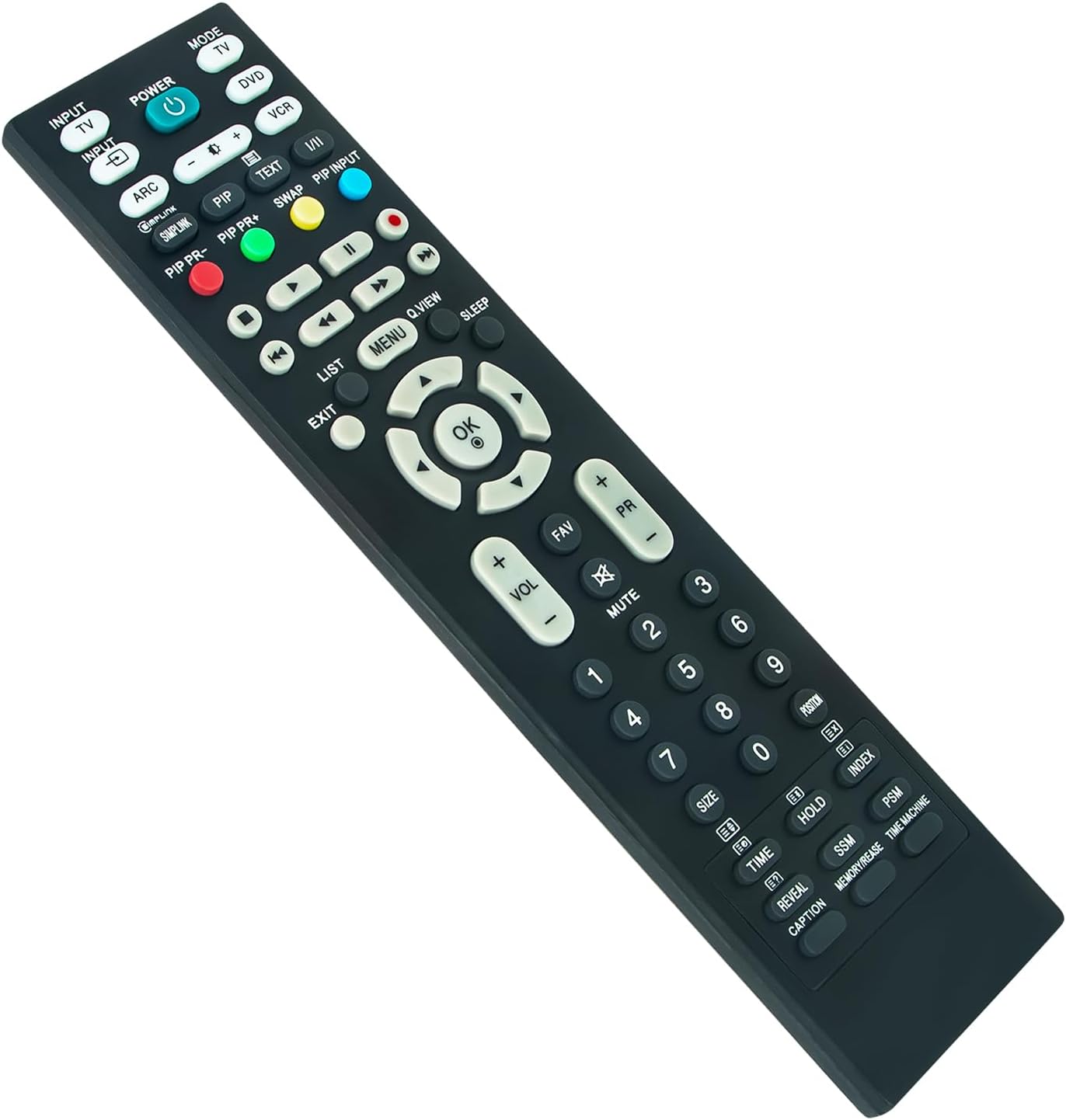
Obraz 1: Przód view of the ALLIMITY RM-D657 Remote Control.
2. Konfiguracja
2.1 Instalacja baterii
To begin using your remote control, you must first install the batteries. No programming or setup is required beyond this step.
- Znajdź komorę baterii z tyłu pilota.
- Aby otworzyć komorę baterii, przesuń ją w dół lub naciśnij zatrzask.
- Insert two (2) AAA Alkaline batteries, ensuring the positive (+) and negative (-) terminals match the diagrams inside the compartment.
- Załóż pokrywę komory baterii i upewnij się, że jest dobrze zamocowana.
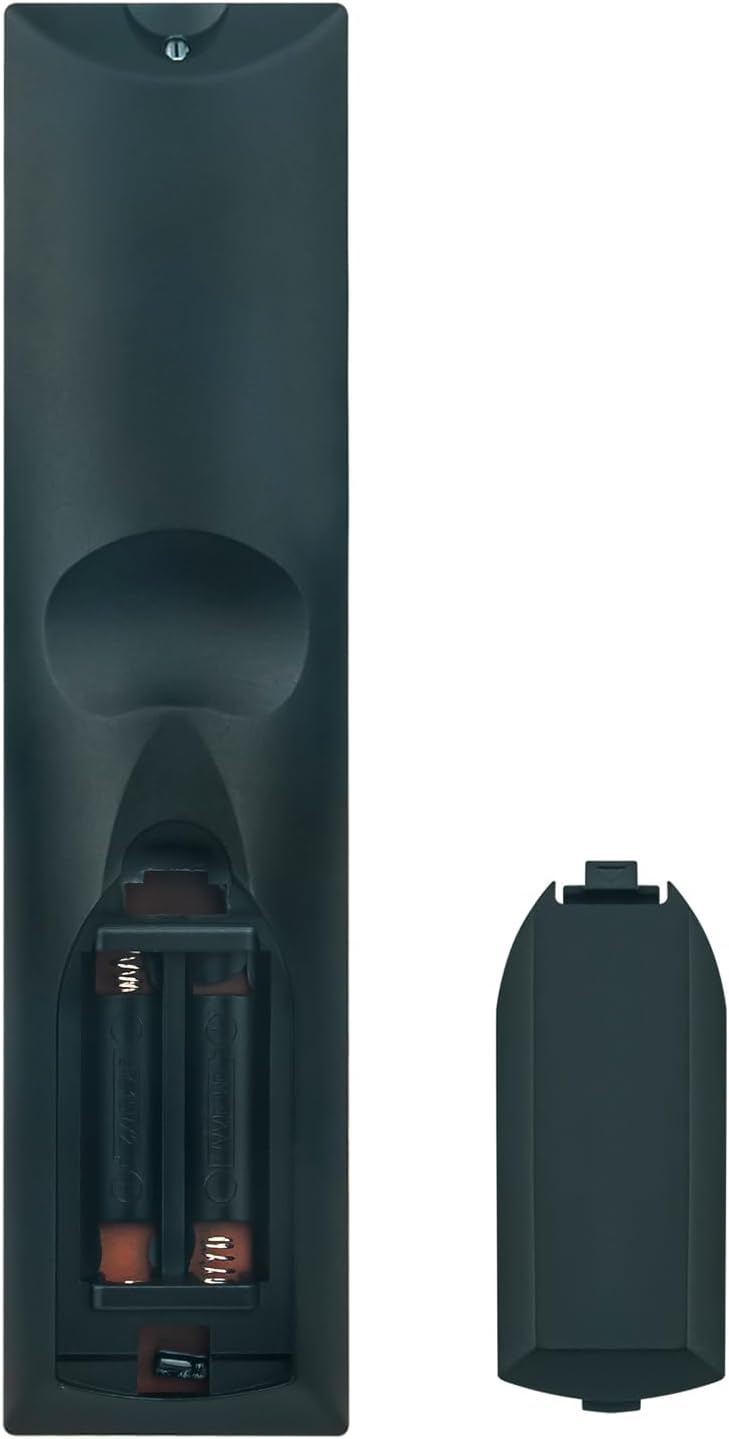
Obraz 2: Tył view showing the battery compartment and cover.
Note: Batteries are not included with the remote control. Use only new AAA Alkaline batteries for optimal performance.
3. Instrukcja obsługi
Once batteries are correctly installed, the ALLIMITY RM-D657 remote control is ready for immediate use with compatible LG TV models. Point the remote directly at your television's infrared receiver.
3.1 Podstawowe funkcje
- MOC: Włącza lub wyłącza telewizor.
- INPUT/TV/DVD/VCR: Selects the input source (e.g., HDMI, AV, TV).
- GŁOŚNOŚĆ +/-: Dostosowuje poziom głośności.
- PR +/- (Channel +/-): Zmienia kanał telewizyjny.
- NIEMY: Wycisza lub wyłącza wyciszenie dźwięku telewizora.
- PRZYCISKI NUMERYCZNE (0-9): Bezpośredni wybór kanałów lub wprowadzanie wartości liczbowych.
- MENU: Dostęp do głównego menu telewizora.
- OK (Enter): Potwierdza wybory w menu.
- ARROW BUTTONS (Up/Down/Left/Right): Nawigacja po menu i opcjach.
- WYJŚCIE: Wyjście z bieżącego menu lub funkcji.
Additional buttons on the remote control correspond to specific functions available on your LG TV. Refer to your television's original user manual for detailed information on these advanced features.
4. Kompatybilne modele
The ALLIMITY RM-D657 remote control is compatible with a wide range of LG TV models, including but not limited to:
- 26LH1DC5
- L26W56BA
- 50PC3D-UE
- 60PC1D-UE
- 50PQ20-UA
- 50PQ30-UA
- 37LC5DC
- 37LG3500
- 42LF66
- 42LF75
- 42LC46
- 42LC55
- 42LF65
- 37LB5DF
- 37LB4DS
- 50PB65
- MKJ32022830
- MKJ32022833
5. Konserwacja
5.1 Czyszczenie
To clean your remote control, gently wipe it with a soft, dry cloth. Avoid using liquid cleaners, abrasive materials, or chemical solvents, as these can damage the remote's surface or internal components.
5.2 Wymiana baterii
Replace the batteries when the remote control's responsiveness decreases, or if it stops functioning. Always replace both batteries at the same time with new AAA Alkaline batteries. Do not mix old and new batteries, or different types of batteries.
6. Rozwiązywanie Problemów
6.1 Pilot nie odpowiada
- Sprawdź baterie: Ensure batteries are inserted correctly with the correct polarity (+/-) and are not depleted. Replace with new AAA Alkaline batteries if necessary.
- Linia wzroku: Make sure there is a clear line of sight between the remote control and the television's infrared receiver. Remove any obstructions.
- Czujnik zdalny: Ensure the TV's remote sensor is not blocked or dirty.
6.2 Ograniczony zasięg
- Poziom naładowania baterii: Low battery power can reduce the remote's effective range. Replace batteries.
- Ingerencja: Strong light sources (like direct sunlight or fluorescent lights) or other electronic devices can sometimes interfere with the infrared signal. Try using the remote in a different environment.
7. Specyfikacje
- Marka: WSZECHSTRONNOŚĆ
- Model: RM-D657
- Zgodne urządzenia: Telewizory LG
- Technologia łączności: Podczerwony
- Typ baterii: 2 baterie alkaliczne AAA (brak w zestawie)
- Maksymalny zasięg: Approximately 33 Feet (10 meters)
- Waga przedmiotu: 96 gram
- Dodatek specjalny: Ergonomiczna konstrukcja
8. Gwarancja i wsparcie
For specific warranty details regarding your ALLIMITY RM-D657 remote control, please refer to the retailer's terms and conditions at the time of purchase. For technical support or further assistance, please contact the seller or your point of purchase directly.